HP ScanJet 5300C

from here USB Scanners under Linux

ScanJet 5300C, 5370C, 7400C 7450C These scanners are actually made by Avision and use the Avision SCSI command set over the USB bus. While work to get these scanners working with the Avision backend is under progress, they do work with veiw-scan. Though not ideal for flatbed scanning and does cost money it will enable you to use the scanner under Linux.
 
Last edited:

My Computer

OS
windows 7
CPU
q6600
Motherboard
dfi infinity dark p965
Memory
8gb Corsair xms2 ddr2 800 (4x2gb)
Graphics Card(s)
BFG 8600gts
6300C does not work properly

I had thought that I got the scanner to work properly based on running some test scans (se my previous post in this thread), but when


I tried to use the scanner yesterday, and it seems that my initial prognosis that the scanner works with the HP software under w7 was a bit premature.

It will work for a couple of pages, but eventually the whole thing stops responding, requiring that I kill all hp related processes manually, power down the scanner. then restart everything.

It took 2 hours to scan 15 pages.

Sorry for giving false hope.

Mark
 

My Computer

Computer type
PC/Desktop
Computer Manufacturer/Model Number
3 Home Built Computers
OS
Server 2012 R2, Windows 8.1 , W7 ultimate x64
CPU
Q6600,
Motherboard
Gigabyte ga-p35-ds4, ga-ep45-ud3p, ga-p35-dq6
Memory
8G, 4G, 2G
Graphics Card(s)
7300GS, 9600GT, 8600GT
Sound Card
onboard ALC889
Monitor(s) Displays
dell, TV
Screen Resolution
1280x1024, PAL SD TV
Hard Drives
WD 1.0T GP x2,wd 320G x2,WD 1.0T GP x2
PSU
corsair HX520,corsair HX520,corsair HX520
Case
Antec Solo, Antec Solo,Thermaltake DH101
Cooling
Thermalright TRUE, Thermalright TRUE, Ninja mini
Internet Speed
not too fast
Sorry to hear that,, what a pain!

Time to buy a Canon product i think, ive wasted sooo much time trying to get this to work.
 

My Computer

OS
windows 7
CPU
q6600
Motherboard
dfi infinity dark p965
Memory
8gb Corsair xms2 ddr2 800 (4x2gb)
Graphics Card(s)
BFG 8600gts
I just installed W7 and am feeling the same frustration with an HP 7450C scanner.

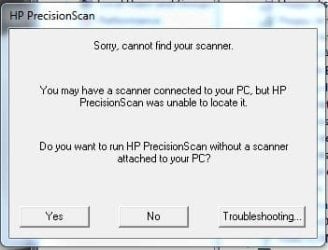
The scanner is properly installed as indicated by the Device Manager and works fine using VueScan or the native WIA scanner interface used by Paperport. However, the HP scanner app, PrecisionScan Pro, using a TWAIN driver, states it cannot initialize the scanner. PrecisionScan Pro provides productivity and scanner control not available from any of the WIA apps so it is essential we get it to work.

HP bluntly told us they would not support this scanner and we should buy a new one. This was very offensive because this scanner works perfectly, suits our needs very well, and an equivalent replacement is over $600.00. We have a small real estate business and simply cannot now afford to replace equipment that is in excellent condition and works as well as the day it was purchased. I cannot begin to adequately express the frustration this is causing us.

After replacing the original W7 64 bit install with a 32 bit install, I was able to get it to work under virtual XP. This is still a poor work around because Paperport is very sluggish and unstable under virtual XP. It also means we cannot use the additional memory we purchased to use under the 64 bit operating system.

I have thought about using the SCSI interface but a SCSI card compatible with W7 is just too expensive to buy without knowing for sure it will work.

I strongly suspect the issue is a TWAIN driver problem that could be easily resolved by someone knowledgeable. Unfortunately, HP is unwilling to help. I certainly understand the business decisions HP made to not support this and other older scanners but it is still very insulting to a loyal long term HP customer. I suspect all the scanner vendors (HP, Epson, Fujitsu, Canon, etc.) are all doing the same thing. However, I am human, and even understanding it will accomplish nothing, I am done with HP products.
 

My Computer

OS
W7
CPU
Core 2 Duo E8400 3.0GHz @ 3.8 Ghz
Motherboard
GIGABYTE GA-EP45-UD3P
Memory
4 GB G.Skill PC2-8500 RAM
Graphics Card(s)
EVGA 7900GS
Hard Drives
Intel G2 80GB SSD
WD 750 GB Caviar Black
Cooling
Coolit Freezone
i feel your pain, this doesnt solve your main problem but.... can i point you in the direction of sun virtualbox, it knocks the socks of xp mode, i can even run cad applications on it. + its totally free

Downloads - VirtualBox

seriously recommended
 

My Computer

OS
windows 7
CPU
q6600
Motherboard
dfi infinity dark p965
Memory
8gb Corsair xms2 ddr2 800 (4x2gb)
Graphics Card(s)
BFG 8600gts
"As for me and my house" it's VueScan time.
 

My Computer

Computer Manufacturer/Model Number
Me
OS
Windows 7 Pro
CPU
AMD Athlon 64 X2, 3.2GHz (6400+)
Motherboard
Biostar TF8200 A2+
Memory
GSkill DDR2 PC2 6400, 4Gb (2x2Gb)
Graphics Card(s)
XFX 8800GT (DDR3, 512Mb, OC with radiator and 120mm fan)
Sound Card
MB (Realtek 7.1)
Monitor(s) Displays
LG 19" LCD
Screen Resolution
1600*1200
Hard Drives
Samsung 500GB SATA 3.0
PSU
Thermaltake 600W modular
Case
Antec 300
Cooling
Air
Keyboard
MS Ergo
Mouse
Logitech Trackman Wireless
Internet Speed
DSL 6mb
Other Info
MB LAN (Realtek Gibabit)
Antec 3-spd. 140mm top fan & 120mm rear fan (want to replace with 120mm Smartcool)
Antec Smartcool 120mm video card fan on radiator
AMD 80mm CPU fan (hoping to upgrade this to 120mm Smartcool as well)
I've been wrestling with installing an HP 7400c scanner into Windows 7 Pro Ultimate. I have VueScan and it does work great from that program directly (although I can't use the "copy" button I used so often in the old computer running XP). But when I try to scan into Adobe Acrobat 9, it reverts back to the lame Windows Device characteristics which only scans a full page (legal size). The scanner properties won't let me edit scanned page size or assign button actions from the scanner. I installed the original HP Precision Scan Pro 3.02 using native and alternately using compatibility with XP mode (not the virtual machine) and the program comes up but can't find the scanner. If I could link the scanner to the HP program, Acrobat will let me select that combo as the scanner source. Does anybody have any suggestions? I'd hate to be forced to buy a new scanner (already bought a new printer because the old hp1012 is not supported under Windows 7).
 

My Computer

Computer Manufacturer/Model Number
Many systems - HP, Sony desktops, laptops, going back 10 years
OS
Windows 7 Ultimate 64; Windows Pro XP Ultimate; Windows Vista Ultimate; Windows Vista Ultimate 64
i'm buying a new scanner this weekend, a canon lide, about 50GBP

i sick of wrestling with my hp and wont ever purchase any more of their products.

vuescan is fine, but its not free, functionality is limited photoshop wont see it, and i cant use my scanner as a fax machine etc,

sorry to be the r bringer of bad news, but just forget it and buy a new one if your pocket will stretch,

im pretty hacked of by the whole situation
 

My Computer

OS
windows 7
CPU
q6600
Motherboard
dfi infinity dark p965
Memory
8gb Corsair xms2 ddr2 800 (4x2gb)
Graphics Card(s)
BFG 8600gts
ive tried this before on a beta build of w7, with no success..... will try again.
 

My Computer

OS
windows 7
CPU
q6600
Motherboard
dfi infinity dark p965
Memory
8gb Corsair xms2 ddr2 800 (4x2gb)
Graphics Card(s)
BFG 8600gts
failed again,

do you personally have this working on w7 x64?
 

Attachments

  • Capture.JPG
    Capture.JPG
    21.5 KB · Views: 99

My Computer

OS
windows 7
CPU
q6600
Motherboard
dfi infinity dark p965
Memory
8gb Corsair xms2 ddr2 800 (4x2gb)
Graphics Card(s)
BFG 8600gts
For me that worked, albeit unstable. It frequently stops responding and once my 5300c made some weird clicking noises, as if the lamp was trying to push itself out of the scanner.

Even so, it does work most of the time.
 

My Computer

OS
Windows 7
Ah, and now my scanner had given up the ghost. USB doesn't seem to respond anymore even when I connect it to my XP laptop.

Bugger.
 

My Computer

OS
Windows 7
Doesn't work with the HP's drivers in W7 and W7 don't suports Windows 7 Compatibility for HP ScanJet 5300C Scanner: HP. Drivers, Updates, Downloads

But, I can use the HP ScanJet 5300C in W7 installing a program called "VueScan" v. 8.6.11. I don't know if there's a free version but the scanner works really fine! That's my solution.

i am also using the 5300C in windows 7, with VueScan 8.5.0.1. I am amazed.I have been using it for months now. at first i couldn't get it recognised... and then i did something, followed some driver installation advice i had found on the net and it has worked ever since.

Previously I had contacted hp support and they had told me:

1: they will not be writing new drivers for this model and win7, and

2. it will not work in win7.
 

My Computer

OS
windows 7
HP 5300C instructions for Windows 7 64

I looked for the instructions on planetamd64.com to find their server down. I found a cached copy on google which I am posting below in case the condition is terminal (apologies for cross-posting if planetamd64.com recovers)

The first post is for 32bit systems (credit to J0lx). Scroll down for 64bit instructions (credit to golfslicer).

Make the HP Scanjet 5300C work with Vista RC2 32-bit Build 5744!!!!

1) Go to this link and download the official Hp 5300C WinXP 32-bit drivers

ftp://ftp.hp.com/pub/scanners/software/sj664en.exe

2) Run the .EXE

This extracts the files to the directory c:\sj664en

3) Edit the hp53sti.inf file

Find this line:
%HPSJ5300C%=SJ5300C.Par_NT,LPTENUM\VID_04E6PID_800000402ED4

Insert this line above it:
%HPSJ5300C%=SJ5300C.Usb.NT,USB\VID_03f0&PID_0701

The section should look like:
; Win2k Models
%HPSJ5300C%=SJ5300C.Usb.NT,USB\VID_03f0&PID_0701
%HPSJ5300C%=SJ5300C.Par_NT,LPTENUM\VID_04E6PID_800000402ED4
%HPSJ5300C%=SJ5300C.Par_NT,LPTENUM\Hewlett-PackardHewle76A2

4) save the file and exit

5) delete HP53STI.CAT

6) Install the driver

Open Device Manager

Find the HP Scanjet device in teh device tree (yellow exclamation mark no doubt)

Right click it

Select Properties

Select Update Driver

Select Browse my comptuer

Select 'Let me pick'

Select 'Have disk'

In the dialog, type c:\sj664

Two unsigned HP Scanjet 5300c drivers will appear

Click on the top one

click next

it will tell you to reboot

7) reboot your PC

8) after rebooting, try it out!


I found this worked for me in PrecisionScan 3.03 TWAIN mode only. The HP-WIA part is broken in this scenario and does not appear in the WIA manager GUI at all.

Regards
j0lx


XP X64 Instructions


This is modified from a vista post, so most of the credit goes to that post that helped me make it work on xp x64.

Go to this link and download the official Hp 5300C WinXP 32-bit drivers to use with x64, the one posted on hp's site does not work.

ftp://ftp.hp.com/pub/scanners/software/sj664en.exe

2) Run the .EXE and then cancel the install, don't install the software, haven't been able to get it to work.

This extracts the files to the directory c:\sj664en

3) Edit the hp53sti.inf file

4. Find this line:
[Manufacturer]
%Mfg%=Models
5. Change it to all of the following, all 6 lines:

[Manufacturer]
%Mfg%=Models,NT.5.1, NTamd64
[Models.NTamd64]
%HPSJ5300C%=SJ5300C.Usb.NT,USB\VID_03f0&PID_0701
%HPSJ5300C%=SJ5300C.Par_NT,LPTENUM\VID_04E6PID_800000402ED4
%HPSJ5300C%=SJ5300C.Par_NT,LPTENUM\Hewlett-PackardHewle76A2

Don't change anything else.
Save.

6. delete HP53STI.CAT

Go to device manager and update driver or add new hardware
select the directory these files are in
and it will install or select the scanner from the list.

now install a second party scanner program and it will work the one that comes with the installer for hp doesn't work.
so any second part scanner program should now work with the drive that this installs.

 

My Computer

OS
Windows 7 64
CPU
Core I7 860
I know this is a really old thread but I wanted to post in case someone out there is still trying to use their 5300c with windows 7.
If you still have this scanner laying around and want to use it you may want to try installing a more modern scanner's driver first. Maybe even if you don't have that scanner.
I say this because I have an HP Photosmart 3210 all in one, and had already installed updated drivers for that. It's kind of bulky though and I wanted to use my old 5300c as a more portable option with my laptop. Knowing that it was a very old scanner and that I no longer have any software that may have come with it I started looking online for drivers - when I saw this thread. It kind of bummed me out and I thought I would just not be using this scanner. Then - just for the heck of it I just plugged it in and attached the usb cord to see if it would do anything. The drivers installed automatically and worked just fine.
Maybe it is because the other drivers were already installed - maybe not. I am just glad it's working.
No extra software or workarounds to deal with at all.
 

My Computer

OS
Windows 7 home premium x86
Vuescan works in win7 x64 ultimate... if you still have one of these scanners laying around... i see no reason in buying a new scanner when the old old works great... now i can finally be done with win XP!
 

My Computer

OS
windows 7 x64 ultimate
I have a very old HP ScanJet 5300C Scanner which will not work with Windows 7

Hello Klaw117,

I had the same problem with my old and reliable HP Scanjet 4400C, when I upgraded (from XP) to Win7 Home Premium (32 bits).

What I did:

I installed Oracle's "VM Virtualbox", that created a virtual machine on my laptop. "VMware Player" will do the same. I have both, and they are excellent.

Then, I installed my original XP CD (it's a must!!) on the created virtual machine and run the original HP Scanjet 4400C CD and BINGO, the scanner started to run as smooth as when using my old OS's (XP, Vista, etc) as well as some old programs (and games) that refused to run with Win7!!!!!

Yes, it may seem frightening and will take some time to do this :huh:, but I did not scrap my 4400C. It was worthwhile. I consider myself a rookie on computer matters.

Now my system runs both Win7 and XP.:D
HTH.

Regards,
Flores
 

My Computer

Computer type
Laptop
Computer Manufacturer/Model Number
DELL Vostro 1510
OS
Windows 7 Home Premium 32bits
Hard Drives
Seagate external HD 500Gb
Browser
IE11 and Chrome
Other Info
DELL Vostro 1510
I looked for the instructions on planetamd64.com to find their server down. I found a cached copy on google which I am posting below in case the condition is terminal (apologies for cross-posting if planetamd64.com recovers)

The first post is for 32bit systems (credit to J0lx). Scroll down for 64bit instructions (credit to golfslicer).
.
.
.

Hi dgerson

Thanks for posting the instructions here. I went also to other servers, but the domain was on sale.

Anyway, I did the installation for Windows 7 / 64Bit and the driver was installed.

As you said, you need another sofware to scan. The one coming with the software doesn't work.

I installed a program called VueScan for Windows 7 / 64Bit and it worked. Unfortunately it was a trial version, so, it added a watermark on the scans. I will try to look for a free scan software.

Best regards
Josef
 

My Computer

Computer type
Laptop
OS
Windows 7 Enterprise 64Bit
Back
Top