
HSF abnormally fast

Gilly

New member
Power User
Local time
1:11 PM
Messages
412
Location
manchester ,England
okay, so ive just bought new motherboard and was planning to get a new heatsink fan sometime this week.So im using my stock HSF on my new motherboard untill i get a new one,but the hsf is running at 4500rpmCapture.PNG:huh: and sounds like a helicopter in my pc .This motherboard has q fan and cool n quiet what should slow it but has know effect on it regardless off or on:(.. it was completely silent on other pc , is there anyway i can slow this thing down ,my idle cpu temp is usually 25 when the hsf is completely silent
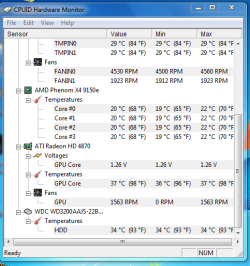
is there any other way i can slow this thing down?[
 

My Computer

OS
7 RTM 64bit
CPU
AMD Phenom 965 B3
Motherboard
ASUS M3A79-T DELUXE
Memory
Corsair 4GB (2x2GB) DDR2 800MHz/PC2-6400 XMS2 Memory Kit CL5
Graphics Card(s)
PowerColour HD 5770 CF 16x-16x
Monitor(s) Displays
32"
Screen Resolution
1920-1080
Hard Drives
Hitachi

1tb 7200rpm
PSU
Be Quiet Straight Power 650wat
Case
Asus TA-M series
Cooling
CoolIT Eco ALC Water Cooling System
Keyboard
Microsoft wireless Keyboard
Mouse
Microsoft wireless mouse
have a look at speedfan for manual control.

look in your bios for hardware control.
 

My Computer

Computer Manufacturer/Model Number
mickey megabyte 1234
OS
ultimate 64 sp1
CPU
i5 2500K [email protected]
Motherboard
MSI P67A-GD53
Memory
8 gigs GSkill Ripjaws 1600
Graphics Card(s)
amd hd6950
Sound Card
creative x-fi gamer
Monitor(s) Displays
samsung 24"
Screen Resolution
1920x1080
Hard Drives
ocz vertex 2e 60 gig, samsung f3 1tb, buffalo 2tb ext
PSU
antec 550
Case
antec three hundred
Cooling
i'm a cooling fan
Keyboard
saitek eclipse ii
Mouse
logitech g3
Internet Speed
about 4 Mbps
Other Info
i love win7
okay, so ive just bought new motherboard and was planning to get a new heatsink fan sometime this week.So im using my stock HSF on my new motherboard untill i get a new one,but the hsf is running at 4500rpmView attachment 26417:huh: and sounds like a helicopter in my pc .This motherboard has q fan and cool n quiet what should slow it but has know effect on it regardless off or on:(.. it was completely silent on other pc , is there anyway i can slow this thing down ,my idle cpu temp is usually 25 when the hsf is completely silent

is there any other way i can slow this thing down?[

Hi Gilly.....;)

you could try this.....Speedfan

your HSF should be ''PWM'' enabled & as such it can be adjusted with one of the ''speed'' channels on this app...

have a play, see if it helps...
 

My Computer

Computer Manufacturer/Model Number
myself
OS
SEVEN x64
CPU
Q9450 @ 3.6GHZ 1.34v
Motherboard
ASUS P5K PREMIUM P35
Memory
8GB 1066 buffalo firestix @ 1152mhz CL5
Graphics Card(s)
Sapphire HD 5970 + GTX260 (physX)
Sound Card
Creative X-FI Xtreme Gamer
Monitor(s) Displays
SAMSUNG 20'' & SAMSUNG 23'' (dual screens)
Screen Resolution
2048x1152 & 1680x1050
Hard Drives
1x seagate 160gb IDE & 1x seagate 160gb SATA
PSU
XCILIO 850w (78A)
Case
CM590 1x 120x38mm & 2x92x38mm / 4x 120x25mm
Cooling
AC7 PRO @ 92x38mm blower, Lamptron military bus bay controll
Keyboard
LOGITECH E110
Mouse
logitech NX5
Internet Speed
2MB
Other Info
its a continual ''work in progress''....
ive tried speed fan but everytime i slow the fans down buy lowering the percentage of the fans it just automaticly goes back to 100 percant again am i doing something wrong?

ive tried everything in bios with know luck even lowering the voltage doesnt work the hsf fan is a 3 pin like normal .ive even tried plugging it into molex through three pin to molex still no joy:(

do some stock hsf dont have fan controller ,and its just the stock motherboard controls it:sarc:
 

My Computer

OS
7 RTM 64bit
CPU
AMD Phenom 965 B3
Motherboard
ASUS M3A79-T DELUXE
Memory
Corsair 4GB (2x2GB) DDR2 800MHz/PC2-6400 XMS2 Memory Kit CL5
Graphics Card(s)
PowerColour HD 5770 CF 16x-16x
Monitor(s) Displays
32"
Screen Resolution
1920-1080
Hard Drives
Hitachi

1tb 7200rpm
PSU
Be Quiet Straight Power 650wat
Case
Asus TA-M series
Cooling
CoolIT Eco ALC Water Cooling System
Keyboard
Microsoft wireless Keyboard
Mouse
Microsoft wireless mouse
ive tried speed fan but everytime i slow the fans down buy lowering the percentage of the fans it just automaticly goes back to 100 percant again am i doing something wrong?

ive tried everything in bios with know luck even lowering the voltage doesnt work the hsf fan is a 3 pin like normal .ive even tried plugging it into molex through three pin to molex still no joy:(

do some stock hsf dont have fan controller ,and its just the stock motherboard controls it:sarc:

your HSF is a 3pin connection...... ''Speedfan'' will only work with the 4pin connection :(

are you using the correct output for the CPU HSF..??, (refer to your mobo user manual)

the only other thing i can think of is a fan controller.....
 

My Computer

Computer Manufacturer/Model Number
myself
OS
SEVEN x64
CPU
Q9450 @ 3.6GHZ 1.34v
Motherboard
ASUS P5K PREMIUM P35
Memory
8GB 1066 buffalo firestix @ 1152mhz CL5
Graphics Card(s)
Sapphire HD 5970 + GTX260 (physX)
Sound Card
Creative X-FI Xtreme Gamer
Monitor(s) Displays
SAMSUNG 20'' & SAMSUNG 23'' (dual screens)
Screen Resolution
2048x1152 & 1680x1050
Hard Drives
1x seagate 160gb IDE & 1x seagate 160gb SATA
PSU
XCILIO 850w (78A)
Case
CM590 1x 120x38mm & 2x92x38mm / 4x 120x25mm
Cooling
AC7 PRO @ 92x38mm blower, Lamptron military bus bay controll
Keyboard
LOGITECH E110
Mouse
logitech NX5
Internet Speed
2MB
Other Info
its a continual ''work in progress''....
your HSF is a 3pin connection...... ''Speedfan'' will only work with the 4pin connection :(

are you using the correct output for the CPU HSF..??, (refer to your mobo user manual)

the only other thing i can think of is a fan controller.....
yes im using the correct connection ,it is a four pin on my motherboard but hsf is a 3pin is that my problem??

do all good new heatsinks have four pin connection?
 

My Computer

OS
7 RTM 64bit
CPU
AMD Phenom 965 B3
Motherboard
ASUS M3A79-T DELUXE
Memory
Corsair 4GB (2x2GB) DDR2 800MHz/PC2-6400 XMS2 Memory Kit CL5
Graphics Card(s)
PowerColour HD 5770 CF 16x-16x
Monitor(s) Displays
32"
Screen Resolution
1920-1080
Hard Drives
Hitachi

1tb 7200rpm
PSU
Be Quiet Straight Power 650wat
Case
Asus TA-M series
Cooling
CoolIT Eco ALC Water Cooling System
Keyboard
Microsoft wireless Keyboard
Mouse
Microsoft wireless mouse
the heatsink is the big metal block that the fan sits on top of. the fan is the actual electrical component with the connections.

a lot of fans do have four pins, yes. is yours the stock amd fan?
 

My Computer

Computer Manufacturer/Model Number
mickey megabyte 1234
OS
ultimate 64 sp1
CPU
i5 2500K [email protected]
Motherboard
MSI P67A-GD53
Memory
8 gigs GSkill Ripjaws 1600
Graphics Card(s)
amd hd6950
Sound Card
creative x-fi gamer
Monitor(s) Displays
samsung 24"
Screen Resolution
1920x1080
Hard Drives
ocz vertex 2e 60 gig, samsung f3 1tb, buffalo 2tb ext
PSU
antec 550
Case
antec three hundred
Cooling
i'm a cooling fan
Keyboard
saitek eclipse ii
Mouse
logitech g3
Internet Speed
about 4 Mbps
Other Info
i love win7
the heatsink is the big metal block that the fan sits on top of. the fan is the actual electrical component with the connections.

a lot of fans do have four pins, yes. is yours the stock amd fan?

i know what it is:D. a fan for ure heatsink thats why i call it heat sink fan " hsf":D

yes its the stock one that came with my acer aspire m3201 pc

anyway, nevermind ill just have too put up with it till i buy a new 1

thanks anyway
 

My Computer

OS
7 RTM 64bit
CPU
AMD Phenom 965 B3
Motherboard
ASUS M3A79-T DELUXE
Memory
Corsair 4GB (2x2GB) DDR2 800MHz/PC2-6400 XMS2 Memory Kit CL5
Graphics Card(s)
PowerColour HD 5770 CF 16x-16x
Monitor(s) Displays
32"
Screen Resolution
1920-1080
Hard Drives
Hitachi

1tb 7200rpm
PSU
Be Quiet Straight Power 650wat
Case
Asus TA-M series
Cooling
CoolIT Eco ALC Water Cooling System
Keyboard
Microsoft wireless Keyboard
Mouse
Microsoft wireless mouse
There are reports of issues with AMD Cool 'n Quiet. I would look for an update.
 
There are reports of issues with AMD Cool 'n Quiet. I would look for an update.
ive updated too newest bios but regardless if cool n quiet isnt working i have Q-fan on my asus board also should slow it down
:(
 

My Computer

OS
7 RTM 64bit
CPU
AMD Phenom 965 B3
Motherboard
ASUS M3A79-T DELUXE
Memory
Corsair 4GB (2x2GB) DDR2 800MHz/PC2-6400 XMS2 Memory Kit CL5
Graphics Card(s)
PowerColour HD 5770 CF 16x-16x
Monitor(s) Displays
32"
Screen Resolution
1920-1080
Hard Drives
Hitachi

1tb 7200rpm
PSU
Be Quiet Straight Power 650wat
Case
Asus TA-M series
Cooling
CoolIT Eco ALC Water Cooling System
Keyboard
Microsoft wireless Keyboard
Mouse
Microsoft wireless mouse
ive updated too newest bios but regardless if cool n quiet isnt working i have Q-fan on my asus board also should slow it down
:(
This motherboard has q fan and cool n quiet what should slow it but has know effect on it regardless off or on..[

And yet, the problem remains. I am reading some posts at Asus.
 
Back
Top