
Huawei 169 USB 3g modem

Hmmm - weird, because I have DriverMax running in Vista x64 right now - did it fail to make a backup of the driver? Or did it fail to run?
 

My Computers

System One System Two

  • Computer type
    PC/Desktop
    Computer Manufacturer/Model Number
    The Beast Model A (homebrew)
    OS
    Windows 11 21H2 Current build
    CPU
    AMD Ryzen 9 3950X
    Motherboard
    MSI MEG X570 GODLIKE
    Memory
    4 * 32 GB - Corsair Vengeance 3600 MHz
    Graphics Card(s)
    EVGA GeForce RTX 3080 Ti XC3 ULTRA GAMING (12G-P5-3955-KR)
    Sound Card
    Realtek® ALC1220 Codec
    Monitor(s) Displays
    2x Eve Spectrum ES07D03 4K Gaming Monitor (Matte) | Eve Spec
    Screen Resolution
    3x 3840 x 2160
    Hard Drives
    3x Samsung 980 Pro NVMe PCIe 4 M.2 2 TB SSD (MZ-V8P2T0B/AM) } 3x Sabrent Rocket NVMe 4.0 1 TB SSD
    PSU
    PC Power & Cooling’s Silencer Series 1050 Watt, 80 Plus Plat
    Case
    Fractal Design Define 7 XL Dark ATX Full Tower Case
    Cooling
    SteelSeries Apex Pro Wired Gaming Keyboard
    Keyboard
    SteelSeries Apex Pro
    Mouse
    Logitech MX Master 3S | MX Master 3 for business
    Internet Speed
    AT&T LightSpeed Gigabit Duplex Ftth
    Antivirus
    Windows Defender + MB 3
    Browser
    Nightly (default) + Firefox (stable),Chrome, Edge
  • Computer type
    PC/Desktop
    System Manufacturer/Model Number
    Dell Latitude E5470
    OS
    ChromeOS Flex Dev Channel (current)
    CPU
    Intel(R) Core(TM) i5-6300U CPU @ 2.40GHz, 2501 Mhz, 2 Core(s), 4 Logical Processor(s)
    Motherboard
    Dell
    Memory
    16 GB
    Graphics Card(s)
    Intel(R) HD Graphics 520
    Sound Card
    Intel(R) HD Graphics 520 + RealTek Audio
    Monitor(s) Displays
    Dell laptop display 15"
    Screen Resolution
    1920 * 1080
    Hard Drives
    Toshiba 128GB M.2 22300 drive
    INTEL Cherryville 520 Series SSDSC2CW180A 180 GB SATA III SSD
    PSU
    Dell
    Case
    Dell
    Cooling
    Dell
    Keyboard
    Dell
    Mouse
    Logitech MX Master 3S (shared w. Sys 1) | Dell TouchPad
    Internet Speed
    AT&T LightSpeed Gigabit Duplex Ftth
you are able to run 32bit apps in 64 bit OS....
i dont think you ran it as admin...
try that and see if it does...
remember it does backup drivers...
meaning it needs privilege access to retrieve the drivers
 

My Computer

Computer Manufacturer/Model Number
Tx2500z Tablet Pc/Homemade Server
OS
Windows 7 Ult x64(x2), HomePrem x32(x4), Server 08 (+VM), 08 R2 (VM) , SuSe 11.2 (VM), XP 32 (VM)
CPU
Turion X2 ultra (oh well came with laptop)/P4 @3.2 (yes P4)
Motherboard
IDK HP Motherboard / Intel DG965SS
Memory
OCZ Dual Channel 4GB kit/ 1gb Dual Channel
Graphics Card(s)
HD 3200 graphics /GMA x3100 (yay for intergrated!!)
Sound Card
Realtek HD Audio(mic working, well sort of)/Siig IC-70012
Monitor(s) Displays
built-in Hp 12" laptop screen/ Acer 19"
Screen Resolution
1280x800 /1440x900
Cooling
All Air Cooled
Mouse
Logi MX Rev. /MS Wheel Optical 1.1A /Logitech Optical Mouse
Internet Speed
College baby but its still routed through vpn to 1536k...
Other Info
love my wacom pen and pressure sensitivity...
wished it worked in 7, SUSE for that matter though
I never ran DM as Admin....
 

My Computers

System One System Two

  • Computer type
    PC/Desktop
    Computer Manufacturer/Model Number
    The Beast Model A (homebrew)
    OS
    Windows 11 21H2 Current build
    CPU
    AMD Ryzen 9 3950X
    Motherboard
    MSI MEG X570 GODLIKE
    Memory
    4 * 32 GB - Corsair Vengeance 3600 MHz
    Graphics Card(s)
    EVGA GeForce RTX 3080 Ti XC3 ULTRA GAMING (12G-P5-3955-KR)
    Sound Card
    Realtek® ALC1220 Codec
    Monitor(s) Displays
    2x Eve Spectrum ES07D03 4K Gaming Monitor (Matte) | Eve Spec
    Screen Resolution
    3x 3840 x 2160
    Hard Drives
    3x Samsung 980 Pro NVMe PCIe 4 M.2 2 TB SSD (MZ-V8P2T0B/AM) } 3x Sabrent Rocket NVMe 4.0 1 TB SSD
    PSU
    PC Power & Cooling’s Silencer Series 1050 Watt, 80 Plus Plat
    Case
    Fractal Design Define 7 XL Dark ATX Full Tower Case
    Cooling
    SteelSeries Apex Pro Wired Gaming Keyboard
    Keyboard
    SteelSeries Apex Pro
    Mouse
    Logitech MX Master 3S | MX Master 3 for business
    Internet Speed
    AT&T LightSpeed Gigabit Duplex Ftth
    Antivirus
    Windows Defender + MB 3
    Browser
    Nightly (default) + Firefox (stable),Chrome, Edge
  • Computer type
    PC/Desktop
    System Manufacturer/Model Number
    Dell Latitude E5470
    OS
    ChromeOS Flex Dev Channel (current)
    CPU
    Intel(R) Core(TM) i5-6300U CPU @ 2.40GHz, 2501 Mhz, 2 Core(s), 4 Logical Processor(s)
    Motherboard
    Dell
    Memory
    16 GB
    Graphics Card(s)
    Intel(R) HD Graphics 520
    Sound Card
    Intel(R) HD Graphics 520 + RealTek Audio
    Monitor(s) Displays
    Dell laptop display 15"
    Screen Resolution
    1920 * 1080
    Hard Drives
    Toshiba 128GB M.2 22300 drive
    INTEL Cherryville 520 Series SSDSC2CW180A 180 GB SATA III SSD
    PSU
    Dell
    Case
    Dell
    Cooling
    Dell
    Keyboard
    Dell
    Mouse
    Logitech MX Master 3S (shared w. Sys 1) | Dell TouchPad
    Internet Speed
    AT&T LightSpeed Gigabit Duplex Ftth
well it was just me then for proper precaution....
i was just putting it out there...
 

My Computer

Computer Manufacturer/Model Number
Tx2500z Tablet Pc/Homemade Server
OS
Windows 7 Ult x64(x2), HomePrem x32(x4), Server 08 (+VM), 08 R2 (VM) , SuSe 11.2 (VM), XP 32 (VM)
CPU
Turion X2 ultra (oh well came with laptop)/P4 @3.2 (yes P4)
Motherboard
IDK HP Motherboard / Intel DG965SS
Memory
OCZ Dual Channel 4GB kit/ 1gb Dual Channel
Graphics Card(s)
HD 3200 graphics /GMA x3100 (yay for intergrated!!)
Sound Card
Realtek HD Audio(mic working, well sort of)/Siig IC-70012
Monitor(s) Displays
built-in Hp 12" laptop screen/ Acer 19"
Screen Resolution
1280x800 /1440x900
Cooling
All Air Cooled
Mouse
Logi MX Rev. /MS Wheel Optical 1.1A /Logitech Optical Mouse
Internet Speed
College baby but its still routed through vpn to 1536k...
Other Info
love my wacom pen and pressure sensitivity...
wished it worked in 7, SUSE for that matter though
But my point is I have it working and I never ran it as admin - and never received an error message....

So, I want a methodology listing so I can verify if this is a DriverMax problem or a Vista x64 problem or imply that user's bad luck....

I wasn't correcting *you* I was pointing out that it works OK here - so something ain't right over on his end, or else I ain't doing what he is doing to get the error.
 

My Computers

System One System Two

  • Computer type
    PC/Desktop
    Computer Manufacturer/Model Number
    The Beast Model A (homebrew)
    OS
    Windows 11 21H2 Current build
    CPU
    AMD Ryzen 9 3950X
    Motherboard
    MSI MEG X570 GODLIKE
    Memory
    4 * 32 GB - Corsair Vengeance 3600 MHz
    Graphics Card(s)
    EVGA GeForce RTX 3080 Ti XC3 ULTRA GAMING (12G-P5-3955-KR)
    Sound Card
    Realtek® ALC1220 Codec
    Monitor(s) Displays
    2x Eve Spectrum ES07D03 4K Gaming Monitor (Matte) | Eve Spec
    Screen Resolution
    3x 3840 x 2160
    Hard Drives
    3x Samsung 980 Pro NVMe PCIe 4 M.2 2 TB SSD (MZ-V8P2T0B/AM) } 3x Sabrent Rocket NVMe 4.0 1 TB SSD
    PSU
    PC Power & Cooling’s Silencer Series 1050 Watt, 80 Plus Plat
    Case
    Fractal Design Define 7 XL Dark ATX Full Tower Case
    Cooling
    SteelSeries Apex Pro Wired Gaming Keyboard
    Keyboard
    SteelSeries Apex Pro
    Mouse
    Logitech MX Master 3S | MX Master 3 for business
    Internet Speed
    AT&T LightSpeed Gigabit Duplex Ftth
    Antivirus
    Windows Defender + MB 3
    Browser
    Nightly (default) + Firefox (stable),Chrome, Edge
  • Computer type
    PC/Desktop
    System Manufacturer/Model Number
    Dell Latitude E5470
    OS
    ChromeOS Flex Dev Channel (current)
    CPU
    Intel(R) Core(TM) i5-6300U CPU @ 2.40GHz, 2501 Mhz, 2 Core(s), 4 Logical Processor(s)
    Motherboard
    Dell
    Memory
    16 GB
    Graphics Card(s)
    Intel(R) HD Graphics 520
    Sound Card
    Intel(R) HD Graphics 520 + RealTek Audio
    Monitor(s) Displays
    Dell laptop display 15"
    Screen Resolution
    1920 * 1080
    Hard Drives
    Toshiba 128GB M.2 22300 drive
    INTEL Cherryville 520 Series SSDSC2CW180A 180 GB SATA III SSD
    PSU
    Dell
    Case
    Dell
    Cooling
    Dell
    Keyboard
    Dell
    Mouse
    Logitech MX Master 3S (shared w. Sys 1) | Dell TouchPad
    Internet Speed
    AT&T LightSpeed Gigabit Duplex Ftth
So, I want a methodology listing so I can verify if this is a DriverMax problem or a Vista x64 problem or imply that user's bad luck....

yes i want to hear that from him because i am also puzzled..:sarc:
I wasn't correcting *you* I was pointing out that it works OK here - so something ain't right over on his end, or else I ain't doing what he is doing to get the error.

i know
and even if you did thats okay...lol
remember you are the wise mod here...:geek:
hey im young and in college...:p
i know ill make mistakes
and thats what makes life fun(well at least to me...;))
 

My Computer

Computer Manufacturer/Model Number
Tx2500z Tablet Pc/Homemade Server
OS
Windows 7 Ult x64(x2), HomePrem x32(x4), Server 08 (+VM), 08 R2 (VM) , SuSe 11.2 (VM), XP 32 (VM)
CPU
Turion X2 ultra (oh well came with laptop)/P4 @3.2 (yes P4)
Motherboard
IDK HP Motherboard / Intel DG965SS
Memory
OCZ Dual Channel 4GB kit/ 1gb Dual Channel
Graphics Card(s)
HD 3200 graphics /GMA x3100 (yay for intergrated!!)
Sound Card
Realtek HD Audio(mic working, well sort of)/Siig IC-70012
Monitor(s) Displays
built-in Hp 12" laptop screen/ Acer 19"
Screen Resolution
1280x800 /1440x900
Cooling
All Air Cooled
Mouse
Logi MX Rev. /MS Wheel Optical 1.1A /Logitech Optical Mouse
Internet Speed
College baby but its still routed through vpn to 1536k...
Other Info
love my wacom pen and pressure sensitivity...
wished it worked in 7, SUSE for that matter though
Ok, I want to wake up this thread from the dead as I have some updates...

I tried all and everything to get the modem to work both in build6801 and 6956, but nothing worked. Last night I finally upgraded ( actually a fresh install) to build 7000. And judge my happiness as I know discover that my Huawei modem works like expected :) MS must have made some "behind the scenes" changes in build 7000, I don't really know what, but something has made it all to work...
 

My Computer

OS
Windows 7 7100 RC 1, Windows Vista 64, Windows XP, MAC OS X 10.5.5
CPU
Intel E8400
Motherboard
Asus P5Q3 Deluxe P45
Memory
4 GB Corsair DDR3
Graphics Card(s)
ATI 4870x2
Sound Card
Asus Xonar DX
Monitor(s) Displays
Dell 2405 24" widescreen
Screen Resolution
1920 x 1200
Hard Drives
Western Digital VelociRaptor 300 GB, Samsung Spinpoint F1 1 TB
PSU
Zalman ZM-850
Case
Antec p-180
Internet Speed
24 mb/s
Other Info
Laptop: Lenovo ThinkPad T60, T5600, 3 gb RAM, Western Digital Scorpio Blue 160 gb HDD, ATI x1400, 15" 1400x1050 FlexView screen.

Netbook: Lenovo IdeaPad s10e, 2 gb RAM, WD Scorpio 500 gb HDD
I have the same problem, with a Samsung Z810 modem.
Win7 recognise the partition, where the drivers, but can't recognise the "modem" part.
Any help?
I've tryed DriverMAX, it isn't workin...
I'm using build 7077, but it isn't working on 7100 either.
 

My Computer

OS
Win7
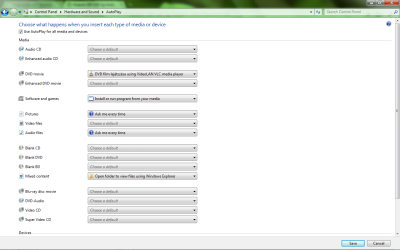
Confirm that you've enabled "Auto Run" in the control Panel -> Hardware and Sound. I don't know why, but whenever I disable auto run my modem stops working...
 

My Computer

OS
Windows 7 7100 RC 1, Windows Vista 64, Windows XP, MAC OS X 10.5.5
CPU
Intel E8400
Motherboard
Asus P5Q3 Deluxe P45
Memory
4 GB Corsair DDR3
Graphics Card(s)
ATI 4870x2
Sound Card
Asus Xonar DX
Monitor(s) Displays
Dell 2405 24" widescreen
Screen Resolution
1920 x 1200
Hard Drives
Western Digital VelociRaptor 300 GB, Samsung Spinpoint F1 1 TB
PSU
Zalman ZM-850
Case
Antec p-180
Internet Speed
24 mb/s
Other Info
Laptop: Lenovo ThinkPad T60, T5600, 3 gb RAM, Western Digital Scorpio Blue 160 gb HDD, ATI x1400, 15" 1400x1050 FlexView screen.

Netbook: Lenovo IdeaPad s10e, 2 gb RAM, WD Scorpio 500 gb HDD
Yes, that's what I meant. I've checked the box "Use AutoPlay for all media and devices"

I don't know how your Samsung modem operates, but whenever I insert my Huawei modem in a new PC the "Auto Run" (Windows OS) dialogue pops up. If I don't set auto run to default the modem will not initiate. Once I set it not to "auto run", it took me several days before I figured it out...
 

My Computer

OS
Windows 7 7100 RC 1, Windows Vista 64, Windows XP, MAC OS X 10.5.5
CPU
Intel E8400
Motherboard
Asus P5Q3 Deluxe P45
Memory
4 GB Corsair DDR3
Graphics Card(s)
ATI 4870x2
Sound Card
Asus Xonar DX
Monitor(s) Displays
Dell 2405 24" widescreen
Screen Resolution
1920 x 1200
Hard Drives
Western Digital VelociRaptor 300 GB, Samsung Spinpoint F1 1 TB
PSU
Zalman ZM-850
Case
Antec p-180
Internet Speed
24 mb/s
Other Info
Laptop: Lenovo ThinkPad T60, T5600, 3 gb RAM, Western Digital Scorpio Blue 160 gb HDD, ATI x1400, 15" 1400x1050 FlexView screen.

Netbook: Lenovo IdeaPad s10e, 2 gb RAM, WD Scorpio 500 gb HDD
It is checked, but it is still not working.
As I saw on other PCs (Vista, XP), this modem has two "parts" - with 2 kind of pop up window.
The first install the connection software - this part seeming in My computer as a CD drive.
The second part would install the device as a modem, but i don't get the second part under windows 7....
 

My Computer

OS
Win7
That's how my Huawei modem works as well. Have you tried to uninstall it in the device manager and start all over again?
 

My Computer

OS
Windows 7 7100 RC 1, Windows Vista 64, Windows XP, MAC OS X 10.5.5
CPU
Intel E8400
Motherboard
Asus P5Q3 Deluxe P45
Memory
4 GB Corsair DDR3
Graphics Card(s)
ATI 4870x2
Sound Card
Asus Xonar DX
Monitor(s) Displays
Dell 2405 24" widescreen
Screen Resolution
1920 x 1200
Hard Drives
Western Digital VelociRaptor 300 GB, Samsung Spinpoint F1 1 TB
PSU
Zalman ZM-850
Case
Antec p-180
Internet Speed
24 mb/s
Other Info
Laptop: Lenovo ThinkPad T60, T5600, 3 gb RAM, Western Digital Scorpio Blue 160 gb HDD, ATI x1400, 15" 1400x1050 FlexView screen.

Netbook: Lenovo IdeaPad s10e, 2 gb RAM, WD Scorpio 500 gb HDD
It's not a problem that your modem is a Samsung, keep calm and try to do it all over once again :) Uninstall it in your device manager, reboot, insert it once more and this time make sure you enable auto play :geek: You could easily assume that computers are a exact science, but as we all know sometimes things stop or start to work without any apparent reason... ;)
 

My Computer

OS
Windows 7 7100 RC 1, Windows Vista 64, Windows XP, MAC OS X 10.5.5
CPU
Intel E8400
Motherboard
Asus P5Q3 Deluxe P45
Memory
4 GB Corsair DDR3
Graphics Card(s)
ATI 4870x2
Sound Card
Asus Xonar DX
Monitor(s) Displays
Dell 2405 24" widescreen
Screen Resolution
1920 x 1200
Hard Drives
Western Digital VelociRaptor 300 GB, Samsung Spinpoint F1 1 TB
PSU
Zalman ZM-850
Case
Antec p-180
Internet Speed
24 mb/s
Other Info
Laptop: Lenovo ThinkPad T60, T5600, 3 gb RAM, Western Digital Scorpio Blue 160 gb HDD, ATI x1400, 15" 1400x1050 FlexView screen.

Netbook: Lenovo IdeaPad s10e, 2 gb RAM, WD Scorpio 500 gb HDD
Yes i know.
I've tried, on build 7077 and 7100 also, but it isn't working...
 

My Computer

OS
Win7
Well, I'm sorry to hear that. I wish I could come over and help you because I know it should work. You just have to keep your spirit high and hang on in there (try everything you can think of in the lines of the previous discussion) :geek: (not much of a help I know, but that's all I can do for you at this moment... )
 

My Computer

OS
Windows 7 7100 RC 1, Windows Vista 64, Windows XP, MAC OS X 10.5.5
CPU
Intel E8400
Motherboard
Asus P5Q3 Deluxe P45
Memory
4 GB Corsair DDR3
Graphics Card(s)
ATI 4870x2
Sound Card
Asus Xonar DX
Monitor(s) Displays
Dell 2405 24" widescreen
Screen Resolution
1920 x 1200
Hard Drives
Western Digital VelociRaptor 300 GB, Samsung Spinpoint F1 1 TB
PSU
Zalman ZM-850
Case
Antec p-180
Internet Speed
24 mb/s
Other Info
Laptop: Lenovo ThinkPad T60, T5600, 3 gb RAM, Western Digital Scorpio Blue 160 gb HDD, ATI x1400, 15" 1400x1050 FlexView screen.

Netbook: Lenovo IdeaPad s10e, 2 gb RAM, WD Scorpio 500 gb HDD
When you plug in your Samsung and Auto run s appear go to the Open Folder menu and either Setup s set in the compatibility mode to Vista Sp1 ..now run as Administrator ....

If you have the softwer for it run Vista Sp1 compatibiliy mode to ...
 

My Computer

OS
Windows 7
Back
Top