Ken Silver
New member
- Local time
- 4:09 PM
- Messages
- 18
Hello all. I could really use some help.
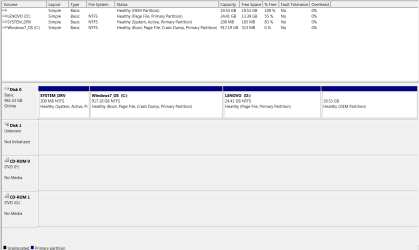
I have a TB hard drive with 917 GB of actual space. But right now, I only have 27 GB free. Why?
Because SOMETHING happened and now 602 GB of space has gone UP in smoke. Cannot be found.
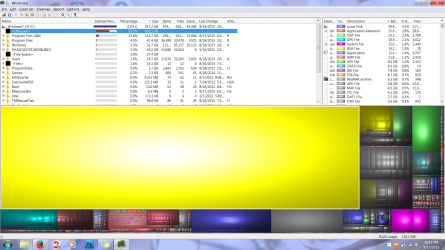
I used WinDirStat and it just shows up a HUGE yellow box that simply says "C:" and leads to nowhere.
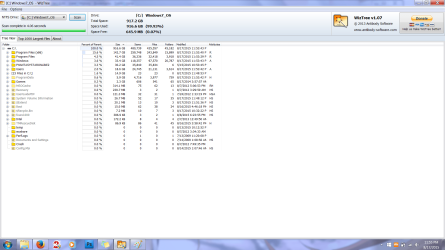
I then used Treesize and it doesn't even pick up the missing 602 GB. It recognizes that I only have 27 GB left out of 917 GB, but it doesn't lead to anywhere.
I have also gone into System Properties and turned down the Disk Space Usage for restore points down to 1% and deleted all previous points.
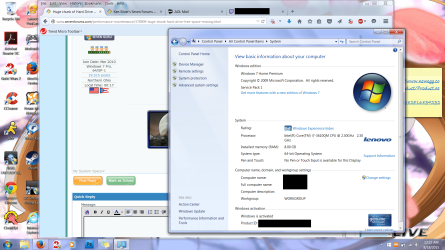
I'm on a Lenovo y580. Laptop is about 4 to 5 years old. It has never given me any problems like this before. I ran a CHKDSK recently too. It said some errors were found and fixed, but it says that every time I run CHKDSK now. This issue is new, having only occurred over the last weekend.
I'll post pictures and stuff necessary if anyone has any ideas. I know a bit about computers so I should be able to follow directions. But from what I researched, I don't think it's any of the super common issues. Part of me thinks it's a dying hard drive from a very old laptop, but I need to exaust every last option before I decide to buy a replacement. Money is sort of an issue.
Thanks in advance to any and all who can help with this.
I have a TB hard drive with 917 GB of actual space. But right now, I only have 27 GB free. Why?
Because SOMETHING happened and now 602 GB of space has gone UP in smoke. Cannot be found.
I used WinDirStat and it just shows up a HUGE yellow box that simply says "C:" and leads to nowhere.
I then used Treesize and it doesn't even pick up the missing 602 GB. It recognizes that I only have 27 GB left out of 917 GB, but it doesn't lead to anywhere.
I have also gone into System Properties and turned down the Disk Space Usage for restore points down to 1% and deleted all previous points.
I'm on a Lenovo y580. Laptop is about 4 to 5 years old. It has never given me any problems like this before. I ran a CHKDSK recently too. It said some errors were found and fixed, but it says that every time I run CHKDSK now. This issue is new, having only occurred over the last weekend.
I'll post pictures and stuff necessary if anyone has any ideas.
I know a bit about computers so I should be able to follow directions. But from what I researched, I don't think it's any of the super common issues. Part of me thinks it's a dying hard drive from a very old laptop, but I need to exaust every last option before I decide to buy a replacement. Money is sort of an issue.Thanks in advance to any and all who can help with this.
My Computer
At a glance
Windows 7 64 Bit ProfessionalIntel (R) Core(TM) i7-3610QM CPU @ 2.30 GHz 2...8 GB RAM (7.90 GB useable)Nvidia GeForce GTX 660 & Intel Intergrated Gr...
- Computer type
- Laptop
- Computer Manufacturer/Model Number
- Lenovo Y580
- OS
- Windows 7 64 Bit Professional
- CPU
- Intel (R) Core(TM) i7-3610QM CPU @ 2.30 GHz 2.30 GHz
- Memory
- 8 GB RAM (7.90 GB useable)
- Graphics Card(s)
- Nvidia GeForce GTX 660 & Intel Intergrated Graphics Card
- Monitor(s) Displays
- Solo Monitor
- Screen Resolution
- 1920 x 1080
- Hard Drives
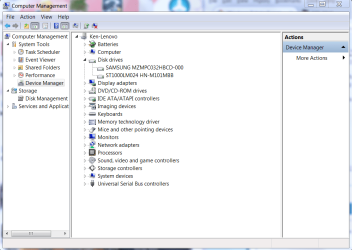
- 1TB HD
- Antivirus
- Trend Micro Maximum Security
- Browser
- Mozilla Firefox


 I'll need to install WizTree. I already used TreeSize and that came up empty.