Huge hidden file in system drive

Malcul

New member
Local time
10:09 PM
Messages
4
I made an image backup of my system drive to another separate drive (E:\). Since then, although there is a "WindowsImageBackup" folder on E:\ there is also a huge hidden file on C:\, my system drive. 71GB of a 100GB drive!!
It is so large there is little room left to install anything else. How can I delete a 'hidden' file? Is it part of the WindowsImageBackup? Will it go if I delete the "WindowsImageBackup" folder?
I'm so cheesed off with it I'm thinking about re-installing, and I only did so 10 days ago. Something must be wrong as I cannot even restore to the point before the image backup.
The little niggles with Windows 7 are beginning to mount up!
 

My Computer My Computer

At a glance

Windows 7 HP 64-bitAMD Athlon 78504GBGeForce 9800 GT
OS
Windows 7 HP 64-bit
CPU
AMD Athlon 7850
Motherboard
MSI K9N6PGM2
Memory
4GB
Graphics Card(s)
GeForce 9800 GT
Before deleting it have a look whats inside it.

Go to MYComputer>Organize (top left)>Folder and Search Options>View>CLick Show Hidden files ,folders, or drives.

Then have a look at the file.

What back up software are you using?
There could have been an option to set how much storage you allow it to use and this could be the result.
 

My Computer My Computer

At a glance

Windows 7 Ultimate 64bitAMD Phenom II 555 Black Edition Quad Core OC'...G Skill RipJaw 1333MHz 4GBATI raideon 4250 HD/XFX ATI Radeon 1GB HD4650
Computer Manufacturer/Model Number
Blue Shards 1.0
OS
Windows 7 Ultimate 64bit
CPU
AMD Phenom II 555 Black Edition Quad Core OC'd to 4.0GHz
Motherboard
ASUS M4A88T-M
Memory
G Skill RipJaw 1333MHz 4GB
Graphics Card(s)
ATI raideon 4250 HD/XFX ATI Radeon 1GB HD4650
Sound Card
Realteck HD Audio
Monitor(s) Displays
2x 22" Widescreen HD Monitors
Hard Drives
500GB Sata 7500RPM
80GB IDE
PSU
850W OCUK Modular
Case
Antec Dark Fleet DF-30
Cooling
Titan Fenrir Pro (CPU)
Keyboard
Logitech Wireless
Mouse
Logitech Wireless
Internet Speed
24Meg
Other Info
Getting soon-
2TB 7200RPM HDD
+8GB RAM
30GB SSD
HD6950/70
Hello Malcul, welcome to Seven Forums!


You may have a better experience using an image program like the one discussed in this tutorial at the link below and be sure to post back with any further questions you may have and to keep us informed.


Imaging with free Macrium
 

My Computer My Computer

At a glance

W 7 64-bit UltimateIntel Q9550 Yorkfield8GB Dominator 8500C5DATI : XFX 5870
Computer Manufacturer/Model Number
* BFK Customs *
OS
W 7 64-bit Ultimate
CPU
Intel Q9550 Yorkfield
Motherboard
ASUS P5Q Pro
Memory
8GB Dominator 8500C5D
Graphics Card(s)
ATI : XFX 5870
Sound Card
Realtek HD Audio 7-1
Monitor(s) Displays
1x 47" LCD HDMI & 3x 26" LCD HDMI
Screen Resolution
1920x1080P & 1920x1200
Hard Drives
1x 80GB Intel X25-M G2 SSD : 1x 500GB & 1x 640GB WD Caviar Black(s)
PSU
Corsair 620HX
Case
Cooler Master RC-690
Cooling
Tuniq Tower 120, 2x 140mm and 3x 120mm case fans
Keyboard
Microsoft 500
Mouse
Razer Diamondback 3G
Internet Speed
14 Mb/s
Other Info
1x Koutech 3Gb/s SATA HDD Hot Swap Rack
Cannot see it even after following your instructions.
I used windows' own create a system image from the backup and restore your files part of the system and security section of the control panel. There was opportunity to select place but not size (Which didn't surprise me as it would depend on c:\ size, would it not?)
 

My Computer My Computer

At a glance

Windows 7 HP 64-bitAMD Athlon 78504GBGeForce 9800 GT
OS
Windows 7 HP 64-bit
CPU
AMD Athlon 7850
Motherboard
MSI K9N6PGM2
Memory
4GB
Graphics Card(s)
GeForce 9800 GT
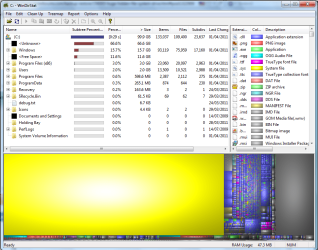
Further to my previous post here is a screenshot of what WinDirStat is showing me.
WinDirStat-2011-04-01.png
The yellow area is the culprit, no name, 'unknown' is how WindirStat calls it.
What, why and how: did it appear, and can I get rid of it without re-installing.
 

My Computer My Computer

At a glance

Windows 7 HP 64-bitAMD Athlon 78504GBGeForce 9800 GT
OS
Windows 7 HP 64-bit
CPU
AMD Athlon 7850
Motherboard
MSI K9N6PGM2
Memory
4GB
Graphics Card(s)
GeForce 9800 GT

My Computer My Computer

At a glance

W 7 64-bit UltimateIntel Q9550 Yorkfield8GB Dominator 8500C5DATI : XFX 5870
Computer Manufacturer/Model Number
* BFK Customs *
OS
W 7 64-bit Ultimate
CPU
Intel Q9550 Yorkfield
Motherboard
ASUS P5Q Pro
Memory
8GB Dominator 8500C5D
Graphics Card(s)
ATI : XFX 5870
Sound Card
Realtek HD Audio 7-1
Monitor(s) Displays
1x 47" LCD HDMI & 3x 26" LCD HDMI
Screen Resolution
1920x1080P & 1920x1200
Hard Drives
1x 80GB Intel X25-M G2 SSD : 1x 500GB & 1x 640GB WD Caviar Black(s)
PSU
Corsair 620HX
Case
Cooler Master RC-690
Cooling
Tuniq Tower 120, 2x 140mm and 3x 120mm case fans
Keyboard
Microsoft 500
Mouse
Razer Diamondback 3G
Internet Speed
14 Mb/s
Other Info
1x Koutech 3Gb/s SATA HDD Hot Swap Rack
It's curious. WindowsImageBackup is an explicitly named folder as you know. It does keep some small information in System Volume Information.

You may want to try "Partition Wizard" of all things. It has a "partition Explorer" which let's you explore all sorts of places. Failing that try "Search Everything".
 

My Computer My Computer

At a glance

Windows 7x64 Home Premium SP1Intel i7 2600kG.Skill Ripjaws (DDR3-1600) 2x4GBNvidia GeForce GTS 450; Intel HD Graphics 300...
Computer type
PC/Desktop
Computer Manufacturer/Model Number
Own build
OS
Windows 7x64 Home Premium SP1
CPU
Intel i7 2600k
Motherboard
ASUS P8Z68 Deluxe
Memory
G.Skill Ripjaws (DDR3-1600) 2x4GB
Graphics Card(s)
Nvidia GeForce GTS 450; Intel HD Graphics 3000(GT2+)
Monitor(s) Displays
Dell Ultrasharp IPS panel U2311H, Samsung SyncMaster P2350
Screen Resolution
1920x1080
Hard Drives
Samsung 850 Pro SSD 256GB, Samsung SSD 840 120GB, Seagates 1TB Barracuda ST31000528AS x2
PSU
Seasonic M12II 520W
Case
Lian Li Lancool PC-K60
Cooling
Case: 1x120mm, 3x140mm CPU: Hyper 212+
Keyboard
Logitech MK520 (wireless)
Mouse
Logitech MK520
Internet Speed
6-7 Mbps
Antivirus
Norton Security Premium, Malwarebytes on 2 (MSE on 3rd PC)
Browser
FireFox
Other Info
Audio: Logitech Z523 2.1
Do you use hibernation? Might be the hiberfil.sys. Open the command prompt as admin, then type the followinh:

powercfg -h off

Hit Enter. This'll disable hibernation and also delete the hiberfil.
 

My Computer My Computer

At a glance

Windows 7 x64 pro/ Windows 7 x86 Pro/ XP SP3 x86
Computer Manufacturer/Model Number
Too many to describe...
OS
Windows 7 x64 pro/ Windows 7 x86 Pro/ XP SP3 x86
Before deleting it have a look whats inside it.

Go to MYComputer>Organize (top left)>Folder and Search Options>View>CLick Show Hidden files ,folders, or drives.

Then have a look at the file.

What back up software are you using?
There could have been an option to set how much storage you allow it to use and this could be the result.

A screen cap of your root drive (C:) would also prove helpful after applying the above tip.
 

My Computer My Computer

At a glance

Windows 7 Ultimate x64AMD Sempron Dual Core3GBNVIDIA GeForce 6150SE nForce 430
Computer Manufacturer/Model Number
Compaq Desktop
OS
Windows 7 Ultimate x64
CPU
AMD Sempron Dual Core
Memory
3GB
Graphics Card(s)
NVIDIA GeForce 6150SE nForce 430
Screen Resolution
1024x768
Hard Drives
150GB Sata
Unfortunately I don't think "Show Hidden files ,folders, or drives" gives you easy access to everything.
 

My Computer My Computer

At a glance

Windows 7x64 Home Premium SP1Intel i7 2600kG.Skill Ripjaws (DDR3-1600) 2x4GBNvidia GeForce GTS 450; Intel HD Graphics 300...
Computer type
PC/Desktop
Computer Manufacturer/Model Number
Own build
OS
Windows 7x64 Home Premium SP1
CPU
Intel i7 2600k
Motherboard
ASUS P8Z68 Deluxe
Memory
G.Skill Ripjaws (DDR3-1600) 2x4GB
Graphics Card(s)
Nvidia GeForce GTS 450; Intel HD Graphics 3000(GT2+)
Monitor(s) Displays
Dell Ultrasharp IPS panel U2311H, Samsung SyncMaster P2350
Screen Resolution
1920x1080
Hard Drives
Samsung 850 Pro SSD 256GB, Samsung SSD 840 120GB, Seagates 1TB Barracuda ST31000528AS x2
PSU
Seasonic M12II 520W
Case
Lian Li Lancool PC-K60
Cooling
Case: 1x120mm, 3x140mm CPU: Hyper 212+
Keyboard
Logitech MK520 (wireless)
Mouse
Logitech MK520
Internet Speed
6-7 Mbps
Antivirus
Norton Security Premium, Malwarebytes on 2 (MSE on 3rd PC)
Browser
FireFox
Other Info
Audio: Logitech Z523 2.1
Shadow Copy?

Could it be shadow copies?
 

My Computer My Computer

At a glance

win 7 X64 Ultimate SP1I3770KG Skill F3-14900CL9-4GBXL x 4NVIDIA GeForce GTX670 + Intel 4000
Computer Manufacturer/Model Number
BGC (Bob's Garage Crew)
OS
win 7 X64 Ultimate SP1
CPU
I3770K
Motherboard
Asus P8Z77-V Deluxe
Memory
G Skill F3-14900CL9-4GBXL x 4
Graphics Card(s)
NVIDIA GeForce GTX670 + Intel 4000
Sound Card
Realtek HD 5.1 (MOB)
Monitor(s) Displays
Asus VW224T (1)
Screen Resolution
1920 x 1080
Hard Drives
SATA Corsair Force GT 2.5" 180GB (System) Sata 3
OCZ Vertex3 120GB
OCZ Vertex 2 120GB 2.5" SATA II
ST31000524AS 1000.2GB
WD15EARS (External)
PSU
CoolerMaster 1000 Watt
Case
CoolerMaster HAF X
Cooling
CPU -- CoolerMaster 520N
Keyboard
MS Wireless 3000 V2
Mouse
MS Wireless 3000 V2
Internet Speed
Cable
Antivirus
Norton Internet Security
Browser
IE9
Other Info
AMI Bios 1805
OC'd 3%
The obvious place to check is $Recycle.bin, and RECYCLER, just in case the recycle bin for all users has not been emptied yet, the next place is the $quota file, and virus quarantine files. The browser cache and safe browser bloom are also hidey holes where big files lurk, depending on which browsers are used, they are found in different places.

Very large files are found by defragmenters I recommend Puran defrag for a quick analysis

Puran Defrag Trial and Free Edition Download

Also Easy Clean by Toniarts has a disk usage pie chart which fairly clearly shows where large files are hiding

ToniArts EasyCleaner - Free software downloads and software reviews - CNET Download.com
 

My Computer My Computer

At a glance

Win 7 Ult + Starter, XP Pro +Home, 2kAS, Linu...AMD 64 Athlon X2 , Intel Atom N450, Intel Cel...2.5GB ; 1GB; 2GBNvidia GeForce7000m; Intel; Intel
Computer Manufacturer/Model Number
Acer 7520, Packard Bell dot se, Acer travelmate 2423
OS
Win 7 Ult + Starter, XP Pro +Home, 2kAS, Linux Mint 8, SuperOS
CPU
AMD 64 Athlon X2 , Intel Atom N450, Intel Celeron M 1.50 Ghz
Motherboard
Acer Fuquene
Memory
2.5GB ; 1GB; 2GB
Graphics Card(s)
Nvidia GeForce7000m; Intel; Intel
Sound Card
Realtek AC57
Monitor(s) Displays
17" ;10.1"; 19"
Screen Resolution
1440x900;1024x600;1440x900;
Hard Drives
WD 80, WD 320;
PSU
19v
Case
Laptop
Cooling
Air
Internet Speed
9.7Mb/s down 0.99Mb/s up
Other Info
ISP VIRGINMEDIA 10M cable broadband - D-Link DIR615 wireless router, 3Com OfficeConnect ASDL router used as wireless extender switch
No, to see everything you also need to 'show system files' , then you can view everything on the drive.
 

My Computer My Computer

At a glance

Windows 7 home premium x64AMD FX-4100 AM3+ 3.6GHz 12MB Black EditionCrsair vengeance 12Gb DDR3 1600MHz CL9Asus GTX 560 1GB
Computer Manufacturer/Model Number
DIY
OS
Windows 7 home premium x64
CPU
AMD FX-4100 AM3+ 3.6GHz 12MB Black Edition
Motherboard
Asus M5A97 Pro
Memory
Crsair vengeance 12Gb DDR3 1600MHz CL9
Graphics Card(s)
Asus GTX 560 1GB
Sound Card
Realtek onboard
Monitor(s) Displays
Hanns G 1680x1050 native
Hard Drives
OCZ 128Gb Petrol ssd
2x500 Gb Samsung
PSU
OCZ StealthXstream II 500W
Internet Speed
8Mb or better
No, to see everything you also need to 'show system files' , then you can view everything on the drive.

That's not always true - there are files and folders that are superhidden.

Look in:

HKEY_CURRENT_USER\Software\Microsoft\Windows\CurrentVersion\Explorer\Advanced

Yesterday I would have told you that you can see even more hidden stuff if you create a new value called:

SuperDuperHidden

and give it a DWORD value of 1,

But I have since realized it would be foolish to give that advice today :)
 

My Computer My Computer

At a glance

Win 7 Ult + Starter, XP Pro +Home, 2kAS, Linu...AMD 64 Athlon X2 , Intel Atom N450, Intel Cel...2.5GB ; 1GB; 2GBNvidia GeForce7000m; Intel; Intel
Computer Manufacturer/Model Number
Acer 7520, Packard Bell dot se, Acer travelmate 2423
OS
Win 7 Ult + Starter, XP Pro +Home, 2kAS, Linux Mint 8, SuperOS
CPU
AMD 64 Athlon X2 , Intel Atom N450, Intel Celeron M 1.50 Ghz
Motherboard
Acer Fuquene
Memory
2.5GB ; 1GB; 2GB
Graphics Card(s)
Nvidia GeForce7000m; Intel; Intel
Sound Card
Realtek AC57
Monitor(s) Displays
17" ;10.1"; 19"
Screen Resolution
1440x900;1024x600;1440x900;
Hard Drives
WD 80, WD 320;
PSU
19v
Case
Laptop
Cooling
Air
Internet Speed
9.7Mb/s down 0.99Mb/s up
Other Info
ISP VIRGINMEDIA 10M cable broadband - D-Link DIR615 wireless router, 3Com OfficeConnect ASDL router used as wireless extender switch
Clean the $Recycle.bin and see if the yellow goes away.
 

My Computer My Computer

At a glance

Windows 10 Pro. 64/ version 1709 Windows 7 Pr...Intel i7-6800K @ 4.3Corsair Platinum 16 gig @2400EVGA GTX 1070 OC
Computer type
PC/Desktop
Computer Manufacturer/Model Number
Home made Desktop
OS
Windows 10 Pro. 64/ version 1709 Windows 7 Pro/64
CPU
Intel i7-6800K @ 4.3
Motherboard
ASUS X-99 Deluxe II
Memory
Corsair Platinum 16 gig @2400
Graphics Card(s)
EVGA GTX 1070 OC
Monitor(s) Displays
Asus 27" LED LCD/VE278Q
Screen Resolution
1920-1080 or 1280-720 HDMI
Hard Drives
INTEL SSD 730-240 Gb Sata 3.0/
PSU
EVGA Platium 1200W
Case
Phanteks Luxe Tempered Glass 8 fans/ one radiator
Cooling
XSPC/ Water Cooled CPU
Keyboard
Das 4 Professional
Mouse
Logitech M705/MX Anywhere 2-S
Internet Speed
100 mbits
Antivirus
Microsoft Security Essentials/ Malwarebytes Premium 3.0/ SAS
Browser
I.E. 11 default/Firefox/ ISP Time Warner Cable/Spectrum
Other Info
LG BluRay Burner/
Sound system-KLipsch-THX/
Icy Dock ssd Hot Swap bays.
I gave up and reinstalled. Problem solved. Maybe I had a virus. who knows ... and now I,m rid of it who cares.
I have had enough 'mishaps' to have made things easy for myself to be able to reinstall quite easily, without having lost anything.
I really do wish my mobile broadband dongle would work with linux, I'll be dead and buried before I can rid myself of Mycrapsoft.
Thanks anyway guys for the ideas, Cheers!
 

My Computer My Computer

At a glance

Windows 7 HP 64-bitAMD Athlon 78504GBGeForce 9800 GT
OS
Windows 7 HP 64-bit
CPU
AMD Athlon 7850
Motherboard
MSI K9N6PGM2
Memory
4GB
Graphics Card(s)
GeForce 9800 GT
Microsoft VirtualStore

I know this post is closed, but I just had a similar problem and eventually discovered that the cause was the VirtualStore, it may have been the same problem you were having.

Basically, when programs are run with non-administrative priveleges and they try to save files to protected Windows folders in Windows Vista/7 (such as C:\ or C:\Program Files\) they are instead placed inside the 'VirtualStore' folder for that user. This means the files are instead hidden in something like C:\users\[your username]\appdata\local\virtualstore\program files\[your program that created the file]\, usually without any indication to the user that this has occured.

So, while your program might have seemingly saved a big file to C:\file.ext as you requested, it's actually been hidden under your user path above by your OS, and the OS has created a junction point on the C drive named C:\file.ext which points to the real file.
Ideally you're able to delete or move the junction-point file and it will take the real file and the junction point with it, but if it's been created under another username, or if you're not running the delte (or move) command with administrative permission it may not work so simply.
I recommend WinDirStat to track down the weird files, and then searching for them under C:\users\[your username]\appdata\local\virtualstore\ - do a search for VirtualStore and junction points for more info.

Hope that essay helps someone! ;)
 

My Computer My Computer

At a glance

Windows 7 Enterprise SP1 x64
OS
Windows 7 Enterprise SP1 x64
Back
Top