Huge Processor Usage Problems

A lot of the process explorer functionality is now built into the task manager.

I'm not at my W7 box so I can't be too specific, but if you bring up task manager, somewhere is a "system monitor" button. Something like that, you can track CPU usage better there and I believe you can see what DLL is actually attached to svchost instances with it.

I'll post clearer details when I get home if you haven't figured it out by then.
 

My Computer

Computer Manufacturer/Model Number
Scratch built
OS
Windows 7 x64 Ultimate
CPU
i7 960
Motherboard
Asus P6X58D
Memory
12 Gig Corsair Dominator
Graphics Card(s)
Nvidia 480
Sound Card
Maudio Delta 44 + breakout box
Monitor(s) Displays
Dell UltraSharp U2410 24in and Samsung 21 dual monitors
Screen Resolution
1920x1200 and 1280x1024
Hard Drives
Primary: Intel X-25M G2 160G SSD
Secondary: Segate baracuda 1.0 TB
HDs in AHCI mode.
PSU
Corasair TX850
Case
Cooler Master HAF
Cooling
Corsair H50
Keyboard
Logitech G15 + N52 game pad
Mouse
Logitech MX518
Internet Speed
15kbs down 4.5kbps up
Other Info
WEI 7.6
CPU & RAM 7.6
Graphics 7.9
Hard disk 7.7
+1

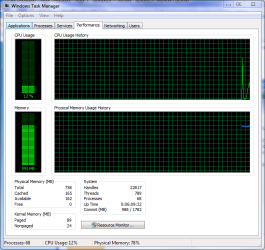
It's in performance, just click 'Resource Monitor'
Capture.PNG
 

My Computer

Computer Manufacturer/Model Number
Compaq Desktop
OS
Windows 7 Ultimate x64
CPU
AMD Sempron Dual Core
Memory
3GB
Graphics Card(s)
NVIDIA GeForce 6150SE nForce 430
Screen Resolution
1024x768
Hard Drives
150GB Sata
Sorry to jump in here but i am facing the same problem here. I have reinstalled Windows 7 RC1 Build 7100 4 times over the past week after the initial installation (and after telling the OS that i have 2 cores not 1) the CPU idles at about 3-5% but after that it jumps to 100% (thats before i install anything).

After viewing the forums and going over what has been placed to look out for it seems to be that the svchost.exe (LocalServiceNetworkRestricted) CPU useage: 35% +, svchost.exe (LocalServiceNoNetwork) CPU useage: 20% + and svchost.exe (secsvcs) CPU useage: 10% +, are the culprits.

Is there likely to be any kind of fix for this as i have read (not jsut here but on other forums as well) that this is a wide spread problem? I know restarting the PC will 'fix' it temporarely but when it shoots straight back up to 100% CPU useage after about 30 seconds - 1 minute uptime something must be wrong... any Ideas in the mean time?

DD
I found out how to fix it, at least on my machine. On XP I had a stable overclock of 3.2ghz on my 2.13ghz core 2 duo, by bringing this down to 3.0ghz I was able to remove any processor usage problems. Windows 7 must not be as good with overclocking as XP sadly :( , guess we can't have our cake and eat it too.
 

My Computer

OS
Windows 7
Heh yeah, Resource Moitor.

Vista had this too but it's on steroids in W7. Wanna find out what's hammering you hard drive? Look at the the Disk tab. And under the CPU tab it shows every DLL thread and handle for every process. THe Network tab shows you all the info you used to have to shell out to ipconfig and netstat for, all live!

It's stuff lke this that is ALL OVER in Vista and with more polish in W7 that makes this OS completely kick XPs butt. But sadly most people will never see how much it's improved "technically", they'll see three UAC popups and their 12 year old printer wont work and it'll be called "Junk" all over again :(
 

My Computer

Computer Manufacturer/Model Number
Scratch built
OS
Windows 7 x64 Ultimate
CPU
i7 960
Motherboard
Asus P6X58D
Memory
12 Gig Corsair Dominator
Graphics Card(s)
Nvidia 480
Sound Card
Maudio Delta 44 + breakout box
Monitor(s) Displays
Dell UltraSharp U2410 24in and Samsung 21 dual monitors
Screen Resolution
1920x1200 and 1280x1024
Hard Drives
Primary: Intel X-25M G2 160G SSD
Secondary: Segate baracuda 1.0 TB
HDs in AHCI mode.
PSU
Corasair TX850
Case
Cooler Master HAF
Cooling
Corsair H50
Keyboard
Logitech G15 + N52 game pad
Mouse
Logitech MX518
Internet Speed
15kbs down 4.5kbps up
Other Info
WEI 7.6
CPU & RAM 7.6
Graphics 7.9
Hard disk 7.7
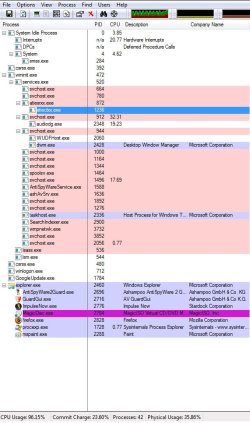
As this attachment shows (as i didnt state in my original post here) i had downloaded Process Explorer and run it and identified what processes where causing the usage to go off the charts.

But im not that good at finding what file(s) are directly behind it even going thru the Resource Moitor didnt show me anything useful.

As im all out of ideas (except for going back to vista till Win7 release, and i would rather not as i like the new OS) is there anything else that you can think of?

DD
 

Attachments

  • processlist.jpg
    processlist.jpg
    69.2 KB · Views: 247

My Computer

OS
Windows 7 RC1 Build: 7100
CPU
Intel Pentium Duel CPU E2180 @ 2.00GHz 2.01 GHz
Memory
2 gig ram
Graphics Card(s)
ATI Radeon 2400 HD Pro
Monitor(s) Displays
Benq FP71G+S
Screen Resolution
1280 X 1024 )reconmended
Case
Soprano
Cooling
Fan
Keyboard
Power Wave
Mouse
DSE Wireless Mouse
Internet Speed
Wireless Broadband (3G)
Hmm... A little over 20% CPU usage for 'Hardware Interrupts' when it should be none, or almost none... 32% usage on one of the svchost instances, with a sub of almost 20% for "audiodg.exe".

I'd say you have an issue with your audio card and/or driver.
 

My Computer

Computer Manufacturer/Model Number
Home Built
OS
Windows 7 (x64)
CPU
Intel Core i7 960 @ 3.8GHz (3.2GHz stock)
Motherboard
EVGA E758 X-58
Memory
6GB OCZ DDR3 1600
Graphics Card(s)
Powercolor AX5870 (ATI 5870 w/improved cooling)
Sound Card
Omega Claro+
Monitor(s) Displays
1. Acer P243W (24") 2. Samsung T260 HD HDMI HDTV/Monitor
Screen Resolution
1920 x 1200 x 2
Hard Drives
(1) 128GB Kingston SNVP325-S2 SSD for OS/Games
(2) 500GB WD Caviar Black - Storage
PSU
Corsair CMPSU-850HX
Case
Lian Li PC-K60WB
Cooling
Thermalright Venemous-X
Keyboard
Microsoft Natural keyboard 4000
Mouse
Microsoft Sidewinder
Internet Speed
Cable
Other Info
165 bclk, 23 Multi
Well its an inbuilt Sound card... and i have been thinking of upgrading my mobo, cpu and such but wont be for a while tho... ill see if there is an update for my card driver
 

My Computer

OS
Windows 7 RC1 Build: 7100
CPU
Intel Pentium Duel CPU E2180 @ 2.00GHz 2.01 GHz
Memory
2 gig ram
Graphics Card(s)
ATI Radeon 2400 HD Pro
Monitor(s) Displays
Benq FP71G+S
Screen Resolution
1280 X 1024 )reconmended
Case
Soprano
Cooling
Fan
Keyboard
Power Wave
Mouse
DSE Wireless Mouse
Internet Speed
Wireless Broadband (3G)
Hi yes i have a Windows Seven Ultimate when i turn on my computer or even restart when it goes to the desktop the processor is at 100% for about five minutes the most then it cools off and it takes it about 3 minutes to see i have a network when i have dsl it has a circle around the network icon then it goes to a triangle yellow and then it goes to my network. thanks i really need help im still new at this.
 

My Computer

Computer Manufacturer/Model Number
Emachine W3619
OS
Windows Seven Ultimate
CPU
Intel Celeron D
Motherboard
Elitegroup 945GCT-M3
Memory
2 GB Ram
Graphics Card(s)
Geforce Nvidia 8500 GT 512 MB
Sound Card
Realtek
Monitor(s) Displays
Emachine 500PW
Hard Drives
120 GB Sata ll
Cooling
Heat Sink, Fan with Artic Silver 5 thermal compound
My processor usage with w7 is constantly not less than 80%. RAM stays a steady 50%

Then there is something wrong with your installation because idle shouldn't be more than 2 to 3 % most of the time. If it is always at 80% then you have some background stuff going on that is likely not necessary.
 

My Computer

Computer Manufacturer/Model Number
DELL / Alienware M17x
OS
Windiows & Home Premium
CPU
Intel® CoreTM 2 Duo P8700 (3MB Cache, 1066MHz FSB)
Memory
6GB DDR3 - 1333Mhz
Graphics Card(s)
SLITM Dual 1GB GDDR3 NVIDIA® GeForce® GTX 260M7
Sound Card
Internal High-Definition 5.1 Surround Sound Audio
Monitor(s) Displays
17-inch WideUXGA 1920 x 1200 - (1200p) LCD
Hard Drives
640GB 7,200RPM - RAID 0 (2x320GB)
Back
Top