MathGuy
New member
Hi,
I had (or have, actually) almost the same problem as Hey Man under "CPU Usage Problem". My computer is a Sony VAIO running 64-bit Windows 7 Home Premium. I followed the suggestion from ThrashZone in that thread: I already had update KB3020369 installed, but did not have KB3172605. So I downloaded it, and then stopped and disabled the Windows Update service as per ThrashZone's excellent graphic.
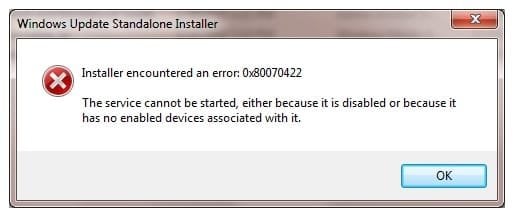
But upon opening the update for installation, the Windows Update Standalone Installer just kept showing the moving shaded progress bar. I decided to click on Cancel (several times), but the program wouldn't accept it. So, I had to open Task Manager to end the task. (I then went back and re-enabled Windows Update.)
Does anyone have any ideas? Hey Man? ThrashZone?
MathGuy
I had (or have, actually) almost the same problem as Hey Man under "CPU Usage Problem". My computer is a Sony VAIO running 64-bit Windows 7 Home Premium. I followed the suggestion from ThrashZone in that thread: I already had update KB3020369 installed, but did not have KB3172605. So I downloaded it, and then stopped and disabled the Windows Update service as per ThrashZone's excellent graphic.
But upon opening the update for installation, the Windows Update Standalone Installer just kept showing the moving shaded progress bar. I decided to click on Cancel (several times), but the program wouldn't accept it. So, I had to open Task Manager to end the task. (I then went back and re-enabled Windows Update.)
Does anyone have any ideas? Hey Man? ThrashZone?
MathGuy
My Computer
At a glance
Microsoft Windows 7 Home Premium 64-bitIntel Core i7 -- 1.60GHz - 2.80GHz, 6MB L3 Cache8GB (4GBx2) DDR3/1333MHzNVIDIA GeForce 310M GPU; tot. mem. 2263MB; 51...
- Computer type
- Laptop
- Computer Manufacturer/Model Number
- Sony F11KFX/H Laptop (2010)
- OS
- Microsoft Windows 7 Home Premium 64-bit
- CPU
- Intel Core i7 -- 1.60GHz - 2.80GHz, 6MB L3 Cache
- Memory
- 8GB (4GBx2) DDR3/1333MHz
- Graphics Card(s)
- NVIDIA GeForce 310M GPU; tot. mem. 2263MB; 512MB RAM
- Hard Drives
- 320GB 7200rpm, Serial ATA
- Antivirus
- Microsoft Security Essentials
- Browser
- Microsoft IE, Version 11