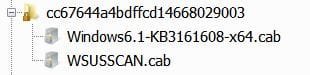
Folder Created by Successful Standalone-Installer Update

Rick1441

New member
Local time
6:22 PM
Messages
34
Yesterday, for reasons I won't go into (but feel free to ask if interested), I installed Patch Tuesday update KB3161608 (x64) via the downloaded MS standalone installer (.msu), instead of via Windows Update. The installation was successful. (A little more detail, in case it might have any relevance: After I first started the install it seemed stuck at the "Searching for Updates" stage. Clicking cancel would not make the dialog go away. So I restarted the pc, with the "Searching for Updates" message still active. Upon restart and retry, it moved past the "Searching for Updates" stage almost instantly, and the install went smoothly.)

But now I see that, apparently as a result of the installation, Windows created a new lengthy-name locked sub-folder of C. (See screenshots of folder and contained files.)

Is this normal? What is this folder for? Can I delete or move it?

Thanks.
 

Attachments

  • Capture SF2.JPG
    Capture SF2.JPG
    27.4 KB · Views: 0
  • Capture SF1.JPG
    Capture SF1.JPG
    13.5 KB · Views: 36
Last edited:

My Computer

Computer type
PC/Desktop
Computer Manufacturer/Model Number
Lenovo
OS
Windows 7 Pro x64
Hi Rick,
Thats cause you downloaded via WSUS (business) servers, there are some fix's that utilise this option, NOT the normal day to day standard user servers.

Roy

EDIT

DO NOT DELETE IT
 

My Computer

Computer type
PC/Desktop
Computer Manufacturer/Model Number
medionl/Aspire 6930G/acer x55a
OS
W7 home premium 32bit/W7HP 64bit/w10 tp insider ring
CPU
E5300 dual core
Motherboard
medion MS7366
Memory
3gb
Graphics Card(s)
Nvidia Geforce 7100 Nforce 630i
Monitor(s) Displays
avixc
Internet Speed
n (isp resticted to 72)
Antivirus
mse/pands
Browser
palemoon
Other Info
Belkin Fd7050 n USB using Railink RT2870 drivers, more upto date
Thanks torchwood. Do you know how the system uses the folder going forward, and why it shouldn't be deleted? And can it be moved (e.g., to the Windows folder) or renamed?
 

My Computer

Computer type
PC/Desktop
Computer Manufacturer/Model Number
Lenovo
OS
Windows 7 Pro x64
...Windows created a new lengthy-name locked sub-folder of C...

Minor point:
The installer created that temp folder, not the Windows OS.

See this post with my videos:
http://www.sevenforums.com/general-discussion/306905-unnecessary-files-creating-external-hdd.html#post2550806

I'll let torchwood tell us why we should not manually delete them.


There is probably some reason why these installers do not create that temp folder in the Windows\Temp folder, but I don't know what that reason would be.
 
Last edited:

My Computer

Computer type
Laptop
Computer Manufacturer/Model Number
Employer provided Dell Latitude
OS
W7 Pro SP1 64bit
CPU
i7
Memory
8GB
Graphics Card(s)
Intel HD Graphics
Hard Drives
crappy SSD
Antivirus
Employer mandated Symantec Endpoint Protection
Browser
Pale Moon 64bit, IE11 64bit & Chrome 64bit
Thanks. FWIW, I just did a search and found that a subfolder of Windows\SoftwareDistribution\Download has a file that appears to be identical to the largest file in my screenshot, Windows6.1-KB3161608-x64.cab. It has a Created timestamp that is about an hour later than the version in the screenshot.
 

My Computer

Computer type
PC/Desktop
Computer Manufacturer/Model Number
Lenovo
OS
Windows 7 Pro x64
Its the equivalent of the Windows/SXS file and contains the manifest (.mum) and catalog (.cat) folders which may be needed at a later stage if you encounter problems.
(the .cat & .mum files are used by SURT and sfc scannow)

Roy
 

My Computer

Computer type
PC/Desktop
Computer Manufacturer/Model Number
medionl/Aspire 6930G/acer x55a
OS
W7 home premium 32bit/W7HP 64bit/w10 tp insider ring
CPU
E5300 dual core
Motherboard
medion MS7366
Memory
3gb
Graphics Card(s)
Nvidia Geforce 7100 Nforce 630i
Monitor(s) Displays
avixc
Internet Speed
n (isp resticted to 72)
Antivirus
mse/pands
Browser
palemoon
Other Info
Belkin Fd7050 n USB using Railink RT2870 drivers, more upto date
Almost every time the Windows Installer gets stuck or you cancel it there will be a temp file with that kind of naming convention in the root of C or if you are installing an update from drive D it will be left there instead... after you have restarted and managed to successfully install the update it still does not remove the previous temp file it created...
Personally I just delete them from the root of C or if they are on D been doing this for years without any known side affects in my case...
 

My Computer

Computer type
Laptop
Computer Manufacturer/Model Number
Sony
OS
Windows 7 x64 SP1
CPU
Intel
Motherboard
Sony
Memory
4gb
Graphics Card(s)
Nvidia
Hard Drives
WD
Internet Speed
Dial up wasn't as bad as this !
Antivirus
Avast
Browser
Firefox
Thanks, Andyrids! That all makes sense.
 

My Computer

Computer type
PC/Desktop
Computer Manufacturer/Model Number
Lenovo
OS
Windows 7 Pro x64
Thanks, Andyrids! That all makes sense.

No problem mate :)

Just as a side note, only remove the ones that fail that you find in the root of C or D don't do anything with the others... I know you understand what I meant just saying in case another person reads and does not.
 

My Computer

Computer type
Laptop
Computer Manufacturer/Model Number
Sony
OS
Windows 7 x64 SP1
CPU
Intel
Motherboard
Sony
Memory
4gb
Graphics Card(s)
Nvidia
Hard Drives
WD
Internet Speed
Dial up wasn't as bad as this !
Antivirus
Avast
Browser
Firefox
The drive that the installer picks to create the temp folder on should be the one with the most free space. It should not matter what drive the installer was launched from.

The vast majority of these temp folders go away on their own. Some of these temp folders only exits for a few seconds. Sadly, some installers are flawed and will leave their temp folder behind every time - even if there were no errors during the installation.

I too have deleted them for years - after I look around inside the folder and any sub-folders that might be there. It might be safer to leave them be, but I would have dozens of them if I did that. torchwood, how many of these folders do you have in the root?
 

My Computer

Computer type
Laptop
Computer Manufacturer/Model Number
Employer provided Dell Latitude
OS
W7 Pro SP1 64bit
CPU
i7
Memory
8GB
Graphics Card(s)
Intel HD Graphics
Hard Drives
crappy SSD
Antivirus
Employer mandated Symantec Endpoint Protection
Browser
Pale Moon 64bit, IE11 64bit & Chrome 64bit
With the windows update installer it will pick the drive you launch the update from to place the temp files... try it launch and update package from D then cancel it... launch the same from C cancel it you will find you have the same temp files on the root of both drives... that have to be manually removed, normally.

Those temp folders only exist for a few seconds if the Windows update install was successful if not then they will remain...
 

My Computer

Computer type
Laptop
Computer Manufacturer/Model Number
Sony
OS
Windows 7 x64 SP1
CPU
Intel
Motherboard
Sony
Memory
4gb
Graphics Card(s)
Nvidia
Hard Drives
WD
Internet Speed
Dial up wasn't as bad as this !
Antivirus
Avast
Browser
Firefox
Back
Top