I am trying to record voice but get very little volume

blockie

New member
Member
VIP
Local time
3:11 PM
Messages
605
Location
in Assisted Care facility, Calif
I am using W7 Ultimate SP1 on a Asus P53E Notebook and trying to record an annotation on a Screencast video that I am creating. The voice I record is barely audible although I have system volume as well as the Windows Media Player volume at 100%.
If I go to Skype and test the audio it is loud enough that I have to turn the system volume down.
I know very little about audio as I don't play music at all, although, if I watch a U-Tube video or movie I can hear very well.
Anybody want to offer a suggestion?

Bill
 

My Computer My Computer

At a glance

W7 Ultimate2.2 bh Intel Core i3-2330M4MBOn Board
Computer type
Laptop
Computer Manufacturer/Model Number
Asus
OS
W7 Ultimate
CPU
2.2 bh Intel Core i3-2330M
Motherboard
Asustek Computer Inc. P53E 1.0
Memory
4MB
Graphics Card(s)
On Board
Sound Card
On Board
Monitor(s) Displays
On Board
Screen Resolution
1366 X 768
Hard Drives
ST9500423AS
ST2000DM USB Backup Drive External
I am using W7 Ultimate SP1 on a Asus P53E Notebook and trying to record an annotation on a Screencast video that I am creating. The voice I record is barely audible although I have system volume as well as the Windows Media Player volume at 100%.
If I go to Skype and test the audio it is loud enough that I have to turn the system volume down.
I know very little about audio as I don't play music at all, although, if I watch a U-Tube video or movie I can hear very well.
Anybody want to offer a suggestion?

Bill
What's the program you're using to create that screen cast video? Maybe the problem's with the program you're using. You could mix up the audio by recording the audio in built in reccorder for Win 7.
 

My Computer My Computer

At a glance

Windows 7 Professional 32bitP6200 @ 2.13GHz2043 MBIntel HD graphics
Computer type
Laptop
Computer Manufacturer/Model Number
Acer 5733Z
OS
Windows 7 Professional 32bit
CPU
P6200 @ 2.13GHz
Memory
2043 MB
Graphics Card(s)
Intel HD graphics
Hard Drives
C: Total - 49899 MB; D: Total - 149999; E: Total - 149999 MB; F: Total - 123107 MB;
Antivirus
Microsoft Security Essentials, ESET NOD 32
Browser
Mozilla
Did you try this?
 

Attachments

  • Sound Recorder.png
    Sound Recorder.png
    2 KB · Views: 12

My Computer My Computer

At a glance

Windows 7 Professional 32bitP6200 @ 2.13GHz2043 MBIntel HD graphics
Computer type
Laptop
Computer Manufacturer/Model Number
Acer 5733Z
OS
Windows 7 Professional 32bit
CPU
P6200 @ 2.13GHz
Memory
2043 MB
Graphics Card(s)
Intel HD graphics
Hard Drives
C: Total - 49899 MB; D: Total - 149999; E: Total - 149999 MB; F: Total - 123107 MB;
Antivirus
Microsoft Security Essentials, ESET NOD 32
Browser
Mozilla
I was talking about the "Sound Recorder" Sorry I didn't mention it.
Bill
 

My Computer My Computer

At a glance

W7 Ultimate2.2 bh Intel Core i3-2330M4MBOn Board
Computer type
Laptop
Computer Manufacturer/Model Number
Asus
OS
W7 Ultimate
CPU
2.2 bh Intel Core i3-2330M
Motherboard
Asustek Computer Inc. P53E 1.0
Memory
4MB
Graphics Card(s)
On Board
Sound Card
On Board
Monitor(s) Displays
On Board
Screen Resolution
1366 X 768
Hard Drives
ST9500423AS
ST2000DM USB Backup Drive External

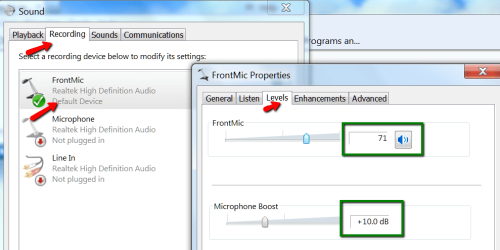
Start -> Settings -> Control Panel -> Sound
Click the Recording tab, then the Microphone image, then the Properties button, then the Levels tab.
<whew>
You should see a slider for recording level as well as a percentage. If it's low, move the slider to the right and try your recording again.
If it's already at 100%, then I'm out of ideas.
 

My Computer My Computer

At a glance

Win10 Pro 64-bitAMD Ryzen 7 3800X32 GB Kingston DDR4-2666MSI nVidia GT 710 (2GB)
Computer type
PC/Desktop
Computer Manufacturer/Model Number
Self-Built
OS
Win10 Pro 64-bit
CPU
AMD Ryzen 7 3800X
Motherboard
Gigabyte X570 UD
Memory
32 GB Kingston DDR4-2666
Graphics Card(s)
MSI nVidia GT 710 (2GB)
Sound Card
Creative Audigy FX 5.1
Monitor(s) Displays
ViewSonic VG2439Smh 24"
Screen Resolution
1920x1080
Hard Drives
3xWD1TB; 1xSeagate 1TB... all spinning rust
PSU
EVGA 100-W1-0500-KR (500w)
Case
SilverStone PS10 (modified)
Cooling
CPU:AMD Wraith Prism. Case:3x Noctua 120mm
Keyboard
Compaq Professional PS/2
Mouse
Microsoft Basic Optical Mouse 2.0
Internet Speed
Fiber 1Gbit/sec down/up
Antivirus
Avast Free
Browser
FF, Chrome
Other Info
2x LG GH24NSC0 DVD burners, Mackie CR3 monitor speakers
I had a similar problem and changed the settings to that (see pic). Also look at enhancements.
 

Attachments

  • 2014-03-29_0100.png
    2014-03-29_0100.png
    40.7 KB · Views: 1

My Computer My Computer

At a glance

Vista, Windows7, Mint Mate, Zorin, Windows 8from 1.6GHz Duo to i7
Computer Manufacturer/Model Number
HP, Dell, Gateway, Toshiba - 4 laptops and 2 desktops
OS
Vista, Windows7, Mint Mate, Zorin, Windows 8
CPU
from 1.6GHz Duo to i7
Monitor(s) Displays
2x HP w2207
Hard Drives
5x HDD, 7x SSD, 12x Externals
Keyboard
with trackball - no mices
Mouse
Trackball mice
Internet Speed
DSL 6000
Back
Top