Solved I am trying to format an SSD, but it's not showing on Desktop

0verdrive

New member
Local time
2:23 PM
Messages
19
I have an Asus laptop on which I would like to install a 240 GB Crucial SSD. However, although I can see it in Device Manager via a USB port, the SSD doesn't appear on the desktop. I have checked the drive on the EaseUs Partition app and it comes up as healthy. I was hoping to install Windows 10 on the drive. Any advice appreciated, and thanks in advance. Sorry, when I say 'desktop' I mean My Computer.
 

My Computer My Computer

At a glance

Windows 7 32 bit.
Computer type
Laptop
Computer Manufacturer/Model Number
Asus
OS
Windows 7 32 bit.
Hard Drives
SSD
Mouse
Logitech
Antivirus
Malwarebytes Premium, Winpatrol.
Browser
Firefox
Other Info
Retired (86 Years of age), Live in the UK
Welcome to the forum if its new it wont show up in explorer until its paritioned and formatted but your best leaving it blank and install 10 on it which will create the correct paritions and format them
 

My Computer My Computer

At a glance

win 8 32 bit
Computer type
PC/Desktop
OS
win 8 32 bit
Thanks for that. I shall set about replacing 7 with 10 sometime this week and see how it goes. I did try to install Windows 7, but it wouldn't have it. I used to use the SSD as a back-up on my iMac, and wonder if that has anything to do with it.
 

My Computer My Computer

At a glance

Windows 7 32 bit.
Computer type
Laptop
Computer Manufacturer/Model Number
Asus
OS
Windows 7 32 bit.
Hard Drives
SSD
Mouse
Logitech
Antivirus
Malwarebytes Premium, Winpatrol.
Browser
Firefox
Other Info
Retired (86 Years of age), Live in the UK
What is the partition style and filesystem on that disk? Easeus or similar will tell you.
 

My Computers My Computers

  • At a glance

    7 X64i5 84002x8gb 3200mhz
    Computer type
    PC/Desktop
    OS
    7 X64
    CPU
    i5 8400
    Motherboard
    gigabyte b365m ds3h
    Memory
    2x8gb 3200mhz
    Hard Drives
    various
    PSU
    pure power 11 400w cm
    Case
    Coolermaster
    Cooling
    cryorig m9i
  • At a glance

    7x64g54008gb ddr4 2400
    Computer type
    PC/Desktop
    OS
    7x64
    CPU
    g5400
    Motherboard
    ga b365m ds3h
    Memory
    8gb ddr4 2400
    PSU
    xfx pro 450w
(What is the partition style and filesystem on that disk? Easeus or similar will tell you.)

Hello, and thanks once more. It's 2.45 am here so I won't be looking at it again until morning, but I think it said something about 'unallocated'. Sadly, I'm a bit of an opsimath when it comes to computing. Just wish I'd been born 50 years later! (I'm in my eighty-sixth year, by the way) I worked for the Thomas Edison concern as a technician in the fifties, but that was an entirely different ball game. Anyway, I'm just going to have a quick game of online Scrabble, then back to bed. See you tomorrow :) .
 

My Computer My Computer

At a glance

Windows 7 32 bit.
Computer type
Laptop
Computer Manufacturer/Model Number
Asus
OS
Windows 7 32 bit.
Hard Drives
SSD
Mouse
Logitech
Antivirus
Malwarebytes Premium, Winpatrol.
Browser
Firefox
Other Info
Retired (86 Years of age), Live in the UK
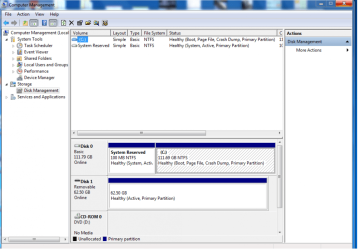
A screenshot of the EaseUs Partitioner result. I don't know how to interpret this, but I'm sure someone on here will know what it means.
 

Attachments

  • EaseUs.png
    EaseUs.png
    113.5 KB · Views: 1

My Computer My Computer

At a glance

Windows 7 32 bit.
Computer type
Laptop
Computer Manufacturer/Model Number
Asus
OS
Windows 7 32 bit.
Hard Drives
SSD
Mouse
Logitech
Antivirus
Malwarebytes Premium, Winpatrol.
Browser
Firefox
Other Info
Retired (86 Years of age), Live in the UK
By the way, EaseUs has a 'format' option but it doesn't manifest itself when analyzing this SSD, for some reason.
 

My Computer My Computer

At a glance

Windows 7 32 bit.
Computer type
Laptop
Computer Manufacturer/Model Number
Asus
OS
Windows 7 32 bit.
Hard Drives
SSD
Mouse
Logitech
Antivirus
Malwarebytes Premium, Winpatrol.
Browser
Firefox
Other Info
Retired (86 Years of age), Live in the UK
The shot you posted is from windows disk management, not Easeus.

You will notice that the two partitions on Disk0 are shown as NTFS filesystem.

Disk1 is shown as having only one partition, and no filesystem is listed.

That leads one to suspect it has been formatted with a filesystem that windows doesn't recognize.

I haven't looked at Easeus for a while. I usually recommend Aomei partition Assistant, which does support some non windows systems - the free edition is fine for most things.

If there is nothing on Disk1 that you need, you could try deleting the partition, then create a new one using NTFS.
 

My Computers My Computers

  • At a glance

    7 X64i5 84002x8gb 3200mhz
    Computer type
    PC/Desktop
    OS
    7 X64
    CPU
    i5 8400
    Motherboard
    gigabyte b365m ds3h
    Memory
    2x8gb 3200mhz
    Hard Drives
    various
    PSU
    pure power 11 400w cm
    Case
    Coolermaster
    Cooling
    cryorig m9i
  • At a glance

    7x64g54008gb ddr4 2400
    Computer type
    PC/Desktop
    OS
    7x64
    CPU
    g5400
    Motherboard
    ga b365m ds3h
    Memory
    8gb ddr4 2400
    PSU
    xfx pro 450w
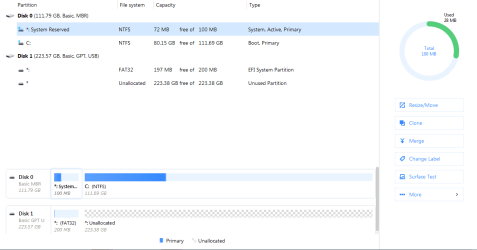
Sorry about that. A senior moment I guess. Anyway, here is what I thought I'd posted. :(. Thanks for the tip about Aomel. I'll take a look at it.
 

Attachments

  • EaseUs.PNG
    EaseUs.PNG
    18.6 KB · Views: 2

My Computer My Computer

At a glance

Windows 7 32 bit.
Computer type
Laptop
Computer Manufacturer/Model Number
Asus
OS
Windows 7 32 bit.
Hard Drives
SSD
Mouse
Logitech
Antivirus
Malwarebytes Premium, Winpatrol.
Browser
Firefox
Other Info
Retired (86 Years of age), Live in the UK
Does Easeus offer to create ( not format) a partition in that unallocated space?

Partitions can be formatted. Unallocated space cannot.

Otherwise, Aomei is good for most things. It might let you delete and then create fresh partitions on that disk. And/or you could convert the disk from GPT to MBR if you wish.

If Aomei doesn't want to delete/create the partitions on that disk , then Paragon supports many filesystems, or at least it used to to for basic functions. I am not that keen on Paragon hard disk manager nowadays since they have rebuilt it into something very large and unwieldy.
 

My Computers My Computers

  • At a glance

    7 X64i5 84002x8gb 3200mhz
    Computer type
    PC/Desktop
    OS
    7 X64
    CPU
    i5 8400
    Motherboard
    gigabyte b365m ds3h
    Memory
    2x8gb 3200mhz
    Hard Drives
    various
    PSU
    pure power 11 400w cm
    Case
    Coolermaster
    Cooling
    cryorig m9i
  • At a glance

    7x64g54008gb ddr4 2400
    Computer type
    PC/Desktop
    OS
    7x64
    CPU
    g5400
    Motherboard
    ga b365m ds3h
    Memory
    8gb ddr4 2400
    PSU
    xfx pro 450w
Wow! That did the trick. I did what you said, deleted the partitions, repartitioned the disk with Aomei and viola! Thank you so much for your help. Very much appreciated.
 

My Computer My Computer

At a glance

Windows 7 32 bit.
Computer type
Laptop
Computer Manufacturer/Model Number
Asus
OS
Windows 7 32 bit.
Hard Drives
SSD
Mouse
Logitech
Antivirus
Malwarebytes Premium, Winpatrol.
Browser
Firefox
Other Info
Retired (86 Years of age), Live in the UK
:-)
 

My Computers My Computers

  • At a glance

    7 X64i5 84002x8gb 3200mhz
    Computer type
    PC/Desktop
    OS
    7 X64
    CPU
    i5 8400
    Motherboard
    gigabyte b365m ds3h
    Memory
    2x8gb 3200mhz
    Hard Drives
    various
    PSU
    pure power 11 400w cm
    Case
    Coolermaster
    Cooling
    cryorig m9i
  • At a glance

    7x64g54008gb ddr4 2400
    Computer type
    PC/Desktop
    OS
    7x64
    CPU
    g5400
    Motherboard
    ga b365m ds3h
    Memory
    8gb ddr4 2400
    PSU
    xfx pro 450w
I don't know what happened but I posted a reply a couple of hours ago and it's nowhere to be seen. Anyway, thanks to your help, the problem has now been resolved. I deleted the partitions on the SSD with Aomei and then repartitioned it. Bingo! All is well again. A big 'Thank You' to all on here for your assistance. Much appreciated.
Edit. Well it seems the missing post was on a fresh page. Think I'm losing my marbles. :)
 

My Computer My Computer

At a glance

Windows 7 32 bit.
Computer type
Laptop
Computer Manufacturer/Model Number
Asus
OS
Windows 7 32 bit.
Hard Drives
SSD
Mouse
Logitech
Antivirus
Malwarebytes Premium, Winpatrol.
Browser
Firefox
Other Info
Retired (86 Years of age), Live in the UK
Back
Top