Solved i believe my winsock may be corrupt

vv211

New member
Member
Local time
9:45 AM
Messages
57
Location
Not NYC, NY, USA
Thank you in advance for any help, if there's more info you need to know i would be happy to supply it
Some back-story if you're interested is posted below the issue

so here's the problem,
  1. After manually removing some entries from my winsock catalog I can't connect to the internet via windows (luckily I have Ubuntu installed alongside windows, and that's how i'm posting this)
  2. "netsh winsock reset" and "netsh int ip reset" both return "Initialization Function InitHelperDll in NSHHTTP.DLL failed to start error code 11003" and it doesn't help anything
  3. system restore to a point prior to all this (or after for that matter) returns "An unspecified error occurred during system restore 0x80070005" stating that I have antivirus running and i should stop it, but i don't have any antivirus running
  4. I NEED HELP
I was thinking maybe i could download a new winsock catalog? not sure if that's how it works

If I absolutely need to, I have an external hard drive I could back up all my data to and just re-install windows, however I would really rather not

a little back story:
My parents installed Covenant Eyes on my laptop, which is a program that monitors all internet traffic on a pc and reports it back to a central server so it can be checked from any other pc after you've logged in. After they installed it, iTunes wouldn't load the store, it was just a blank white screen. I tried using the built-in updater for Covenant Eyes but it told me that I had the most recent version installed, I read on an Apple forum that certain winsock providers (including those from Covenant Eyes) can interfere with iTunes' ability to connect to the store. So i used the program "autoruns" to delete all instances of covenant eyes from the list of winsock providers (dumb idea, i know). That doesn't go over too well: covenant eyes realizes parts of it were removed so it tries to restart my pc after 30 seconds. I got an uninstall code from online and finally am able to stop the covenant eyes process so i can uninstall it and then i reinstall it, talk to a covenant eyes support guy who says i need to install the new version for it to work with itunes (their automatic upgrade feature is currently down i found out). FINALLY, everything is working fine. Then i start uTorrent and it keeps freezing. after reading around on the forums for a while, i learn that if someone unsuccessfully tries to remove covenant eyes, it can mess up uTorrent. Now, the first time i got an uninstall code (which changes every day), my parents gave me all sorts of a hassle about it (it emails all your "accountability partners" when you get an uninstall code), so i didn't want to have to go through that again, cause they would probably think i was just trying to find a way around covenant eyes and be annoying about it.

So I use the revo uninstaller program to delete all instances of covenant eyes files from the computer and registry, and then go into the winsock providers and delete all covenant eyes entries in that, and then reset my netsh winsock catalog with command prompt, figuring i would just do a clean install afterwards and uTorrent would work again. i restart my pc, and i have no internet. my wireless card isn't even recognizing that there's an access point in reach. ok, maybe after i reinstall covenant eyes it will work. nope. and it still tries to auto restart my computer after 30 seconds of the service starting


System Info:
HP Pavilion dv6t-6100 CTO Quad Edition Entertainment Notebook PC
Window 7 Home Premium x64
8GB ddr3 RAM
Intel i7 Quad Core 2630QM 2.0Ghz
750GB Seagate Momentus 7200rpm
ATI Radeon HD 6770M
Intel Wifi Link 1000 bgn
 
Last edited:

My Computer My Computer

At a glance

Windows 7 Professional x64 w/SP1Intel i7-3770 3.4GHz32GB (8GB x4) DDR3 1600MHz Corsair Vengeance ...Sapphire Radeon HD 7950 3GB GDDR5 VRAM
Computer type
PC/Desktop
Computer Manufacturer/Model Number
Custom
OS
Windows 7 Professional x64 w/SP1
CPU
Intel i7-3770 3.4GHz
Motherboard
Gigabyte GA-Z77-D3H
Memory
32GB (8GB x4) DDR3 1600MHz Corsair Vengeance Dual Channel
Graphics Card(s)
Sapphire Radeon HD 7950 3GB GDDR5 VRAM
Sound Card
Sound Blaster ZxR PCIe
Monitor(s) Displays
1x 21.5"
Screen Resolution
1920x1080
Hard Drives
128GB OCZ Vertex 4 SSD
1TB 7200 rpm Seagate Barracuda
4TB 7200 rpm Western Digital Black
PSU
600W Coolmax ZU-600B
Case
Antec Nine Hundred Two V3
Cooling
4 stock case fans. 1 stock cpu fan. 2 stock gpu fans
Keyboard
Logitech K800 wireless backlit
Mouse
Roccat Tyon
Internet Speed
400 KB/s or so
Antivirus
992KB Hosts file, Hardware firewall, not clicking on links
Browser
Chrome
Hello vv211 and welcome to Seven Forums.

First thing I'd do is run a full malware scan with my antivirus/antispyware of choice. Then I'd follow up with a couple of free on-demand scanners like Malwarebytes, Hitman Pro, Superantispyware, HouseCall, etc.

Sounds like you have more than just a winsock issue if system restore doesn't work and you're getting all those other error codes when trying to reset the winsock protocol. Ordinarily I wouldn't recommend messing around with the registry but it sounds like there may be some deeply embedded remants of Covenant Eyes lurking about. If you are comfortable using regedit you could search for Covenant Eyes and delete all references to it. (You could also try a free utility called CCleaner. Click the Registry tab then scan for and fix issues related to Covenant Eyes. See third screenshot.)

CCleaner - Screenshots

After removing any remnants I'd run a System File Checker scan from an elevated command prompt (option two, this tutorial.) If any problems are found run the scan 3 times rebooting in between each scan.

http://www.sevenforums.com/tutorials/1538-sfc-scannow-command-system-file-checker.html

If this doesn't fix the issues you could try a Repair Install. Read all the warnings very carefully.

http://www.sevenforums.com/tutorials/3413-repair-install.html

If you're still having issues you might have no choice but to do a clean install. Please post back if any of the above helps or not.
 

My Computer My Computer

At a glance

Win 7 Pro 64-bitIntel i5 2.4 Ghz8GB DDR3Intel HD 3000
Computer type
Laptop
Computer Manufacturer/Model Number
Sony Vaio VPCEB47GM Laptop
OS
Win 7 Pro 64-bit
CPU
Intel i5 2.4 Ghz
Memory
8GB DDR3
Graphics Card(s)
Intel HD 3000
Sound Card
IDT High Definition
Monitor(s) Displays
15.6 WGXA Anti-Glare LED
Screen Resolution
1280x800
Hard Drives
640Gb 7200rpm
Antivirus
MSE
Browser
Opera (primary) with IE9 backup
I did a full system scan with Norton Bootable Recovery and that found nothing. A few days ago I had done a full system scan with McAfee and that found nothing. System File Checker returned "Windows Resource Protection did not find any integrity violations". I'm about to run CCleaner.
 

My Computer My Computer

At a glance

Windows 7 Professional x64 w/SP1Intel i7-3770 3.4GHz32GB (8GB x4) DDR3 1600MHz Corsair Vengeance ...Sapphire Radeon HD 7950 3GB GDDR5 VRAM
Computer type
PC/Desktop
Computer Manufacturer/Model Number
Custom
OS
Windows 7 Professional x64 w/SP1
CPU
Intel i7-3770 3.4GHz
Motherboard
Gigabyte GA-Z77-D3H
Memory
32GB (8GB x4) DDR3 1600MHz Corsair Vengeance Dual Channel
Graphics Card(s)
Sapphire Radeon HD 7950 3GB GDDR5 VRAM
Sound Card
Sound Blaster ZxR PCIe
Monitor(s) Displays
1x 21.5"
Screen Resolution
1920x1080
Hard Drives
128GB OCZ Vertex 4 SSD
1TB 7200 rpm Seagate Barracuda
4TB 7200 rpm Western Digital Black
PSU
600W Coolmax ZU-600B
Case
Antec Nine Hundred Two V3
Cooling
4 stock case fans. 1 stock cpu fan. 2 stock gpu fans
Keyboard
Logitech K800 wireless backlit
Mouse
Roccat Tyon
Internet Speed
400 KB/s or so
Antivirus
992KB Hosts file, Hardware firewall, not clicking on links
Browser
Chrome
ccleaner didnt find anything related to covenant eyes. do i need a physical disk to do the repair install?
 

My Computer My Computer

At a glance

Windows 7 Professional x64 w/SP1Intel i7-3770 3.4GHz32GB (8GB x4) DDR3 1600MHz Corsair Vengeance ...Sapphire Radeon HD 7950 3GB GDDR5 VRAM
Computer type
PC/Desktop
Computer Manufacturer/Model Number
Custom
OS
Windows 7 Professional x64 w/SP1
CPU
Intel i7-3770 3.4GHz
Motherboard
Gigabyte GA-Z77-D3H
Memory
32GB (8GB x4) DDR3 1600MHz Corsair Vengeance Dual Channel
Graphics Card(s)
Sapphire Radeon HD 7950 3GB GDDR5 VRAM
Sound Card
Sound Blaster ZxR PCIe
Monitor(s) Displays
1x 21.5"
Screen Resolution
1920x1080
Hard Drives
128GB OCZ Vertex 4 SSD
1TB 7200 rpm Seagate Barracuda
4TB 7200 rpm Western Digital Black
PSU
600W Coolmax ZU-600B
Case
Antec Nine Hundred Two V3
Cooling
4 stock case fans. 1 stock cpu fan. 2 stock gpu fans
Keyboard
Logitech K800 wireless backlit
Mouse
Roccat Tyon
Internet Speed
400 KB/s or so
Antivirus
992KB Hosts file, Hardware firewall, not clicking on links
Browser
Chrome
Yes, you'll need an install disk to run a repair install. If install media didn't come with your machine from the manufacturer, you can download a legitimate copy of Windows 7 from Digital River (an official Microsoft distribution partner.) It will be an .iso file that you can save on your desktop and then burn it to a DVD. You'll most likely have to reactive using the Product Key on your computer. It's a large download (about 2.5GB) so it will take a while.

Official Windows 7 SP1 ISO from Digital River « My Digital Life
 

My Computer My Computer

At a glance

Win 7 Pro 64-bitIntel i5 2.4 Ghz8GB DDR3Intel HD 3000
Computer type
Laptop
Computer Manufacturer/Model Number
Sony Vaio VPCEB47GM Laptop
OS
Win 7 Pro 64-bit
CPU
Intel i5 2.4 Ghz
Memory
8GB DDR3
Graphics Card(s)
Intel HD 3000
Sound Card
IDT High Definition
Monitor(s) Displays
15.6 WGXA Anti-Glare LED
Screen Resolution
1280x800
Hard Drives
640Gb 7200rpm
Antivirus
MSE
Browser
Opera (primary) with IE9 backup
Some more info, dunno if it'll help anything but hey, maybe it will.

When I start my computer in normal mode, it takes about 5 min to boot, it will show the welcome screen after i type my password for a minute or two and then the screen will be black for a minute or two before loading my desktop and the task bar. When i do get it started up, a notification bubble pops up that says "Windows could not connect to the System Event Notification Service. This problem prevents standard users from logging on to the system. As an administrative user, you can review the system event log for details about why the service didn't respond." Of course, when i try to do that, it says that the system event viewer or whatever isn't running.

Why i use the troubleshooting option on my connection icon on the taskbar, it detects, but doesn't fix, the following: Windows wireless service is not running on this computer
When i try and start the Wireless PAN DHCP Server service manually i get the error code 1067

In the services window, i see:
DHCP Client startING (note: network storage interface service is started, which dhcp client depends on)
System Notification Service startING (note: COM+ event system is started, which system notification service depends on)
TCP/IP NetBIOS Helper startING

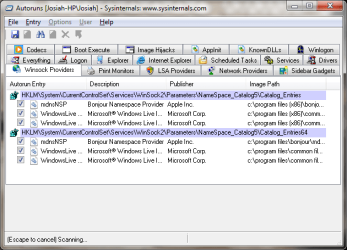
i attached a screen capture of my running winsock providers. maybe i'm missing one or something
 

Attachments

  • Untitled.png
    Untitled.png
    20.9 KB · Views: 153
Last edited:

My Computer My Computer

At a glance

Windows 7 Professional x64 w/SP1Intel i7-3770 3.4GHz32GB (8GB x4) DDR3 1600MHz Corsair Vengeance ...Sapphire Radeon HD 7950 3GB GDDR5 VRAM
Computer type
PC/Desktop
Computer Manufacturer/Model Number
Custom
OS
Windows 7 Professional x64 w/SP1
CPU
Intel i7-3770 3.4GHz
Motherboard
Gigabyte GA-Z77-D3H
Memory
32GB (8GB x4) DDR3 1600MHz Corsair Vengeance Dual Channel
Graphics Card(s)
Sapphire Radeon HD 7950 3GB GDDR5 VRAM
Sound Card
Sound Blaster ZxR PCIe
Monitor(s) Displays
1x 21.5"
Screen Resolution
1920x1080
Hard Drives
128GB OCZ Vertex 4 SSD
1TB 7200 rpm Seagate Barracuda
4TB 7200 rpm Western Digital Black
PSU
600W Coolmax ZU-600B
Case
Antec Nine Hundred Two V3
Cooling
4 stock case fans. 1 stock cpu fan. 2 stock gpu fans
Keyboard
Logitech K800 wireless backlit
Mouse
Roccat Tyon
Internet Speed
400 KB/s or so
Antivirus
992KB Hosts file, Hardware firewall, not clicking on links
Browser
Chrome
Do you actually use Bonjour? Reason I ask is I had a winsock problem in Nov 2010.

http://www.sevenforums.com/network-sharing/124380-resetting-winsock-protocol.html#post1072382

One of the suggestions (post # 8) was that a service such as Bonjour was trying to connect to the internet and caused a time out. Just in case Bonjour or some other service is interfering you might consider troubleshooting with a Clean Boot (aka clean startup.)

http://www.sevenforums.com/tutorial...ation-conflicts-performing-clean-startup.html
 

My Computer My Computer

At a glance

Win 7 Pro 64-bitIntel i5 2.4 Ghz8GB DDR3Intel HD 3000
Computer type
Laptop
Computer Manufacturer/Model Number
Sony Vaio VPCEB47GM Laptop
OS
Win 7 Pro 64-bit
CPU
Intel i5 2.4 Ghz
Memory
8GB DDR3
Graphics Card(s)
Intel HD 3000
Sound Card
IDT High Definition
Monitor(s) Displays
15.6 WGXA Anti-Glare LED
Screen Resolution
1280x800
Hard Drives
640Gb 7200rpm
Antivirus
MSE
Browser
Opera (primary) with IE9 backup
clean startup didn't help. i'm either gonna have to do a repair install or a clean install of windows i think:(
 

My Computer My Computer

At a glance

Windows 7 Professional x64 w/SP1Intel i7-3770 3.4GHz32GB (8GB x4) DDR3 1600MHz Corsair Vengeance ...Sapphire Radeon HD 7950 3GB GDDR5 VRAM
Computer type
PC/Desktop
Computer Manufacturer/Model Number
Custom
OS
Windows 7 Professional x64 w/SP1
CPU
Intel i7-3770 3.4GHz
Motherboard
Gigabyte GA-Z77-D3H
Memory
32GB (8GB x4) DDR3 1600MHz Corsair Vengeance Dual Channel
Graphics Card(s)
Sapphire Radeon HD 7950 3GB GDDR5 VRAM
Sound Card
Sound Blaster ZxR PCIe
Monitor(s) Displays
1x 21.5"
Screen Resolution
1920x1080
Hard Drives
128GB OCZ Vertex 4 SSD
1TB 7200 rpm Seagate Barracuda
4TB 7200 rpm Western Digital Black
PSU
600W Coolmax ZU-600B
Case
Antec Nine Hundred Two V3
Cooling
4 stock case fans. 1 stock cpu fan. 2 stock gpu fans
Keyboard
Logitech K800 wireless backlit
Mouse
Roccat Tyon
Internet Speed
400 KB/s or so
Antivirus
992KB Hosts file, Hardware firewall, not clicking on links
Browser
Chrome
I purchased Windows 7 Home Premium with my laptop, and got a Windows 7 Professional ISO from a friend. Will I be able to use that with the Windows 7 Home Premium key that I got, or will I need to download the Windows 7 Home Premium ISO?
 

My Computer My Computer

At a glance

Windows 7 Professional x64 w/SP1Intel i7-3770 3.4GHz32GB (8GB x4) DDR3 1600MHz Corsair Vengeance ...Sapphire Radeon HD 7950 3GB GDDR5 VRAM
Computer type
PC/Desktop
Computer Manufacturer/Model Number
Custom
OS
Windows 7 Professional x64 w/SP1
CPU
Intel i7-3770 3.4GHz
Motherboard
Gigabyte GA-Z77-D3H
Memory
32GB (8GB x4) DDR3 1600MHz Corsair Vengeance Dual Channel
Graphics Card(s)
Sapphire Radeon HD 7950 3GB GDDR5 VRAM
Sound Card
Sound Blaster ZxR PCIe
Monitor(s) Displays
1x 21.5"
Screen Resolution
1920x1080
Hard Drives
128GB OCZ Vertex 4 SSD
1TB 7200 rpm Seagate Barracuda
4TB 7200 rpm Western Digital Black
PSU
600W Coolmax ZU-600B
Case
Antec Nine Hundred Two V3
Cooling
4 stock case fans. 1 stock cpu fan. 2 stock gpu fans
Keyboard
Logitech K800 wireless backlit
Mouse
Roccat Tyon
Internet Speed
400 KB/s or so
Antivirus
992KB Hosts file, Hardware firewall, not clicking on links
Browser
Chrome
I purchased Windows 7 Home Premium with my laptop, and got a Windows 7 Professional ISO from a friend. Will I be able to use that with the Windows 7 Home Premium key that I got, or will I need to download the Windows 7 Home Premium ISO?

The product key is attached to a specific version of Windows 7. In your case that would be Home Premium. If reactivation is necessary the Home Premium key wouldn't work with Windows 7 Professional. Download the Home Premium ISO from Digital River. Make sure you select the correct bit-ness (x86 or x64).
 

My Computer My Computer

At a glance

Win 7 Pro 64-bitIntel i5 2.4 Ghz8GB DDR3Intel HD 3000
Computer type
Laptop
Computer Manufacturer/Model Number
Sony Vaio VPCEB47GM Laptop
OS
Win 7 Pro 64-bit
CPU
Intel i5 2.4 Ghz
Memory
8GB DDR3
Graphics Card(s)
Intel HD 3000
Sound Card
IDT High Definition
Monitor(s) Displays
15.6 WGXA Anti-Glare LED
Screen Resolution
1280x800
Hard Drives
640Gb 7200rpm
Antivirus
MSE
Browser
Opera (primary) with IE9 backup
Turns out i didn't even need an ISO there was a system image i guess on the recovery partition. I did a minimized image recovery through HP Recovery Manager. So Windows was re-loaded and i'm no longer having the issue, however i never did get to the root of my problem :( which i was really hoping to do. i don't really like leaving things like this unsolved.
 

My Computer My Computer

At a glance

Windows 7 Professional x64 w/SP1Intel i7-3770 3.4GHz32GB (8GB x4) DDR3 1600MHz Corsair Vengeance ...Sapphire Radeon HD 7950 3GB GDDR5 VRAM
Computer type
PC/Desktop
Computer Manufacturer/Model Number
Custom
OS
Windows 7 Professional x64 w/SP1
CPU
Intel i7-3770 3.4GHz
Motherboard
Gigabyte GA-Z77-D3H
Memory
32GB (8GB x4) DDR3 1600MHz Corsair Vengeance Dual Channel
Graphics Card(s)
Sapphire Radeon HD 7950 3GB GDDR5 VRAM
Sound Card
Sound Blaster ZxR PCIe
Monitor(s) Displays
1x 21.5"
Screen Resolution
1920x1080
Hard Drives
128GB OCZ Vertex 4 SSD
1TB 7200 rpm Seagate Barracuda
4TB 7200 rpm Western Digital Black
PSU
600W Coolmax ZU-600B
Case
Antec Nine Hundred Two V3
Cooling
4 stock case fans. 1 stock cpu fan. 2 stock gpu fans
Keyboard
Logitech K800 wireless backlit
Mouse
Roccat Tyon
Internet Speed
400 KB/s or so
Antivirus
992KB Hosts file, Hardware firewall, not clicking on links
Browser
Chrome
Glad to hear things are working again. :D

But yet another unsolved computer mystery. :confused:
 

My Computer My Computer

At a glance

Win 7 Pro 64-bitIntel i5 2.4 Ghz8GB DDR3Intel HD 3000
Computer type
Laptop
Computer Manufacturer/Model Number
Sony Vaio VPCEB47GM Laptop
OS
Win 7 Pro 64-bit
CPU
Intel i5 2.4 Ghz
Memory
8GB DDR3
Graphics Card(s)
Intel HD 3000
Sound Card
IDT High Definition
Monitor(s) Displays
15.6 WGXA Anti-Glare LED
Screen Resolution
1280x800
Hard Drives
640Gb 7200rpm
Antivirus
MSE
Browser
Opera (primary) with IE9 backup
would you lock this thread please? I don't think it's quite appropriate to mark it as solved.
 

My Computer My Computer

At a glance

Windows 7 Professional x64 w/SP1Intel i7-3770 3.4GHz32GB (8GB x4) DDR3 1600MHz Corsair Vengeance ...Sapphire Radeon HD 7950 3GB GDDR5 VRAM
Computer type
PC/Desktop
Computer Manufacturer/Model Number
Custom
OS
Windows 7 Professional x64 w/SP1
CPU
Intel i7-3770 3.4GHz
Motherboard
Gigabyte GA-Z77-D3H
Memory
32GB (8GB x4) DDR3 1600MHz Corsair Vengeance Dual Channel
Graphics Card(s)
Sapphire Radeon HD 7950 3GB GDDR5 VRAM
Sound Card
Sound Blaster ZxR PCIe
Monitor(s) Displays
1x 21.5"
Screen Resolution
1920x1080
Hard Drives
128GB OCZ Vertex 4 SSD
1TB 7200 rpm Seagate Barracuda
4TB 7200 rpm Western Digital Black
PSU
600W Coolmax ZU-600B
Case
Antec Nine Hundred Two V3
Cooling
4 stock case fans. 1 stock cpu fan. 2 stock gpu fans
Keyboard
Logitech K800 wireless backlit
Mouse
Roccat Tyon
Internet Speed
400 KB/s or so
Antivirus
992KB Hosts file, Hardware firewall, not clicking on links
Browser
Chrome
It's been a long time coming, but I think I've figured this out:
The entries in winsock are labeled like so:

[HKEY_LOCAL_MACHINE\SYSTEM\ControlSet002\services\WinSock2\Parameters\Protocol_Catalog9\Catalog_Entries\000000000008]

When Covenant Eyes was installed, it added its winsock values to the beginning of all the entries, offsetting the number at the end of the name of the original keys by 10. Of course, when I manually removed Covenant Eyes, those numbers weren't restored to their original values, and I believe that's what was causing all of the issues.

In my most recent experiment with Covenant Eyes, I made backups of every file and registry key I was deleting. I then installed windows 7 x64 onto a virtual machine, and made a backup of the virtual machine's vanilla winsock registry keys. I transferred the backup to my host machine, and used that to restore my host machine's winsock catalog.

I compared the winsock with the CE entries simply removed to the vanilla winsock, and the only difference between the two was the offset by 10.

I've attached exports of the two winsocks for whoever may be interested
 

Attachments

My Computer My Computer

At a glance

Windows 7 Professional x64 w/SP1Intel i7-3770 3.4GHz32GB (8GB x4) DDR3 1600MHz Corsair Vengeance ...Sapphire Radeon HD 7950 3GB GDDR5 VRAM
Computer type
PC/Desktop
Computer Manufacturer/Model Number
Custom
OS
Windows 7 Professional x64 w/SP1
CPU
Intel i7-3770 3.4GHz
Motherboard
Gigabyte GA-Z77-D3H
Memory
32GB (8GB x4) DDR3 1600MHz Corsair Vengeance Dual Channel
Graphics Card(s)
Sapphire Radeon HD 7950 3GB GDDR5 VRAM
Sound Card
Sound Blaster ZxR PCIe
Monitor(s) Displays
1x 21.5"
Screen Resolution
1920x1080
Hard Drives
128GB OCZ Vertex 4 SSD
1TB 7200 rpm Seagate Barracuda
4TB 7200 rpm Western Digital Black
PSU
600W Coolmax ZU-600B
Case
Antec Nine Hundred Two V3
Cooling
4 stock case fans. 1 stock cpu fan. 2 stock gpu fans
Keyboard
Logitech K800 wireless backlit
Mouse
Roccat Tyon
Internet Speed
400 KB/s or so
Antivirus
992KB Hosts file, Hardware firewall, not clicking on links
Browser
Chrome
Thank You!!!

Thank You! Thank You so much! I had just the same problem and truth to tell I got really desperate! I was about to reinstall my Windows but I was lucky to come across this thread! I simply replaced all those corrupted winlsock registry entries with the ones from my other PC and it worked! I You're the man! Your vivid curiosity and wit helped me so much! Thanks again!:D
 

My Computer My Computer

At a glance

Windows Home Premium 64bit
Computer type
PC/Desktop
OS
Windows Home Premium 64bit
Adware Cleaner and ccleaner both worked for me it will fix your internet. I don't know how or why
 

My Computer My Computer

At a glance

windows 7 64 bit
Computer type
PC/Desktop
OS
windows 7 64 bit
Thank you for your registry analysis. I'm another one you helped with this particular problem :-)
 

My Computer My Computer

At a glance

Windows 7 Ultimate x64
Computer type
PC/Desktop
OS
Windows 7 Ultimate x64
Back
Top