Solved i can ping to 127.0.0.1 but not to the localhost name

leotina

New member
Local time
3:08 AM
Messages
10
so here is my story

last week all of a sudden the wirelesslan gave me message limited access

now connecting my pc via lancable to a network gave me the message no connection to lan

ipconfig ---gave me just

Windows IP Configuration


ipconfig /all gave me

Windows IP Configuration
Host Name . . . . . . . . . . . . :
Primary Dns Suffix . . . . . . . :
Node Type . . . . . . . . . . . . : Peer-Peer
IP Routing Enabled. . . . . . . . : No
WINS Proxy Enabled. . . . . . . . : No


deinstallled the networkcard - deleted the driver load via stick new driver from intel plus restarts
reinstalled tcp on the networkadapter --- no success

found in some forums that ping to 127.0.0.1 must work -- which is in my case true
but trying to ping to the name localhost -- i get errormessage


my it-deparment told me new installation -- which in fact i could do
but my personel view of the things is different -- i want to know whats going on

basically i have time to solve the issue , cause i already typing this via my new pc

nevertheless i am eager to dig into the depth of windows

i kindly ask the community for usefull tipps --
my personell oppinion to problems

when there is a problem i have it
but after a certain period i am getting the problem for the problem
and that where its getting though for it :):)

leo
 

My Computer My Computer

At a glance

windows 7 enterprise
Computer type
Laptop
Computer Manufacturer/Model Number
hp 6570
OS
windows 7 enterprise
Hi Leo
don't worry it's just a name resolving problem/dns

what you have to do is open Notepad as admin (right click>> open as admin)
then click open a new file, after that browse to this location in your Pc:
C:\Windows\System32\drivers\etc\

and open the hosts file with notepad and add this line

127.0.0.1 localhost
and Save
:D
 
Last edited:

My Computer My Computer

At a glance

Win7
Computer type
Laptop
Computer Manufacturer/Model Number
HP
OS
Win7
Antivirus
Avast
Browser
Opera
dear oualid

thnks for response
tried your proposed action
i checked the file data as you mention above are there -- so i think we have to keep on diggin :)
 

My Computer My Computer

At a glance

windows 7 enterprise
Computer type
Laptop
Computer Manufacturer/Model Number
hp 6570
OS
windows 7 enterprise
dear all
one more remark: i verified 100% that the prob is not related to hardware
i swapped my hard disk to another laptop of same type still the problem
i took the harddisk from the other laptop put it into my pc all was the working fine
 

My Computer My Computer

At a glance

windows 7 enterprise
Computer type
Laptop
Computer Manufacturer/Model Number
hp 6570
OS
windows 7 enterprise
dear Leo

It sounds like your TCP stack is in some way corrupted.

This may clear the issue

Open a command prompt as Administrator and Run these commands one line at the time:

netsh winsock reset
netsh winsock reset catalog
netsh int ip reset reset.log
netsh int ipv4 reset reset.log
netsh int ipv6 reset reset.log
ipconfig /flushdns


Reboot if necessary

Try ping again
 

My Computer My Computer

At a glance

Win7
Computer type
Laptop
Computer Manufacturer/Model Number
HP
OS
Win7
Antivirus
Avast
Browser
Opera
dear Oualid
following your advise find below the results
for better understanding it did it in the following way
as the pc is offline -- copied your commands to a usb stick
put the usb stick to my "bad pc" did all actions- put results back to stick and attached it below


Here is the message that has just been posted:
***************
dear Leo

It sounds like your TCP stack is in some way corrupted.

This may clear the issue

Open a command prompt as Administrator and Run these commands one line at the time:

netsh winsock reset
netsh winsock reset catalog
netsh int ip reset reset.log
netsh int ipv4 reset reset.log
netsh int ipv6 reset reset.log
ipconfig /flushdns


Reboot if necessary
Microsoft Windows [Version 6.1.7601]
Copyright (c) 2009 Microsoft Corporation. All rights reserved.

C:\WINDOWS\system32>netsh winsock reset

Sucessfully reset the Winsock Catalog.
You must restart the computer in order to complete the reset.


C:\WINDOWS\system32>netsh winsock reset catalog

Sucessfully reset the Winsock Catalog.
You must restart the computer in order to complete the reset.


C:\WINDOWS\system32>netsh int ip reset reset.log
Reseting Global, OK!
Reseting Interface, OK!
Reseting Unicast Address, OK!
Restart the computer to complete this action.


C:\WINDOWS\system32>netsh int ipv4 reset reset.log
There's no user specified settings to be reset.


C:\WINDOWS\system32>netsh int ipv6 reset reset.log
There's no user specified settings to be reset.


C:\WINDOWS\system32>ipconfig /flushdns

Windows IP Configuration

Could not flush the DNS Resolver Cache: Function failed during execution.


C:\WINDOWS\system32>


after reset of pc i get the following


Microsoft Windows [Version 6.1.7601]
Copyright (c) 2009 Microsoft Corporation. All rights reserved.

C:\Users\lwenth>ipconfig

Windows IP Configuration


C:\Users\lwenth>ipconfig /all

Windows IP Configuration

Host Name . . . . . . . . . . . . :
Primary Dns Suffix . . . . . . . :
Node Type . . . . . . . . . . . . : Peer-Peer
IP Routing Enabled. . . . . . . . : No
WINS Proxy Enabled. . . . . . . . : No

C:\Users\lwenth>ping 127.0.0.1

Pinging 127.0.0.1 with 32 bytes of data:
Reply from 127.0.0.1: bytes=32 time<1ms TTL=128

Ping statistics for 127.0.0.1:
Packets: Sent = 2, Received = 2, Lost = 0 (0% loss),
Approximate round trip times in milli-seconds:
Minimum = 0ms, Maximum = 0ms, Average = 0ms
Control-C
^C
C:\Users\lwenth>ping localhost
Ping request could not find host localhost. Please check the name and try again.


C:\Users\lwenth>
 

My Computer My Computer

At a glance

windows 7 enterprise
Computer type
Laptop
Computer Manufacturer/Model Number
hp 6570
OS
windows 7 enterprise
Can you run CMD ipconfig /all and post the full results
 

My Computer My Computer

At a glance

win 8 32 bit
Computer type
PC/Desktop
OS
win 8 32 bit
answer to samurai

dear samurai


C:\Users\lwenth>ipconfig /all

Windows IP Configuration

Host Name . . . . . . . . . . . . :
Primary Dns Suffix . . . . . . . :
Node Type . . . . . . . . . . . . : Peer-Peer
IP Routing Enabled. . . . . . . . : No
WINS Proxy Enabled. . . . . . . . : No

C:\Users\lwenth>ping 127.0.0.1

Pinging 127.0.0.1 with 32 bytes of data:
Reply from 127.0.0.1: bytes=32 time<1ms TTL=128

Ping statistics for 127.0.0.1:
Packets: Sent = 2, Received = 2, Lost = 0 (0% loss),
Approximate round trip times in milli-seconds:
Minimum = 0ms, Maximum = 0ms, Average = 0ms
Control-C
^C
C:\Users\lwenth>ping localhost
Ping request could not find host localhost. Please check the name and try again.
info requested
 

My Computer My Computer

At a glance

windows 7 enterprise
Computer type
Laptop
Computer Manufacturer/Model Number
hp 6570
OS
windows 7 enterprise
If that's a full print out you don't have any network adapters is there any with yellow triangles in device manager?
 

My Computer My Computer

At a glance

win 8 32 bit
Computer type
PC/Desktop
OS
win 8 32 bit
dear samurai
thnks for your response
just quick info
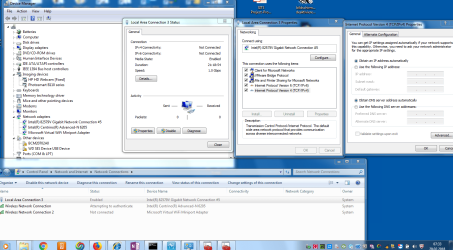
in device manager i can see the networkcard without any triangle- i will send you screen shot
in 10 hours - so that you can see it yourself -maybe meanwhile you have another idea
so that i could also do this
nice day
 

My Computer My Computer

At a glance

windows 7 enterprise
Computer type
Laptop
Computer Manufacturer/Model Number
hp 6570
OS
windows 7 enterprise
dear samurai i attached screenshot as informed yesterday
 

Attachments

  • samurai_1.png
    samurai_1.png
    106.6 KB · Views: 1

My Computer My Computer

At a glance

windows 7 enterprise
Computer type
Laptop
Computer Manufacturer/Model Number
hp 6570
OS
windows 7 enterprise
dear all who helped me
actually it was kind of silly mistake from my side
is deleted below some time ago while trying to solve other problem
befor i did below i exported the registry -- which was the right move

z+addvyUKTH+wAAAABJRU5ErkJgggA=


now checking below link i found the solution
so after importing the registry i can ping now also local host

Start/Stop DNS Client service in Windows 7 from Services, Regedit or CMD


dear all thanks for your anticipation
 

My Computer My Computer

At a glance

windows 7 enterprise
Computer type
Laptop
Computer Manufacturer/Model Number
hp 6570
OS
windows 7 enterprise
so it was DNSCACHE in the registry i deleted erronuosly
z+addvyUKTH+wAAAABJRU5ErkJgggA=
 
Last edited:

My Computer My Computer

At a glance

windows 7 enterprise
Computer type
Laptop
Computer Manufacturer/Model Number
hp 6570
OS
windows 7 enterprise
Back
Top