I can't access my samsung external hard drive. please please help

Having Similar Issue

I have a samsung 2TB external HDD. Recently I performed an Error-Check by right-clicking on the drive, selecting properties and then Tools. Here's the problem. I didn't let the Error-check finish, I cancelled part of the way through because I had to leave my computer. I didn't think this would cause a problem, but when I went to access the drive it won't open. It appears in the My Computer section under Hard Disks Drives, and is now labeled as NTSF and is showing the whole disk is free!!! Before running the check I had exactly 188GB's of data on the drive and now I can't find said data or access the disk...and windows will not allow me to run the Error-Check again saying it cannot find the drive.

Please HELP! I'm pulling my hair out. :cry:

Mizzy
 

My Computer My Computer

At a glance

Windows 7 x648GB
Computer Manufacturer/Model Number
HP dv7t Quad
OS
Windows 7 x64
Memory
8GB
Yes K: is actually my external drive which connects to computer via usb port.

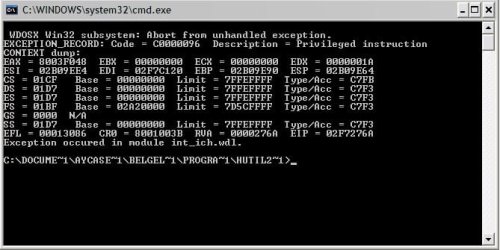
And here is the result of Hutil:

hutil.jpg
 

My Computer My Computer

At a glance

windows7, windows XP home
OS
windows7, windows XP home
The last line in that screenshot shows your system using short filenames (MS-DOS 8.3 style) instead of the full NTFS names for files and folders. This seems pretty unusual to me and I wonder if this has something to do with your problems accessing your drive.
It's only a hunch, perhaps someone else can give more input on this.
 

My Computer My Computer

At a glance

Windows 7 Professional SP1 32-bitIntel Core 2 Duo E6600 2.4GHz4GB DDR2-667 (4x1GB in dual-channel config)nVidia GeForce 9800 GT
Computer type
PC/Desktop
Computer Manufacturer/Model Number
Custom-built
OS
Windows 7 Professional SP1 32-bit
CPU
Intel Core 2 Duo E6600 2.4GHz
Motherboard
Asus PL5D2
Memory
4GB DDR2-667 (4x1GB in dual-channel config)
Graphics Card(s)
nVidia GeForce 9800 GT
Sound Card
Creative X-Fi XtremeMusic
Monitor(s) Displays
Acer P236H
Screen Resolution
1920x1200 (DVI)
Hard Drives
OCZ SSD Vertex Plus 60GB SATA (Firmware 3.55), 64MB cache
Hitachi HD321KJ SATA, 320GB, 7200rpm, 16MB cache
PSU
Antec TruePower 2.0
Case
Cooler Master Centurion
Cooling
Too many fans
Keyboard
Standard
Mouse
Microsoft wireless optical mouse
Internet Speed
AT&T U-verse (18mbit/sec)
Antivirus
Microsoft Security Essentials
Browser
Firefox
Other Info
Other devices:
Compaq CQ-60 laptop
Google Nexus 7 (2012) tablet
Nvidia SHIELD tablet (US/LTE)
Hardkernel ODROID-XU single-board computer (Samsung Exynos 5420)
I have a samsung s2 tb external hard drive

Today when I hooked it up to my laptop it would not load. It will shows local F drive when it usually will say samsung Drive.

A pop up box will then appear stating "you need to format drive"

I know if I reformat it I will lose all my data which I will not do.

When I look in device manager it states that the external hard drive is installed.

I attempted to go through start menu and type cmd then F: and it states "The volume does not recognize this system file. Please make sure all required system drivers are loaded and the volume is not corrupted."

PLEASE HELP I DONT WANT TO LOSE ALL MY FILES
 

My Computer My Computer

At a glance

windows 7 home premium 64bit2.00ghz4gbMobile intel(R) HD Graphics
Computer Manufacturer/Model Number
HP Pavilion dv6 notebook pc
OS
windows 7 home premium 64bit
CPU
2.00ghz
Memory
4gb
Graphics Card(s)
Mobile intel(R) HD Graphics
Screen Resolution
1366 x 768
Try this

Hi emausar

This sort of sounds like the problem I had. Here's what I did to resolve my issue, it sounds like you just need to reset the drive. Shut down your computer, unplug the drive. Turn your computer back on, then shut down again and plug the drive in...then restart your computer.

This should clear things up, at least it worked for me when my drive did the same thing. I hope this helps. If not, hopefully someone will get back to you soon.

Also, in my experience I have found the samsung HDD's to be a little tempermental. For instance if my computer restarts, the drive won't turn back on with it. To resolve this I have to unplug the usb cord from the back of the HDD and then plug it back in again...when I do that the drive pops up exactly the way it should.

Good Luck
 
Last edited:

My Computer My Computer

At a glance

Windows 7 x648GB
Computer Manufacturer/Model Number
HP dv7t Quad
OS
Windows 7 x64
Memory
8GB
This sort of sounds like the problem I had. Here's what I did to resolve my issue, it sounds like you just need to reset the drive. Shut down your computer, unplug the drive. Turn your computer back on, then shut down again and plug the drive in...then restart your computer.

I tried nothing happened. i attempted it a couple of times nothing.I think its abit more of issue then just restarting it.
 

My Computer My Computer

At a glance

windows 7 home premium 64bit2.00ghz4gbMobile intel(R) HD Graphics
Computer Manufacturer/Model Number
HP Pavilion dv6 notebook pc
OS
windows 7 home premium 64bit
CPU
2.00ghz
Memory
4gb
Graphics Card(s)
Mobile intel(R) HD Graphics
Screen Resolution
1366 x 768
Im having problems with my Samsung S2 hard disk. I was transferring files to the hard disk just earlier and now when I want to open the hard disk on my desktop, all the files cannot be open and located. A command prompt would appear and a window popout saying that this is an error finding the folder.


HELP! I don't want to lose all my files!!!!!!!!:cry::cry::cry::cry::cry:
 

My Computer My Computer

At a glance

vista
OS
vista
Guys,

chkdsk windows tool do the magic. It helped me already several times (starting from win2000 and just today on Win7)

To fix the problem please run it in administrator mode (Start -> type "cmd" -> right click on "cmd.exe" and select "Run as administrator").

Then run the tool chkdsk with switches "/f /r" for your disk. For example to fix disk K please use following command
chkdsk k: /f /r

That is it
 

My Computer My Computer

At a glance

Win7
Computer type
PC/Desktop
Computer Manufacturer/Model Number
HP
OS
Win7
Back
Top