
Hey guys,
So I have a samsung 1.5TB External Hard Drive that all of a sudden tells me it needs to be formatted. All I did prior to this happening was restart my PC, the same way I do every day.
I have 1TB of files, pictures, videos and more on that drive with no backups of it anywhere and I really need everything back.
I have read many threads similar to this one but others don't seem to have exactly the same problem that I do, in that when connected, my EHD constantly appears and then disappears in My Computer with a pop-up message.
This means that no matter which data/partition/HD recovery software I use, it doesn't allow me to select the EHD as it keeps disappearing from the list.
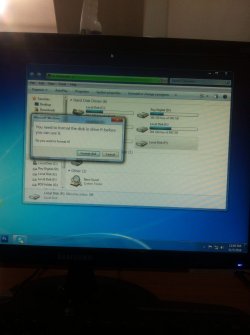
So basically, when it is plugged in, every 10 seconds or so it disappears and then reappears with this pop-up message:
"You need to format the disk in drive G: before you can use it.
Do you want to format it?"
Obviously I don't want to format it as that means I lose all my data.
Also, it uses USB 3.0 and is connected with a USB 3.0 cable into a USB 3.0 port.
I have tried:
- Changing the letter of the drive
In terms of recovery software, I have tried a few and another thing that makes it difficult for me to use (besides my EHD disappearing all the tim) is that I don't really know which options to choose.
For example, iCare Data Recovery has 4 sub-menus:
1. Lost Partition Recovery
2. Advanced file recovery
3. Deep Scan Recovery
4. Format Recovery
To me, it would be between 1 and 2, but I don't really know. In the help PDF, it showed this:
- Screenshot by Lightshot
These are the ones that seem like they are appropriate:
- Screenshot by Lightshot
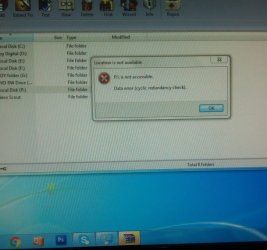
- I tried G: /f/r (G is my hard drive letter )
-I changed cable also
All failed
Any help will be greatly appreciated.
I have so many important photos and files, please help me
Thanks in advance,
- Hezron
So I have a samsung 1.5TB External Hard Drive that all of a sudden tells me it needs to be formatted. All I did prior to this happening was restart my PC, the same way I do every day.
I have 1TB of files, pictures, videos and more on that drive with no backups of it anywhere and I really need everything back.
I have read many threads similar to this one but others don't seem to have exactly the same problem that I do, in that when connected, my EHD constantly appears and then disappears in My Computer with a pop-up message.
This means that no matter which data/partition/HD recovery software I use, it doesn't allow me to select the EHD as it keeps disappearing from the list.
So basically, when it is plugged in, every 10 seconds or so it disappears and then reappears with this pop-up message:
"You need to format the disk in drive G: before you can use it.
Do you want to format it?"
Obviously I don't want to format it as that means I lose all my data.
Also, it uses USB 3.0 and is connected with a USB 3.0 cable into a USB 3.0 port.
I have tried:
- Changing the letter of the drive
In terms of recovery software, I have tried a few and another thing that makes it difficult for me to use (besides my EHD disappearing all the tim) is that I don't really know which options to choose.
For example, iCare Data Recovery has 4 sub-menus:
1. Lost Partition Recovery
2. Advanced file recovery
3. Deep Scan Recovery
4. Format Recovery
To me, it would be between 1 and 2, but I don't really know. In the help PDF, it showed this:
- Screenshot by Lightshot
These are the ones that seem like they are appropriate:
- Screenshot by Lightshot
- I tried G: /f/r (G is my hard drive letter )
-I changed cable also
All failed
Any help will be greatly appreciated.
I have so many important photos and files, please help me
Thanks in advance,
- Hezron
Attachments
My Computer
- Computer type
- PC/Desktop
- OS
- Windows 7 Ultimate 32 bit


