External Hard Drive Partially Detected But I Can't Access It. Help!!!

mecafe1

New member
Local time
5:40 AM
Messages
22
Hello,

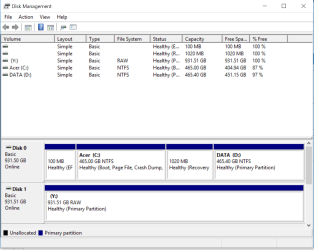
I am having an issue with an external hdd 1GB. I am pretty sure the issue is with the hdd and not the computer because i have multiple external hdd of the same brand and size. Only this one hdd is having issue when i plugged into 2 different laptops, used different cables or usb port. The hdd will flash so i think there is a problem with the system software on the hdd. I have stuffs on this hdd which i need.

Explorer shows the drive "Y:" but when i click on the drive, it would just not do anything.

Can anyone please help? I am so desperate here or point me to links that might be able to resolve this issue?
 

Attachments
  • DiskManagement.PNG
    DiskManagement.PNG
    47.5 KB · Views: 1
Last edited:

My Computer My Computer

At a glance

64bit win 10
Computer type
PC/Desktop
OS
64bit win 10
Welcome to the forum. It shows the drive is raw which means it's lost it partition table you need to use specific partition recovery software there are plenty of free ones if you Google free partition recovery software. When the partition is recovered files will be OK. Do not try file recovery there not lost
 

My Computer My Computer

At a glance

win 8 32 bit
Computer type
PC/Desktop
OS
win 8 32 bit
Thanks samuria. I tried looking at different free partition recovery software and installed a few. What i don't understand is that there are options to select different types of files to recovery. I was under the impression that i only need to recover the partition table only, i can just access the hdd later and the files will be there. Also i don't see any free software, mostly offering limited recovery limit like 1024MB. Can you point me to a specific software and i am most grateful to you.

Thank you so very much.
 

My Computer My Computer

At a glance

64bit win 10
Computer type
PC/Desktop
OS
64bit win 10
Thanks Samurai. I will report back when i get a chance to work on it as i am out all day today. Appreciate your help.
 

My Computer My Computer

At a glance

64bit win 10
Computer type
PC/Desktop
OS
64bit win 10
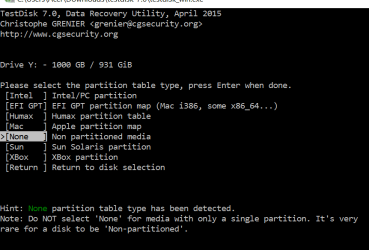
Hi Samurai, got a question for you. Testdisk detected "None" partition table type but warned that "None" is rare for a disk. However the TestDisk website indicates that "Select the partition table type - usually the default value is the correct one as TestDisk auto-detects the partition table type.".

I do believe that the partition type should be [Intel] Intel/PC partition. Am i right here?
 

Attachments

  • 1.PNG
    1.PNG
    14 KB · Views: 1

My Computer My Computer

At a glance

64bit win 10
Computer type
PC/Desktop
OS
64bit win 10
Unfortunately the grand old man Samuria (hmmmm....At +2, I am grander old than him :D) has not responded till now. Wait for some more time till I return. No power here and I will be shutting down my PC now to conserve inverter power. I shall be back after power returns - do not know when it will. Thunderstorms here.
 

My Computer My Computer

At a glance

Windows 7 Home Premium 32 bit
OS
Windows 7 Home Premium 32 bit
OK, with power returning, I am back at my desk.

First of all I would think that it is not a partition table loss problem. The volume is there and it has the drive letter too. Moreover, if it is just a partition table loss your drive will only show as "Unallocated". My guess is that it is a file system corruption that has made your drive RAW.Needs to be investigated.

Since you have already started on checking for partition table loss, I shall continue with it and see what happens. Your assumption is correct. The partition type cannot be none. Highlight [Intel] and press enter key.Next [Analyse] Enter. Post the next screen that appears.
 

My Computer My Computer

At a glance

Windows 7 Home Premium 32 bit
OS
Windows 7 Home Premium 32 bit
Thanks Jumanji. So this could as well be a system corruption issue. Please guide me here because i am really not an expert on hardwares :)....

Appreciate your help here.
 

Attachments

  • 3.PNG
    3.PNG
    24.3 KB · Views: 1

My Computer My Computer

At a glance

64bit win 10
Computer type
PC/Desktop
OS
64bit win 10
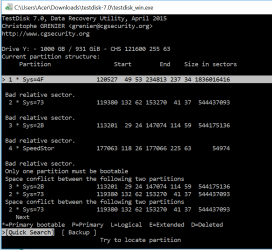
OK, QuicK Search is highlighted. Press Enter to do that. TestDisk will take sometime to analyse. Post the screenshot after the analysis is complete. Let us see whether it finds the partition.
CAUTION: Do not press Enter on any other command other than what is instructed.
 

My Computer My Computer

At a glance

Windows 7 Home Premium 32 bit
OS
Windows 7 Home Premium 32 bit
OK, I am off for the next three or four hours. You can post the screenshot requested, close TestDisk, Safely remove your 1TB HDD and go to sleep - if you are in USA. If not in USA, let me know where you are.

Also let me know the manufacturer, Model name of the HDD in your next post.

When I return, after seeing the screenshot, I shall write further instructions to carryout, which you can do after you wake up tomorrow.
 

My Computer My Computer

At a glance

Windows 7 Home Premium 32 bit
OS
Windows 7 Home Premium 32 bit
My post#10 Have you made the QuickSearch? Post the screenshot after Quick Search. I saw you here two hours back but you have not responded.
 

My Computer My Computer

At a glance

Windows 7 Home Premium 32 bit
OS
Windows 7 Home Premium 32 bit
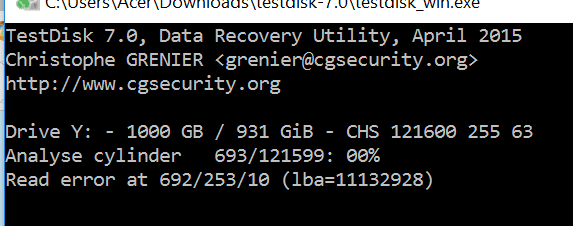
Sorry for the late reply. It's been running for 10 hrs and i am only at cylinder 693 of 121599. Is this normal? I would assume not since you are probably expecting in a few hours. I am currently in Singapore. My HDD is HGST Touro 1TB. Please let me know what else i can do. I am just going to let it run overnight and see where it is at. Thanks.
 

Attachments

  • 4.PNG
    4.PNG
    7.4 KB · Views: 12

My Computer My Computer

At a glance

64bit win 10
Computer type
PC/Desktop
OS
64bit win 10
Am i doing it wrong? Post #9 shows '1 * Sys=4F' and 'Quick Search' highlighted and all i did was hit the 'Enter' Key. I didn't try to select '2 *' or '3 *'. I would assume it will scan thru the entire HDD.
 

My Computer My Computer

At a glance

64bit win 10
Computer type
PC/Desktop
OS
64bit win 10
I think i am going to shut down the quick search analysis on the HDD. It's not going to make any different the next day going at this rate. Can you advise me what else i could do?
 

My Computer My Computer

At a glance

64bit win 10
Computer type
PC/Desktop
OS
64bit win 10
OK, you are at +2.5 hours ahead of me..( You can go to User CP > Settings and Options > Edit Options > Date & Time Options and change the time zone to (GMT + 8.00) to show your current local time in your posts)

And yes, Quick Search shouldn't take so much time. The read error indicates that your drive has developed bad sectors ( I hope I am wrong). Not a good sign. You can quit TestDisk for now. ( Always post a full screenshot of the TestDisk Window. I should see what commands are available on the screen at the bottom. I do not keep anything in my memory - I have none :D)
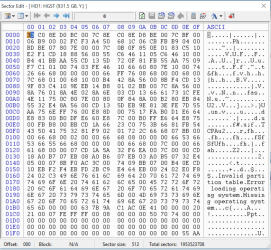
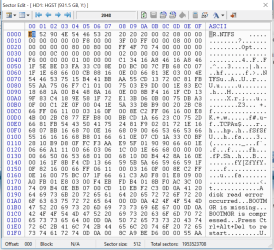
You can download Bootice and post the screenshot of Sector 0 and Sector 2048. If your system is 32 bit download and run the x86 (32 bit) version. If your system is 64 bit download and run the x64 bit version. On how to use bootice - my post #7 here Lost partitions!

Your time now is 10 PM. You can now go to sleep and post the screenshots tomorrow.
 

My Computer My Computer

At a glance

Windows 7 Home Premium 32 bit
OS
Windows 7 Home Premium 32 bit
You need not save any sector . Just go to Sector 0 Take a screenshot. Go to Sector 2048 Take a screenshot. Then close Bootice.
 

My Computer My Computer

At a glance

Windows 7 Home Premium 32 bit
OS
Windows 7 Home Premium 32 bit
Thanks. I will work on it tomorrow. The only command at the bottom of Teskdisk is 'Stop'. I will remember to have a full screenshot next. Have a good one.
 

My Computer My Computer

At a glance

64bit win 10
Computer type
PC/Desktop
OS
64bit win 10
Here are the screens. I will be back later this afternoon. Thanks again.
 

Attachments

  • 5.PNG
    5.PNG
    73.6 KB · Views: 0
  • 7.PNG
    7.PNG
    83.1 KB · Views: 0

My Computer My Computer

At a glance

64bit win 10
Computer type
PC/Desktop
OS
64bit win 10
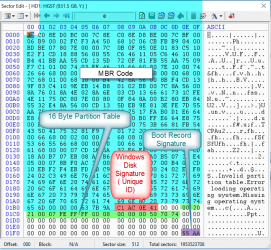
That is a good show. The 16 byte partition table in Sector 0 (highlighted in green) is intact. Confirms that it is not a partition table loss. ( Hey, that is your HDD's sector 0 and not jumanji's magic show :)).

M5.PNG

The Volume Boot Record ( Partition Boot Record) at Sector 2048 also seems to be intact.

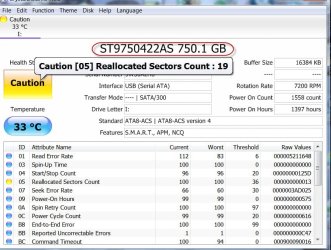
Now download, install and run Crystal Disk Info from http://crystalmark.info/software/CrystalDiskInfo/index-e.html

Make sure that you select your 1TB HGST drive and post a screenshot. If it shows "Caution", hover the mouse pointer over that box, note down the message and post. ( I do not know whether you will be able to capture the screen with the error message as shown below)

29-05-2017 08-14-33.jpg
 

My Computer My Computer

At a glance

Windows 7 Home Premium 32 bit
OS
Windows 7 Home Premium 32 bit
Back
Top