Solved I can't burn music to CD's

linda3421

New member
Local time
5:45 AM
Messages
32
This has been going on a long time. I have changed media players, I have 3 cd/dvd players to use and lots of different kinds of disks that say CD-R The process always looks like it is going fine. I see that it is burning and at the end it says it was successful, but the music is not on the disk. If I just open the disk to view the files it shows a list of the songs. Later I get that message that I have music waiting to be burned. I've tried using that....same results

Does the computer list the songs first and actually burn them later? I don't know why the list of songs shows up. I put the CD into my regular CD player on my stereo and there is nothing there.

I've tried copy and paste. Doesn't do it.

Do I need to format the disks in a special way? Sometimes when I put the blank CD into the CD player it will say that there is no disk or that I need to put a record-able disk in the player. I just don't get it,.
 

My Computer My Computer

At a glance

Windows7
Computer type
PC/Desktop
Computer Manufacturer/Model Number
HP
OS
Windows7
Antivirus
malwarebytes
Browser
Firefox
Welcome to the forum. How are you writing them to create if you just copy files you can play them on a PC but not a player you need to use for writing software and choose create music CD
 

My Computer My Computer

At a glance

win 8 32 bit
Computer type
PC/Desktop
OS
win 8 32 bit
I have a recording studio and do a lot of audio CD burning. I use Nero BurningROM program for that but there are free CD burning programs such as CDBurnerXP that will do the job.

When you burn an Audio CD (NOT an MP3 CD) you need .wav audio files (some burning programs will convert MP3 to wav). Only use CD-R discs and burn at the slowest speed of the burner drive (16X on most SATA optical drives). However, even that may not be slow enough for older audio CD players (my burn speed standard is "8X" but I have some older PATA (IDE) drives that will burn at slower speed).

Try the CDBurnerXP and create an Audio CD.
https://www.cdburnerxp.se/en/download

One Caution, many downloads now include crapware that you don't want. Look at the download/install screens carefully and uncheck the garbage so you only get the actual program.
 

My Computer My Computer

At a glance

Windows 10 64 bitIntel i7 6700K16GB Corsair DominatorIntel CPU Graphics
Computer type
PC/Desktop
Computer Manufacturer/Model Number
My Own Build
OS
Windows 10 64 bit
CPU
Intel i7 6700K
Motherboard
ASUS ROG Maximus VIII Hero
Memory
16GB Corsair Dominator
Graphics Card(s)
Intel CPU Graphics
Sound Card
RealTek
Monitor(s) Displays
27" Dell S2719dgf
Screen Resolution
2560X1440
Hard Drives
1 TB Samsung 850 EVO SSD for Win 10 Pro
500GB Samsung 850 EVO SSD for Win 10 Insider
2 TB drive for backup
PSU
EVGA Supernova 750G2
Case
BeQuiet Silent Base 600
Cooling
Deepcool Captain 120EX
Keyboard
Microsoft Wireless 2000
Mouse
Microsoft wireless
Internet Speed
100 MB/sec (Cable)
Antivirus
Microsoft Defender and Malwarebytes
Browser
Edge/Firefox
Other Info
Cakewalk (Sonar) by BandLab and Studio One 4.1 Pro recording studio software. MOTU 896Mk3 Hybrid recording interface, Frontier Tranzport wireless control unit, Behringer X-Touch Control Surface.
Five USB connected optical drives for CD Audio production using Nero BurningROM
Thanks for the quick reply. This problem has been making me crazy. I have downloaded the software you suggested and when try it later today.

I wondered if maybe my burned CD's were only good on a computer. If I click on "play"the music plays, but I always wondered if it was coming from the disk or my music file. I'll let you know how it goes.
 

My Computer My Computer

At a glance

Windows7
Computer type
PC/Desktop
Computer Manufacturer/Model Number
HP
OS
Windows7
Antivirus
malwarebytes
Browser
Firefox
If they play on a computer, it could be they are MP3 CD's not regular audio CD's. If you inadvertently made MP3 CD's, Audio CD players have to be MP3 compatible type or they won't play them. Another issue is the burn speed, many older audio CD players will either not play the CD at all or will skip with audio CD's burned at high speeds. That is why I mentioned burning at the slowest speed of your burner (and as noted most SATA interface type burners (what is in almost all PC's in the last 5 or 6 years) slowest burn speed is 16X)
 

My Computer My Computer

At a glance

Windows 10 64 bitIntel i7 6700K16GB Corsair DominatorIntel CPU Graphics
Computer type
PC/Desktop
Computer Manufacturer/Model Number
My Own Build
OS
Windows 10 64 bit
CPU
Intel i7 6700K
Motherboard
ASUS ROG Maximus VIII Hero
Memory
16GB Corsair Dominator
Graphics Card(s)
Intel CPU Graphics
Sound Card
RealTek
Monitor(s) Displays
27" Dell S2719dgf
Screen Resolution
2560X1440
Hard Drives
1 TB Samsung 850 EVO SSD for Win 10 Pro
500GB Samsung 850 EVO SSD for Win 10 Insider
2 TB drive for backup
PSU
EVGA Supernova 750G2
Case
BeQuiet Silent Base 600
Cooling
Deepcool Captain 120EX
Keyboard
Microsoft Wireless 2000
Mouse
Microsoft wireless
Internet Speed
100 MB/sec (Cable)
Antivirus
Microsoft Defender and Malwarebytes
Browser
Edge/Firefox
Other Info
Cakewalk (Sonar) by BandLab and Studio One 4.1 Pro recording studio software. MOTU 896Mk3 Hybrid recording interface, Frontier Tranzport wireless control unit, Behringer X-Touch Control Surface.
Five USB connected optical drives for CD Audio production using Nero BurningROM
I just sat down for a minute and thought I would try to burn a disk. The program is only looking at the CD player inside my computer. That one doesn't work. I have an external cd player plugged into my computer, but I didn't see a place to point the program to it. So it is saying No disk.
 

My Computer My Computer

At a glance

Windows7
Computer type
PC/Desktop
Computer Manufacturer/Model Number
HP
OS
Windows7
Antivirus
malwarebytes
Browser
Firefox
I notice you marked this solved. I assume that means you got the Drive selection problem resolved and you are burning good audio CD's???
 

My Computer My Computer

At a glance

Windows 10 64 bitIntel i7 6700K16GB Corsair DominatorIntel CPU Graphics
Computer type
PC/Desktop
Computer Manufacturer/Model Number
My Own Build
OS
Windows 10 64 bit
CPU
Intel i7 6700K
Motherboard
ASUS ROG Maximus VIII Hero
Memory
16GB Corsair Dominator
Graphics Card(s)
Intel CPU Graphics
Sound Card
RealTek
Monitor(s) Displays
27" Dell S2719dgf
Screen Resolution
2560X1440
Hard Drives
1 TB Samsung 850 EVO SSD for Win 10 Pro
500GB Samsung 850 EVO SSD for Win 10 Insider
2 TB drive for backup
PSU
EVGA Supernova 750G2
Case
BeQuiet Silent Base 600
Cooling
Deepcool Captain 120EX
Keyboard
Microsoft Wireless 2000
Mouse
Microsoft wireless
Internet Speed
100 MB/sec (Cable)
Antivirus
Microsoft Defender and Malwarebytes
Browser
Edge/Firefox
Other Info
Cakewalk (Sonar) by BandLab and Studio One 4.1 Pro recording studio software. MOTU 896Mk3 Hybrid recording interface, Frontier Tranzport wireless control unit, Behringer X-Touch Control Surface.
Five USB connected optical drives for CD Audio production using Nero BurningROM
STILL can't burn CD's

Fireberd - I marked this one as unsolved since I still can't burn Cd's. I went back and read your instructions and I started converting some of my music to .wav and downloading some new music as .wav. Most of the time the downloading as .wav would fail . I have also downloaded the CDBurnerXP. It seems wonderful.
I actually thought it was happening once today. I take time off from this, but I am back at it now. Music is so important to my life that I need to master this. I have the music I want on my computer, but I like to be able to share with friends via a disk. I make the art for the cover and print out song information. I started getting more into liner notes and cover art because I'm selling a lot of vintage albums and I research. anyway, today I started to burn an album that is in .wav format. It showed progress (photo attached) and at the end says it is successful, but the songs were not on the disk. You said to use R disks. The program says I should use re-writeable disks and sometimes says not enough room...do I want to erase...and I say yes...maybe I'm erasing my recordings???? I can't attach
 

My Computer My Computer

At a glance

Windows7
Computer type
PC/Desktop
Computer Manufacturer/Model Number
HP
OS
Windows7
Antivirus
malwarebytes
Browser
Firefox
NEVER use RW (eraseable) discs or any program that uses Packet Writing type of recording. You NEVER have to erase anything is your use CD-R's and a program, such as CDBurnerXP's create an audio disc function.

I can't do it now, but will try to get screenshots of CDBurnerXP "Audio Disc" functions later today and post them.
 

My Computer My Computer

At a glance

Windows 10 64 bitIntel i7 6700K16GB Corsair DominatorIntel CPU Graphics
Computer type
PC/Desktop
Computer Manufacturer/Model Number
My Own Build
OS
Windows 10 64 bit
CPU
Intel i7 6700K
Motherboard
ASUS ROG Maximus VIII Hero
Memory
16GB Corsair Dominator
Graphics Card(s)
Intel CPU Graphics
Sound Card
RealTek
Monitor(s) Displays
27" Dell S2719dgf
Screen Resolution
2560X1440
Hard Drives
1 TB Samsung 850 EVO SSD for Win 10 Pro
500GB Samsung 850 EVO SSD for Win 10 Insider
2 TB drive for backup
PSU
EVGA Supernova 750G2
Case
BeQuiet Silent Base 600
Cooling
Deepcool Captain 120EX
Keyboard
Microsoft Wireless 2000
Mouse
Microsoft wireless
Internet Speed
100 MB/sec (Cable)
Antivirus
Microsoft Defender and Malwarebytes
Browser
Edge/Firefox
Other Info
Cakewalk (Sonar) by BandLab and Studio One 4.1 Pro recording studio software. MOTU 896Mk3 Hybrid recording interface, Frontier Tranzport wireless control unit, Behringer X-Touch Control Surface.
Five USB connected optical drives for CD Audio production using Nero BurningROM
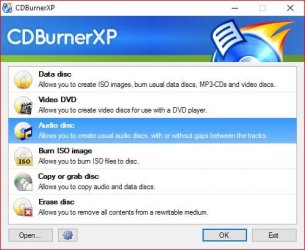
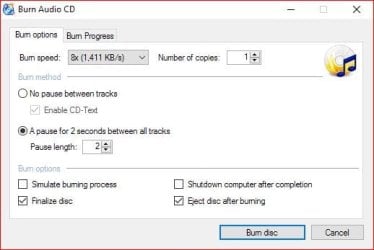
Here are the three screens, I was able to get at it earlier than I expected.

(The forum wouldn't let me add the screenshots in order)/
Second screen shows type selection (audio)
First screen shows adding songs to the compilation
Third screen shows Burn setup.
 

Attachments

  • Burn 1.JPG
    Burn 1.JPG
    43.1 KB · Views: 30
  • Burn 2.JPG
    Burn 2.JPG
    92.5 KB · Views: 1
  • Burn 3.JPG
    Burn 3.JPG
    28.5 KB · Views: 30

My Computer My Computer

At a glance

Windows 10 64 bitIntel i7 6700K16GB Corsair DominatorIntel CPU Graphics
Computer type
PC/Desktop
Computer Manufacturer/Model Number
My Own Build
OS
Windows 10 64 bit
CPU
Intel i7 6700K
Motherboard
ASUS ROG Maximus VIII Hero
Memory
16GB Corsair Dominator
Graphics Card(s)
Intel CPU Graphics
Sound Card
RealTek
Monitor(s) Displays
27" Dell S2719dgf
Screen Resolution
2560X1440
Hard Drives
1 TB Samsung 850 EVO SSD for Win 10 Pro
500GB Samsung 850 EVO SSD for Win 10 Insider
2 TB drive for backup
PSU
EVGA Supernova 750G2
Case
BeQuiet Silent Base 600
Cooling
Deepcool Captain 120EX
Keyboard
Microsoft Wireless 2000
Mouse
Microsoft wireless
Internet Speed
100 MB/sec (Cable)
Antivirus
Microsoft Defender and Malwarebytes
Browser
Edge/Firefox
Other Info
Cakewalk (Sonar) by BandLab and Studio One 4.1 Pro recording studio software. MOTU 896Mk3 Hybrid recording interface, Frontier Tranzport wireless control unit, Behringer X-Touch Control Surface.
Five USB connected optical drives for CD Audio production using Nero BurningROM
Linda3421, I'd like to learn from you, what did you end up doing to finally be successful at burning audio CDs full of nice music?
 

My Computer My Computer

At a glance

Windows 7 Professional 64-bitDesktop i5; Acers i5 & i7desktop 16GB; 1 Acer 8GB & 1 Acer 16GB
Computer type
PC/Desktop
Computer Manufacturer/Model Number
Antec desktop; Acer Aspire laptops
OS
Windows 7 Professional 64-bit
CPU
Desktop i5; Acers i5 & i7
Memory
desktop 16GB; 1 Acer 8GB & 1 Acer 16GB
Hard Drives
1TB split into 2 equal partitions [OS and data] usable by RJS
Internet Speed
AT&T DSL
Browser
FF, GChrome, msIE
Other Info
Windows 7 Firewall, Emsisoft AM/AV, MSE [scan-only], SpywareBlaster, Ruiware/BillP combine
I want to share this first. I have to go do something. I'll get back to this . and I had some screen shots too. Where CDBurnerXP is telling me that I need Re-writable disks. Be back shortly


I think the CDBurnerXP is connected to Wondershare. I can hardly open any of my programs right now. I'm scanning for malware. When I first log on I get "wshelper.exe system erro and the DAQExp.dll missing

Wondershare Video Converter
When Wondershare Video Converter showup on your PC, will you be curious that what it is? Most of us will take it normal as it contains an updated link same as many other system report. Therefore, we prone to click it to update directly since it is complicated to turn to official sites. But just for a while, you will pay back for this laziness.
Wondershare Video Converter belongs to adware infection dropped by freeware and spam email. As we all know, adware is kind of malware and it is notorious for its ads displaying function. It is able to infect all kinds of browsers, and enable ads on the browsers. In most of the cases, these ads are fabricated with the information that it steals from your online activities. It is inevitable for innocent users to click these ads.
spam popup related with Wondershare Video Converter
What is the damaging effect caused by Wondershare Video Converter ? If you think it just a fake updated and you may just open some irrelevant sites which just waste your time, you are too naive. Adware is made by experienced hackers, and it is not so free to just make up a program to annoy you. It must elicit profits from this conducts. Wondershare Video Converter sends you the updated link which will connect you to download some freeware, and with which on your PC, your important resource will be occupied.
What’s more, Wondershare Video Converter will also bring in other malware. And your firewall system will collapse, and your personal information and privacy will no longer safe. To avoid being next victim, it is better for you to get Wondershare Video Converter removed together with its adware. And our teams produce the following removal guides for your reference.
The annoying symptom of Wondershare Video Converter
It helps Potentially Unwanted Programs generate tons of ads on your browser
It takes you to phishing websites created to scam you
It can display spam popups to cheat you download malware
It is able to open a back door for its partners and other threats
It has the ability to record your browsing experience and steal your privacies
________________________________________
________________________________________
Wondershare Video Converter is able infected both Windows OS and Mac OS, thus our lab worked out different solutions for each system. Please read the the First Section if you are a Windows OS user; read the Second Section if your a Mac OS user.
________________________________________
 

My Computer My Computer

At a glance

Windows7
Computer type
PC/Desktop
Computer Manufacturer/Model Number
HP
OS
Windows7
Antivirus
malwarebytes
Browser
Firefox
Hi,
I doubt you really need rw disks
You can burn regular cd-r or +r or combination -+r it really does not matter which :)
.wav files I've found to be best results
I use audacity to convert other file types/ trim out dead beginnings and endings I hate blank spots between songs :p
Some players have issues with rw disks.
 

My Computer My Computer

At a glance

Win-7-Pro64bit 7-H-Prem-64biti7-5930K 2nd i9-9940x both water blocked VRM'...Trident-z 3200C14 2nd Trident-z 3600C16EVGA 1080ti ftw3 2nd Titan Xp both water blocked
Computer type
PC/Desktop
Computer Manufacturer/Model Number
Custom assembled by me :}
OS
Win-7-Pro64bit 7-H-Prem-64bit
CPU
i7-5930K 2nd i9-9940x both water blocked VRM's too
Motherboard
ASUS SABERTOOTH X99 2nd ASUS x299 Apex
Memory
Trident-z 3200C14 2nd Trident-z 3600C16
Graphics Card(s)
EVGA 1080ti ftw3 2nd Titan Xp both water blocked
Sound Card
Built-in Realtek
Monitor(s) Displays
1-AOC G2460PG 24"G-Sync 144Hz/ 2nd 1-ASUS VG248QE 24" 144Hz
Screen Resolution
1920 x 1080 144Hz
Hard Drives
2-Samsung M.2 Evo & Evo Plus
2-Samsung 850 EVO 500GB SSD's/ 3-2.5 W.D. Black 1tb-&3-1tb/3-3.5 WD Black 1tb hdd's
PSU
EVGA SuperNOVA 1000-P2 2nd 1200-P2
Case
2-Corsair Obsidian Series 450D Black ATX Mid Tower
Cooling
Custom water loops
Keyboard
Logitech G710+/ 2nd Logitech G910
Mouse
2-RedDragon M901 Perdition 16400 dpi Gaming mouse = wired
Internet Speed
Comcast Ping 19ms 89.31mbps download speed 6.12mbps upload
Antivirus
Malwarebytes Pro/ Superantispyware Pro
Browser
FireFox & Pale moon
Other Info
2nd ASUS X299 Apex/Intel i9-9940x with Custom water loop/7H-Prem-x64/Corsair 450D case/Ram Trident-z 3600C16 4x8gb / Samsung970Evo plus 500gb SSD/Dual ssd EZ swap evo/PSU EVGA SuperNova 1200w-P2 80+Platinum/GPU Titan Xp /8-ML-140 on push-pull on 2-280GTX rads
If you follow the instructions I've given you there will be no problems. I burn hundreds of audio CD's each year, with my recording studio, and do not have any problems. Your problem with Wondershare, whether it really is causing a problem or not? Uninstall it if its affecting you.
 

My Computer My Computer

At a glance

Windows 10 64 bitIntel i7 6700K16GB Corsair DominatorIntel CPU Graphics
Computer type
PC/Desktop
Computer Manufacturer/Model Number
My Own Build
OS
Windows 10 64 bit
CPU
Intel i7 6700K
Motherboard
ASUS ROG Maximus VIII Hero
Memory
16GB Corsair Dominator
Graphics Card(s)
Intel CPU Graphics
Sound Card
RealTek
Monitor(s) Displays
27" Dell S2719dgf
Screen Resolution
2560X1440
Hard Drives
1 TB Samsung 850 EVO SSD for Win 10 Pro
500GB Samsung 850 EVO SSD for Win 10 Insider
2 TB drive for backup
PSU
EVGA Supernova 750G2
Case
BeQuiet Silent Base 600
Cooling
Deepcool Captain 120EX
Keyboard
Microsoft Wireless 2000
Mouse
Microsoft wireless
Internet Speed
100 MB/sec (Cable)
Antivirus
Microsoft Defender and Malwarebytes
Browser
Edge/Firefox
Other Info
Cakewalk (Sonar) by BandLab and Studio One 4.1 Pro recording studio software. MOTU 896Mk3 Hybrid recording interface, Frontier Tranzport wireless control unit, Behringer X-Touch Control Surface.
Five USB connected optical drives for CD Audio production using Nero BurningROM
I'm doing it!!!! Success as last. I deleted all of my programs that had anything to do with DVD or CD my thought being that something might be causing a conflict. The I researched and found a burning program that I really like It's called InfraRecorder. Here's how it works for you others who are following my progress: I have screen shots if anyone needs them

Open InfraRecorder

Pick want you want to do on the first screen

Then choose File

New Project

Audio CD

Drag your music into the box at the

bottom of the screen

If it's an album, drag it album to the

box on the top and open it to display

the songs. Then drag the songs to the

bottom.

Click on action and choose burn

compilation to a Compact Disk

When I get to this page I have to change the source to the location of my cd player as it is defaulting to a different player, and put a blank disk in your player. It likes the CD-R disks

Sometimes it take a little while for it to accept the disk. If it doesn't

accept it , I try another.

When the OK lights up, click on it.

that's it!!

OMG everyone. I making this solved again. Thank you, thank you, thank you. The only thing I'm having an issue with its copying one of my CD's to my computer. My old media player would just do that automatically. Maybe I'll just add it back to my computer.
 

My Computer My Computer

At a glance

Windows7
Computer type
PC/Desktop
Computer Manufacturer/Model Number
HP
OS
Windows7
Antivirus
malwarebytes
Browser
Firefox
Success burning CD's

How do I let RolandJS (above) know about my solution? He wanted to learn.
 

My Computer My Computer

At a glance

Windows7
Computer type
PC/Desktop
Computer Manufacturer/Model Number
HP
OS
Windows7
Antivirus
malwarebytes
Browser
Firefox
You can either send him a message or if he's following this thread he will see your reply and solution. :)
 

My Computer My Computer

At a glance

Windows 10 64bit/Windows 10 64bit/Windows 10 ...Intel Pentium J3710 @ 60GHz/Intel B820,1.7GHz...8.00GB DDR3 @ 1599MHz/8GB 2 x 4GB DDR3/8.00GB...Intel HD Graphics/Intel/512MB ATI AMD Radeon ...
Computer type
PC/Desktop
Computer Manufacturer/Model Number
Acer Aspire XC-704 x64 bit/ Asus K55A Notebook PC/HP Envy x360 Convertible 15-bq0xx
OS
Windows 10 64bit/Windows 10 64bit/Windows 10 64bit
CPU
Intel Pentium J3710 @ 60GHz/Intel B820,1.7GHz/AMD A9 Radeon
Motherboard
Acer Aspire XC-704 (SOCKET 0)/Asus/HP 8312 (Socket FP4)
Memory
8.00GB DDR3 @ 1599MHz/8GB 2 x 4GB DDR3/8.00GB Dual-Channel
Graphics Card(s)
Intel HD Graphics/Intel/512MB ATI AMD Radeon R5 Graphics (HP
Sound Card
Realtek High Definition Audio/Onboard/AMD High Definition Au
Monitor(s) Displays
Acer LCD K222HQL /Asus 15.6/Generic PnP Monitor (1920x1080@6
Screen Resolution
1920x1080@59Hz/1366 x 768/1920x1080@60Hz
Hard Drives
1863GBWesternn Digital WDC/Asus/119GB SanDisk SD8SN8U-128G-1006 (SSD)
931GB Hitachi HGST HTS721010A9E630 (SATA)
Keyboard
Microsoft Natural Ergonomic Keyboard 4000 (UK)/Inbuilt/Inbui
Mouse
Microsoft Optical Wheel Mouse/Same plus Touchpad/Same + Pad
Internet Speed
Infinity 2 up to 76 Mbps
Antivirus
MSE/MSE/MSE and all 3 have MalwareBytes Premium
Browser
Edge, Firefox/Edge, Firefox/Edge, Firefox, Chrome
Other Info
Seagate Expansion 500GB External Desktop Drive
Seagate Expansion Portable Drives 500GB and 1TB
Epson XP-332 Wireless Printer
Back
Top