I can't connect to my 2WIRE router on my laptop

MrAxe

New member
Local time
12:05 AM
Messages
3
I can connect without any problems on my desktop PC and my other laptop, but it's been nothing but trouble with this one.

First I go and try to connect to the network:
Problem1.png


On the laptop that I have no problems with, this usually comes up:
problem2.png


Instead, it goes straight to this, and it doesn't even let me try to type in the password:
Problem3.png


I'm very new to wireless networks, so I couldn't possibly know what's wrong. I've tried several things, but nothing has worked up to this point.
 

My Computer My Computer

At a glance

Windows 7 Home Premium 64bit
OS
Windows 7 Home Premium 64bit
Put up your system specs - network adapter name in particular and what driver it has - laptop name so it can be found - the other 2 machine's have what OS's ?
 

My Computer My Computer

At a glance

XP, Vista, W7 64bit Home PremiumIntel Core Duo 6850 3.0 ghz @ 3.7 ghz4GB Corsair DDR 2 PC-6400Ati 4870 1ghz
OS
XP, Vista, W7 64bit Home Premium
CPU
Intel Core Duo 6850 3.0 ghz @ 3.7 ghz
Motherboard
Asus P5E
Memory
4GB Corsair DDR 2 PC-6400
Graphics Card(s)
Ati 4870 1ghz
Sound Card
Supreme FX 11
Monitor(s) Displays
View Sonic VX1962wm
Screen Resolution
1680 X1050
Hard Drives
3 Seagate Sata Drives 160gb 250gb 500gb
PSU
Thermaltake 600 watt
Case
NZXT Alpha
Cooling
3X120cm Fans
Keyboard
Microsoft Digital Media Pro Keyboard
Mouse
Microsoft Wheel Mouse Optical
Internet Speed
1.5Mb to 8Mb/384k
The other laptop is the same OS. The desktop PC is Windows XP Media Center Addition.
 

My Computer My Computer

At a glance

Windows 7 Home Premium 64bit
OS
Windows 7 Home Premium 64bit
You need a consitent workgroup name eg MSHOME between the 3 - right click computer - properties - workgroup is towards the bottom of the page - cant help further unless you put up the name off your network adapter - open conrol panel - network & sharing - up the top on the left side select change adapter setiings - the greened adapter is the one in use, next, right click computer, and select properties - your laptops name should be there in middle of the page - models name - post back.
 

My Computer My Computer

At a glance

XP, Vista, W7 64bit Home PremiumIntel Core Duo 6850 3.0 ghz @ 3.7 ghz4GB Corsair DDR 2 PC-6400Ati 4870 1ghz
OS
XP, Vista, W7 64bit Home Premium
CPU
Intel Core Duo 6850 3.0 ghz @ 3.7 ghz
Motherboard
Asus P5E
Memory
4GB Corsair DDR 2 PC-6400
Graphics Card(s)
Ati 4870 1ghz
Sound Card
Supreme FX 11
Monitor(s) Displays
View Sonic VX1962wm
Screen Resolution
1680 X1050
Hard Drives
3 Seagate Sata Drives 160gb 250gb 500gb
PSU
Thermaltake 600 watt
Case
NZXT Alpha
Cooling
3X120cm Fans
Keyboard
Microsoft Digital Media Pro Keyboard
Mouse
Microsoft Wheel Mouse Optical
Internet Speed
1.5Mb to 8Mb/384k
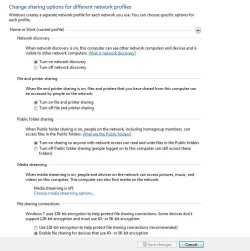
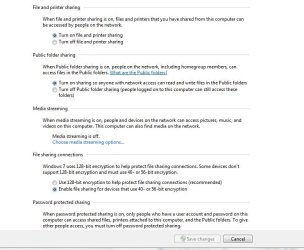
Do you have Discovery turned ON ?
 

Attachments

  • network_options.JPG
    network_options.JPG
    73.4 KB · Views: 153
  • Network_Options2.JPG
    Network_Options2.JPG
    60.1 KB · Views: 56

My Computer My Computer

At a glance

Win7 Enterprise, Win7 x86 (Ult 7600), Win7 x6...AMD fx8350 4ghz, AMD-32 2400mhz, AMD-64 3200m...2gb, 4gb on the Ult 7600, 4gb on Technet RTM,...Draw my own Graphics, several nVidia cards
Computer type
PC/Desktop
Computer Manufacturer/Model Number
Built them myself, Science Experiments !
OS
Win7 Enterprise, Win7 x86 (Ult 7600), Win7 x64 Ult 7600, TechNet RTM on AMD x64 (2.8Ghz)
CPU
AMD fx8350 4ghz, AMD-32 2400mhz, AMD-64 3200mhz, AMDx64 2.8G
Motherboard
SIS 755, ECS-K8M890M-M (Ult 7600), GigaByte & others
Memory
2gb, 4gb on the Ult 7600, 4gb on Technet RTM, 32gb on FX8350
Graphics Card(s)
Draw my own Graphics, several nVidia cards
Sound Card
on motherboard
Monitor(s) Displays
19" flat scr, 28" I-Inc widescr,22" Emprex Widescr, 23" Acer
Screen Resolution
1280 x 1024, 1440 x 900, 1920 x 1080
Hard Drives
6 pata Ide HD's & 2 Sata HD's
added 80gb external on Ult 7600 computer,
numerous extra 1tb, 2TB, 3Tb SATA HD's
A collection of ext HD Docks w/ HDs
PSU
430w, 550w, 600w, 700, 800, etc
Case
All Generic Full Towers
Cooling
Open Air & a few fans, some w/ colored LEDs
Keyboard
Compaq & Dell recycled from GoodWill
Mouse
Made in China Optical Wired Mouse
Internet Speed
Fast Cable InterNet
Antivirus
AVG Free on 24 different Desktops, NO Problems!
Browser
IE 8 is preferred, but use FireFox sometimes
Other Info
Linksys Routers, switches, & Hubs
Too Many USB Flash Drives to count, Biggest is 64GB !
Eight computers in my home network.
Sixteen computers at my business network.
Linked via TeamViewer !
Lots of old used spare computer parts everywhere!
Network discovery is on.

whest - I don't understand what you're saying.
 

My Computer My Computer

At a glance

Windows 7 Home Premium 64bit
OS
Windows 7 Home Premium 64bit
Cant help till you put up your system specs - may need to find an updated driver - maybe not - for one you cant have a homegroup because you have WXP on one of the machines - so this is what I would do -

Delete your current network on all machines - now start a new network on the XPpc if it has the wireless output located on it eg wireless modem or access point - default name for the workgroup using XP is MSHOME - make that the same name on both the laptops when you get to them - on the w7 machines just enable network discovery and see if both connect - then if they dont try these settings under advanced setting -

1 network discovery (already on)

2 turn on file and printer sharing

3 turn on sharing so that anyone with network access can read and write files in public folders

4 media streaming - may not allow

5 use 128 encyption ----------------

6 password on/off - optional

7 homegroup connections - select this even though its not actually a homegroup - use user accounts and passwords to connect to other computers

This set up will be limited to sharing public folders - read & write - if you have a printer to share and you try this, post back as you need a few extra settings to get it to work.

I have 2 laptops and a pc - originally one pc with w7 (it has the wireless access point) and one laptop with xp - so i decided i would link the pc (w7) with the laptop (w7) using homegroup - and see what would happen with the xp laptop

This is the Result none of the w7 machines show in xp, but itself, but you can copy from and two the folders available in itself eg documents, video etc - then they show up in both the w7 machines, with the w7's machines you can see the the xp lappy in both (cool) ie its working both ways per machine = 3 ways = all are now connected with file sharing and printer access.
 

My Computer My Computer

At a glance

XP, Vista, W7 64bit Home PremiumIntel Core Duo 6850 3.0 ghz @ 3.7 ghz4GB Corsair DDR 2 PC-6400Ati 4870 1ghz
OS
XP, Vista, W7 64bit Home Premium
CPU
Intel Core Duo 6850 3.0 ghz @ 3.7 ghz
Motherboard
Asus P5E
Memory
4GB Corsair DDR 2 PC-6400
Graphics Card(s)
Ati 4870 1ghz
Sound Card
Supreme FX 11
Monitor(s) Displays
View Sonic VX1962wm
Screen Resolution
1680 X1050
Hard Drives
3 Seagate Sata Drives 160gb 250gb 500gb
PSU
Thermaltake 600 watt
Case
NZXT Alpha
Cooling
3X120cm Fans
Keyboard
Microsoft Digital Media Pro Keyboard
Mouse
Microsoft Wheel Mouse Optical
Internet Speed
1.5Mb to 8Mb/384k
Back
Top