
Solved I Can't Create a System Repair Disk

Durango

New member
Member
Local time
5:30 AM
Messages
83
Location
North Central Arkansas
My new UEFI BIOS computer system is as follows:

Mfg/Model: Velocity Micro/Raptor Z55 SLYLAKE Desktop
Motherboard: Asus Z170-P Intel Z170 chipset, ATX Motherboard
Processor: Intel Core I5-6600 Processor, 4-core @ 3.3GHz
C Drive: 512GB Samsung 950 Pros PCIe 3.0 SS Drive
OS: Win 7 Pro (installed by vendor)

When I try to create a System Repair Disk from the Backup and Restore screen, I get the following error:
This version of System Recovery Options is not compatible with the version of Windows that you are trying to repair.

I don't know what to do at this point and would appreciate any help/advice. Thanks in advance.
 

My Computer

Computer type
PC/Desktop
Computer Manufacturer/Model Number
Custom Build by Velocity Micro/Raptor Z55 SKYLAKE
OS
win 7 pro
CPU
Intel Core i5-6600, 4 core @ 3.3GHz
Motherboard
Asus Z170-P Intel Z170 base chipset
Memory
16 GB Crucial Ballistix
Graphics Card(s)
2GB EVGA NVIDIA GeForce GTX950 GDDR5
Sound Card
On-Board Integrated Realtek ALC887 7.1 Channel Audio
Monitor(s) Displays
Viewsonic 28"
Hard Drives
512GB Samsung 950 Pros PCIe 3.0 SSD
Two - 2TB 7200 SATA 600 with 64MB Cache
PSU
750 Watt EVGA SuperNOVA
Case
Full Sized ATX
Cooling
Intel High Performance Heatsink
Keyboard
Logitech Illuminated k740
Mouse
Logitech Wireless M310
Internet Speed
2.5 (slow DSL)
Antivirus
Microsoft Security Essentials, Malwarebytes
Browser
Internet Explorer 11
Other Info
TeamViewer installed
Acronis True Image installed
Ok mate I will assume you have done these in safe mode but if not run them the sfc ideally you should run for about three runs
http://www.sevenforums.com/tutorials/1538-sfc-scannow-command-system-file-checker.html
http://www.sevenforums.com/tutorials/433-disk-check.html < if necessary include the /f and /r in the command line as per Option2


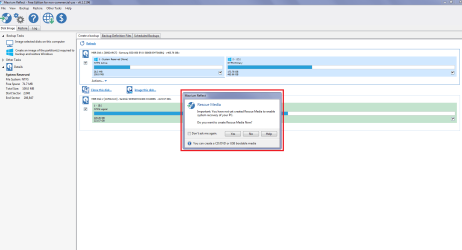
Now an option is to use this Macrium Reflect Free install it because it is very good for a lot of back up and imaging stuff. Now when you first open the program and before it gets to settinhg an image it gives the option to make a repair disk see pic Plus it is very good at cloning drives.

Plus it might be of help to you to read through this tutorial http://www.sevenforums.com/tutorials/73828-imaging-free-macrium.html < a lot of us use it frequently for imaging which can be reinstated when failure occurs.
 

Attachments

  • MACRIUM.PNG
    MACRIUM.PNG
    35.8 KB · Views: 2

My Computer

Computer type
PC/Desktop
Computer Manufacturer/Model Number
Own build (new) Desk1 / Asus ROG Win 7 / Desk2 1st build
OS
Desk1 7 Home Prem / Desk2 10 Pro / Main lap Asus ROG 10 Pro 2 laptop Toshiba 7 Pro Asus P2520 7 & 10
CPU
Desk1 i5 3750K / Laptop i7 GTX 860M / Desk2 i5 2500
Motherboard
Desk1 Asus P877-V / Desk2 Gigabyte H67 UD3H / Laptop ?
Memory
Desk1 8GB (1866) / Desk2 16GB (1333) / Laptop 8Gb DDR3
Graphics Card(s)
Desk 1& 2NVidia GTX 650 & Laptops on board Intel
Sound Card
Desk 1 & 2 -XONAR DG Realtek High Def audio Laptop
Monitor(s) Displays
Desk 1 Benq HD 2450 / Desk2 Philips 24" / Laptop 17.5"
Screen Resolution
1920x1080 D1 & D2 & Laptop 1
Hard Drives
Desk1 Samsung 120GB 830 SSD
Asus ROG 256GB 850 Pro SSD
Desk2 Samsung 840 256 SSD
Toshiba 120GB EVO
PSU
Desk 1 Corsair HX 1050/ Laptop ? / Desk 2 Corsair HX 650
Case
Desk 1 Cooler HAF XM ? Toshiba laptop / Desk2 Coolermaster
Cooling
Fans on all Desk1 -2 Desk2 - all Coolermasters 5 Laptop ?
Keyboard
Desk 1 MS Sidewinder X6 Desk 2 MS Sidewinder X 4
Mouse
Desk 1&2 - Gigabyte MS 900 gamer - laptop - Logitec wireless
Internet Speed
ADSL2+
Other Info
One other Desktop (tester) and spare Toshba laptop both with SSD's
Running Kaspersky 2016 ISS on all machines config'd identically
Logitec audio stereo systems on each machine (x3)
Canon MG5250MFC
Router/modem TP-Link running WPA2SK
Thanks very much for the response. I hope I wasn't misleading......Win 7 Pro is running just fine on my SSD, and I do image backups using both Windows and Acronis. So just to be ready in case I ever had to restore a Windows image, I wanted to make a System Repair Disk. And that's when I got the error message. I was able to create a WinPE-based Repair Disk in Acronis, but not in Windows at the time.

As an update, I was finally successful in creating a bootable USB flash drive from my Windows installation DVD. When I booted from the USB drive, I got as far as the System Recovery Option menu. But when I selected System Image Recovery from that menu, I once again got the same 'Not Compatible' error.

Although not in Safe mode, I did previously run sfc /scannow three times and got no integrity violations.

I did try Macrium Free a few months ago on an older computer, just to play around with it. Since I'm probably not as computer savvy as you guys, I found my Acronis program to be more user friendly. But maybe I have to give up on Windows Repair and go with Acronis and Macrium (personally, I always like to use two different programs to create system images).

Any other thoughts or ideas you have would be sincerely appreciated. Thanks again........
 

My Computer

Computer type
PC/Desktop
Computer Manufacturer/Model Number
Custom Build by Velocity Micro/Raptor Z55 SKYLAKE
OS
win 7 pro
CPU
Intel Core i5-6600, 4 core @ 3.3GHz
Motherboard
Asus Z170-P Intel Z170 base chipset
Memory
16 GB Crucial Ballistix
Graphics Card(s)
2GB EVGA NVIDIA GeForce GTX950 GDDR5
Sound Card
On-Board Integrated Realtek ALC887 7.1 Channel Audio
Monitor(s) Displays
Viewsonic 28"
Hard Drives
512GB Samsung 950 Pros PCIe 3.0 SSD
Two - 2TB 7200 SATA 600 with 64MB Cache
PSU
750 Watt EVGA SuperNOVA
Case
Full Sized ATX
Cooling
Intel High Performance Heatsink
Keyboard
Logitech Illuminated k740
Mouse
Logitech Wireless M310
Internet Speed
2.5 (slow DSL)
Antivirus
Microsoft Security Essentials, Malwarebytes
Browser
Internet Explorer 11
Other Info
TeamViewer installed
Acronis True Image installed
Hi,
Skylake is not exactly compatible with win-7 so I've read but windows recovery or system restore has always never worked when really needed to
System recovery :/
You could download a iso file and create either a dvd or flash drive installation media and see how well the tools work on it
Use Chrome and this process,
Download Windows 7 and 8.1 ISO Images from Microsoft - gHacks Tech News
 

My Computer

Computer type
PC/Desktop
Computer Manufacturer/Model Number
Custom assembled by me :}
OS
Win-7-Pro64bit 7-H-Prem-64bit
CPU
i7-5930K 2nd i9-9940x both water blocked VRM's too
Motherboard
ASUS SABERTOOTH X99 2nd ASUS x299 Apex
Memory
Trident-z 3200C14 2nd Trident-z 3600C16
Graphics Card(s)
EVGA 1080ti ftw3 2nd Titan Xp both water blocked
Sound Card
Built-in Realtek
Monitor(s) Displays
1-AOC G2460PG 24"G-Sync 144Hz/ 2nd 1-ASUS VG248QE 24" 144Hz
Screen Resolution
1920 x 1080 144Hz
Hard Drives
2-Samsung M.2 Evo & Evo Plus
2-Samsung 850 EVO 500GB SSD's/ 3-2.5 W.D. Black 1tb-&3-1tb/3-3.5 WD Black 1tb hdd's
PSU
EVGA SuperNOVA 1000-P2 2nd 1200-P2
Case
2-Corsair Obsidian Series 450D Black ATX Mid Tower
Cooling
Custom water loops
Keyboard
Logitech G710+/ 2nd Logitech G910
Mouse
2-RedDragon M901 Perdition 16400 dpi Gaming mouse = wired
Internet Speed
Comcast Ping 19ms 89.31mbps download speed 6.12mbps upload
Antivirus
Malwarebytes Pro/ Superantispyware Pro
Browser
FireFox & Pale moon
Other Info
2nd ASUS X299 Apex/Intel i9-9940x with Custom water loop/7H-Prem-x64/Corsair 450D case/Ram Trident-z 3600C16 4x8gb / Samsung970Evo plus 500gb SSD/Dual ssd EZ swap evo/PSU EVGA SuperNova 1200w-P2 80+Platinum/GPU Titan Xp /8-ML-140 on push-pull on 2-280GTX rads
Thrash, thanks for your response. I did download a Win 7 iso file, from which I created both a DVD and a USB flash drive installation media. When I booted from either, it led me to the System Recovery Option menu. But then when I selected System Image Recovery from that menu, I once again got the same 'Not Compatible' error.

Trying to work with Windows repair & image recovery has been very frustrating. I think my new computer configuration was meant to be state-of-the-art, but some of the art is still missing.
 

My Computer

Computer type
PC/Desktop
Computer Manufacturer/Model Number
Custom Build by Velocity Micro/Raptor Z55 SKYLAKE
OS
win 7 pro
CPU
Intel Core i5-6600, 4 core @ 3.3GHz
Motherboard
Asus Z170-P Intel Z170 base chipset
Memory
16 GB Crucial Ballistix
Graphics Card(s)
2GB EVGA NVIDIA GeForce GTX950 GDDR5
Sound Card
On-Board Integrated Realtek ALC887 7.1 Channel Audio
Monitor(s) Displays
Viewsonic 28"
Hard Drives
512GB Samsung 950 Pros PCIe 3.0 SSD
Two - 2TB 7200 SATA 600 with 64MB Cache
PSU
750 Watt EVGA SuperNOVA
Case
Full Sized ATX
Cooling
Intel High Performance Heatsink
Keyboard
Logitech Illuminated k740
Mouse
Logitech Wireless M310
Internet Speed
2.5 (slow DSL)
Antivirus
Microsoft Security Essentials, Malwarebytes
Browser
Internet Explorer 11
Other Info
TeamViewer installed
Acronis True Image installed
I think you need to ascertain whether your OS is loaded in UEFI or Legacy.
You then need to start the recovery in the same mode as the OS was loaded.
I.E. start the recovery in UEFI if that is what the OS was loaded in.
Have a look at the format of the OS drive if it is GPT then it will be loaded UEFI or NTFS will be Legacy.
E.G you are trying to start the recovery in Legacy when it needs to be started in UEFI

I am no expert on UEFI yet.....just my thoughts.
 

My Computer

Computer type
PC/Desktop
Computer Manufacturer/Model Number
Owner Builder
OS
Windows 7 Ultimate x64 SP1 OEM
CPU
Intel i7 3930K
Motherboard
Asus X79 Deluxe
Memory
Kingston Genesis KHX2133C11D3K4/32G
Graphics Card(s)
Asus RTX 2070 Ti Turbo fan series
Sound Card
Creative Sound Blaster ZXR
Monitor(s) Displays
Samsung U32J39 UHD
Screen Resolution
3840 x 2160
Hard Drives
Samsung 860 Pro 256 GB
OCZ Vertex 4 512GB
Western Digital Black 4TB
PSU
Corsair AX850
Case
Gigabyte
Cooling
Push - Pull 120 mm Noctua PWM, Scythe Big Shuriken 2 Rev. B
Keyboard
Logitech K800 Backlit
Mouse
Logitech MX2 Master
Internet Speed
NBN 25 Mbps
Antivirus
Kaspersky Internet Security
Browser
Mozilla FireFox
Other Info
TP-Link Archer VR600v
Sennheiser TR220 WiFi Head Phones.
I think you need to ascertain whether your OS is loaded in UEFI or Legacy.
You then need to start the recovery in the same mode as the OS was loaded.
I.E. start the recovery in UEFI if that is what the OS was loaded in.
Have a look at the format of the OS drive if it is GPT then it will be loaded UEFI or NTFS will be Legacy.
E.G you are trying to start the recovery in Legacy when it needs to be started in UEFI

I am no expert on UEFI yet.....just my thoughts.
Me, too.......I'm struggling to learn UEFI. But my OS is loaded in UEFI, and I start the recovery search in UEFI, i.e., from the Boot menu I select UEFI: DVD/CD device, where my bootable DVD is located..

Thanks for your response.
 

My Computer

Computer type
PC/Desktop
Computer Manufacturer/Model Number
Custom Build by Velocity Micro/Raptor Z55 SKYLAKE
OS
win 7 pro
CPU
Intel Core i5-6600, 4 core @ 3.3GHz
Motherboard
Asus Z170-P Intel Z170 base chipset
Memory
16 GB Crucial Ballistix
Graphics Card(s)
2GB EVGA NVIDIA GeForce GTX950 GDDR5
Sound Card
On-Board Integrated Realtek ALC887 7.1 Channel Audio
Monitor(s) Displays
Viewsonic 28"
Hard Drives
512GB Samsung 950 Pros PCIe 3.0 SSD
Two - 2TB 7200 SATA 600 with 64MB Cache
PSU
750 Watt EVGA SuperNOVA
Case
Full Sized ATX
Cooling
Intel High Performance Heatsink
Keyboard
Logitech Illuminated k740
Mouse
Logitech Wireless M310
Internet Speed
2.5 (slow DSL)
Antivirus
Microsoft Security Essentials, Malwarebytes
Browser
Internet Explorer 11
Other Info
TeamViewer installed
Acronis True Image installed

My Computer

Computer type
PC/Desktop
Computer Manufacturer/Model Number
Custom assembled by me :}
OS
Win-7-Pro64bit 7-H-Prem-64bit
CPU
i7-5930K 2nd i9-9940x both water blocked VRM's too
Motherboard
ASUS SABERTOOTH X99 2nd ASUS x299 Apex
Memory
Trident-z 3200C14 2nd Trident-z 3600C16
Graphics Card(s)
EVGA 1080ti ftw3 2nd Titan Xp both water blocked
Sound Card
Built-in Realtek
Monitor(s) Displays
1-AOC G2460PG 24"G-Sync 144Hz/ 2nd 1-ASUS VG248QE 24" 144Hz
Screen Resolution
1920 x 1080 144Hz
Hard Drives
2-Samsung M.2 Evo & Evo Plus
2-Samsung 850 EVO 500GB SSD's/ 3-2.5 W.D. Black 1tb-&3-1tb/3-3.5 WD Black 1tb hdd's
PSU
EVGA SuperNOVA 1000-P2 2nd 1200-P2
Case
2-Corsair Obsidian Series 450D Black ATX Mid Tower
Cooling
Custom water loops
Keyboard
Logitech G710+/ 2nd Logitech G910
Mouse
2-RedDragon M901 Perdition 16400 dpi Gaming mouse = wired
Internet Speed
Comcast Ping 19ms 89.31mbps download speed 6.12mbps upload
Antivirus
Malwarebytes Pro/ Superantispyware Pro
Browser
FireFox & Pale moon
Other Info
2nd ASUS X299 Apex/Intel i9-9940x with Custom water loop/7H-Prem-x64/Corsair 450D case/Ram Trident-z 3600C16 4x8gb / Samsung970Evo plus 500gb SSD/Dual ssd EZ swap evo/PSU EVGA SuperNova 1200w-P2 80+Platinum/GPU Titan Xp /8-ML-140 on push-pull on 2-280GTX rads
Hi,
I believe if you used a flash drive was it formatted as device default = Fat32 ?
It would need to be as far as I've read.
Did you use Rufus to create the flash media Option 2 here ?
http://www.sevenforums.com/tutorials/2432-usb-windows-7-installation-key-drive-create.html
Thrash, I actually used Option 3 - DiskPart. And I did format the flash drive as Fat32.

I noticed in the referenced tutorial, Shawn said
"If you have UEFI instead of BIOS motherboard, then you will need to temporarily disable Secure Boot to use the USB to install Windows. After installation is complete, you can enable Secure Boot again."

I do have a UEFI motherboard, but I wasn't able to successfully disable Secure Boot. When I did that and rebooted, someplace in the process my mouse and keyboard became inoperative. But I will try again.

Again, thanks for your response.
 

My Computer

Computer type
PC/Desktop
Computer Manufacturer/Model Number
Custom Build by Velocity Micro/Raptor Z55 SKYLAKE
OS
win 7 pro
CPU
Intel Core i5-6600, 4 core @ 3.3GHz
Motherboard
Asus Z170-P Intel Z170 base chipset
Memory
16 GB Crucial Ballistix
Graphics Card(s)
2GB EVGA NVIDIA GeForce GTX950 GDDR5
Sound Card
On-Board Integrated Realtek ALC887 7.1 Channel Audio
Monitor(s) Displays
Viewsonic 28"
Hard Drives
512GB Samsung 950 Pros PCIe 3.0 SSD
Two - 2TB 7200 SATA 600 with 64MB Cache
PSU
750 Watt EVGA SuperNOVA
Case
Full Sized ATX
Cooling
Intel High Performance Heatsink
Keyboard
Logitech Illuminated k740
Mouse
Logitech Wireless M310
Internet Speed
2.5 (slow DSL)
Antivirus
Microsoft Security Essentials, Malwarebytes
Browser
Internet Explorer 11
Other Info
TeamViewer installed
Acronis True Image installed
Hi,
You might need a bios update skylake has had some issues reported and that solves it
But mainly a special installer was needed here's an example
 

My Computer

Computer type
PC/Desktop
Computer Manufacturer/Model Number
Custom assembled by me :}
OS
Win-7-Pro64bit 7-H-Prem-64bit
CPU
i7-5930K 2nd i9-9940x both water blocked VRM's too
Motherboard
ASUS SABERTOOTH X99 2nd ASUS x299 Apex
Memory
Trident-z 3200C14 2nd Trident-z 3600C16
Graphics Card(s)
EVGA 1080ti ftw3 2nd Titan Xp both water blocked
Sound Card
Built-in Realtek
Monitor(s) Displays
1-AOC G2460PG 24"G-Sync 144Hz/ 2nd 1-ASUS VG248QE 24" 144Hz
Screen Resolution
1920 x 1080 144Hz
Hard Drives
2-Samsung M.2 Evo & Evo Plus
2-Samsung 850 EVO 500GB SSD's/ 3-2.5 W.D. Black 1tb-&3-1tb/3-3.5 WD Black 1tb hdd's
PSU
EVGA SuperNOVA 1000-P2 2nd 1200-P2
Case
2-Corsair Obsidian Series 450D Black ATX Mid Tower
Cooling
Custom water loops
Keyboard
Logitech G710+/ 2nd Logitech G910
Mouse
2-RedDragon M901 Perdition 16400 dpi Gaming mouse = wired
Internet Speed
Comcast Ping 19ms 89.31mbps download speed 6.12mbps upload
Antivirus
Malwarebytes Pro/ Superantispyware Pro
Browser
FireFox & Pale moon
Other Info
2nd ASUS X299 Apex/Intel i9-9940x with Custom water loop/7H-Prem-x64/Corsair 450D case/Ram Trident-z 3600C16 4x8gb / Samsung970Evo plus 500gb SSD/Dual ssd EZ swap evo/PSU EVGA SuperNova 1200w-P2 80+Platinum/GPU Titan Xp /8-ML-140 on push-pull on 2-280GTX rads
Thrash, I watched the video on building a special USB installer. Although I used Diskpart to create my bootable USB flash drive, he did a few things that I didn't do (especially with the bootmgfw.efi file). So I am going to try that. I'm also going to talk with my computer vendor about the availability of a Skylake update.

Creating a Windows Rescue Disk should not be this difficult. Macrium is looking better and better to me, to complement my Acronis program. I always like two different ways of creating a system image, and Windows just ain't hacking it.

Thanks for hanging in there with me.....
 

My Computer

Computer type
PC/Desktop
Computer Manufacturer/Model Number
Custom Build by Velocity Micro/Raptor Z55 SKYLAKE
OS
win 7 pro
CPU
Intel Core i5-6600, 4 core @ 3.3GHz
Motherboard
Asus Z170-P Intel Z170 base chipset
Memory
16 GB Crucial Ballistix
Graphics Card(s)
2GB EVGA NVIDIA GeForce GTX950 GDDR5
Sound Card
On-Board Integrated Realtek ALC887 7.1 Channel Audio
Monitor(s) Displays
Viewsonic 28"
Hard Drives
512GB Samsung 950 Pros PCIe 3.0 SSD
Two - 2TB 7200 SATA 600 with 64MB Cache
PSU
750 Watt EVGA SuperNOVA
Case
Full Sized ATX
Cooling
Intel High Performance Heatsink
Keyboard
Logitech Illuminated k740
Mouse
Logitech Wireless M310
Internet Speed
2.5 (slow DSL)
Antivirus
Microsoft Security Essentials, Malwarebytes
Browser
Internet Explorer 11
Other Info
TeamViewer installed
Acronis True Image installed
Hi,
Skylake is not exactly compatible with win-7 so I've read but windows recovery or system restore has always never worked when really needed to
System recovery :/
You could download a iso file and create either a dvd or flash drive installation media and see how well the tools work on it
Use Chrome and this process,
Download Windows 7 and 8.1 ISO Images from Microsoft - gHacks Tech News
Thrash, I finally communicated with the vendor's Director of Engineering where I bought my computer, and he confirmed exactly what you said regarding my Skylake system with the Samsung boot drive. His exact words were as follows:
"The specific boot drive selected in your system is a newer bleeding edge technology called NVMe. Windows 7 does not natively support this drive, so an external driver is required to get the OS to be able to recognize it. With that being said, the built in restore process in windows 7 will not function due to the NVMe drive being your boot drive. We actually do not recommend using the built in windows restore, because it is not as robust as other solutions out there that will allow you to make images to restore from."

As he suggested, I am going to forget about Windows restore and turn to Acronis and Macrium.

I didn't mean to lead anyone on a wild goose chase, and I thank all for their attempt to help me with this issue. I consider this problem resolved.
 

My Computer

Computer type
PC/Desktop
Computer Manufacturer/Model Number
Custom Build by Velocity Micro/Raptor Z55 SKYLAKE
OS
win 7 pro
CPU
Intel Core i5-6600, 4 core @ 3.3GHz
Motherboard
Asus Z170-P Intel Z170 base chipset
Memory
16 GB Crucial Ballistix
Graphics Card(s)
2GB EVGA NVIDIA GeForce GTX950 GDDR5
Sound Card
On-Board Integrated Realtek ALC887 7.1 Channel Audio
Monitor(s) Displays
Viewsonic 28"
Hard Drives
512GB Samsung 950 Pros PCIe 3.0 SSD
Two - 2TB 7200 SATA 600 with 64MB Cache
PSU
750 Watt EVGA SuperNOVA
Case
Full Sized ATX
Cooling
Intel High Performance Heatsink
Keyboard
Logitech Illuminated k740
Mouse
Logitech Wireless M310
Internet Speed
2.5 (slow DSL)
Antivirus
Microsoft Security Essentials, Malwarebytes
Browser
Internet Explorer 11
Other Info
TeamViewer installed
Acronis True Image installed
Hi and thanks for the update :)
You might find this an interesting read it is caused by a Recommended April update that issues just surfaced about uefi install which I image you had to do to get windows 7 installed on skylake,
A bitlocker update is the problem and win-7 and secure boot
https://support.microsoft.com/en-us/kb/3133977
https://rog.asus.com/forum/showthre...Secure-Boot-Violation-Asus-Maximus-VII-Ranger

Solution in your case might be to enter your bios and Avanced/ Boot and under secure boot go to CSM and activate uefi only ?
Most people all they had to do is disable secure boot or switch os type to Other os to get around booting problems.
 

My Computer

Computer type
PC/Desktop
Computer Manufacturer/Model Number
Custom assembled by me :}
OS
Win-7-Pro64bit 7-H-Prem-64bit
CPU
i7-5930K 2nd i9-9940x both water blocked VRM's too
Motherboard
ASUS SABERTOOTH X99 2nd ASUS x299 Apex
Memory
Trident-z 3200C14 2nd Trident-z 3600C16
Graphics Card(s)
EVGA 1080ti ftw3 2nd Titan Xp both water blocked
Sound Card
Built-in Realtek
Monitor(s) Displays
1-AOC G2460PG 24"G-Sync 144Hz/ 2nd 1-ASUS VG248QE 24" 144Hz
Screen Resolution
1920 x 1080 144Hz
Hard Drives
2-Samsung M.2 Evo & Evo Plus
2-Samsung 850 EVO 500GB SSD's/ 3-2.5 W.D. Black 1tb-&3-1tb/3-3.5 WD Black 1tb hdd's
PSU
EVGA SuperNOVA 1000-P2 2nd 1200-P2
Case
2-Corsair Obsidian Series 450D Black ATX Mid Tower
Cooling
Custom water loops
Keyboard
Logitech G710+/ 2nd Logitech G910
Mouse
2-RedDragon M901 Perdition 16400 dpi Gaming mouse = wired
Internet Speed
Comcast Ping 19ms 89.31mbps download speed 6.12mbps upload
Antivirus
Malwarebytes Pro/ Superantispyware Pro
Browser
FireFox & Pale moon
Other Info
2nd ASUS X299 Apex/Intel i9-9940x with Custom water loop/7H-Prem-x64/Corsair 450D case/Ram Trident-z 3600C16 4x8gb / Samsung970Evo plus 500gb SSD/Dual ssd EZ swap evo/PSU EVGA SuperNova 1200w-P2 80+Platinum/GPU Titan Xp /8-ML-140 on push-pull on 2-280GTX rads
Thrash, as it turns out the hardware vendor actually did the Win 7 Pro install before they shipped the unit. He did say that a special driver was required just to get the system to recognize my Samsung drive.

So I just don't think I can get there from here. I will use Acronis and Macrium instead (I always like to use two different programs for generating system images).

FYI, when 'UEFI only' was activated under CSM, my DVD/CD device was not even recognized. So I had to change the setting to 'UEFI and Legacy". And I did try to disable secure boot, which as you indicated meant changing the setting to 'Other os'. But that didn't work either. I'm embarrassed to say, I must have 20 pages of notes where I kept track of all the setting changes I tried.

But now I'm tired of trying. Let's leave my thread marked as solved, and my personal thanks to you for sticking with me.
 

My Computer

Computer type
PC/Desktop
Computer Manufacturer/Model Number
Custom Build by Velocity Micro/Raptor Z55 SKYLAKE
OS
win 7 pro
CPU
Intel Core i5-6600, 4 core @ 3.3GHz
Motherboard
Asus Z170-P Intel Z170 base chipset
Memory
16 GB Crucial Ballistix
Graphics Card(s)
2GB EVGA NVIDIA GeForce GTX950 GDDR5
Sound Card
On-Board Integrated Realtek ALC887 7.1 Channel Audio
Monitor(s) Displays
Viewsonic 28"
Hard Drives
512GB Samsung 950 Pros PCIe 3.0 SSD
Two - 2TB 7200 SATA 600 with 64MB Cache
PSU
750 Watt EVGA SuperNOVA
Case
Full Sized ATX
Cooling
Intel High Performance Heatsink
Keyboard
Logitech Illuminated k740
Mouse
Logitech Wireless M310
Internet Speed
2.5 (slow DSL)
Antivirus
Microsoft Security Essentials, Malwarebytes
Browser
Internet Explorer 11
Other Info
TeamViewer installed
Acronis True Image installed

My Computer

Computer type
PC/Desktop
Computer Manufacturer/Model Number
Custom assembled by me :}
OS
Win-7-Pro64bit 7-H-Prem-64bit
CPU
i7-5930K 2nd i9-9940x both water blocked VRM's too
Motherboard
ASUS SABERTOOTH X99 2nd ASUS x299 Apex
Memory
Trident-z 3200C14 2nd Trident-z 3600C16
Graphics Card(s)
EVGA 1080ti ftw3 2nd Titan Xp both water blocked
Sound Card
Built-in Realtek
Monitor(s) Displays
1-AOC G2460PG 24"G-Sync 144Hz/ 2nd 1-ASUS VG248QE 24" 144Hz
Screen Resolution
1920 x 1080 144Hz
Hard Drives
2-Samsung M.2 Evo & Evo Plus
2-Samsung 850 EVO 500GB SSD's/ 3-2.5 W.D. Black 1tb-&3-1tb/3-3.5 WD Black 1tb hdd's
PSU
EVGA SuperNOVA 1000-P2 2nd 1200-P2
Case
2-Corsair Obsidian Series 450D Black ATX Mid Tower
Cooling
Custom water loops
Keyboard
Logitech G710+/ 2nd Logitech G910
Mouse
2-RedDragon M901 Perdition 16400 dpi Gaming mouse = wired
Internet Speed
Comcast Ping 19ms 89.31mbps download speed 6.12mbps upload
Antivirus
Malwarebytes Pro/ Superantispyware Pro
Browser
FireFox & Pale moon
Other Info
2nd ASUS X299 Apex/Intel i9-9940x with Custom water loop/7H-Prem-x64/Corsair 450D case/Ram Trident-z 3600C16 4x8gb / Samsung970Evo plus 500gb SSD/Dual ssd EZ swap evo/PSU EVGA SuperNova 1200w-P2 80+Platinum/GPU Titan Xp /8-ML-140 on push-pull on 2-280GTX rads
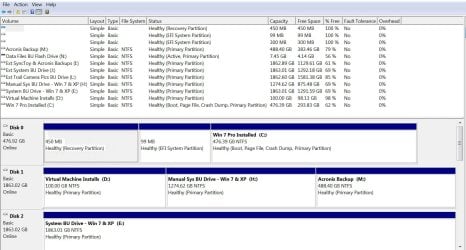
Sure, here it is. Do you seen anything unusual? Like I mentioned, the vendor installed Win 7 Pro for me on my SSD C: Drive.

I'm just curious as to why I don't get an email alert when there has been a new posting on my thread? Unless I remember to go to the website and check, I never know about a new posting. Is there a setting someplace that I missed?
 

Attachments

  • diskmgt.JPG
    diskmgt.JPG
    202.9 KB · Views: 4

My Computer

Computer type
PC/Desktop
Computer Manufacturer/Model Number
Custom Build by Velocity Micro/Raptor Z55 SKYLAKE
OS
win 7 pro
CPU
Intel Core i5-6600, 4 core @ 3.3GHz
Motherboard
Asus Z170-P Intel Z170 base chipset
Memory
16 GB Crucial Ballistix
Graphics Card(s)
2GB EVGA NVIDIA GeForce GTX950 GDDR5
Sound Card
On-Board Integrated Realtek ALC887 7.1 Channel Audio
Monitor(s) Displays
Viewsonic 28"
Hard Drives
512GB Samsung 950 Pros PCIe 3.0 SSD
Two - 2TB 7200 SATA 600 with 64MB Cache
PSU
750 Watt EVGA SuperNOVA
Case
Full Sized ATX
Cooling
Intel High Performance Heatsink
Keyboard
Logitech Illuminated k740
Mouse
Logitech Wireless M310
Internet Speed
2.5 (slow DSL)
Antivirus
Microsoft Security Essentials, Malwarebytes
Browser
Internet Explorer 11
Other Info
TeamViewer installed
Acronis True Image installed
Hi thanks
The screen shot just confirms you have an efi system reserved partition instead of a ntfs one
So yea your install was meant for secure boot but win-7 was not.

Email's well some where you may have unsubscribed from here if you ever were
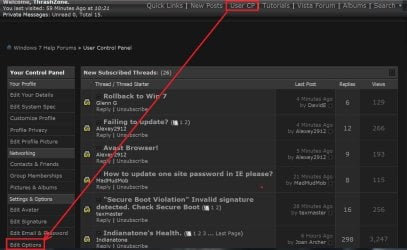
But yes user CP = user control panel would have those options which are default to receive email alerts
Go to Edit Options and way down at the bottom you can use Reset fields.
user cp.JPG
 

My Computer

Computer type
PC/Desktop
Computer Manufacturer/Model Number
Custom assembled by me :}
OS
Win-7-Pro64bit 7-H-Prem-64bit
CPU
i7-5930K 2nd i9-9940x both water blocked VRM's too
Motherboard
ASUS SABERTOOTH X99 2nd ASUS x299 Apex
Memory
Trident-z 3200C14 2nd Trident-z 3600C16
Graphics Card(s)
EVGA 1080ti ftw3 2nd Titan Xp both water blocked
Sound Card
Built-in Realtek
Monitor(s) Displays
1-AOC G2460PG 24"G-Sync 144Hz/ 2nd 1-ASUS VG248QE 24" 144Hz
Screen Resolution
1920 x 1080 144Hz
Hard Drives
2-Samsung M.2 Evo & Evo Plus
2-Samsung 850 EVO 500GB SSD's/ 3-2.5 W.D. Black 1tb-&3-1tb/3-3.5 WD Black 1tb hdd's
PSU
EVGA SuperNOVA 1000-P2 2nd 1200-P2
Case
2-Corsair Obsidian Series 450D Black ATX Mid Tower
Cooling
Custom water loops
Keyboard
Logitech G710+/ 2nd Logitech G910
Mouse
2-RedDragon M901 Perdition 16400 dpi Gaming mouse = wired
Internet Speed
Comcast Ping 19ms 89.31mbps download speed 6.12mbps upload
Antivirus
Malwarebytes Pro/ Superantispyware Pro
Browser
FireFox & Pale moon
Other Info
2nd ASUS X299 Apex/Intel i9-9940x with Custom water loop/7H-Prem-x64/Corsair 450D case/Ram Trident-z 3600C16 4x8gb / Samsung970Evo plus 500gb SSD/Dual ssd EZ swap evo/PSU EVGA SuperNova 1200w-P2 80+Platinum/GPU Titan Xp /8-ML-140 on push-pull on 2-280GTX rads
OK, I found it and hopefully changed the email setting to instant notification. While I was there I completed my System Specs section and a little personal info. This is an excellent forum and since I have three computers all running Win 7 (one Pro and two Ultimate), I plan on being a frequent visitor. And I will contribute when I can.
 

My Computer

Computer type
PC/Desktop
Computer Manufacturer/Model Number
Custom Build by Velocity Micro/Raptor Z55 SKYLAKE
OS
win 7 pro
CPU
Intel Core i5-6600, 4 core @ 3.3GHz
Motherboard
Asus Z170-P Intel Z170 base chipset
Memory
16 GB Crucial Ballistix
Graphics Card(s)
2GB EVGA NVIDIA GeForce GTX950 GDDR5
Sound Card
On-Board Integrated Realtek ALC887 7.1 Channel Audio
Monitor(s) Displays
Viewsonic 28"
Hard Drives
512GB Samsung 950 Pros PCIe 3.0 SSD
Two - 2TB 7200 SATA 600 with 64MB Cache
PSU
750 Watt EVGA SuperNOVA
Case
Full Sized ATX
Cooling
Intel High Performance Heatsink
Keyboard
Logitech Illuminated k740
Mouse
Logitech Wireless M310
Internet Speed
2.5 (slow DSL)
Antivirus
Microsoft Security Essentials, Malwarebytes
Browser
Internet Explorer 11
Other Info
TeamViewer installed
Acronis True Image installed

My Computer

Computer type
PC/Desktop
Computer Manufacturer/Model Number
Own build (new) Desk1 / Asus ROG Win 7 / Desk2 1st build
OS
Desk1 7 Home Prem / Desk2 10 Pro / Main lap Asus ROG 10 Pro 2 laptop Toshiba 7 Pro Asus P2520 7 & 10
CPU
Desk1 i5 3750K / Laptop i7 GTX 860M / Desk2 i5 2500
Motherboard
Desk1 Asus P877-V / Desk2 Gigabyte H67 UD3H / Laptop ?
Memory
Desk1 8GB (1866) / Desk2 16GB (1333) / Laptop 8Gb DDR3
Graphics Card(s)
Desk 1& 2NVidia GTX 650 & Laptops on board Intel
Sound Card
Desk 1 & 2 -XONAR DG Realtek High Def audio Laptop
Monitor(s) Displays
Desk 1 Benq HD 2450 / Desk2 Philips 24" / Laptop 17.5"
Screen Resolution
1920x1080 D1 & D2 & Laptop 1
Hard Drives
Desk1 Samsung 120GB 830 SSD
Asus ROG 256GB 850 Pro SSD
Desk2 Samsung 840 256 SSD
Toshiba 120GB EVO
PSU
Desk 1 Corsair HX 1050/ Laptop ? / Desk 2 Corsair HX 650
Case
Desk 1 Cooler HAF XM ? Toshiba laptop / Desk2 Coolermaster
Cooling
Fans on all Desk1 -2 Desk2 - all Coolermasters 5 Laptop ?
Keyboard
Desk 1 MS Sidewinder X6 Desk 2 MS Sidewinder X 4
Mouse
Desk 1&2 - Gigabyte MS 900 gamer - laptop - Logitec wireless
Internet Speed
ADSL2+
Other Info
One other Desktop (tester) and spare Toshba laptop both with SSD's
Running Kaspersky 2016 ISS on all machines config'd identically
Logitec audio stereo systems on each machine (x3)
Canon MG5250MFC
Router/modem TP-Link running WPA2SK
Thanks. I had seen and used that guide before......I have already implemented some of the recommendations on my new computer.

Since I think this is such a neat forum and since I have received many good tips/advice from forum members, I would like to become a "Supporter". But I can't figure out how to do that.

So I guess I need some help in figuring out how to give you money, lol.
 

My Computer

Computer type
PC/Desktop
Computer Manufacturer/Model Number
Custom Build by Velocity Micro/Raptor Z55 SKYLAKE
OS
win 7 pro
CPU
Intel Core i5-6600, 4 core @ 3.3GHz
Motherboard
Asus Z170-P Intel Z170 base chipset
Memory
16 GB Crucial Ballistix
Graphics Card(s)
2GB EVGA NVIDIA GeForce GTX950 GDDR5
Sound Card
On-Board Integrated Realtek ALC887 7.1 Channel Audio
Monitor(s) Displays
Viewsonic 28"
Hard Drives
512GB Samsung 950 Pros PCIe 3.0 SSD
Two - 2TB 7200 SATA 600 with 64MB Cache
PSU
750 Watt EVGA SuperNOVA
Case
Full Sized ATX
Cooling
Intel High Performance Heatsink
Keyboard
Logitech Illuminated k740
Mouse
Logitech Wireless M310
Internet Speed
2.5 (slow DSL)
Antivirus
Microsoft Security Essentials, Malwarebytes
Browser
Internet Explorer 11
Other Info
TeamViewer installed
Acronis True Image installed
Back
Top