Solved I can't drag and drop?...

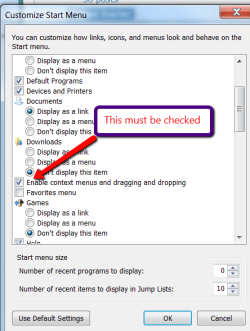
Check this:
 

Attachments

  • 2010-12-04_1801.png
    2010-12-04_1801.png
    18.7 KB · Views: 459

My Computer My Computer

At a glance

Vista, Windows7, Mint Mate, Zorin, Windows 8from 1.6GHz Duo to i7
Computer Manufacturer/Model Number
HP, Dell, Gateway, Toshiba - 4 laptops and 2 desktops
OS
Vista, Windows7, Mint Mate, Zorin, Windows 8
CPU
from 1.6GHz Duo to i7
Monitor(s) Displays
2x HP w2207
Hard Drives
5x HDD, 7x SSD, 12x Externals
Keyboard
with trackball - no mices
Mouse
Trackball mice
Internet Speed
DSL 6000
Yep. It's checked.
 

My Computer My Computer

At a glance

Windows 7 Ultimate x64AMD Atholom II X2 245 2.90GHz4GB DDR2NVidia GeForce 8600 GTS
OS
Windows 7 Ultimate x64
CPU
AMD Atholom II X2 245 2.90GHz
Motherboard
ASUS M4A785M
Memory
4GB DDR2
Graphics Card(s)
NVidia GeForce 8600 GTS
Thanks, mdahouse. My ESC key WAS stuck in the down position due to some crumbs. Solved all my problems, including boot-up problems.
 

My Computer My Computer

At a glance

Windows 7 Home Premium 64bit
OS
Windows 7 Home Premium 64bit
I've experienced this before, and always if I haven't restarted the PC after a Windows update. Restarting after every update now never results in this problem.

Regards,
Golden
 

My Computer My Computer

At a glance

Windows 10 Pro x64 ; Xubuntu x64Intel i7 860 @ 2.80 GHz O/C'ed to 4.0GHz16GB Corsair Vengance DDR3 @ 661 MHz Dual Cha...EVGA NVidia GTX 560 1024MB
Computer type
PC/Desktop
Computer Manufacturer/Model Number
Golden Mk. I.4
OS
Windows 10 Pro x64 ; Xubuntu x64
CPU
Intel i7 860 @ 2.80 GHz O/C'ed to 4.0GHz
Motherboard
Gigabyte P55A-UD3R Rev.1. Award BIOS F13
Memory
16GB Corsair Vengance DDR3 @ 661 MHz Dual Channel (9-9-9-24)
Graphics Card(s)
EVGA NVidia GTX 560 1024MB
Sound Card
Realtek Integrated
Monitor(s) Displays
Dual Samsung SyncMaster 2494HS
Screen Resolution
1920*1080 and 1920*1080
Hard Drives
1*Samsung 840 EVO 120GB SSD;
1*OCZ Vertex 2 60GB SSD;
2*Samsung F3 SpinPoint 1TB in RAID0;
1*Samsung F1 SpinPoint 1TB;
2*Western Digital 1TB External USB 3.0
1*Western Digital 500GB External USB 3.0
1*Seagate 500GB External USB 2.0
PSU
Thermaltake ToughPower QFan 750W
Case
Thermaltake Element S VK60001W2Z
Cooling
Corsair H60 Water Cooling, 2*230mm and 2*80mm case fans
Keyboard
Logitech G110
Mouse
Logitech MX518
right click on the Taskbar > Properties > Start Menu button > Customize > check the box" Enable context menus and dragging and dropping" > OK > Apply. You might have to reboot (don't remember).
 

My Computer My Computer

At a glance

Vista, Windows7, Mint Mate, Zorin, Windows 8from 1.6GHz Duo to i7
Computer Manufacturer/Model Number
HP, Dell, Gateway, Toshiba - 4 laptops and 2 desktops
OS
Vista, Windows7, Mint Mate, Zorin, Windows 8
CPU
from 1.6GHz Duo to i7
Monitor(s) Displays
2x HP w2207
Hard Drives
5x HDD, 7x SSD, 12x Externals
Keyboard
with trackball - no mices
Mouse
Trackball mice
Internet Speed
DSL 6000
Thanks for your help. I discovered that Texter from lifehacker.com was the problem.
 

My Computer My Computer

At a glance

Windows 7 Ultimate x64AMD Atholom II X2 245 2.90GHz4GB DDR2NVidia GeForce 8600 GTS
OS
Windows 7 Ultimate x64
CPU
AMD Atholom II X2 245 2.90GHz
Motherboard
ASUS M4A785M
Memory
4GB DDR2
Graphics Card(s)
NVidia GeForce 8600 GTS
The escape key was stuck down on my keyboard too, thanks for posting that 'way-too-obvious-for-me-to-think-of' solution. :)
 

My Computer My Computer

At a glance

Windows 7 x64 Ultimate
OS
Windows 7 x64 Ultimate
I just wanted to add a Thank You to the ESC key stuck comment. Brand new laptop and not being able to drag and drop drove me nuts the last two days! :eek:
 

My Computer My Computer

At a glance

Windows 7 x64
OS
Windows 7 x64
I have this problem off and on. I'm uder the impression that it's caused by VMware. It started happenng after I got it (version 7), and it only ever seems to show up after I start draging files to and form VMs.
 

My Computer My Computer

At a glance

Windows XP
OS
Windows XP
Tying the last two posts together, I'll add I too experienced an inability to drag/drop anything on my Windows 7 PC, but that arose shortly after I'd launched Virtual Box. However, I'd long since closed Virtual Box and the problem persisted until....yep....I press the ESC key. So, thanks to mdahouse for steering me in that direction. No kekyboard crumbs but something surely locked up the ESC key, leaving Virtual Box as the supsect....and this seems vaguely familiar.
 

My Computer My Computer

At a glance

Vista64 and Windows 7RCIntel Core2 Duo X6800Aopen 4x2GB PC6400 DDR2XFX GeForce 7600GT 256MB GDDR3
Computer Manufacturer/Model Number
Self-built
OS
Vista64 and Windows 7RC
CPU
Intel Core2 Duo X6800
Motherboard
Gigabyte EP45-DS3R
Memory
Aopen 4x2GB PC6400 DDR2
Graphics Card(s)
XFX GeForce 7600GT 256MB GDDR3
Sound Card
Creative Audigy 2 ZS Platinum
Monitor(s) Displays
BenQ FP241W LCD, Iiyama VisionMaster 450 CRT
Hard Drives
2x150GB Western Digital Raptor SATA150
1x750GB Seagate Barracuda 7200.11 SATA3 swappable
PSU
Seasonic S12-600
Case
Coolermaster R690
Cooling
Thermalright Ultra120 Extreme
Thanks, I never thought to try the ESC key to resolve this. I don't run any of the listed programs, but experience this from time to time. I have found sometimes a hung IE will cause this, but in this case, that did not appear to be open.

I tapped the ESC key a few times, and system functionality returned to normal.
 

My Computer My Computer

At a glance

Windows 7 Ultimate x64i7 9606GB DDR3Dual nVidia GTS450
Computer Manufacturer/Model Number
Self Built
OS
Windows 7 Ultimate x64
CPU
i7 960
Motherboard
Intel
Memory
6GB DDR3
Graphics Card(s)
Dual nVidia GTS450
Monitor(s) Displays
3x BenQ G2420HD
Hard Drives
Intel SSD
PSU
Corsair 1200W
Case
Cooler Master CM690 II
answered for my self ....
thx to this forum..:D
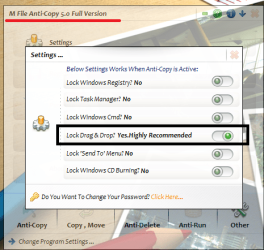
this programs also affects to windows drag n drop
M file anti copy 5.0:p

default configuration after finish installation is locking drag n drop window
plz kindly see the attachment:o
 

Attachments

  • 1111.png
    1111.png
    65.9 KB · Views: 359

My Computer My Computer

At a glance

windows 7 starter Edition 32bitIntel Core 2 Duo Processor T5870 (2.0 GHz, 2 ...1 GB 800 MHz DDR2 SDRAMMobile Intel(R) GMA X3100 256MB (shared)
Computer Manufacturer/Model Number
Compaq 510
OS
windows 7 starter Edition 32bit
CPU
Intel Core 2 Duo Processor T5870 (2.0 GHz, 2 MB L2 cache, 80
Memory
1 GB 800 MHz DDR2 SDRAM
Graphics Card(s)
Mobile Intel(R) GMA X3100 256MB (shared)
Sound Card
Integrated
Monitor(s) Displays
14″ WXGA TFT
Hard Drives
250 GB Serial ATA 5400 RPM
Verified

Just wanted to verify that it was a sticky Escape key. Mark Pavlis mentioned VMware 7, which I also have just recently installed. Confident that's our culprit.
 

My Computer My Computer

At a glance

windows 7 ultimate x64Q94508gb ddr3nvidia gforce 9600
Computer Manufacturer/Model Number
Custom
OS
windows 7 ultimate x64
CPU
Q9450
Motherboard
xfxforce
Memory
8gb ddr3
Graphics Card(s)
nvidia gforce 9600
Sound Card
sb xfi trustudio
Monitor(s) Displays
view hand-me-down sonic
Hard Drives
3x WD10/50 Western Digital 1TB & a 500gb Hitachi
PSU
toughpower
Case
Custom
Cooling
Intel Boxed Standard
Keyboard
ms elite
Mouse
razer imperator =D
I signed up to these forums just to post that a sticky ESC key was my problem also.

I have this issue at work every now and then and it drives me bananas. Have read so many threads about the possible cause with all these ridiculous answers, none of which solved my problem!

I can't believe one little stuck key could cause so much grief!!!!

:D:D:D
 

My Computer My Computer

At a glance

Windows 7 Home Premium x64
OS
Windows 7 Home Premium x64
It IS a "sticky" Esc key?
"CONFIRMED" lol
(drawing blood from pressing my tongue so hard against my cheek)
First, I LOVE that someone actually took the time to post that, "we"
shouldn't waste our time posting! LOL:D:D:D

When 10 different things "resolve" the issue, it's kinda hard to
"confirm" the resolution, although I do not doubt it worked for
you. If a sticky Escape key was the culprit, it would have to have
been stuck in the Down position,(?) chances are, you would have
had many issues caused by you esc being held down. The key was
not "stuck" By pressing ESC, you simply "released" some operation
that was hanging.
Having said that, please allow me to add my "confirmed" fix.

Closed and restarted SetPoint.
Furthermore, I don't even want to think how 4 of you simultaneously
got sticky Escape keys:(
Did all of you clean your Escape keys since the confirmation?

 

My Computer My Computer

At a glance

Windows 7
OS
Windows 7
I also had the issue of sticky ESC and had just installed VMWare Player.
 

My Computer My Computer

At a glance

Windows 7 Ultimate x64
OS
Windows 7 Ultimate x64
Stuck Key

My ESC key was stuck as well. Thanks for the idea!
 

My Computer My Computer

At a glance

windows 7 Pro 32bitIntelDellNVIDIA
Computer Manufacturer/Model Number
Dell
OS
windows 7 Pro 32bit
CPU
Intel
Motherboard
Intel
Memory
Dell
Graphics Card(s)
NVIDIA
Monitor(s) Displays
Dell
I know this thread is old...

However, I am having this problem...

I have read through this entire Thread.


All four pages, every post and every suggested solution.

Not one single solution suggested has resolved the problem.

The problem is fairly recent, only started within the last week; and only thing that has been installed in that time is a few Windows Updates and an update to MalwareBytes.

I am getting very frustrated, I can not move ANYTHING, on my Desktop. I can not drag or drop anything...

I have some icons on my Desktop that I want to move into a seperate folder on my Desktop, and I can not do that.

I can not drag/drop anything from Explorer onto my Desktop, or into any other Folder...

Everything else on my PC is working just fine though...

For reference, this is my Sig Rig, and it was a recent new build with a fresh installation of Windows 7 Ultimate 64bit.

All Windows Updates are current.
 

My Computer My Computer

At a glance

Windows 7 Ultimate 64bitIntel Core i5-4690K @ 4.7ghzG-Skill Snipers DDR3-1600 8GB oc'd@ 1866eVGA GTX 770 4GB FTW
Computer type
PC/Desktop
Computer Manufacturer/Model Number
Antares
OS
Windows 7 Ultimate 64bit
CPU
Intel Core i5-4690K @ 4.7ghz
Motherboard
ASRock Z97 Extreme6
Memory
G-Skill Snipers DDR3-1600 8GB oc'd@ 1866
Graphics Card(s)
eVGA GTX 770 4GB FTW
Sound Card
Creative X-Fi Titanium Fatal1ty Professional Series PCIe
Monitor(s) Displays
Acer K272HUL HDMI 27" 1440p
Screen Resolution
2560x1440
Hard Drives
Samsung 950 Pro M.2 512GB SSD, Samsong 850 Evo M.2 500GB SSD, Western Digital WD1002FAEX 1TB 6.0GBs HDD
PSU
EVGA SuperNOVA 750 G2
Case
CM Storm Trooper
Cooling
Corsair Hydro H105 High Performance w/ Dual GT AP-15's
Keyboard
Logitech G110
Mouse
RAZER Naga HEX Wraith Red
Internet Speed
Comcast 100mpbs
As someone said, I just signed up to confirm that the 'ESC key trick' resolved the issue for me also.
I had the exact same problem today, for the first time in my life :) . I'm a long time vmware user.
I'm also confident it isn't a stuck Esc key but something vmware has been doing to the keyboard subsystem, and it certainly does a lot at its core to emulate all the stuff. And sometimes something just goes wrong but this seems just a little glitch after all.
A friend with Virtualbox experiences the same from time to time.
 

My Computer My Computer

At a glance

Windows 7 Enterprise x64
OS
Windows 7 Enterprise x64
Popping in to state that...

None of the suggestions in this thread resolved the problem for me...

However, I discovered what was causing it,for me, and thus was able to resolve it...

The problem, for me, was caused by a program called XFastUSB, which is a Utility Application that comes with ASRock Motherboards; and installs off the Driver Disk for those Motherboards.

I recently bought and installed the ASRock Z68 Extreme4 Gen3 Motherboard, which installed the XFastUSB Utility Application from the driver disk. After disabling this application, my problems with not being able to rearrange my Desktop icons was instantly resolved, and so I uninstalled the XFastUSB utility, and have never had the problem since!
 

My Computer My Computer

At a glance

Windows 7 Ultimate 64bitIntel Core i5-4690K @ 4.7ghzG-Skill Snipers DDR3-1600 8GB oc'd@ 1866eVGA GTX 770 4GB FTW
Computer type
PC/Desktop
Computer Manufacturer/Model Number
Antares
OS
Windows 7 Ultimate 64bit
CPU
Intel Core i5-4690K @ 4.7ghz
Motherboard
ASRock Z97 Extreme6
Memory
G-Skill Snipers DDR3-1600 8GB oc'd@ 1866
Graphics Card(s)
eVGA GTX 770 4GB FTW
Sound Card
Creative X-Fi Titanium Fatal1ty Professional Series PCIe
Monitor(s) Displays
Acer K272HUL HDMI 27" 1440p
Screen Resolution
2560x1440
Hard Drives
Samsung 950 Pro M.2 512GB SSD, Samsong 850 Evo M.2 500GB SSD, Western Digital WD1002FAEX 1TB 6.0GBs HDD
PSU
EVGA SuperNOVA 750 G2
Case
CM Storm Trooper
Cooling
Corsair Hydro H105 High Performance w/ Dual GT AP-15's
Keyboard
Logitech G110
Mouse
RAZER Naga HEX Wraith Red
Internet Speed
Comcast 100mpbs
Back
Top