
You are using an out of date browser. It may not display this or other websites correctly.
You should upgrade or use an alternative browser.
You should upgrade or use an alternative browser.
I can't enter the personalize menu!
- Thread starter micke7
- Start date

Terrorz
New member
Wow this is a strange problem, did it work before? You must have done something to cause it... or its some kind of bug.
My Computer
- Computer Manufacturer/Model Number
- Gateway NV5378u
- OS
- Windows 7 Ultimate 64-bit
- CPU
- AMD Athlon II X2 M300
- Motherboard
- Gateway SJV50TR 0100
- Memory
- 4GB
- Graphics Card(s)
- AMD M880G with ATI Mobility Radeon HD 4200
- Sound Card
- Conexant High Definition Audio
- Monitor(s) Displays
- Generic PnP Monitor
- Screen Resolution
- 15.6" 16:9 HD LED LCD
- Hard Drives
- Hitachi HTS545050B9A300 Disk Device 500GB

- Local time
- 6:41 PM
- Messages
- 35,002
Hi Micke7,
There is another way to get in personalization menu. Click the start button > control panel (in large or small icon view, not in category view) > customization .
See whether it gets in the customization menu or not.
There is another way to get in personalization menu. Click the start button > control panel (in large or small icon view, not in category view) > customization .
See whether it gets in the customization menu or not.
My Computer
- Computer type
- PC/Desktop
- Computer Manufacturer/Model Number
- Self Assembled
- OS
- Microsoft Windows 10 Pro Insider Preview 64-bit
- CPU
- Intel(R) Core(TM) i3-4130 CPU @ 3.40GHz
- Motherboard
- Gigabyte Technology Co., Ltd. B85M-D3H
- Memory
- Corsair Vengence 4GB x2 (8.00GB Dual-Channel DDR3 @ 798MHz)
- Graphics Card(s)
- 2047MB GeForce GTS 450 (ZOTAC International)
- Sound Card
- Onboard (Realtek High Definition Audio)
- Monitor(s) Displays
- LG Flatron E2040T
- Screen Resolution
- 1600x900
- Hard Drives
- Western Digital 1 TB
Seagate 500 GB
- PSU
- Corsair VS550
- Case
- Cooler Master K380
- Cooling
- Cooler Master Seidon 120V Plus
- Keyboard
- Logitech MK260r
- Mouse
- Logitech MK260r
- Internet Speed
- PMPL Broadband
- Antivirus
- Windows Defender + MBAM
- Browser
- Firefox
- Other Info
- Dell Studio 15" Laptop
Terrorz
New member
He said it dosent work for him from control panel either...Hi Micke7,
There is another way to get in personalization menu. Click the start button > control panel (in large or small icon view, not in category view) > customization .
See whether it gets in the customization menu or not.
My Computer
- Computer Manufacturer/Model Number
- Gateway NV5378u
- OS
- Windows 7 Ultimate 64-bit
- CPU
- AMD Athlon II X2 M300
- Motherboard
- Gateway SJV50TR 0100
- Memory
- 4GB
- Graphics Card(s)
- AMD M880G with ATI Mobility Radeon HD 4200
- Sound Card
- Conexant High Definition Audio
- Monitor(s) Displays
- Generic PnP Monitor
- Screen Resolution
- 15.6" 16:9 HD LED LCD
- Hard Drives
- Hitachi HTS545050B9A300 Disk Device 500GB
- Local time
- 6:41 PM
- Messages
- 35,002
Is thus from the very beginning, or a recent scenario? If the problem is recent, try to http://www.sevenforums.com/tutorials/700-system-restore.html using an older system restore point. If still not working, it is better to have a http://www.sevenforums.com/tutorials/3413-repair-install.html. Then read it to know how to Restore Personal Files on Windows Vista from the windows.old folder generated due to repair install. The process is the same for windows 7.
There is another way to change download and replace original system files, but that is a bit risky
There is another way to change download and replace original system files, but that is a bit risky
My Computer
- Computer type
- PC/Desktop
- Computer Manufacturer/Model Number
- Self Assembled
- OS
- Microsoft Windows 10 Pro Insider Preview 64-bit
- CPU
- Intel(R) Core(TM) i3-4130 CPU @ 3.40GHz
- Motherboard
- Gigabyte Technology Co., Ltd. B85M-D3H
- Memory
- Corsair Vengence 4GB x2 (8.00GB Dual-Channel DDR3 @ 798MHz)
- Graphics Card(s)
- 2047MB GeForce GTS 450 (ZOTAC International)
- Sound Card
- Onboard (Realtek High Definition Audio)
- Monitor(s) Displays
- LG Flatron E2040T
- Screen Resolution
- 1600x900
- Hard Drives
- Western Digital 1 TB
Seagate 500 GB
- PSU
- Corsair VS550
- Case
- Cooler Master K380
- Cooling
- Cooler Master Seidon 120V Plus
- Keyboard
- Logitech MK260r
- Mouse
- Logitech MK260r
- Internet Speed
- PMPL Broadband
- Antivirus
- Windows Defender + MBAM
- Browser
- Firefox
- Other Info
- Dell Studio 15" Laptop

If the system files are corrupt, in this case may be the case, open an elevated command prompt AKA CMD in admin rights, and type "sfc /scannow" without quotes.
My Computer
- Computer Manufacturer/Model Number
- Custom Build
- OS
- W7 RTM Ultimate x64
- CPU
- Intel Q8400 @ 2.66GHZ
- Motherboard
- Gigabyte GA-EG45M-UD2H
- Memory
- 4GB DDR2-800
- Graphics Card(s)
- Gainward GTS 450 GLH 1GB Edition
- Sound Card
- Integrated 8 Channel
- Monitor(s) Displays
- AOC 23.6 Inch Widescreen LCD
- Screen Resolution
- 1920x1080
- Hard Drives
- Seagate 500GB Internal
Western Digital 1TB Internal
Hitachi 1TB External
- PSU
- Apevia Java Power 500W
- Case
- Cooler Master HAF 922 Black
- Cooling
- Stock Intel CPU Fan
- Keyboard
- HP SK-2960 Multimedia Keyboard
- Mouse
- Logitech M350 Wireless Gaming Mouse
- Internet Speed
- 1.5MB
- Local time
- 6:41 PM
- Messages
- 35,002
If the system files are corrupt, in this case may be the case, open an elevated command prompt AKA CMD in admin rights, and type "sfc /scannow" without quotes.
Hi Uber !
Thinking about that the point to come somewhere in the forum, or I would have started a new thread. I have a question to ask you.
I learned that there are two ways to open an elevated command prompt : 1). In run box, type cmd and hit enter with ctrl+shift pressed; and 2). nevigate to the command prompt as start > all programs > accessories > command prompt ; right click and run as admin. Then a command prompt will open with the prompt as C:\windows\system 32
But whatever I did, my prompt is C:\users\username
Have I learned the wrong process ? If so , what is the actual process ? and if not, what is the reason behind it ? Thanks in advance.
Edit : I have user account control settings turned off.
My Computer
- Computer type
- PC/Desktop
- Computer Manufacturer/Model Number
- Self Assembled
- OS
- Microsoft Windows 10 Pro Insider Preview 64-bit
- CPU
- Intel(R) Core(TM) i3-4130 CPU @ 3.40GHz
- Motherboard
- Gigabyte Technology Co., Ltd. B85M-D3H
- Memory
- Corsair Vengence 4GB x2 (8.00GB Dual-Channel DDR3 @ 798MHz)
- Graphics Card(s)
- 2047MB GeForce GTS 450 (ZOTAC International)
- Sound Card
- Onboard (Realtek High Definition Audio)
- Monitor(s) Displays
- LG Flatron E2040T
- Screen Resolution
- 1600x900
- Hard Drives
- Western Digital 1 TB
Seagate 500 GB
- PSU
- Corsair VS550
- Case
- Cooler Master K380
- Cooling
- Cooler Master Seidon 120V Plus
- Keyboard
- Logitech MK260r
- Mouse
- Logitech MK260r
- Internet Speed
- PMPL Broadband
- Antivirus
- Windows Defender + MBAM
- Browser
- Firefox
- Other Info
- Dell Studio 15" Laptop
If the system files are corrupt, in this case may be the case, open an elevated command prompt AKA CMD in admin rights, and type "sfc /scannow" without quotes.
Hi Uber !
Thinking about that the point to come somewhere in the forum, or I would have started a new thread. I have a question to ask you.
I learned that there are two ways to open an elevated command prompt : 1). In run box, type cmd and hit enter with ctrl+shift pressed; and 2). nevigate to the command prompt as start > all programs > accessories > command prompt ; right click and run as admin. Then a command prompt will open with the prompt as C:\windows\system 32
But whatever I did, my prompt is C:\users\username
Have I learned the wrong process ? If so , what is the actual process ? and if not, what is the reason behind it ? Thanks in advance.
That should naturally be the case, the top bar should say Administrator C:/Windows... etc etc.
I THINK!
I'm not currently at my W7 machine atm, but i'll confirm it when i get back home.
My Computer
- Computer Manufacturer/Model Number
- Custom Build
- OS
- W7 RTM Ultimate x64
- CPU
- Intel Q8400 @ 2.66GHZ
- Motherboard
- Gigabyte GA-EG45M-UD2H
- Memory
- 4GB DDR2-800
- Graphics Card(s)
- Gainward GTS 450 GLH 1GB Edition
- Sound Card
- Integrated 8 Channel
- Monitor(s) Displays
- AOC 23.6 Inch Widescreen LCD
- Screen Resolution
- 1920x1080
- Hard Drives
- Seagate 500GB Internal
Western Digital 1TB Internal
Hitachi 1TB External
- PSU
- Apevia Java Power 500W
- Case
- Cooler Master HAF 922 Black
- Cooling
- Stock Intel CPU Fan
- Keyboard
- HP SK-2960 Multimedia Keyboard
- Mouse
- Logitech M350 Wireless Gaming Mouse
- Internet Speed
- 1.5MB
- Local time
- 6:41 PM
- Messages
- 35,002
That should naturally be the case, the top bar should say Administrator C:/Windows... etc etc.
I THINK!
I'm not currently at my W7 machine atm, but i'll confirm it when i get back home.
Yes. The window name should be Administrator\C:\Windows\System32\cmd.exe and the prompt should be C:\windows\System32_ but..........
Waiting for your reply, friend
My Computer
- Computer type
- PC/Desktop
- Computer Manufacturer/Model Number
- Self Assembled
- OS
- Microsoft Windows 10 Pro Insider Preview 64-bit
- CPU
- Intel(R) Core(TM) i3-4130 CPU @ 3.40GHz
- Motherboard
- Gigabyte Technology Co., Ltd. B85M-D3H
- Memory
- Corsair Vengence 4GB x2 (8.00GB Dual-Channel DDR3 @ 798MHz)
- Graphics Card(s)
- 2047MB GeForce GTS 450 (ZOTAC International)
- Sound Card
- Onboard (Realtek High Definition Audio)
- Monitor(s) Displays
- LG Flatron E2040T
- Screen Resolution
- 1600x900
- Hard Drives
- Western Digital 1 TB
Seagate 500 GB
- PSU
- Corsair VS550
- Case
- Cooler Master K380
- Cooling
- Cooler Master Seidon 120V Plus
- Keyboard
- Logitech MK260r
- Mouse
- Logitech MK260r
- Internet Speed
- PMPL Broadband
- Antivirus
- Windows Defender + MBAM
- Browser
- Firefox
- Other Info
- Dell Studio 15" Laptop
That should naturally be the case, the top bar should say Administrator C:/Windows... etc etc.
I THINK!
I'm not currently at my W7 machine atm, but i'll confirm it when i get back home.
Yes. The window name should be Administrator : Elevated Command Prompt and the prompt should be C:\windows\System32_ but..........
Waiting for your reply, friend
TBH, start a new thread, and we can give you some troubleshooting steps to go through, i kinda feel slack hijacking this poor mans thread.
My Computer
- Computer Manufacturer/Model Number
- Custom Build
- OS
- W7 RTM Ultimate x64
- CPU
- Intel Q8400 @ 2.66GHZ
- Motherboard
- Gigabyte GA-EG45M-UD2H
- Memory
- 4GB DDR2-800
- Graphics Card(s)
- Gainward GTS 450 GLH 1GB Edition
- Sound Card
- Integrated 8 Channel
- Monitor(s) Displays
- AOC 23.6 Inch Widescreen LCD
- Screen Resolution
- 1920x1080
- Hard Drives
- Seagate 500GB Internal
Western Digital 1TB Internal
Hitachi 1TB External
- PSU
- Apevia Java Power 500W
- Case
- Cooler Master HAF 922 Black
- Cooling
- Stock Intel CPU Fan
- Keyboard
- HP SK-2960 Multimedia Keyboard
- Mouse
- Logitech M350 Wireless Gaming Mouse
- Internet Speed
- 1.5MB
- Local time
- 6:41 PM
- Messages
- 35,002
TBH, start a new thread, and we can give you some troubleshooting steps to go through, i kinda feel slack hijacking this poor mans thread.
Ok ! Starting it in Performance and maintenance .
My Computer
- Computer type
- PC/Desktop
- Computer Manufacturer/Model Number
- Self Assembled
- OS
- Microsoft Windows 10 Pro Insider Preview 64-bit
- CPU
- Intel(R) Core(TM) i3-4130 CPU @ 3.40GHz
- Motherboard
- Gigabyte Technology Co., Ltd. B85M-D3H
- Memory
- Corsair Vengence 4GB x2 (8.00GB Dual-Channel DDR3 @ 798MHz)
- Graphics Card(s)
- 2047MB GeForce GTS 450 (ZOTAC International)
- Sound Card
- Onboard (Realtek High Definition Audio)
- Monitor(s) Displays
- LG Flatron E2040T
- Screen Resolution
- 1600x900
- Hard Drives
- Western Digital 1 TB
Seagate 500 GB
- PSU
- Corsair VS550
- Case
- Cooler Master K380
- Cooling
- Cooler Master Seidon 120V Plus
- Keyboard
- Logitech MK260r
- Mouse
- Logitech MK260r
- Internet Speed
- PMPL Broadband
- Antivirus
- Windows Defender + MBAM
- Browser
- Firefox
- Other Info
- Dell Studio 15" Laptop
Hey guys,
I noticed this same issue today in my windows 7 ultimate 32bit, did a little research and found more people with this issue.
I have found something weird on my end:
Go to "C:\Windows\System32" and look for a dll file in the name of "themecpl.dll" ( theme control panel i guess).
In my system, said file was renamed to "themecpl.dll.ok". No on else uses this computer but me, and i'm don't have any idea how this file was renamed to ".ok"
Now go to "C:\Windows\System32\en-US" and look for a file named "themecpl.dll.mui".
In my system it was renamed to "themecpl.dll.mui.ok". Again, i have no idea of how this happened.
After you rename "themecpl.dll.ok" to "themecpl.dll" (how it should be) you can tehn acces the personalization menu in control panel, but the window is blank. Then i renamed the "themecpl.dll.mui.ok" to "themecpl.dll.mui" (how it should be) and notice the help button and (an invisble one) to change the screen saver in the personalization window. But still, all blank.
Please, people having these problem go check and write me back if you too have those files renamed to ".ok". I'll keep investigating about this.
I noticed this same issue today in my windows 7 ultimate 32bit, did a little research and found more people with this issue.
I have found something weird on my end:
Go to "C:\Windows\System32" and look for a dll file in the name of "themecpl.dll" ( theme control panel i guess).
In my system, said file was renamed to "themecpl.dll.ok". No on else uses this computer but me, and i'm don't have any idea how this file was renamed to ".ok"
Now go to "C:\Windows\System32\en-US" and look for a file named "themecpl.dll.mui".
In my system it was renamed to "themecpl.dll.mui.ok". Again, i have no idea of how this happened.
After you rename "themecpl.dll.ok" to "themecpl.dll" (how it should be) you can tehn acces the personalization menu in control panel, but the window is blank. Then i renamed the "themecpl.dll.mui.ok" to "themecpl.dll.mui" (how it should be) and notice the help button and (an invisble one) to change the screen saver in the personalization window. But still, all blank.
Please, people having these problem go check and write me back if you too have those files renamed to ".ok". I'll keep investigating about this.
My Computer
- OS
- Windows 7 Ultimate 32bit
Hey guys,
I noticed this same issue today in my windows 7 ultimate 32bit, did a little research and found more people with this issue.
I have found something weird on my end:
Go to "C:\Windows\System32" and look for a dll file in the name of "themecpl.dll" ( theme control panel i guess).
In my system, said file was renamed to "themecpl.dll.ok". No on else uses this computer but me, and i'm don't have any idea how this file was renamed to ".ok"
Now go to "C:\Windows\System32\en-US" and look for a file named "themecpl.dll.mui".
In my system it was renamed to "themecpl.dll.mui.ok". Again, i have no idea of how this happened.
After you rename "themecpl.dll.ok" to "themecpl.dll" (how it should be) you can tehn acces the personalization menu in control panel, but the window is blank. Then i renamed the "themecpl.dll.mui.ok" to "themecpl.dll.mui" (how it should be) and notice the help button and (an invisble one) to change the screen saver in the personalization window. But still, all blank.
Please, people having these problem go check and write me back if you too have those files renamed to ".ok". I'll keep investigating about this.
UPDATE:
After renaming back the dll files, i did a system restart, and guess what? yes, more weird stuff happened. When the OS was shutting down, it displayed a message of "installing updates" (when i haven't downloaded, nor installed any update). Then, when the os rebooted, the personalization menu came back to normal (yey!!), but...
I use Rocketdock, and i have it configured to run with windows startup. Rocketdock got a little messed up, and didn't want to run. I started it with default icons, and its running now, though still with some issues. I had some 3rd party themes installed and now they're not working. Currently using the windows 7 default aero theme.
Maybe the dlls being misteriously renamed is the problem, maybe not. I don't know. But now my personalization menu is working. I will post back if a find any more issues or whatsoever.
EDIT:
This is sort of another update:
I think what the OS was "installing", was the original files of some dlls (I've known the OS keeps backups somewhere of its files, and not necessarily need to be retreive from a instalation disc) because i had uxtheme.dll files patched for 3rd party themes and now i check them, they are back to the originals, which doesn't allow me to use 3rd party themes. Correct me if i am wrong in any conclusion i have drawn here. Thank youWhen the OS was shutting down, it displayed a message of "installing updates" (when i haven't downloaded, nor installed any update)
My Computer
- OS
- Windows 7 Ultimate 32bit
ctpsupport
New member
- Local time
- 9:11 PM
- Messages
- 2
Very common issue ..
I am having the same problem on 3 different DELL System (2 note book and 1 desktop)
And I am trying to find a solution to it ..
Let's narrow down the problem ..
The software installed on the system are
1. Lotus Notes 8.52
2. MS office 2007, 2010
3. Symantec Endpoint Enterprise 11.06
4. Glary Utilities -- run to clean up registry error
5. ccCleaner
Those are the common software on the 3 system.
Symantec Endpoint client would not launch on all 3 systems. I have reinstalled it on one system .. it still refuse to launch.
On one system, not confirm on other 2 system, right click on Computer cannot launch properties.
I have done the following ..
1. check on IE -- the systems are using IE8
2. register the dl -- done on one system .. no effect ..
To get to bottom of this, I may to do install a fresh copy and see what cause the issue.
Hi!
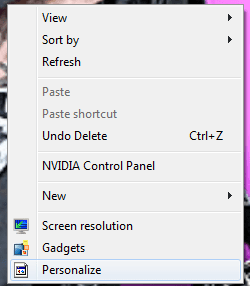
When i right click on my desktop and select personalize, nothing happens. I have tried to enter it via control panel, but it's not working!
View attachment 58861
Thank you in advance
I am having the same problem on 3 different DELL System (2 note book and 1 desktop)
And I am trying to find a solution to it ..
Let's narrow down the problem ..
The software installed on the system are
1. Lotus Notes 8.52
2. MS office 2007, 2010
3. Symantec Endpoint Enterprise 11.06
4. Glary Utilities -- run to clean up registry error
5. ccCleaner
Those are the common software on the 3 system.
Symantec Endpoint client would not launch on all 3 systems. I have reinstalled it on one system .. it still refuse to launch.
On one system, not confirm on other 2 system, right click on Computer cannot launch properties.
I have done the following ..
1. check on IE -- the systems are using IE8
2. register the dl -- done on one system .. no effect ..
To get to bottom of this, I may to do install a fresh copy and see what cause the issue.
My Computer
- Computer Manufacturer/Model Number
- DELL OPTIPLEX 980
- OS
- Windows 7 Professional 64bit
- CPU
- intel [email protected]
- Memory
- 8GB
- Graphics Card(s)
- Intel GT330
- Monitor(s) Displays
- DELL
- Hard Drives
- 1 TB
Possible solution
Hey, I solved it in my 32bit system doing this:
You might solve it the same way.
I've never used 64bit windows, so i don't know if the system32 folder is named system64... anyways:
Go to "C:\Windows\System32" and look for a dll file with the name of "themecpl.dll"
If such file was renamed with an extension at the end or in any way, rename it back to "themecpl.dll".
Go to "C:\Windows\System32\en-US" and look for a file named "themecpl.dll.mui"
If such file was renamed with an extension at the end or in any way, rename it back to "themecpl.dll.mui".
Reboot your system, and problem solved. It worked for me. If your "themecpl.dll" and "themecpl.dll.mui" are ok, then i'm afraid i can't help you.
Hi!
When i right click on my desktop and select personalize, nothing happens. I have tried to enter it via control panel, but it's not working!
View attachment 58861
Thank you in advance
I am having the same problem on 3 different DELL System (2 note book and 1 desktop)
And I am trying to find a solution to it ..
Let's narrow down the problem ..
The software installed on the system are
1. Lotus Notes 8.52
2. MS office 2007, 2010
3. Symantec Endpoint Enterprise 11.06
4. Glary Utilities -- run to clean up registry error
5. ccCleaner
Those are the common software on the 3 system.
Symantec Endpoint client would not launch on all 3 systems. I have reinstalled it on one system .. it still refuse to launch.
On one system, not confirm on other 2 system, right click on Computer cannot launch properties.
I have done the following ..
1. check on IE -- the systems are using IE8
2. register the dl -- done on one system .. no effect ..
To get to bottom of this, I may to do install a fresh copy and see what cause the issue.
Hey, I solved it in my 32bit system doing this:
Hey guys,
I noticed this same issue today in my windows 7 ultimate 32bit, did a little research and found more people with this issue.
I have found something weird on my end:
Go to "C:\Windows\System32" and look for a dll file in the name of "themecpl.dll" ( theme control panel i guess).
In my system, said file was renamed to "themecpl.dll.ok". No on else uses this computer but me, and i'm don't have any idea how this file was renamed to ".ok"
Now go to "C:\Windows\System32\en-US" and look for a file named "themecpl.dll.mui".
In my system it was renamed to "themecpl.dll.mui.ok". Again, i have no idea of how this happened.
After you rename "themecpl.dll.ok" to "themecpl.dll" (how it should be) you can tehn acces the personalization menu in control panel, but the window is blank. Then i renamed the "themecpl.dll.mui.ok" to "themecpl.dll.mui" (how it should be) and notice the help button and (an invisble one) to change the screen saver in the personalization window. But still, all blank.
Please, people having these problem go check and write me back if you too have those files renamed to ".ok". I'll keep investigating about this.
UPDATE:
After renaming back the dll files, i did a system restart, and guess what? yes, more weird stuff happened. When the OS was shutting down, it displayed a message of "installing updates" (when i haven't downloaded, nor installed any update). Then, when the os rebooted, the personalization menu came back to normal (yey!!), but...
I use Rocketdock, and i have it configured to run with windows startup. Rocketdock got a little messed up, and didn't want to run. I started it with default icons, and its running now, though still with some issues. I had some 3rd party themes installed and now they're not working. Currently using the windows 7 default aero theme.
Maybe the dlls being misteriously renamed is the problem, maybe not. I don't know. But now my personalization menu is working. I will post back if a find any more issues or whatsoever.
EDIT:
This is sort of another update:I think what the OS was "installing", was the original files of some dlls (I've known the OS keeps backups somewhere of its files, and not necessarily need to be retreive from a instalation disc) because i had uxtheme.dll files patched for 3rd party themes and now i check them, they are back to the originals, which doesn't allow me to use 3rd party themes. Correct me if i am wrong in any conclusion i have drawn here. Thank youWhen the OS was shutting down, it displayed a message of "installing updates" (when i haven't downloaded, nor installed any update)
You might solve it the same way.
I've never used 64bit windows, so i don't know if the system32 folder is named system64... anyways:
Go to "C:\Windows\System32" and look for a dll file with the name of "themecpl.dll"
If such file was renamed with an extension at the end or in any way, rename it back to "themecpl.dll".
Go to "C:\Windows\System32\en-US" and look for a file named "themecpl.dll.mui"
If such file was renamed with an extension at the end or in any way, rename it back to "themecpl.dll.mui".
Reboot your system, and problem solved. It worked for me. If your "themecpl.dll" and "themecpl.dll.mui" are ok, then i'm afraid i can't help you.
My Computer
- OS
- Windows 7 Ultimate 32bit
ctpsupport
New member
- Local time
- 9:11 PM
- Messages
- 2
Thanks nomogo, I did look at your suggested solution earlier before posting the question.
I decide to do a REPAIR INSTALL on my system, and that resolved the issue I have with my system, most of the programming are running fine.
I am monitoring the situation.
And I am checking on the error indication - in ability of doing personification etc to check on when this recur.
I decide to do a REPAIR INSTALL on my system, and that resolved the issue I have with my system, most of the programming are running fine.
I am monitoring the situation.
And I am checking on the error indication - in ability of doing personification etc to check on when this recur.
My Computer
- Computer Manufacturer/Model Number
- DELL OPTIPLEX 980
- OS
- Windows 7 Professional 64bit
- CPU
- intel [email protected]
- Memory
- 8GB
- Graphics Card(s)
- Intel GT330
- Monitor(s) Displays
- DELL
- Hard Drives
- 1 TB
I know it's an old thread, I just want to help in case someone googled her/his way here in search for a solution like I did.
My problem was, not only "personalization" but also "screen resolution" and many other links in the control panel (and desktop menu) rudely ignored my clicks. Then I fortunately right clicked and solution suddenly hit me. I have recently installed an alternative file manager (Q-Dir) and had it set for a default browser for all. Silly me. Of course file managers other than Explorer (might be wrong on that one, but that is beyond the point) can't open special folders like Personalization and Q-Dir gave me no warning to remind me.
So my advice on this one would be, if you have an alternative file browser installed make sure it is not set as a default browser.
My problem was, not only "personalization" but also "screen resolution" and many other links in the control panel (and desktop menu) rudely ignored my clicks. Then I fortunately right clicked and solution suddenly hit me. I have recently installed an alternative file manager (Q-Dir) and had it set for a default browser for all. Silly me. Of course file managers other than Explorer (might be wrong on that one, but that is beyond the point) can't open special folders like Personalization and Q-Dir gave me no warning to remind me.
So my advice on this one would be, if you have an alternative file browser installed make sure it is not set as a default browser.
My Computer
- Computer type
- PC/Desktop
- OS
- Windows 7 x64/Arch Linux
Similar threads
- Replies
- 5
- Views
- 2K

- Replies
- 4
- Views
- 2K

- Replies
- 7
- Views
- 2K