Solved I can't find the PCI simple communications controller driver for my PC

mohab

New member
Local time
12:37 PM
Messages
130
I just bought a new Dell Optiplex 7020 core i5, RAM upgraded to 12 G RAM and hard disk replaced by an SSD
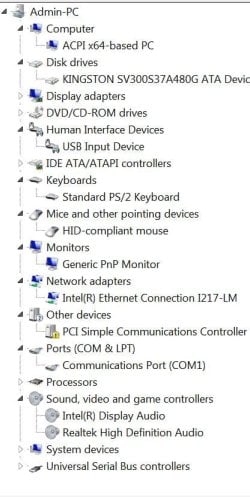
The device manager has a little yellow icon with an exclamation mark on " PCI simple communications controller" does that mean that I'm missing a driver? I checked this web-page Product Support | Dell US for relevant drivers but I couldn't find one for a PCI simple communications controller
 

My Computer My Computer

At a glance

Windows 7 Professional 64 bitsCore i5 3.3 GHz12GBoriginal (Intel HD graphics 4600
Computer type
PC/Desktop
Computer Manufacturer/Model Number
Dell Optiplex 7020
OS
Windows 7 Professional 64 bits
CPU
Core i5 3.3 GHz
Motherboard
original
Memory
12GB
Graphics Card(s)
original (Intel HD graphics 4600
Monitor(s) Displays
Samsung SyncMaster 713N
Screen Resolution
1280 x 1024
Hard Drives
Kingstone SSDnow 480GB
Antivirus
Kaspersky Internet security 2016
Browser
Opera
hi post the hardware id for the device that has the yellow exclamation mark next to it.
 

My Computer My Computer

At a glance

win 10
Computer type
PC/Desktop
Computer Manufacturer/Model Number
dell xps 9000
OS
win 10
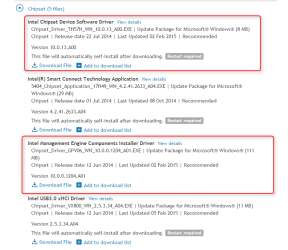
That should be covered in the chipset drivers,

From your link:

2015-11-09_20h04_04.png

You probably want those USB 3.0 drivers too, but the chipset should be first.
 

My Computer My Computer

At a glance

Win 10 Pro x64Intel I5-2500K @3.3GHz16GB G.Skill Ripjaws X (4x4GB)EVGA GeForce 750 Ti SC 2GB
Computer type
PC/Desktop
Computer Manufacturer/Model Number
Self Built
OS
Win 10 Pro x64
CPU
Intel I5-2500K @3.3GHz
Motherboard
Asrock P67 Extreme4
Memory
16GB G.Skill Ripjaws X (4x4GB)
Graphics Card(s)
EVGA GeForce 750 Ti SC 2GB
Sound Card
ASUS Xonar DG 5.1 Channels 24-bit 96KHz PCI Interface Sound
Monitor(s) Displays
auria eq2367
Screen Resolution
1920 x 1080
Hard Drives
250GB Samsung 850 EVO SSD
1TB WD Blue
1TB Hitachi
PSU
SeaSonic X 650W 80 Plus Gold
Case
Corsair Obsidian 750D
Cooling
Corsair H60, Three 140mm case fans
Keyboard
Logitech Wireless Keyboard K520
Mouse
Logitech Wireless Mouse M310
Internet Speed
Wave Broadband ~ 100 dn 5 up
Antivirus
Windows Defender, Malwarebytes Premium
Browser
Edge, IE11, Chrome
Other Info
Laptop specs: HP g7-1365dx /
CPU: AMD A6-3420M APU with Radeon(tm) HD Graphics /
RAM: Crucial 8Gb (2x4Gb) /
SSD: Crucial M4-CT128M4SSD2 ATA Device/ FW 000F /
GFX: AMD Radeon HD 6520G /
OS: Windows 10 Pro x64
Oscer1 if you are refering to the ids under the dtails tab in the properties of this device then here they are:

PCI\VEN_8086&DEV_8C3A&SUBSYS_05A51028&REV_04
PCI\VEN_8086&DEV_8C3A&SUBSYS_05A51028
PCI\VEN_8086&DEV_8C3A&CC_078000
PCI\VEN_8086&DEV_8C3A&CC_0780
 

My Computer My Computer

At a glance

Windows 7 Professional 64 bitsCore i5 3.3 GHz12GBoriginal (Intel HD graphics 4600
Computer type
PC/Desktop
Computer Manufacturer/Model Number
Dell Optiplex 7020
OS
Windows 7 Professional 64 bits
CPU
Core i5 3.3 GHz
Motherboard
original
Memory
12GB
Graphics Card(s)
original (Intel HD graphics 4600
Monitor(s) Displays
Samsung SyncMaster 713N
Screen Resolution
1280 x 1024
Hard Drives
Kingstone SSDnow 480GB
Antivirus
Kaspersky Internet security 2016
Browser
Opera
look at post 3 the second red box is the driver you need.
 

My Computer My Computer

At a glance

win 10
Computer type
PC/Desktop
Computer Manufacturer/Model Number
dell xps 9000
OS
win 10
I downloaded and try to install but the following message came up"
A required update is missing:kernel-mode driver framework 1.11(kb 2685811)
 

My Computer My Computer

At a glance

Windows 7 Professional 64 bitsCore i5 3.3 GHz12GBoriginal (Intel HD graphics 4600
Computer type
PC/Desktop
Computer Manufacturer/Model Number
Dell Optiplex 7020
OS
Windows 7 Professional 64 bits
CPU
Core i5 3.3 GHz
Motherboard
original
Memory
12GB
Graphics Card(s)
original (Intel HD graphics 4600
Monitor(s) Displays
Samsung SyncMaster 713N
Screen Resolution
1280 x 1024
Hard Drives
Kingstone SSDnow 480GB
Antivirus
Kaspersky Internet security 2016
Browser
Opera
So I downloaded :kernel-mode driver framework 1.11(kb 2685811) and tried to install it which resulted in this message:"Installer encountered an error: 0x8007042


The service cabbot be statrted, either because it is disabled or because it has no enabled device associated with it"

What a demanding box?!!
 

My Computer My Computer

At a glance

Windows 7 Professional 64 bitsCore i5 3.3 GHz12GBoriginal (Intel HD graphics 4600
Computer type
PC/Desktop
Computer Manufacturer/Model Number
Dell Optiplex 7020
OS
Windows 7 Professional 64 bits
CPU
Core i5 3.3 GHz
Motherboard
original
Memory
12GB
Graphics Card(s)
original (Intel HD graphics 4600
Monitor(s) Displays
Samsung SyncMaster 713N
Screen Resolution
1280 x 1024
Hard Drives
Kingstone SSDnow 480GB
Antivirus
Kaspersky Internet security 2016
Browser
Opera
ok try the first one in post three if that installs then try the other
 

My Computer My Computer

At a glance

win 10
Computer type
PC/Desktop
Computer Manufacturer/Model Number
dell xps 9000
OS
win 10
I've tried to install ALL of them but non work!
 

My Computer My Computer

At a glance

Windows 7 Professional 64 bitsCore i5 3.3 GHz12GBoriginal (Intel HD graphics 4600
Computer type
PC/Desktop
Computer Manufacturer/Model Number
Dell Optiplex 7020
OS
Windows 7 Professional 64 bits
CPU
Core i5 3.3 GHz
Motherboard
original
Memory
12GB
Graphics Card(s)
original (Intel HD graphics 4600
Monitor(s) Displays
Samsung SyncMaster 713N
Screen Resolution
1280 x 1024
Hard Drives
Kingstone SSDnow 480GB
Antivirus
Kaspersky Internet security 2016
Browser
Opera
did you just install the OS? if so i would try it again. and install the chipset drivers first before anything else and see if that works. do you have a driver disk that came with the computer? i know back in the day they did. i don't know about now. if you have the disk you could try installing the driver from the disk.
 

My Computer My Computer

At a glance

win 10
Computer type
PC/Desktop
Computer Manufacturer/Model Number
dell xps 9000
OS
win 10
oscer1,actually I installed the OS, like two weeks ago.
I'm surprised I didn't get a CD with this pc, which is an original after all.

Is this driver worth this hassle that I'm going through? I mean the machine is working without it. I only saw a yellow triangle with an exclamation mark in the middle of it in the device manager ( attached screen captures)
 

Attachments

  • Capture.JPG
    Capture.JPG
    15.6 KB · Views: 10
  • Capture2.JPG
    Capture2.JPG
    60.1 KB · Views: 0

My Computer My Computer

At a glance

Windows 7 Professional 64 bitsCore i5 3.3 GHz12GBoriginal (Intel HD graphics 4600
Computer type
PC/Desktop
Computer Manufacturer/Model Number
Dell Optiplex 7020
OS
Windows 7 Professional 64 bits
CPU
Core i5 3.3 GHz
Motherboard
original
Memory
12GB
Graphics Card(s)
original (Intel HD graphics 4600
Monitor(s) Displays
Samsung SyncMaster 713N
Screen Resolution
1280 x 1024
Hard Drives
Kingstone SSDnow 480GB
Antivirus
Kaspersky Internet security 2016
Browser
Opera
It might not effect your computer. Just use the computer as you normally do and see if any problems arises. If things start messing up I would re-install the OS .
 

My Computer My Computer

At a glance

win 10
Computer type
PC/Desktop
Computer Manufacturer/Model Number
dell xps 9000
OS
win 10
It might not effect your computer. Just use the computer as you normally do and see if any problems arises. If things start messing up I would re-install the OS .
I second oscer1's opinion.

The hardware ids you posted earlier indicate this device is part of the Intel Management Engine. Intel Mangement Engine isn't really needed for the home user. (It helps corporate IT staff remotely management the computers on their network)

No real gain for the pain of trying to get IME installed correctly.
 

My Computer My Computer

At a glance

Desk 1: Win 7 Pro x32; Desk 2: Windows 10 x64
Computer type
PC/Desktop
Computer Manufacturer/Model Number
Dell Optiplex 360 and Optiplex 755
OS
Desk 1: Win 7 Pro x32; Desk 2: Windows 10 x64
Hard Drives
500GB Crucial SSD in both Desktops
Other Info
Buffalo 6TB NAS, Raid 1
OK, so the next time I format my SSD and install a fresh copy of Windows, I'll install the chipset driver first

Thank you oscer1 and derekimo for all your help. I've marked this thread as solved
 

My Computer My Computer

At a glance

Windows 7 Professional 64 bitsCore i5 3.3 GHz12GBoriginal (Intel HD graphics 4600
Computer type
PC/Desktop
Computer Manufacturer/Model Number
Dell Optiplex 7020
OS
Windows 7 Professional 64 bits
CPU
Core i5 3.3 GHz
Motherboard
original
Memory
12GB
Graphics Card(s)
original (Intel HD graphics 4600
Monitor(s) Displays
Samsung SyncMaster 713N
Screen Resolution
1280 x 1024
Hard Drives
Kingstone SSDnow 480GB
Antivirus
Kaspersky Internet security 2016
Browser
Opera

My Computer My Computer

At a glance

Win 10 Pro x64Intel I5-2500K @3.3GHz16GB G.Skill Ripjaws X (4x4GB)EVGA GeForce 750 Ti SC 2GB
Computer type
PC/Desktop
Computer Manufacturer/Model Number
Self Built
OS
Win 10 Pro x64
CPU
Intel I5-2500K @3.3GHz
Motherboard
Asrock P67 Extreme4
Memory
16GB G.Skill Ripjaws X (4x4GB)
Graphics Card(s)
EVGA GeForce 750 Ti SC 2GB
Sound Card
ASUS Xonar DG 5.1 Channels 24-bit 96KHz PCI Interface Sound
Monitor(s) Displays
auria eq2367
Screen Resolution
1920 x 1080
Hard Drives
250GB Samsung 850 EVO SSD
1TB WD Blue
1TB Hitachi
PSU
SeaSonic X 650W 80 Plus Gold
Case
Corsair Obsidian 750D
Cooling
Corsair H60, Three 140mm case fans
Keyboard
Logitech Wireless Keyboard K520
Mouse
Logitech Wireless Mouse M310
Internet Speed
Wave Broadband ~ 100 dn 5 up
Antivirus
Windows Defender, Malwarebytes Premium
Browser
Edge, IE11, Chrome
Other Info
Laptop specs: HP g7-1365dx /
CPU: AMD A6-3420M APU with Radeon(tm) HD Graphics /
RAM: Crucial 8Gb (2x4Gb) /
SSD: Crucial M4-CT128M4SSD2 ATA Device/ FW 000F /
GFX: AMD Radeon HD 6520G /
OS: Windows 10 Pro x64
Your welcome
 

My Computer My Computer

At a glance

win 10
Computer type
PC/Desktop
Computer Manufacturer/Model Number
dell xps 9000
OS
win 10
Back
Top