Solved I cant update amd 13.9 drivers on windows 7

girish889

New member
Local time
10:03 PM
Messages
5
Im using ati 4670 1gb gpu,
The problem is, I want update my display drivers.
I downloaded latest amd drivers but when im installing amd 13.9 version drivers that time installation complete. .
But when I launch nfs rivals game. Screen splash with error.."please update drivers, you are using ati 10.5 old drivers please install ati 13.4 or later".
Please help to sort out this problem
 

My Computer My Computer

At a glance

windows 7 32 bitintel core2duo E75003gb ddr2amd 4670 1GB
Computer type
PC/Desktop
Computer Manufacturer/Model Number
custom build
OS
windows 7 32 bit
CPU
intel core2duo E7500
Motherboard
gigabyte g31
Memory
3gb ddr2
Graphics Card(s)
amd 4670 1GB
Hard Drives
320 GB WD hard drive
Antivirus
quick heal
Browser
chrome
Im using ati 4670 1gb gpu,
The problem is, I want update my display drivers.
I downloaded latest amd drivers but when im installing amd 13.9 version drivers that time installation complete. .
But when I launch nfs rivals game. Screen splash with error.."please update drivers, you are using ati 10.5 old drivers please install ati 13.4 or later".
Please help to sort out this problem
Did you get the correct 13.9 drivers for your "legacy" HD4670?

AMD has two driver branches now, with HD4xxx and below using "legacy" version, and HD5xxx and above using active WHQL. You can't succeed in installing the wrong driver for your hardware, and the installation log should show that the Display Driver WAS NOT INSTALLED (or rather, it won't appear on the log list of those things that actually did get installed).

When doing a "custom install", the list of components eligible for installation would be presented. If you try to use the wrong driver for your hardware, the Display Driver item won't show up in the list. So this is another clue you're trying to install the wrong driver package for your hardware.

All that said, are you trying to install the correct "legacy" 13.9 driver??
 

My Computer My Computer

At a glance

Windows 7 Pro x64 (1), Win7 Pro X64 (2)i5-3350p 3.1Ghz/6MB-cache (1); E8400 3.0Ghz/6...8GB PC3-12800 DDR3 (1); 4GB PC3-10600 DDR3 (2)ATI HD7750 (1), (see TV cards); ATI R7 250 (2)
Computer type
PC/Desktop
Computer Manufacturer/Model Number
Home-built, two systems (1) and (2)
OS
Windows 7 Pro x64 (1), Win7 Pro X64 (2)
CPU
i5-3350p 3.1Ghz/6MB-cache (1); E8400 3.0Ghz/6MB-cache (2)
Motherboard
ASUS P8Z77-V Pro (1); ASUS P5Q3 (2)
Memory
8GB PC3-12800 DDR3 (1); 4GB PC3-10600 DDR3 (2)
Graphics Card(s)
ATI HD7750 (1), (see TV cards); ATI R7 250 (2)
Sound Card
Realtek ALC892 HD Audio (1); Realtek ALC1200 HD Audio (2)
Monitor(s) Displays
Eizo HD2441W LCD, Eizo S2433W (1); Eizo 24" S2433W (2)
Screen Resolution
1920x1200, 1920x1200 (1); 1920x1200 (2)
Hard Drives
(1) 1TB SATA-II (7200RPM), 2x2TB SATA-III (7200RPM), 250GB SATA-III (10000RPM) for OS; 2x2TB external USB 3.0

(2) 320GB SATA-II (7200RPM), 750GB SATA-II (7200RPM), 150GB SATA-II (10000RPM) for OS; 2TB external USB 3.0
PSU
Nesteq ECS-6001 600W (1); Nesteq ECS-5001 500W (2)
Case
Acousti-Case 360 (1) and (2)
Cooling
Noctua NH-U12P SE2 for CPU, 2x120mm case fans (1) and (2)
Keyboard
IBM PS/2 (1) and (2)
Mouse
Logitech MX Revolution wireless (1); Microsoft wired (2)
Internet Speed
100mbps down / 10mbps up
Antivirus
Microsoft Security Essentials; Malwarebyte Anti-Malware Pro
Browser
Firefox
Other Info
Ceton InfiniTV 4-tuner cablecard-enabled TV card as well as Hauppauge HVR-2250 OTA/ATSC 2-tuner TV card in (1), running under Win7 WMC
Sometimes you will have to install older set of drivers for ATI Cards...

For example on my previous Graphics i had to install v12.4, v12.9 before jumping to the v13.4 then v13.9 drivers set. It could be normal asking you to install older set before. Looks primary a bit odd but it had worked fine for me.
 

My Computer My Computer

At a glance

Windows 7 Professional SP1 - x64 [Non-UEFI Boot]Ivy Bridge Core i5 3570K (Delidded)G.Skill "Ares" DDR3 PC3-12800 - 1600MHz (16Gb)Asus Dual-RX480-O4G
Computer type
PC/Desktop
Computer Manufacturer/Model Number
Custom Build
OS
Windows 7 Professional SP1 - x64 [Non-UEFI Boot]
CPU
Ivy Bridge Core i5 3570K (Delidded)
Motherboard
Asus P8Z77-V LE PLUS
Memory
G.Skill "Ares" DDR3 PC3-12800 - 1600MHz (16Gb)
Graphics Card(s)
Asus Dual-RX480-O4G
Sound Card
Creative Sound Blaster Z w/5.1 sound system
Monitor(s) Displays
Asus IPS 23"
Screen Resolution
16/9
Hard Drives
Internal:
500Go Sata 6Gb/s (x2)
500Go Sata 3Gb/s (x2)
SSD 60Go Sata 6Gb/s
PSU
In Win C 900W Series 80+ Platinum
Case
Thermaltake Chaser A71
Cooling
Custom Water Cooling Loop
Keyboard
Cooler Master QuickFire XTi
Mouse
Razer Imperator 2012 (4G)
Antivirus
MSE
Browser
IE 11.0.xxx Rtm
Other Info
"Raid0" with Intel Smart Response Technology (HDD/SSD)
Im using ati 4670 1gb gpu,
The problem is, I want update my display drivers.
I downloaded latest amd drivers but when im installing amd 13.9 version drivers that time installation complete. .
But when I launch nfs rivals game. Screen splash with error.."please update drivers, you are using ati 10.5 old drivers please install ati 13.4 or later".
Please help to sort out this problem
Did you get the correct 13.9 drivers for your "legacy" HD4670?

AMD has two driver branches now, with HD4xxx and below using "legacy" version, and HD5xxx and above using active WHQL. You can't succeed in installing the wrong driver for your hardware, and the installation log should show that the Display Driver WAS NOT INSTALLED (or rather, it won't appear on the log list of those things that actually did get installed).

When doing a "custom install", the list of components eligible for installation would be presented. If you try to use the wrong driver for your hardware, the Display Driver item won't show up in the list. So this is another clue you're trying to install the wrong driver package for your hardware.

All that said, are you trying to install the correct "legacy" 13.9 driver??

I don't know about legacy and whql driver, I just know, I had downloaded WHQL driver.
If I download legacy drivers, can drivers will support?
 

My Computer My Computer

At a glance

windows 7 32 bitintel core2duo E75003gb ddr2amd 4670 1GB
Computer type
PC/Desktop
Computer Manufacturer/Model Number
custom build
OS
windows 7 32 bit
CPU
intel core2duo E7500
Motherboard
gigabyte g31
Memory
3gb ddr2
Graphics Card(s)
amd 4670 1GB
Hard Drives
320 GB WD hard drive
Antivirus
quick heal
Browser
chrome
I had similar problems with an HD 4290 -- drivers would claim to install but when I restarted and checked the driver version, old one was still there.

If you completely remove the AMD drivers first, reboot, and then install -- that should work.

What also worked for me was NOT using the AMD installer but instead, using Device Manager and doing the update from there using the option to browse for the .INF file. That would appear NOT to work, but when I restarted, the newer drivers had been installed anyway.
 

My Computer My Computer

At a glance

Win7 Pro 32-bit, Win8 Pro 32-bitAMD Phenom II X6 1090T4GB ddr3 1300AMD HD 4290 onboard
Computer type
PC/Desktop
Computer Manufacturer/Model Number
Custom
OS
Win7 Pro 32-bit, Win8 Pro 32-bit
CPU
AMD Phenom II X6 1090T
Motherboard
Gigabyte
Memory
4GB ddr3 1300
Graphics Card(s)
AMD HD 4290 onboard
Sound Card
Builtin Realtek HD Audio
Monitor(s) Displays
Samsung 24" widescreen, LG 23" widescreen
Screen Resolution
1920x1200/1920x1080
Hard Drives
Kingston 256GB SSD
Keyboard
Logitech Illuminated Keyboard
Mouse
Logitech M705 wireless mouse
Antivirus
Norton Av 2013
Browser
IE v10
I don't know about legacy and whql driver, I just know, I had downloaded WHQL driver.
If I download legacy drivers, can drivers will support?
I'll try to re-clarify.

There are TWO separate "WHQL" drivers for what AMD now considers TWO separate groups of their products. The older group of hardware (i.e. HD4xxx and below) are now considered "legacy". And "legacy WHQL Catalyst 13.9" is the latest driver version applicable.

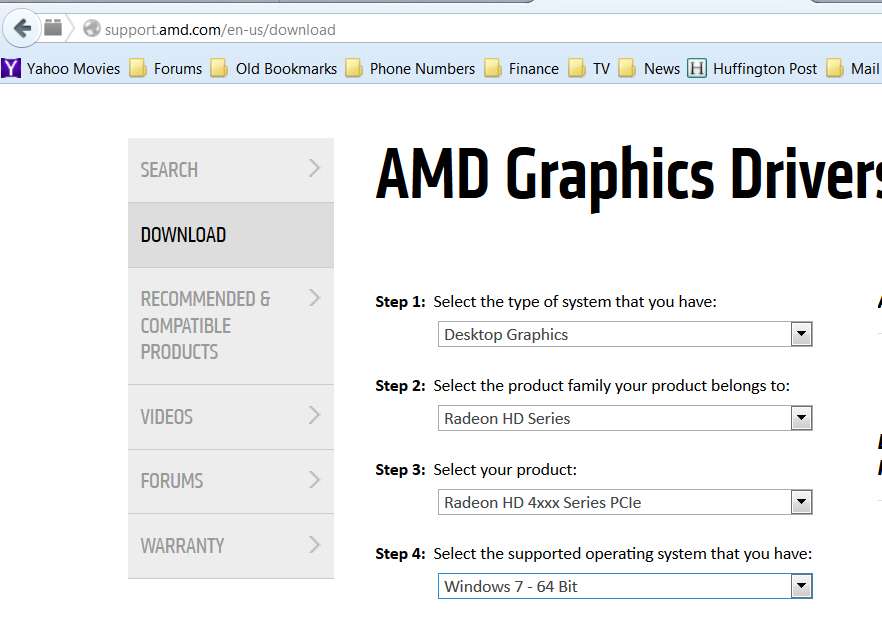
The way you get that "legacy WHQL 13.9" driver file is to go to their driver download site, and select the correct entries from the dropdown lists, and then push SEARCH:

bad55b.jpg


You will then be presented with the results page, which provides the link (same as I posted above) to that "legacy WHQL 13.9" driver:

50d8a8.jpg


Again... THESE "LEGACY 13.9 WHQL" DRIVERS ARE ONLY APPLICABLE TO HD4xxx HARDWARE (like yours) AND OLDER. The driver file cannot be installed for HD5xxx and newer hardware.

Nor can any version of the second category of WHQL drivers (for HD5xxx and newer hardware) be installed on HD4xxx and older hardware. Even the 13.9 version of this second category of WHQL driver is NOT the correct 13.9 version for older cards. There are two different 13.9 versions.

You need to use this exact "legacy 13.9 WHQL" driver for HD4xxx cards and older.
 

My Computer My Computer

At a glance

Windows 7 Pro x64 (1), Win7 Pro X64 (2)i5-3350p 3.1Ghz/6MB-cache (1); E8400 3.0Ghz/6...8GB PC3-12800 DDR3 (1); 4GB PC3-10600 DDR3 (2)ATI HD7750 (1), (see TV cards); ATI R7 250 (2)
Computer type
PC/Desktop
Computer Manufacturer/Model Number
Home-built, two systems (1) and (2)
OS
Windows 7 Pro x64 (1), Win7 Pro X64 (2)
CPU
i5-3350p 3.1Ghz/6MB-cache (1); E8400 3.0Ghz/6MB-cache (2)
Motherboard
ASUS P8Z77-V Pro (1); ASUS P5Q3 (2)
Memory
8GB PC3-12800 DDR3 (1); 4GB PC3-10600 DDR3 (2)
Graphics Card(s)
ATI HD7750 (1), (see TV cards); ATI R7 250 (2)
Sound Card
Realtek ALC892 HD Audio (1); Realtek ALC1200 HD Audio (2)
Monitor(s) Displays
Eizo HD2441W LCD, Eizo S2433W (1); Eizo 24" S2433W (2)
Screen Resolution
1920x1200, 1920x1200 (1); 1920x1200 (2)
Hard Drives
(1) 1TB SATA-II (7200RPM), 2x2TB SATA-III (7200RPM), 250GB SATA-III (10000RPM) for OS; 2x2TB external USB 3.0

(2) 320GB SATA-II (7200RPM), 750GB SATA-II (7200RPM), 150GB SATA-II (10000RPM) for OS; 2TB external USB 3.0
PSU
Nesteq ECS-6001 600W (1); Nesteq ECS-5001 500W (2)
Case
Acousti-Case 360 (1) and (2)
Cooling
Noctua NH-U12P SE2 for CPU, 2x120mm case fans (1) and (2)
Keyboard
IBM PS/2 (1) and (2)
Mouse
Logitech MX Revolution wireless (1); Microsoft wired (2)
Internet Speed
100mbps down / 10mbps up
Antivirus
Microsoft Security Essentials; Malwarebyte Anti-Malware Pro
Browser
Firefox
Other Info
Ceton InfiniTV 4-tuner cablecard-enabled TV card as well as Hauppauge HVR-2250 OTA/ATSC 2-tuner TV card in (1), running under Win7 WMC
Thank u so much buddy..
I downloaded drivers.
 

My Computer My Computer

At a glance

windows 7 32 bitintel core2duo E75003gb ddr2amd 4670 1GB
Computer type
PC/Desktop
Computer Manufacturer/Model Number
custom build
OS
windows 7 32 bit
CPU
intel core2duo E7500
Motherboard
gigabyte g31
Memory
3gb ddr2
Graphics Card(s)
amd 4670 1GB
Hard Drives
320 GB WD hard drive
Antivirus
quick heal
Browser
chrome
I don't know about legacy and whql driver, I just know, I had downloaded WHQL driver.
If I download legacy drivers, can drivers will support?
I'll try to re-clarify.

There are TWO separate "WHQL" drivers for what AMD now considers TWO separate groups of their products. The older group of hardware (i.e. HD4xxx and below) are now considered "legacy". And "legacy WHQL Catalyst 13.9" is the latest driver version applicable.

The way you get that "legacy WHQL 13.9" driver file is to go to their driver download site, and select the correct entries from the dropdown lists, and then push SEARCH:

bad55b.jpg


You will then be presented with the results page, which provides the link (same as I posted above) to that "legacy WHQL 13.9" driver:

50d8a8.jpg


Again... THESE "LEGACY 13.9 WHQL" DRIVERS ARE ONLY APPLICABLE TO HD4xxx HARDWARE (like yours) AND OLDER. The driver file cannot be installed for HD5xxx and newer hardware.

Nor can any version of the second category of WHQL drivers (for HD5xxx and newer hardware) be installed on HD4xxx and older hardware. Even the 13.9 version of this second category of WHQL driver is NOT the correct 13.9 version for older cards. There are two different 13.9 versions.

You need to use this exact "legacy 13.9 WHQL" driver for HD4xxx cards and older.

Thank u so much

Now I have updated drivers.
Thanks alot.
 

My Computer My Computer

At a glance

windows 7 32 bitintel core2duo E75003gb ddr2amd 4670 1GB
Computer type
PC/Desktop
Computer Manufacturer/Model Number
custom build
OS
windows 7 32 bit
CPU
intel core2duo E7500
Motherboard
gigabyte g31
Memory
3gb ddr2
Graphics Card(s)
amd 4670 1GB
Hard Drives
320 GB WD hard drive
Antivirus
quick heal
Browser
chrome
Back
Top