I can't view Nvidia Control Panel

StarYasmin

New member
Local time
10:49 AM
Messages
6
I can't view Nvidia Control Panel nor I can't update either..

First I wanted to get the updated driver of my NVIDIA driver here:

Drivers - Download NVIDIA Drivers


I went to their site, got the 195.62 version window 7 x64 (I have windows 7 x64 installed) it would download a bit and then My screen would go black and a lil music note would play, my screen would turn on after it ends and the installing window would finish but it would say:

InstallShield Wizard Complete
The system has not been modified. To install this program at a later time, run the installation again.

Click Finish to exit the wizard

I quickly assume, maybe something is blocking it? , I disable my firewall, my AV and it's firewall, and User Account Control Settings, I lowered it to Never notify.

I rebooted, tried again, same thing happens. So I thought maybe it isn't comparable? but I have a GTS 250 NVIDIA geforce, with windows 7 x64, and downloaded the one with those specifications ofc.

Not only that but from the beginning I couldn't view NVIDIA control panel either.

When I click NVIDIA control Panel, a pop up says"

The NVIDIA Display Panel Extension cannot be created.

Possible reasons include:
Version mismatch. Resintalling display drivers may solve this problem.

I been thinking of maybe erasing my NVIDIA drivers and reinstalling, but I'm afraid it won't download or "allow" me to download the driver of NVIDIA to make my graphic card work as it is now...

Any other way to fix this without Uninstalling my NVIDIA driver? :(

And why, when I try to download updated NVIDIA driver would it make my screen go black (This part I'm think it's modifying the resolution of my screen or something?) and a music note would play? It gives me the impression as if it's blocking it but I don't know what it means exactly... and it doesn't do that to anything else I have downloaded either.

*If this is the wrong place to post this, I apologize since I'm new and kinda desperate for an answer. :o
 

My Computer

OS
windows 7 Home Edition
CPU
Interl(R) Core(TM) i5 750 @ 2.67GHz(4 CPUs), ~ 2.8GHz
Motherboard
Gigabyte
Memory
4GB DDR3-1333
Graphics Card(s)
NVIDIA GeForce GTS 250 1GB
Sound Card
Realtek HD Audio ALC888B
Monitor(s) Displays
ViewSonic 22''
Hard Drives
3.5" SATA II 1TB
Case
NZXT GAMMA Gaming Tower
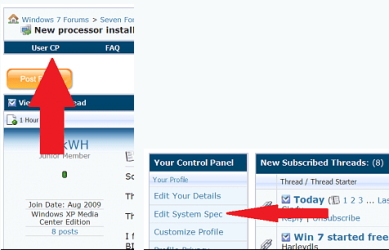
Theri are some things we need like your system specs filled out. If a laptop the maker and model # Thanksusercp 1.png
 

My Computer

Computer Manufacturer/Model Number
Self Built
OS
Windows 7 ultimate 64 bit / XP Home sp3
CPU
intel Core 2 Duo E8400 3.0ghz
Motherboard
Asus P5ND bios 1401
Memory
8 gigs 1066 OCZ Fata1ty
Graphics Card(s)
EVGA GTX 580 Call of Duty Black Ops Edition
Sound Card
Creative Soundblaster Audigy 2zs
Monitor(s) Displays
Asus 24in LCD's 2MS X2
Screen Resolution
1920x1080p @60Hz
Hard Drives
WD Caviar 500 Black/ WD Caviar 200 Blue
PSU
OCZ 700W GameXtreme
Case
NZXT Apollo
Cooling
Corsair H50 CPU/120mm x3 /60mm x2 /Corsair Dominator Ram
Keyboard
Logitech Bluetooth Wireless MX5000
Mouse
Logitech Bluetooth Wireless MX1000
Internet Speed
Download 19.83 Upload 0.97
Other Info
Logitech Z2300 Speakers/ Bose Noise Cancelling Headphones/Avermedia PCI-e Hybrid TV Bravo/Epson NX415 all in one/ 4 Port Powered USB Hub/ LG 10x Bluray Burner /TSST Corp DVDRW External
ive jumped to ATI now so i cant be sure about the process, but does the NV control panel show up in the ''programs & features'' list..??
 

My Computer

Computer Manufacturer/Model Number
myself
OS
SEVEN x64
CPU
Q9450 @ 3.6GHZ 1.34v
Motherboard
ASUS P5K PREMIUM P35
Memory
8GB 1066 buffalo firestix @ 1152mhz CL5
Graphics Card(s)
Sapphire HD 5970 + GTX260 (physX)
Sound Card
Creative X-FI Xtreme Gamer
Monitor(s) Displays
SAMSUNG 20'' & SAMSUNG 23'' (dual screens)
Screen Resolution
2048x1152 & 1680x1050
Hard Drives
1x seagate 160gb IDE & 1x seagate 160gb SATA
PSU
XCILIO 850w (78A)
Case
CM590 1x 120x38mm & 2x92x38mm / 4x 120x25mm
Cooling
AC7 PRO @ 92x38mm blower, Lamptron military bus bay controll
Keyboard
LOGITECH E110
Mouse
logitech NX5
Internet Speed
2MB
Other Info
its a continual ''work in progress''....
ive jumped to ATI now so i cant be sure about the process, but does the NV control panel show up in the ''programs & features'' list..??
Shows up in control panel, As Nvidia control panel
 

My Computer

Computer Manufacturer/Model Number
Self Built
OS
Windows 7 ultimate 64 bit / XP Home sp3
CPU
intel Core 2 Duo E8400 3.0ghz
Motherboard
Asus P5ND bios 1401
Memory
8 gigs 1066 OCZ Fata1ty
Graphics Card(s)
EVGA GTX 580 Call of Duty Black Ops Edition
Sound Card
Creative Soundblaster Audigy 2zs
Monitor(s) Displays
Asus 24in LCD's 2MS X2
Screen Resolution
1920x1080p @60Hz
Hard Drives
WD Caviar 500 Black/ WD Caviar 200 Blue
PSU
OCZ 700W GameXtreme
Case
NZXT Apollo
Cooling
Corsair H50 CPU/120mm x3 /60mm x2 /Corsair Dominator Ram
Keyboard
Logitech Bluetooth Wireless MX5000
Mouse
Logitech Bluetooth Wireless MX1000
Internet Speed
Download 19.83 Upload 0.97
Other Info
Logitech Z2300 Speakers/ Bose Noise Cancelling Headphones/Avermedia PCI-e Hybrid TV Bravo/Epson NX415 all in one/ 4 Port Powered USB Hub/ LG 10x Bluray Burner /TSST Corp DVDRW External
Capture.PNG

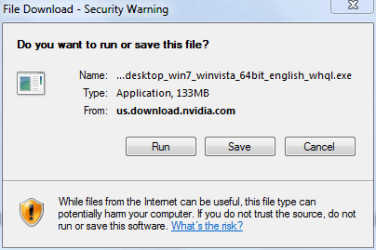
Are you saving the file or are you trying to run it as it is downloaded (in other words, which option did you select as shown above)? I recommend that you should always save files that you download and then run them from the downloaded location. Although I don't have the same graphics card as you, I use the same 195.62 driver as you are trying to install and have no problems regarding the control panel.
 

My Computer

Computer type
PC/Desktop
Computer Manufacturer/Model Number
Dwarf Dwf/11/2012 r09/2013
OS
Windows 8.1 Pro RTM x64
CPU
Intel Core-i5-3570K 4-core @ 3.4GHz (Ivy Bridge) (OC 4.4GHz)
Motherboard
ASRock Z77 Extreme4-M
Memory
4 x 4GB DDR3-1600 Corsair Vengeance CMZ8GX3M2A1600C9B (16GB)
Graphics Card(s)
MSI GeForce GTX770 Gaming OC 2GB
Sound Card
Realtek High Definition on board solution (ALC 898)
Monitor(s) Displays
ViewSonic VA1912w Widescreen (VGA)
Screen Resolution
1440x900
Hard Drives
OCZ Agility 3 SSD 120GB SATA III x2 (RAID 0)
Samsung HD501LJ 500GB SATA II x2
Hitachi HDS721010CLA332 1TB SATA II
Iomega 1.5TB Ext USB 2.0
WD 2.0TB Ext USB 3.0
PSU
XFX Pro Series 850W Semi-Modular
Case
Gigabyte IF233
Cooling
1 x 120mm Front Inlet 1 x 120mm Rear Exhaust
Keyboard
Microsoft Comfort Curve Keyboard 3000 (USB)
Mouse
Microsoft Comfort Mouse 3000 for Business (USB)
Internet Speed
NetGear DG834Gv3 ADSL Modem/Router (Ethernet) ~4.0 Mb/s (O2)
Antivirus
Avast! 8.0.1497
Browser
IE 11
Other Info
Optical Drive: HL-DT-ST BD-RE BH10LS30 SATA Bluray
Lexmark S305 Printer/Scanner/Copier (USB)
WEI Score: 8.1/8.1/8.5/8.5/8.25
Asus Eee PC 1011PX Netbook (Windows 7 x86 Starter)
ive jumped to ATI now so i cant be sure about the process, but does the NV control panel show up in the ''programs & features'' list..??
Shows up in control panel, As Nvidia control panel

no....what i mean is, is it a separate app which can be uninstalled or is it intergrated into the display driver...???
 

My Computer

Computer Manufacturer/Model Number
myself
OS
SEVEN x64
CPU
Q9450 @ 3.6GHZ 1.34v
Motherboard
ASUS P5K PREMIUM P35
Memory
8GB 1066 buffalo firestix @ 1152mhz CL5
Graphics Card(s)
Sapphire HD 5970 + GTX260 (physX)
Sound Card
Creative X-FI Xtreme Gamer
Monitor(s) Displays
SAMSUNG 20'' & SAMSUNG 23'' (dual screens)
Screen Resolution
2048x1152 & 1680x1050
Hard Drives
1x seagate 160gb IDE & 1x seagate 160gb SATA
PSU
XCILIO 850w (78A)
Case
CM590 1x 120x38mm & 2x92x38mm / 4x 120x25mm
Cooling
AC7 PRO @ 92x38mm blower, Lamptron military bus bay controll
Keyboard
LOGITECH E110
Mouse
logitech NX5
Internet Speed
2MB
Other Info
its a continual ''work in progress''....
It's integrated. ;)
 

My Computer

Computer type
PC/Desktop
Computer Manufacturer/Model Number
Dwarf Dwf/11/2012 r09/2013
OS
Windows 8.1 Pro RTM x64
CPU
Intel Core-i5-3570K 4-core @ 3.4GHz (Ivy Bridge) (OC 4.4GHz)
Motherboard
ASRock Z77 Extreme4-M
Memory
4 x 4GB DDR3-1600 Corsair Vengeance CMZ8GX3M2A1600C9B (16GB)
Graphics Card(s)
MSI GeForce GTX770 Gaming OC 2GB
Sound Card
Realtek High Definition on board solution (ALC 898)
Monitor(s) Displays
ViewSonic VA1912w Widescreen (VGA)
Screen Resolution
1440x900
Hard Drives
OCZ Agility 3 SSD 120GB SATA III x2 (RAID 0)
Samsung HD501LJ 500GB SATA II x2
Hitachi HDS721010CLA332 1TB SATA II
Iomega 1.5TB Ext USB 2.0
WD 2.0TB Ext USB 3.0
PSU
XFX Pro Series 850W Semi-Modular
Case
Gigabyte IF233
Cooling
1 x 120mm Front Inlet 1 x 120mm Rear Exhaust
Keyboard
Microsoft Comfort Curve Keyboard 3000 (USB)
Mouse
Microsoft Comfort Mouse 3000 for Business (USB)
Internet Speed
NetGear DG834Gv3 ADSL Modem/Router (Ethernet) ~4.0 Mb/s (O2)
Antivirus
Avast! 8.0.1497
Browser
IE 11
Other Info
Optical Drive: HL-DT-ST BD-RE BH10LS30 SATA Bluray
Lexmark S305 Printer/Scanner/Copier (USB)
WEI Score: 8.1/8.1/8.5/8.5/8.25
Asus Eee PC 1011PX Netbook (Windows 7 x86 Starter)

My Computer

Computer Manufacturer/Model Number
myself
OS
SEVEN x64
CPU
Q9450 @ 3.6GHZ 1.34v
Motherboard
ASUS P5K PREMIUM P35
Memory
8GB 1066 buffalo firestix @ 1152mhz CL5
Graphics Card(s)
Sapphire HD 5970 + GTX260 (physX)
Sound Card
Creative X-FI Xtreme Gamer
Monitor(s) Displays
SAMSUNG 20'' & SAMSUNG 23'' (dual screens)
Screen Resolution
2048x1152 & 1680x1050
Hard Drives
1x seagate 160gb IDE & 1x seagate 160gb SATA
PSU
XCILIO 850w (78A)
Case
CM590 1x 120x38mm & 2x92x38mm / 4x 120x25mm
Cooling
AC7 PRO @ 92x38mm blower, Lamptron military bus bay controll
Keyboard
LOGITECH E110
Mouse
logitech NX5
Internet Speed
2MB
Other Info
its a continual ''work in progress''....

My Computer

OS
windows 7 Home Edition
CPU
Interl(R) Core(TM) i5 750 @ 2.67GHz(4 CPUs), ~ 2.8GHz
Motherboard
Gigabyte
Memory
4GB DDR3-1333
Graphics Card(s)
NVIDIA GeForce GTS 250 1GB
Sound Card
Realtek HD Audio ALC888B
Monitor(s) Displays
ViewSonic 22''
Hard Drives
3.5" SATA II 1TB
Case
NZXT GAMMA Gaming Tower
View attachment 45174

Are you saving the file or are you trying to run it as it is downloaded (in other words, which option did you select as shown above)? I recommend that you should always save files that you download and then run them from the downloaded location. Although I don't have the same graphics card as you, I use the same 195.62 driver as you are trying to install and have no problems regarding the control panel.

Yes I have, I saved it and then run it. :(
 

My Computer

OS
windows 7 Home Edition
CPU
Interl(R) Core(TM) i5 750 @ 2.67GHz(4 CPUs), ~ 2.8GHz
Motherboard
Gigabyte
Memory
4GB DDR3-1333
Graphics Card(s)
NVIDIA GeForce GTS 250 1GB
Sound Card
Realtek HD Audio ALC888B
Monitor(s) Displays
ViewSonic 22''
Hard Drives
3.5" SATA II 1TB
Case
NZXT GAMMA Gaming Tower
Ok I been researching for a solution and came across this post in this website:

http://www.sevenforums.com/graphic-cards/31637-no-nvidia-control-panel-driver-not-installing.html

I tried what this person suggested on page 2:

Hi folks. Put this to good, proper use and you should walk away from this all living to tell about it and happy. :D

Guru3D - Driver Sweeper (Setup) download from Guru3D.com

OH MY GOD I EFFING LOVE YOU MAN ! ..FINALLY it worked to install the latest driver ... So here is exactly what I did so others can maybe get it to work like I did !
I've been having MASSIVE problems with installing the latest drivers for my GPU and finally it worked !

1. I installed and let guru3d clean all my display drivers.
2. Restarted. (ITS IMPORTANT TO DO THIS!)
3. Downloaded and installed the 191.07 driver from WINDOWS UPDATE (IMPORTANT)
4. Restarted (IMPORTANT!)

note: I had to try and install the driver three times from windows update before it installed successfully ! So keep on going until it works! :P

And VOILA ! ...finally after weeks of brainstorming and swearing and only god and me knows what more.... it finally worked to install the driver ! :)

oh and im running 64bit win7

Used the sweeper on Nvidia display driver, restarted, and a black screen had the words "Nvidia, Are you sure? Y/N" I put N (Idk what would happen otherwise x_x) Went to Window Update, had the same issue as what the person said about it not working at first, did it several times but still it won't update thru Windows Update, So I went to Nvidia download driver, download it again, it did the same thing again

InstallShield Wizard Complete
The system has not been modified. To install this program at a later time, run the installation again.

Click Finish to exit the wizard

Then I see Windows update doesn't say anymore to update my Nvidia display driver. I assumed it downloaded, and restarted my computer.

Question now is, did it even download? Of couse, it did say the above statement of it not being modified and to install it later. Tells me it didn't download at all doesn't it?... And How am I able to tell what version i currently have? I went to Nvidia website, tried

Option 2: Automatically find drivers for my NVIDIA products.

And it claims I have the latest driver update, version 195.62 installed...

When I started the whole update thing, I tried this option 2 on their website and it recommended me to download the latest driver update, version 195.62 . (Which tells me I needed the update)

Most likely I'm back to square one ...
 

My Computer

OS
windows 7 Home Edition
CPU
Interl(R) Core(TM) i5 750 @ 2.67GHz(4 CPUs), ~ 2.8GHz
Motherboard
Gigabyte
Memory
4GB DDR3-1333
Graphics Card(s)
NVIDIA GeForce GTS 250 1GB
Sound Card
Realtek HD Audio ALC888B
Monitor(s) Displays
ViewSonic 22''
Hard Drives
3.5" SATA II 1TB
Case
NZXT GAMMA Gaming Tower
Look in Nvidia folder it will show what driver version you have.
 

Attachments

  • Capture.PNG
    Capture.PNG
    105.8 KB · Views: 417

My Computer

Computer type
PC/Desktop
Computer Manufacturer/Model Number
Self Built
OS
Win 10 Pro x64
CPU
Intel I5-2500K @3.3GHz
Motherboard
Asrock P67 Extreme4
Memory
16GB G.Skill Ripjaws X (4x4GB)
Graphics Card(s)
EVGA GeForce 750 Ti SC 2GB
Sound Card
ASUS Xonar DG 5.1 Channels 24-bit 96KHz PCI Interface Sound
Monitor(s) Displays
auria eq2367
Screen Resolution
1920 x 1080
Hard Drives
250GB Samsung 850 EVO SSD
1TB WD Blue
1TB Hitachi
PSU
SeaSonic X 650W 80 Plus Gold
Case
Corsair Obsidian 750D
Cooling
Corsair H60, Three 140mm case fans
Keyboard
Logitech Wireless Keyboard K520
Mouse
Logitech Wireless Mouse M310
Internet Speed
Wave Broadband ~ 100 dn 5 up
Antivirus
Windows Defender, Malwarebytes Premium
Browser
Edge, IE11, Chrome
Other Info
Laptop specs: HP g7-1365dx /
CPU: AMD A6-3420M APU with Radeon(tm) HD Graphics /
RAM: Crucial 8Gb (2x4Gb) /
SSD: Crucial M4-CT128M4SSD2 ATA Device/ FW 000F /
GFX: AMD Radeon HD 6520G /
OS: Windows 10 Pro x64
2nd Update

Ok guys, Finally it worked!!!!!!! when I used what this guy suggested as I mentioned on my above post:

Hi folks. Put this to good, proper use and you should walk away from this all living to tell about it and happy. :D

Guru3D - Driver Sweeper (Setup) download from Guru3D.com

OH MY GOD I EFFING LOVE YOU MAN ! ..FINALLY it worked to install the latest driver ... So here is exactly what I did so others can maybe get it to work like I did !
I've been having MASSIVE problems with installing the latest drivers for my GPU and finally it worked !

1. I installed and let guru3d clean all my display drivers.
2. Restarted. (ITS IMPORTANT TO DO THIS!)
3. Downloaded and installed the 191.07 driver from WINDOWS UPDATE (IMPORTANT)
4. Restarted (IMPORTANT!)

note: I had to try and install the driver three times from windows update before it installed successfully ! So keep on going until it works! :P

And VOILA ! ...finally after weeks of brainstorming and swearing and only god and me knows what more.... it finally worked to install the driver ! :)

oh and im running 64bit win7

I installed my Nvidia CD after I did all this as I mentioned. Went to their website again, and it used the 2nd option

Option 2: Automatically find drivers for my NVIDIA products

Clicked GRAPHIC DRIVERS

(I have used this before mind you, and it didn't work before)

I downloaded it by saving it, and used "Run as Administrator" (Read somewhere to use this option if it doesn't download correctly which I used before but didn't work that time either) and it finally downloaded with no problem!!

what that guy suggested in using Sweeper on Nvidia Display Drivers, it seems it did help, I'm happy to resolve this issue at last :D

Hope anyone else with such an issue will read my post and resolve theirs to! :cool:

Thank you guys for trying to help <3

------------------------------------------------------------------------------
::EDIT:: What i did exactly

1. Download Sweeper (It didn't work at first, when I click to use it, an error popped out, I figured I'll try "Run as Administor" on it and it worked.)

Guru3D - Driver Sweeper (Setup) download from Guru3D.com

2. Remove ONLY Nvidia Display Driver

3. It will reboot, if Not restart your computer. When your back to startup, a black window appears saying "Nvidia, Are you sure? N/Y" I typed N and entered. It will load and everything will appear larger resolution then it had (Well mine did) Don't panic!

*No need to use Windows Update, it doesn't download properly anyway.

5. Just Use Nvidia CD installation and install it.

6. Go to Nvida Website to update it, after your done installing the CD, here's the website:

Drivers - Download NVIDIA Drivers

Do Option 2: Automatically find drivers for my NVIDIA products

Click GRAPHIC DRIVER

Save download to computer. I closed it, rebooted, and right clicked it and hit "Run as Administrator" and it worked for me! :D

------------------------------------------------------------------------------

Again Thank you guys for helping <33 :party:
 
Last edited:

My Computer

OS
windows 7 Home Edition
CPU
Interl(R) Core(TM) i5 750 @ 2.67GHz(4 CPUs), ~ 2.8GHz
Motherboard
Gigabyte
Memory
4GB DDR3-1333
Graphics Card(s)
NVIDIA GeForce GTS 250 1GB
Sound Card
Realtek HD Audio ALC888B
Monitor(s) Displays
ViewSonic 22''
Hard Drives
3.5" SATA II 1TB
Case
NZXT GAMMA Gaming Tower
Glad to hear you got that all figured out StarYasmine and thanks for posting back with your solution hopefully that will help someone else. :D
 

My Computer

Computer type
PC/Desktop
Computer Manufacturer/Model Number
Self Built
OS
Win 10 Pro x64
CPU
Intel I5-2500K @3.3GHz
Motherboard
Asrock P67 Extreme4
Memory
16GB G.Skill Ripjaws X (4x4GB)
Graphics Card(s)
EVGA GeForce 750 Ti SC 2GB
Sound Card
ASUS Xonar DG 5.1 Channels 24-bit 96KHz PCI Interface Sound
Monitor(s) Displays
auria eq2367
Screen Resolution
1920 x 1080
Hard Drives
250GB Samsung 850 EVO SSD
1TB WD Blue
1TB Hitachi
PSU
SeaSonic X 650W 80 Plus Gold
Case
Corsair Obsidian 750D
Cooling
Corsair H60, Three 140mm case fans
Keyboard
Logitech Wireless Keyboard K520
Mouse
Logitech Wireless Mouse M310
Internet Speed
Wave Broadband ~ 100 dn 5 up
Antivirus
Windows Defender, Malwarebytes Premium
Browser
Edge, IE11, Chrome
Other Info
Laptop specs: HP g7-1365dx /
CPU: AMD A6-3420M APU with Radeon(tm) HD Graphics /
RAM: Crucial 8Gb (2x4Gb) /
SSD: Crucial M4-CT128M4SSD2 ATA Device/ FW 000F /
GFX: AMD Radeon HD 6520G /
OS: Windows 10 Pro x64
For anyones information. Once a problem is resolved just click the red triangle and report it as resolved. This way others will know and can check with a resolved thread first. Thanks. Fabe
 

My Computer

Computer Manufacturer/Model Number
Self Built
OS
Windows 7 ultimate 64 bit / XP Home sp3
CPU
intel Core 2 Duo E8400 3.0ghz
Motherboard
Asus P5ND bios 1401
Memory
8 gigs 1066 OCZ Fata1ty
Graphics Card(s)
EVGA GTX 580 Call of Duty Black Ops Edition
Sound Card
Creative Soundblaster Audigy 2zs
Monitor(s) Displays
Asus 24in LCD's 2MS X2
Screen Resolution
1920x1080p @60Hz
Hard Drives
WD Caviar 500 Black/ WD Caviar 200 Blue
PSU
OCZ 700W GameXtreme
Case
NZXT Apollo
Cooling
Corsair H50 CPU/120mm x3 /60mm x2 /Corsair Dominator Ram
Keyboard
Logitech Bluetooth Wireless MX5000
Mouse
Logitech Bluetooth Wireless MX1000
Internet Speed
Download 19.83 Upload 0.97
Other Info
Logitech Z2300 Speakers/ Bose Noise Cancelling Headphones/Avermedia PCI-e Hybrid TV Bravo/Epson NX415 all in one/ 4 Port Powered USB Hub/ LG 10x Bluray Burner /TSST Corp DVDRW External
For anyones information. Once a problem is resolved just click the red triangle and report it as resolved. This way others will know and can check with a resolved thread first. Thanks. Fabe

I didn't know how to, Was trying to find it with no luck x_x, I guess I'm blind since I'm still not sure

<== New ;(
 

My Computer

OS
windows 7 Home Edition
CPU
Interl(R) Core(TM) i5 750 @ 2.67GHz(4 CPUs), ~ 2.8GHz
Motherboard
Gigabyte
Memory
4GB DDR3-1333
Graphics Card(s)
NVIDIA GeForce GTS 250 1GB
Sound Card
Realtek HD Audio ALC888B
Monitor(s) Displays
ViewSonic 22''
Hard Drives
3.5" SATA II 1TB
Case
NZXT GAMMA Gaming Tower
That's alright we both learned something with that tip, Thanks fabe.:D
He's talking about the upper right corner,
 

Attachments

  • solved.PNG
    solved.PNG
    36.6 KB · Views: 61

My Computer

Computer type
PC/Desktop
Computer Manufacturer/Model Number
Self Built
OS
Win 10 Pro x64
CPU
Intel I5-2500K @3.3GHz
Motherboard
Asrock P67 Extreme4
Memory
16GB G.Skill Ripjaws X (4x4GB)
Graphics Card(s)
EVGA GeForce 750 Ti SC 2GB
Sound Card
ASUS Xonar DG 5.1 Channels 24-bit 96KHz PCI Interface Sound
Monitor(s) Displays
auria eq2367
Screen Resolution
1920 x 1080
Hard Drives
250GB Samsung 850 EVO SSD
1TB WD Blue
1TB Hitachi
PSU
SeaSonic X 650W 80 Plus Gold
Case
Corsair Obsidian 750D
Cooling
Corsair H60, Three 140mm case fans
Keyboard
Logitech Wireless Keyboard K520
Mouse
Logitech Wireless Mouse M310
Internet Speed
Wave Broadband ~ 100 dn 5 up
Antivirus
Windows Defender, Malwarebytes Premium
Browser
Edge, IE11, Chrome
Other Info
Laptop specs: HP g7-1365dx /
CPU: AMD A6-3420M APU with Radeon(tm) HD Graphics /
RAM: Crucial 8Gb (2x4Gb) /
SSD: Crucial M4-CT128M4SSD2 ATA Device/ FW 000F /
GFX: AMD Radeon HD 6520G /
OS: Windows 10 Pro x64
------------------------------------------------------------------------------
::EDIT:: What i did exactly

1. Download Sweeper (It didn't work at first, when I click to use it, an error popped out, I figured I'll try "Run as Administor" on it and it worked.)

Guru3D - Driver Sweeper (Setup) download from Guru3D.com

2. Remove ONLY Nvidia Display Driver

3. It will reboot, if Not restart your computer. When your back to startup, a black window appears saying "Nvidia, Are you sure? N/Y" I typed N and entered. It will load and everything will appear larger resolution then it had (Well mine did) Don't panic!

*No need to use Windows Update, it doesn't download properly anyway.

5. Just Use Nvidia CD installation and install it.

6. Go to Nvida Website to update it, after your done installing the CD, here's the website:

Drivers - Download NVIDIA Drivers

Do Option 2: Automatically find drivers for my NVIDIA products

Click GRAPHIC DRIVER

Save download to computer. I closed it, rebooted, and right clicked it and hit "Run as Administrator" and it worked for me! :D

------------------------------------------------------------------------------

Again Thank you guys for helping <33 :party:[/QUOTE]

It's nice to know that using the tried and true standard procedure for installing drivers still works. :)
 

My Computer

Computer type
PC/Desktop
Computer Manufacturer/Model Number
Home built
OS
Windows 7 Ult, Windows 8.1 Pro,
CPU
Q9650-4.275GHz, E8600 4.5GHz, E6750-3.8GHz
Motherboard
Evga 780i FTW
Memory
G.Skill PC2 9600 1200Mhz 5 5 5 15 2T
Graphics Card(s)
GTX480
Sound Card
Asus Xonar D2
Monitor(s) Displays
HannsG
Screen Resolution
1680X1050
Hard Drives
GSkill Phoenix Pro 120GB SSD
PSU
ThermalTake Toughpower 1000Watt modular
Case
ThermalTake XaserV
Cooling
Xigmatek S1283
Keyboard
Logitech G15
Mouse
Logitech G9
Internet Speed
T1
Back
Top