I changed permissions of a drive but now 'drive is not accessible'

tomskii

New member
Local time
2:24 AM
Messages
25
I was trying to deny access of an external hard drive to other users on my PC but I have somehow managed to deny access to everyone including myself.

I right clicked on the drive then: > Security > Advanced > Change Permissions > Edit

My memory is a bit fuzzy what I then did, but I think I selected a drop down that would indicate everyone that wasn't an admin got selected (thinking that myself being an admin would therefore mean I would be excluded from the selection). Underneath that were two columns of radio buttons or check boxes: one column for access and the other for deny. I selected the top deny radio/check box which selected the entire column. I ok'd that and then Windows went about changing all the files/folders.

I now get 'drive is not accessible' and 'access denied' when clicking on the drive and there is no Security tab on the properties of the drive either. As I said I am an admin on the PC.

Is there any way I can make this drive accessible again without losing any of the data?
 

My Computer My Computer

At a glance

Windows 7 Home Premium 64 bit
Computer type
PC/Desktop
Computer Manufacturer/Model Number
Arbico
OS
Windows 7 Home Premium 64 bit
tomskii, welcome to the forums

Use a system restore going to before you changed the permission.

:ar: System Restore
 

My Computer My Computer

At a glance

Windows 10 Pro X64Intel(R) Core(TM) i5-3570K CPU OC@ 4.5GHZ Turbo8.00 GB DDR3 1600MhzMSI Gaming X GTX 1070
Computer type
PC/Desktop
Computer Manufacturer/Model Number
Dude Build
OS
Windows 10 Pro X64
CPU
Intel(R) Core(TM) i5-3570K CPU OC@ 4.5GHZ Turbo
Motherboard
MSI Z77A-G45 Gaming
Memory
8.00 GB DDR3 1600Mhz
Graphics Card(s)
MSI Gaming X GTX 1070
Sound Card
Realtek High Definition
Monitor(s) Displays
Dell S23O9W, HP L1710
Screen Resolution
DELL-1920 x 1080 HP-1280 x1024
Hard Drives
Crucial m4 256 SSD, WD 7200RPM 500GB WD 1TB
PSU
Seasonic X650 GOLD
Case
Zalman Z12
Cooling
Antec Kuhler 920
Keyboard
Logitech
Mouse
MSI DS100 Interceptor
Internet Speed
50 down and 5 up
Antivirus
MSE
Browser
Chrome, IE 11
Other Info
Logitech X-620 Speakers
Thanks Dude. I've now tried that but System Restore did not complete successfully because it could not access a file. So I disabled antivirus as instructed and tried again - still didn't Restore. I then went back to an earlier restore point but this still didn't Restore. The unspecified error is (0x80070005) if that means anything...
 

My Computer My Computer

At a glance

Windows 7 Home Premium 64 bit
Computer type
PC/Desktop
Computer Manufacturer/Model Number
Arbico
OS
Windows 7 Home Premium 64 bit
Hi tomskii

The error 0x80070005 is an access denied error .

See if the command below will work for you .

Click on the :orb: button type CMD inside the Search programs and files box . Right click on CMD under Programs (1) and choose Run as Administrator. On the User Access Control window click on the Yes button . Command Prompt opens to path C:\Windows\System32>_

Type or paste the command below

secedit /configure /cfg %windir%\inf\defltbase.inf /db defltbase.sdb /verbose
Press <enter>

   Note
CTRL and V will not work in a command Prompt
 

My Computer My Computer

At a glance

Windows 7 Ultimate 32-Bit & Windows 7 Ultimat...Intel Core i7 CPU 950 @ 3.07GHzOCZ 6GB (3 x 2GB) 240-Pin DDR3 SDRAM DDR3 160...ATI Radeon HD 5700 Series
Computer Manufacturer/Model Number
Custom Built
OS
Windows 7 Ultimate 32-Bit & Windows 7 Ultimate 64-Bit
CPU
Intel Core i7 CPU 950 @ 3.07GHz
Motherboard
ASUS P6T DELUXE V2
Memory
OCZ 6GB (3 x 2GB) 240-Pin DDR3 SDRAM DDR3 1600 OCZ3X1600R2
Graphics Card(s)
ATI Radeon HD 5700 Series
Sound Card
OnBoard
Hard Drives
WD6400AACS-00M3B0 (640GB SATA )
PSU
CORSAIR 850w
Case
NZXT LEXA
Cooling
Intel Stock Heatsink Fan
Keyboard
Microsoft Wireless Laser Keyboard 7000
Mouse
Microsoft Wireless Laser Mouse 7000
Thanks VistaKing

I have done what you instructed but got this error in the cmd window and the drive is still not accessible:

An extended error has occurred.

The task has completed with an error.
See log %windir%\security\logs\scesrv.log for detail info.

Below is the contents of the log file:

-------------------------------------------
07 May 2013 10:13:18
----Configuration engine was initialized successfully.----

----Reading Configuration Template info...


----Configure User Rights...
SeImpersonatePrivilege must be assigned to administrators. This setting is adjusted.
SeImpersonatePrivilege must be assigned to SERVICE. This setting is adjusted.
Configure S-1-5-21-1047938238-2611085258-2283624652-1002.
remove SeDenyBatchLogonRight.
remove SeDenyInteractiveLogonRight.
Configure S-1-5-19.
Configure S-1-5-20.
Configure S-1-5-32-544.
Configure S-1-5-32-551.
Configure S-1-5-32-559.
Configure S-1-5-32-545.
Configure S-1-1-0.
Configure S-1-5-6.
Configure S-1-5-21-1047938238-2611085258-2283624652-501.
add SeDenyNetworkLogonRight.
add SeDenyInteractiveLogonRight.
Configure S-1-5-32-555.
Configure S-1-5-80-0.
Configure S-1-5-80-3139157870-2983391045-3678747466-658725712-1809340420.

User Rights configuration was completed successfully.


----Configure Group Membership...
Configure Users.
remove TheCore\Betsy.
remove TheCore\Mimi.

Group Membership configuration was completed successfully.


----Configure 64-bit Registry Keys...
Configure users\.default.
Configure machine\software.
Warning 1336: The access control list (ACL) structure is invalid.
Error setting security on machine\software\Macrovision.

Configuration of Registry Keys was completed with one or more errors.


----Configure 32-bit Registry Keys...
Configure machine\software.
Warning 1336: The access control list (ACL) structure is invalid.
Error setting security on machine\software\Macrovision.

Configuration of Registry Keys was completed with one or more errors.


----Configure File Security...
Configure c:\program files\common files\speechengines\microsoft\tts.
Warning 2: The system cannot find the file specified.
Error setting security on c:\program files\common files\speechengines\microsoft\tts.
Configure c:\programdata\microsoft\windows\drm.
Configure c:\programdata\microsoft\windows\drm\cache.
Configure c:\windows\repair\default.
Warning 3: The system cannot find the path specified.
Error setting security on c:\windows\repair\default.
Configure c:\windows\repair\ntuser.dat.
Warning 3: The system cannot find the path specified.
Error setting security on c:\windows\repair\ntuser.dat.
Configure c:\windows\repair\sam.
Warning 3: The system cannot find the path specified.
Error setting security on c:\windows\repair\sam.
Configure c:\windows\repair\security.
Warning 3: The system cannot find the path specified.
Error setting security on c:\windows\repair\security.
Configure c:\windows\repair\software.
Warning 3: The system cannot find the path specified.
Error setting security on c:\windows\repair\software.
Configure c:\windows\repair\system.
Warning 3: The system cannot find the path specified.
Error setting security on c:\windows\repair\system.
Configure c:\windows\system32\windows media.
Warning 2: The system cannot find the file specified.
Error setting security on c:\windows\system32\windows media.
Configure c:\windows\syswow64\export.
Warning 2: The system cannot find the file specified.
Error setting security on c:\windows\syswow64\export.
Configure c:\windows\syswow64\ias.
Warning 2: The system cannot find the file specified.
Error setting security on c:\windows\syswow64\ias.

File Security configuration was completed successfully.


----Configure General Service Settings...
Configure sysmonlog.
Error 1060: The specified service does not exist as an installed service.
Error opening sysmonlog.
Configure SamSs.
Configure ntmssvc.
Error 1060: The specified service does not exist as an installed service.
Error opening ntmssvc.
Configure netddedsdm.
Error 1060: The specified service does not exist as an installed service.
Error opening netddedsdm.
Configure netdde.
Error 1060: The specified service does not exist as an installed service.
Error opening netdde.
Configure dmserver.
Error 1060: The specified service does not exist as an installed service.
Error opening dmserver.
Configure clipsrv.
Error 1060: The specified service does not exist as an installed service.
Error opening clipsrv.
Configure Browser.

General Service configuration was completed successfully.


----Configure available attachment engines...

Configuration of attachment engines was completed successfully.


----Configure Security Policy...
Configure password information.
Administrator account is disabled.
Guest account is disabled.

System Access configuration was completed successfully.
LSA anonymous lookup names setting : existing SD = D:(D;;0x800;;;AN)(A;;0xf1fff;;;BA)(A;;0x20801;;;WD)(A;;0x801;;;AN)(A;;0x1000;;;LS)(A;;0x1000;;;NS)(A;;0x1000;;;S-1-5-17).
Configure LSA anonymous lookup setting.
Configure machine\software\microsoft\windows nt\currentversion\setup\recoveryconsole\securitylevel.
Configure machine\software\microsoft\windows nt\currentversion\setup\recoveryconsole\setcommand.
Configure machine\software\microsoft\windows nt\currentversion\winlogon\scremoveoption.
Configure machine\software\microsoft\windows\currentversion\policies\system\dontdisplaylastusername.
Configure machine\software\microsoft\windows\currentversion\policies\system\legalnoticecaption.
Configure machine\software\microsoft\windows\currentversion\policies\system\legalnoticetext.
Configure machine\software\microsoft\windows\currentversion\policies\system\scforceoption.
Configure machine\software\microsoft\windows\currentversion\policies\system\shutdownwithoutlogon.
Configure machine\software\microsoft\windows\currentversion\policies\system\undockwithoutlogon.
Configure machine\software\policies\microsoft\windows\safer\codeidentifiers\authenticodeenabled.
Configure machine\system\currentcontrolset\control\lsa\auditbaseobjects.
Configure machine\system\currentcontrolset\control\lsa\crashonauditfail.
Configure machine\system\currentcontrolset\control\lsa\disabledomaincreds.
Configure machine\system\currentcontrolset\control\lsa\everyoneincludesanonymous.
Configure machine\system\currentcontrolset\control\lsa\fipsalgorithmpolicy\enabled.
Configure machine\system\currentcontrolset\control\lsa\forceguest.
Configure machine\system\currentcontrolset\control\lsa\fullprivilegeauditing.
Configure machine\system\currentcontrolset\control\lsa\nolmhash.
Configure machine\system\currentcontrolset\control\lsa\restrictanonymous.
Configure machine\system\currentcontrolset\control\lsa\restrictanonymoussam.
Configure machine\system\currentcontrolset\control\print\providers\lanman print services\servers\addprinterdrivers.
Configure machine\system\currentcontrolset\control\session manager\kernel\obcaseinsensitive.
Configure machine\system\currentcontrolset\control\session manager\memory management\clearpagefileatshutdown.
Configure machine\system\currentcontrolset\control\session manager\protectionmode.
Configure machine\system\currentcontrolset\services\lanmanserver\parameters\autodisconnect.
Configure machine\system\currentcontrolset\services\lanmanserver\parameters\enableforcedlogoff.
Configure machine\system\currentcontrolset\services\lanmanserver\parameters\enablesecuritysignature.
Configure machine\system\currentcontrolset\services\lanmanserver\parameters\requiresecuritysignature.
Configure machine\system\currentcontrolset\services\lanmanserver\parameters\restrictnullsessaccess.
Configure machine\system\currentcontrolset\services\lanmanworkstation\parameters\enableplaintextpassword.
Configure machine\system\currentcontrolset\services\lanmanworkstation\parameters\enablesecuritysignature.
Configure machine\system\currentcontrolset\services\lanmanworkstation\parameters\requiresecuritysignature.
Configure machine\system\currentcontrolset\services\ldap\ldapclientintegrity.

Configuration of Registry Values was completed successfully.
Configure log settings.

Audit/Log configuration was completed successfully.


----Configure available attachment engines...

Configuration of attachment engines was completed successfully.


----Un-initialize configuration engine...

 

Attachments

  • cmd.png
    cmd.png
    11.5 KB · Views: 8

My Computer My Computer

At a glance

Windows 7 Home Premium 64 bit
Computer type
PC/Desktop
Computer Manufacturer/Model Number
Arbico
OS
Windows 7 Home Premium 64 bit
Did you run this command under a Guest account ? I also see you didn't run the command inside an elevated command prompt .
 

My Computer My Computer

At a glance

Windows 7 Ultimate 32-Bit & Windows 7 Ultimat...Intel Core i7 CPU 950 @ 3.07GHzOCZ 6GB (3 x 2GB) 240-Pin DDR3 SDRAM DDR3 160...ATI Radeon HD 5700 Series
Computer Manufacturer/Model Number
Custom Built
OS
Windows 7 Ultimate 32-Bit & Windows 7 Ultimate 64-Bit
CPU
Intel Core i7 CPU 950 @ 3.07GHz
Motherboard
ASUS P6T DELUXE V2
Memory
OCZ 6GB (3 x 2GB) 240-Pin DDR3 SDRAM DDR3 1600 OCZ3X1600R2
Graphics Card(s)
ATI Radeon HD 5700 Series
Sound Card
OnBoard
Hard Drives
WD6400AACS-00M3B0 (640GB SATA )
PSU
CORSAIR 850w
Case
NZXT LEXA
Cooling
Intel Stock Heatsink Fan
Keyboard
Microsoft Wireless Laser Keyboard 7000
Mouse
Microsoft Wireless Laser Mouse 7000
Hi VistaKing

No I ran it under my account. I've just done it again using the instructions on this forum on how to run an elevated command prompt and I'm still getting an error.

cmd2.png

This is the log:

-------------------------------------------
07 May 2013 10:37:06
----Configuration engine was initialized successfully.----

----Reading Configuration Template info...


----Configure User Rights...
SeImpersonatePrivilege must be assigned to administrators. This setting is adjusted.
SeImpersonatePrivilege must be assigned to SERVICE. This setting is adjusted.
Configure S-1-5-19.
Configure S-1-5-20.
Configure S-1-5-32-544.
Configure S-1-5-32-551.
Configure S-1-5-32-559.
Configure S-1-5-32-545.
Configure S-1-1-0.
Configure S-1-5-6.
Configure S-1-5-21-1047938238-2611085258-2283624652-501.
Configure S-1-5-32-555.
Configure S-1-5-80-0.
Configure S-1-5-80-3139157870-2983391045-3678747466-658725712-1809340420.

User Rights configuration was completed successfully.


----Configure Group Membership...
Configure Users.

Group Membership configuration was completed successfully.


----Configure 64-bit Registry Keys...
Configure users\.default.
Configure machine\software.
Warning 1336: The access control list (ACL) structure is invalid.
Error setting security on machine\software\Macrovision.

Configuration of Registry Keys was completed with one or more errors.


----Configure 32-bit Registry Keys...
Configure machine\software.
Warning 1336: The access control list (ACL) structure is invalid.
Error setting security on machine\software\Macrovision.

Configuration of Registry Keys was completed with one or more errors.


----Configure File Security...
Configure c:\program files\common files\speechengines\microsoft\tts.
Warning 2: The system cannot find the file specified.
Error setting security on c:\program files\common files\speechengines\microsoft\tts.
Configure c:\programdata\microsoft\windows\drm.
Configure c:\programdata\microsoft\windows\drm\cache.
Configure c:\windows\repair\default.
Warning 3: The system cannot find the path specified.
Error setting security on c:\windows\repair\default.
Configure c:\windows\repair\ntuser.dat.
Warning 3: The system cannot find the path specified.
Error setting security on c:\windows\repair\ntuser.dat.
Configure c:\windows\repair\sam.
Warning 3: The system cannot find the path specified.
Error setting security on c:\windows\repair\sam.
Configure c:\windows\repair\security.
Warning 3: The system cannot find the path specified.
Error setting security on c:\windows\repair\security.
Configure c:\windows\repair\software.
Warning 3: The system cannot find the path specified.
Error setting security on c:\windows\repair\software.
Configure c:\windows\repair\system.
Warning 3: The system cannot find the path specified.
Error setting security on c:\windows\repair\system.
Configure c:\windows\system32\windows media.
Warning 2: The system cannot find the file specified.
Error setting security on c:\windows\system32\windows media.
Configure c:\windows\syswow64\export.
Warning 2: The system cannot find the file specified.
Error setting security on c:\windows\syswow64\export.
Configure c:\windows\syswow64\ias.
Warning 2: The system cannot find the file specified.
Error setting security on c:\windows\syswow64\ias.

File Security configuration was completed successfully.


----Configure General Service Settings...
Configure sysmonlog.
Error 1060: The specified service does not exist as an installed service.
Error opening sysmonlog.
Configure SamSs.
Configure ntmssvc.
Error 1060: The specified service does not exist as an installed service.
Error opening ntmssvc.
Configure netddedsdm.
Error 1060: The specified service does not exist as an installed service.
Error opening netddedsdm.
Configure netdde.
Error 1060: The specified service does not exist as an installed service.
Error opening netdde.
Configure dmserver.
Error 1060: The specified service does not exist as an installed service.
Error opening dmserver.
Configure clipsrv.
Error 1060: The specified service does not exist as an installed service.
Error opening clipsrv.
Configure Browser.

General Service configuration was completed successfully.


----Configure available attachment engines...

Configuration of attachment engines was completed successfully.


----Configure Security Policy...
Configure password information.
Administrator account is disabled.
Guest account is disabled.

System Access configuration was completed successfully.
LSA anonymous lookup names setting : existing SD = D:(D;;0x800;;;AN)(A;;0xf1fff;;;BA)(A;;0x20801;;;WD)(A;;0x801;;;AN)(A;;0x1000;;;LS)(A;;0x1000;;;NS)(A;;0x1000;;;S-1-5-17).
Configure LSA anonymous lookup setting.
Configure machine\software\microsoft\windows nt\currentversion\setup\recoveryconsole\securitylevel.
Configure machine\software\microsoft\windows nt\currentversion\setup\recoveryconsole\setcommand.
Configure machine\software\microsoft\windows nt\currentversion\winlogon\scremoveoption.
Configure machine\software\microsoft\windows\currentversion\policies\system\dontdisplaylastusername.
Configure machine\software\microsoft\windows\currentversion\policies\system\legalnoticecaption.
Configure machine\software\microsoft\windows\currentversion\policies\system\legalnoticetext.
Configure machine\software\microsoft\windows\currentversion\policies\system\scforceoption.
Configure machine\software\microsoft\windows\currentversion\policies\system\shutdownwithoutlogon.
Configure machine\software\microsoft\windows\currentversion\policies\system\undockwithoutlogon.
Configure machine\software\policies\microsoft\windows\safer\codeidentifiers\authenticodeenabled.
Configure machine\system\currentcontrolset\control\lsa\auditbaseobjects.
Configure machine\system\currentcontrolset\control\lsa\crashonauditfail.
Configure machine\system\currentcontrolset\control\lsa\disabledomaincreds.
Configure machine\system\currentcontrolset\control\lsa\everyoneincludesanonymous.
Configure machine\system\currentcontrolset\control\lsa\fipsalgorithmpolicy\enabled.
Configure machine\system\currentcontrolset\control\lsa\forceguest.
Configure machine\system\currentcontrolset\control\lsa\fullprivilegeauditing.
Configure machine\system\currentcontrolset\control\lsa\nolmhash.
Configure machine\system\currentcontrolset\control\lsa\restrictanonymous.
Configure machine\system\currentcontrolset\control\lsa\restrictanonymoussam.
Configure machine\system\currentcontrolset\control\print\providers\lanman print services\servers\addprinterdrivers.
Configure machine\system\currentcontrolset\control\session manager\kernel\obcaseinsensitive.
Configure machine\system\currentcontrolset\control\session manager\memory management\clearpagefileatshutdown.
Configure machine\system\currentcontrolset\control\session manager\protectionmode.
Configure machine\system\currentcontrolset\services\lanmanserver\parameters\autodisconnect.
Configure machine\system\currentcontrolset\services\lanmanserver\parameters\enableforcedlogoff.
Configure machine\system\currentcontrolset\services\lanmanserver\parameters\enablesecuritysignature.
Configure machine\system\currentcontrolset\services\lanmanserver\parameters\requiresecuritysignature.
Configure machine\system\currentcontrolset\services\lanmanserver\parameters\restrictnullsessaccess.
Configure machine\system\currentcontrolset\services\lanmanworkstation\parameters\enableplaintextpassword.
Configure machine\system\currentcontrolset\services\lanmanworkstation\parameters\enablesecuritysignature.
Configure machine\system\currentcontrolset\services\lanmanworkstation\parameters\requiresecuritysignature.
Configure machine\system\currentcontrolset\services\ldap\ldapclientintegrity.

Configuration of Registry Values was completed successfully.
Configure log settings.

Audit/Log configuration was completed successfully.


----Configure available attachment engines...

Configuration of attachment engines was completed successfully.


----Un-initialize configuration engine...

Am I still doing something wrong?
 

My Computer My Computer

At a glance

Windows 7 Home Premium 64 bit
Computer type
PC/Desktop
Computer Manufacturer/Model Number
Arbico
OS
Windows 7 Home Premium 64 bit
Are you trying to access the files inside the C:\ drive ?
 

My Computer My Computer

At a glance

Windows 7 Ultimate 32-Bit & Windows 7 Ultimat...Intel Core i7 CPU 950 @ 3.07GHzOCZ 6GB (3 x 2GB) 240-Pin DDR3 SDRAM DDR3 160...ATI Radeon HD 5700 Series
Computer Manufacturer/Model Number
Custom Built
OS
Windows 7 Ultimate 32-Bit & Windows 7 Ultimate 64-Bit
CPU
Intel Core i7 CPU 950 @ 3.07GHz
Motherboard
ASUS P6T DELUXE V2
Memory
OCZ 6GB (3 x 2GB) 240-Pin DDR3 SDRAM DDR3 1600 OCZ3X1600R2
Graphics Card(s)
ATI Radeon HD 5700 Series
Sound Card
OnBoard
Hard Drives
WD6400AACS-00M3B0 (640GB SATA )
PSU
CORSAIR 850w
Case
NZXT LEXA
Cooling
Intel Stock Heatsink Fan
Keyboard
Microsoft Wireless Laser Keyboard 7000
Mouse
Microsoft Wireless Laser Mouse 7000
The drive that I changed the permissions to and can't access is the D drive.
 

My Computer My Computer

At a glance

Windows 7 Home Premium 64 bit
Computer type
PC/Desktop
Computer Manufacturer/Model Number
Arbico
OS
Windows 7 Home Premium 64 bit
Ok let's try this

Open an elevated command prompt .

Type the command below
CD /D D:
press <Enter>

Type this command
icacls * /T /Q /C /RESET
press <Enter>
 

My Computer My Computer

At a glance

Windows 7 Ultimate 32-Bit & Windows 7 Ultimat...Intel Core i7 CPU 950 @ 3.07GHzOCZ 6GB (3 x 2GB) 240-Pin DDR3 SDRAM DDR3 160...ATI Radeon HD 5700 Series
Computer Manufacturer/Model Number
Custom Built
OS
Windows 7 Ultimate 32-Bit & Windows 7 Ultimate 64-Bit
CPU
Intel Core i7 CPU 950 @ 3.07GHz
Motherboard
ASUS P6T DELUXE V2
Memory
OCZ 6GB (3 x 2GB) 240-Pin DDR3 SDRAM DDR3 1600 OCZ3X1600R2
Graphics Card(s)
ATI Radeon HD 5700 Series
Sound Card
OnBoard
Hard Drives
WD6400AACS-00M3B0 (640GB SATA )
PSU
CORSAIR 850w
Case
NZXT LEXA
Cooling
Intel Stock Heatsink Fan
Keyboard
Microsoft Wireless Laser Keyboard 7000
Mouse
Microsoft Wireless Laser Mouse 7000
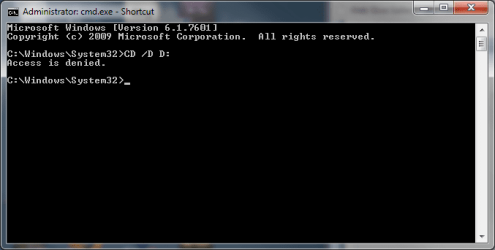
On typing the first command I get access denied so I assume I don't enter the 2nd command. Or should I?

cmd3.png
 

My Computer My Computer

At a glance

Windows 7 Home Premium 64 bit
Computer type
PC/Desktop
Computer Manufacturer/Model Number
Arbico
OS
Windows 7 Home Premium 64 bit
Do this on an administrator rights account

Try this

Click on the :orb: button type CMD inside Search programs and files . Right click on CMD under neath Programs (1) choose Run as administrator . On the User Access Control window click on the Yes button . Inside the Command Prompt window input the commands below .

CD D:

press <Enter>

Type this command

icacls * /T /Q /C /RESET
press <ENTER>
 

My Computer My Computer

At a glance

Windows 7 Ultimate 32-Bit & Windows 7 Ultimat...Intel Core i7 CPU 950 @ 3.07GHzOCZ 6GB (3 x 2GB) 240-Pin DDR3 SDRAM DDR3 160...ATI Radeon HD 5700 Series
Computer Manufacturer/Model Number
Custom Built
OS
Windows 7 Ultimate 32-Bit & Windows 7 Ultimate 64-Bit
CPU
Intel Core i7 CPU 950 @ 3.07GHz
Motherboard
ASUS P6T DELUXE V2
Memory
OCZ 6GB (3 x 2GB) 240-Pin DDR3 SDRAM DDR3 1600 OCZ3X1600R2
Graphics Card(s)
ATI Radeon HD 5700 Series
Sound Card
OnBoard
Hard Drives
WD6400AACS-00M3B0 (640GB SATA )
PSU
CORSAIR 850w
Case
NZXT LEXA
Cooling
Intel Stock Heatsink Fan
Keyboard
Microsoft Wireless Laser Keyboard 7000
Mouse
Microsoft Wireless Laser Mouse 7000
Hi VistaKing

As I said before when I enter CD D: I get access denied and the command window reverts to C:\Windows\System32>

This is the problem I don't have acces to the D drive.

I'm doing it form an admin account and I even set up a new admin account to try that and I get the same.

When following your instructions though, I don't get this:

On the User Access Control window click on the Yes button

It just goes straight to the command window.
 

My Computer My Computer

At a glance

Windows 7 Home Premium 64 bit
Computer type
PC/Desktop
Computer Manufacturer/Model Number
Arbico
OS
Windows 7 Home Premium 64 bit
Are you using the built-in Administrator account ? Or you created a new user account from within Control Panel . You would see the UAC window when you right click on the CMD and choose Run as administrator . Do you have UAC disabled ?
 

My Computer My Computer

At a glance

Windows 7 Ultimate 32-Bit & Windows 7 Ultimat...Intel Core i7 CPU 950 @ 3.07GHzOCZ 6GB (3 x 2GB) 240-Pin DDR3 SDRAM DDR3 160...ATI Radeon HD 5700 Series
Computer Manufacturer/Model Number
Custom Built
OS
Windows 7 Ultimate 32-Bit & Windows 7 Ultimate 64-Bit
CPU
Intel Core i7 CPU 950 @ 3.07GHz
Motherboard
ASUS P6T DELUXE V2
Memory
OCZ 6GB (3 x 2GB) 240-Pin DDR3 SDRAM DDR3 1600 OCZ3X1600R2
Graphics Card(s)
ATI Radeon HD 5700 Series
Sound Card
OnBoard
Hard Drives
WD6400AACS-00M3B0 (640GB SATA )
PSU
CORSAIR 850w
Case
NZXT LEXA
Cooling
Intel Stock Heatsink Fan
Keyboard
Microsoft Wireless Laser Keyboard 7000
Mouse
Microsoft Wireless Laser Mouse 7000
Sorry I don't know whether I have UAC disabled or not - I'm not familiar with that. How do I check or make sure it is enabled? I'm using my account that I set up the first time I ran windows when I got the PC.
 

My Computer My Computer

At a glance

Windows 7 Home Premium 64 bit
Computer type
PC/Desktop
Computer Manufacturer/Model Number
Arbico
OS
Windows 7 Home Premium 64 bit

My Computer My Computer

At a glance

Windows 7 Ultimate 32-Bit & Windows 7 Ultimat...Intel Core i7 CPU 950 @ 3.07GHzOCZ 6GB (3 x 2GB) 240-Pin DDR3 SDRAM DDR3 160...ATI Radeon HD 5700 Series
Computer Manufacturer/Model Number
Custom Built
OS
Windows 7 Ultimate 32-Bit & Windows 7 Ultimate 64-Bit
CPU
Intel Core i7 CPU 950 @ 3.07GHz
Motherboard
ASUS P6T DELUXE V2
Memory
OCZ 6GB (3 x 2GB) 240-Pin DDR3 SDRAM DDR3 1600 OCZ3X1600R2
Graphics Card(s)
ATI Radeon HD 5700 Series
Sound Card
OnBoard
Hard Drives
WD6400AACS-00M3B0 (640GB SATA )
PSU
CORSAIR 850w
Case
NZXT LEXA
Cooling
Intel Stock Heatsink Fan
Keyboard
Microsoft Wireless Laser Keyboard 7000
Mouse
Microsoft Wireless Laser Mouse 7000
Yes I have it disabled. Which one should I have it set to: 1, 2 or 3?
 

My Computer My Computer

At a glance

Windows 7 Home Premium 64 bit
Computer type
PC/Desktop
Computer Manufacturer/Model Number
Arbico
OS
Windows 7 Home Premium 64 bit
That's fine . I have mine disabled .

Try it on the built-in administrators account

Click on :orb: type in CMD inside the Search programs and files box right click on CMD and choose Run as administrator. Inside command prompt type in
Code:
net user administrator /active:yes

Log off from your account and log in under administrator . Will have the flower icon
 

My Computer My Computer

At a glance

Windows 7 Ultimate 32-Bit & Windows 7 Ultimat...Intel Core i7 CPU 950 @ 3.07GHzOCZ 6GB (3 x 2GB) 240-Pin DDR3 SDRAM DDR3 160...ATI Radeon HD 5700 Series
Computer Manufacturer/Model Number
Custom Built
OS
Windows 7 Ultimate 32-Bit & Windows 7 Ultimate 64-Bit
CPU
Intel Core i7 CPU 950 @ 3.07GHz
Motherboard
ASUS P6T DELUXE V2
Memory
OCZ 6GB (3 x 2GB) 240-Pin DDR3 SDRAM DDR3 1600 OCZ3X1600R2
Graphics Card(s)
ATI Radeon HD 5700 Series
Sound Card
OnBoard
Hard Drives
WD6400AACS-00M3B0 (640GB SATA )
PSU
CORSAIR 850w
Case
NZXT LEXA
Cooling
Intel Stock Heatsink Fan
Keyboard
Microsoft Wireless Laser Keyboard 7000
Mouse
Microsoft Wireless Laser Mouse 7000
Ok, I'm now in the administrator account but I'm still getting access denied when trying to access the D drive through the command window.
 

My Computer My Computer

At a glance

Windows 7 Home Premium 64 bit
Computer type
PC/Desktop
Computer Manufacturer/Model Number
Arbico
OS
Windows 7 Home Premium 64 bit
Can you get me a scrnshot of D:\ Properties ? Double click on the Computer icon on the desktop or click on :orb: then click on Computer . Right click on your D: drive and choose Properties . On the Properties window click on the Security tab and use snipping Tool .
 

My Computer My Computer

At a glance

Windows 7 Ultimate 32-Bit & Windows 7 Ultimat...Intel Core i7 CPU 950 @ 3.07GHzOCZ 6GB (3 x 2GB) 240-Pin DDR3 SDRAM DDR3 160...ATI Radeon HD 5700 Series
Computer Manufacturer/Model Number
Custom Built
OS
Windows 7 Ultimate 32-Bit & Windows 7 Ultimate 64-Bit
CPU
Intel Core i7 CPU 950 @ 3.07GHz
Motherboard
ASUS P6T DELUXE V2
Memory
OCZ 6GB (3 x 2GB) 240-Pin DDR3 SDRAM DDR3 1600 OCZ3X1600R2
Graphics Card(s)
ATI Radeon HD 5700 Series
Sound Card
OnBoard
Hard Drives
WD6400AACS-00M3B0 (640GB SATA )
PSU
CORSAIR 850w
Case
NZXT LEXA
Cooling
Intel Stock Heatsink Fan
Keyboard
Microsoft Wireless Laser Keyboard 7000
Mouse
Microsoft Wireless Laser Mouse 7000
Back
Top