Solved I deleted Microsoft Updates boxes in error

abuela101

New member
Local time
8:16 AM
Messages
19
Hi, I'm new here and a senior noob.

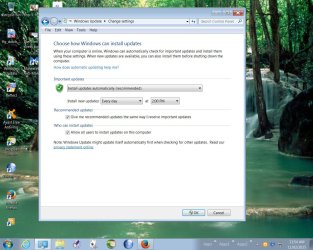
A few days ago I went into Windows Update Module and unticked the following boxes for:

1: Microsoft Updates
2. Software Notifications

Very dumb error and now I cannot get these boxes back. How , if possible, can I get Microsoft updates back? Windows Updates are fine.

Thank you for any help that you can give me!
 

My Computer My Computer

Computer type
PC/Desktop
Computer Manufacturer/Model Number
Dell Vostro
OS
Windows 7 Home Premium 64bit
Simply go back in to Windows Update and re-check them - they don't disappear.
 

My Computer My Computer

Computer type
Laptop
Computer Manufacturer/Model Number
Asus K52F or Lenovo B51-80
OS
Win 7 x64 Home Premium (and x86 VirtualBox VM)/Win10
CPU
i3 370M/i7 6500U
Motherboard
Asus/Lenovo
Memory
8GB - finally :)/8GB
Graphics Card(s)
it's an i3, dude!/dual Intel&nVidia
Sound Card
onboard
Monitor(s) Displays
15.6" built-in
Screen Resolution
1366x768/1920x1080
Hard Drives
750GB Seagate internal
Sundry external drives attached to other computers on the local network
1TB SSD on the Lenovo
PSU
n/a
Internet Speed
as much as I can get - usually on a dongle/phone, so <1MB/s
Antivirus
MSE/Defender
Browser
IE11/12/Edge/Chrome/FF(if I must)
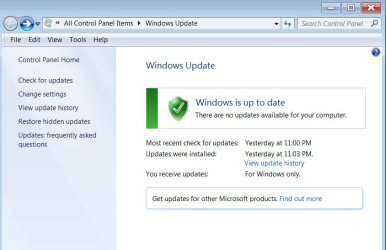
Thanks NoelDP. Since I clicked also on the OK button these boxes disappeared. Will I get only Windows Updates and not Microsoft Updates anymore? Here's a pic to show.
 

Attachments

  • Windows Update.jpg
    Windows Update.jpg
    161.1 KB · Views: 1

My Computer My Computer

Computer type
PC/Desktop
Computer Manufacturer/Model Number
Dell Vostro
OS
Windows 7 Home Premium 64bit
And here is another pic: I cannot revert back to show Microsoft updates. It doesn't allow me to change settings.
 

Attachments

  • Windows Update1.jpg
    Windows Update1.jpg
    43.8 KB · Views: 1

My Computer My Computer

Computer type
PC/Desktop
Computer Manufacturer/Model Number
Dell Vostro
OS
Windows 7 Home Premium 64bit
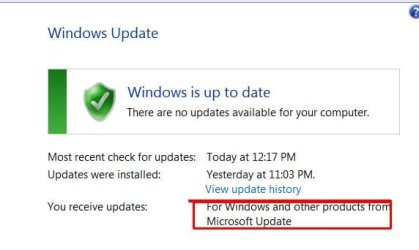
It seems to be solved. Don't ask me how. I was taken to IE11 and was asked to download Microsoft Updates. So I did and now it looks okay. Thanks I don't see the button to mark this thread as SOLVED, just the one green button that shows to mark as UNSOLVED.
 

Attachments

  • Clipboard01.jpg
    Clipboard01.jpg
    20.3 KB · Views: 12
Last edited:

My Computer My Computer

Computer type
PC/Desktop
Computer Manufacturer/Model Number
Dell Vostro
OS
Windows 7 Home Premium 64bit
Glad you got it sorted in the end!
Good luck.
 

My Computer My Computer

Computer type
Laptop
Computer Manufacturer/Model Number
Asus K52F or Lenovo B51-80
OS
Win 7 x64 Home Premium (and x86 VirtualBox VM)/Win10
CPU
i3 370M/i7 6500U
Motherboard
Asus/Lenovo
Memory
8GB - finally :)/8GB
Graphics Card(s)
it's an i3, dude!/dual Intel&nVidia
Sound Card
onboard
Monitor(s) Displays
15.6" built-in
Screen Resolution
1366x768/1920x1080
Hard Drives
750GB Seagate internal
Sundry external drives attached to other computers on the local network
1TB SSD on the Lenovo
PSU
n/a
Internet Speed
as much as I can get - usually on a dongle/phone, so <1MB/s
Antivirus
MSE/Defender
Browser
IE11/12/Edge/Chrome/FF(if I must)
Thanks NoelDP for being so kind and yes I need all the good luck as I am only self-taught and in my seventies.

Now I remember what I did to get Microsoft updates back again. I clicked numerous times *find out more* on the link in *Get updates for other Microsoft products* that took me to IE11 but only some pics were shown there. The last time I tried same it worked for me to get a valid Microsoft download page and I installed it and thus worked.
 

My Computer My Computer

Computer type
PC/Desktop
Computer Manufacturer/Model Number
Dell Vostro
OS
Windows 7 Home Premium 64bit
Back
Top