I dont see thumbnail preview pictures on taskbar.

BradMiles

New member
Local time
6:56 PM
Messages
2
I just received my new laptop, a dell inspiron 15z with Windows 7 home premium 64-bit. I have seen and read about thumbnail preview pictures popping up when you hover the mouse over a program on the taskbar like multiple internet windows for example. When i try and hover my cursor over the taskbar, only word listings pop up of the different windows i have for that program. I would like to get it so that i can see a picture preview of the window, as well as when i hover my mouse over one of the previews, that it displays it full screen like ive seen done for other people. Any help?
 

My Computer My Computer

At a glance

windows 74GB Ram
Computer Manufacturer/Model Number
Dell Inspiron 15z
OS
windows 7
Memory
4GB Ram
Hard Drives
320GB
Hello Brad, Welcome!

This means that Aero is not enabled. Right-click on My Computer and hit Properties. You will see Windows Experience Rating. You will need to hit refresh, and troubleshoot problems with Aero.

There are a few possibilities:
  1. All you need to do is hit Refresh
  2. You need a new driver for your graphics card
  3. Your graphics card is not powerful enough
 

My Computer My Computer

At a glance

Windows 7 Professional x64Intel i7 2600K OC'd @ 4620 MHz16GB GSkill Sniper 2133 Mhz (4x4GB)EVGA GeForce GTX 480 SuperClocked+
Computer Manufacturer/Model Number
Custom
OS
Windows 7 Professional x64
CPU
Intel i7 2600K OC'd @ 4620 MHz
Motherboard
Asus P8Z68-V Pro
Memory
16GB GSkill Sniper 2133 Mhz (4x4GB)
Graphics Card(s)
EVGA GeForce GTX 480 SuperClocked+
Sound Card
Realtek High Definition Audio
Monitor(s) Displays
2x Acer S273HLbmii 27"
Screen Resolution
2 x 1920x1080
Hard Drives
64GB Crucial M4 SSD

Storage: Hitachi 1TB 5400RPM, Samsung 1.5TB 5400RPM
PSU
Corsair HW Series 750w (modular)
Case
Cooler Master HAF 932 Advanced Blue Edition
Cooling
CM Hyper 212+ CPU cooler, 3x 230mm + 1x 140mm case fans
Keyboard
Logitech MK320 (wireless)
Mouse
Logitech MK320 (wireless)
Internet Speed
30 Mb/s : 2 Mb/s
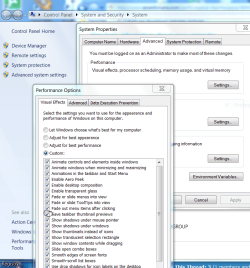
Also check the Visual effects listings in Computer>Properties>Advanced options.

There is a box that needs to be checked there.

Capture.PNG
 
Hey thanks Jonathon, i went where you told me, and i had to run the experience rating and after it was done rating my computer, the thumbnails worked! thanks
 

My Computer My Computer

At a glance

windows 74GB Ram
Computer Manufacturer/Model Number
Dell Inspiron 15z
OS
windows 7
Memory
4GB Ram
Hard Drives
320GB
Back
Top