Solved I.E and games conflict

My Computer

Computer Manufacturer/Model Number
HP, Dell, Gateway, Toshiba - 4 laptops and 2 desktops
OS
Vista, Windows7, Mint Mate, Zorin, Windows 8
CPU
from 1.6GHz Duo to i7
Monitor(s) Displays
2x HP w2207
Hard Drives
5x HDD, 7x SSD, 12x Externals
Keyboard
with trackball - no mices
Mouse
Trackball mice
Internet Speed
DSL 6000
Do I need to restore the whole image or can I replace parts of it?
 

My Computer

Computer Manufacturer/Model Number
HPE-400f
OS
Widows 7 home premium 64 bit
CPU
AMD phenom(tm) 11 x 4 processor 3.00 GHz
Motherboard
?
Memory
8.00 GB
Graphics Card(s)
ATI Radeon HD 5450
Sound Card
?
Monitor(s) Displays
HP vs17
Hard Drives
1 TB Sata
Mouse
usb
Internet Speed
download 15 mbps
You can mount the image (double click on it) and go to Computer. There is will show like any drive and you can open it and pick anything you want.
 
Last edited:

My Computer

Computer Manufacturer/Model Number
HP, Dell, Gateway, Toshiba - 4 laptops and 2 desktops
OS
Vista, Windows7, Mint Mate, Zorin, Windows 8
CPU
from 1.6GHz Duo to i7
Monitor(s) Displays
2x HP w2207
Hard Drives
5x HDD, 7x SSD, 12x Externals
Keyboard
with trackball - no mices
Mouse
Trackball mice
Internet Speed
DSL 6000
Thank you, I will try that.
 

My Computer

Computer Manufacturer/Model Number
HPE-400f
OS
Widows 7 home premium 64 bit
CPU
AMD phenom(tm) 11 x 4 processor 3.00 GHz
Motherboard
?
Memory
8.00 GB
Graphics Card(s)
ATI Radeon HD 5450
Sound Card
?
Monitor(s) Displays
HP vs17
Hard Drives
1 TB Sata
Mouse
usb
Internet Speed
download 15 mbps
Vonda be sure to scan the drive ;)
If to late :(
Repeat after restoring the folders you choose :)
Thanks you Wolfgang :)
 

My Computer

Computer type
PC/Desktop
Computer Manufacturer/Model Number
Custom assembled by me :}
OS
Win-7-Pro64bit 7-H-Prem-64bit
CPU
i7-5930K 2nd i9-9940x both water blocked VRM's too
Motherboard
ASUS SABERTOOTH X99 2nd ASUS x299 Apex
Memory
Trident-z 3200C14 2nd Trident-z 3600C16
Graphics Card(s)
EVGA 1080ti ftw3 2nd Titan Xp both water blocked
Sound Card
Built-in Realtek
Monitor(s) Displays
1-AOC G2460PG 24"G-Sync 144Hz/ 2nd 1-ASUS VG248QE 24" 144Hz
Screen Resolution
1920 x 1080 144Hz
Hard Drives
2-Samsung M.2 Evo & Evo Plus
2-Samsung 850 EVO 500GB SSD's/ 3-2.5 W.D. Black 1tb-&3-1tb/3-3.5 WD Black 1tb hdd's
PSU
EVGA SuperNOVA 1000-P2 2nd 1200-P2
Case
2-Corsair Obsidian Series 450D Black ATX Mid Tower
Cooling
Custom water loops
Keyboard
Logitech G710+/ 2nd Logitech G910
Mouse
2-RedDragon M901 Perdition 16400 dpi Gaming mouse = wired
Internet Speed
Comcast Ping 19ms 89.31mbps download speed 6.12mbps upload
Antivirus
Malwarebytes Pro/ Superantispyware Pro
Browser
FireFox & Pale moon
Other Info
2nd ASUS X299 Apex/Intel i9-9940x with Custom water loop/7H-Prem-x64/Corsair 450D case/Ram Trident-z 3600C16 4x8gb / Samsung970Evo plus 500gb SSD/Dual ssd EZ swap evo/PSU EVGA SuperNova 1200w-P2 80+Platinum/GPU Titan Xp /8-ML-140 on push-pull on 2-280GTX rads
I did scan the external HD and it is Ok.
Do I need to insert the pe disk that my son made before opening the external drive? Would it be easier to do the complete image restore? Sorry to ask so many questions, I looked at the restore video, and it still looks very complicated to me.
 

My Computer

Computer Manufacturer/Model Number
HPE-400f
OS
Widows 7 home premium 64 bit
CPU
AMD phenom(tm) 11 x 4 processor 3.00 GHz
Motherboard
?
Memory
8.00 GB
Graphics Card(s)
ATI Radeon HD 5450
Sound Card
?
Monitor(s) Displays
HP vs17
Hard Drives
1 TB Sata
Mouse
usb
Internet Speed
download 15 mbps
You can only mount the Macrium image if Macrium is installed on your system. It does not work with the DVD.
 

My Computer

Computer Manufacturer/Model Number
HP, Dell, Gateway, Toshiba - 4 laptops and 2 desktops
OS
Vista, Windows7, Mint Mate, Zorin, Windows 8
CPU
from 1.6GHz Duo to i7
Monitor(s) Displays
2x HP w2207
Hard Drives
5x HDD, 7x SSD, 12x Externals
Keyboard
with trackball - no mices
Mouse
Trackball mice
Internet Speed
DSL 6000
Yes, I do have the program installed on my pc, but he made a cd that went with it. I thought that one is needed before starting the recovery process.
 

My Computer

Computer Manufacturer/Model Number
HPE-400f
OS
Widows 7 home premium 64 bit
CPU
AMD phenom(tm) 11 x 4 processor 3.00 GHz
Motherboard
?
Memory
8.00 GB
Graphics Card(s)
ATI Radeon HD 5450
Sound Card
?
Monitor(s) Displays
HP vs17
Hard Drives
1 TB Sata
Mouse
usb
Internet Speed
download 15 mbps
Yes you need the CD for any recovery. But mounting the image works from the installed program. If you mount the image, that is not a recovery. But it allows you to e.g. copy individual files or folders from the image.
 

My Computer

Computer Manufacturer/Model Number
HP, Dell, Gateway, Toshiba - 4 laptops and 2 desktops
OS
Vista, Windows7, Mint Mate, Zorin, Windows 8
CPU
from 1.6GHz Duo to i7
Monitor(s) Displays
2x HP w2207
Hard Drives
5x HDD, 7x SSD, 12x Externals
Keyboard
with trackball - no mices
Mouse
Trackball mice
Internet Speed
DSL 6000
I think that I want to do a recovery, do I insert that cd first? It says Macrium rescue ISO on the case.
 
Last edited:

My Computer

Computer Manufacturer/Model Number
HPE-400f
OS
Widows 7 home premium 64 bit
CPU
AMD phenom(tm) 11 x 4 processor 3.00 GHz
Motherboard
?
Memory
8.00 GB
Graphics Card(s)
ATI Radeon HD 5450
Sound Card
?
Monitor(s) Displays
HP vs17
Hard Drives
1 TB Sata
Mouse
usb
Internet Speed
download 15 mbps
Yes, that's where you start. Then follow the steps that are shown in the recovery video that I linked earlier. To boot from the DVD, you might have to change the BIOS boot order.
 

My Computer

Computer Manufacturer/Model Number
HP, Dell, Gateway, Toshiba - 4 laptops and 2 desktops
OS
Vista, Windows7, Mint Mate, Zorin, Windows 8
CPU
from 1.6GHz Duo to i7
Monitor(s) Displays
2x HP w2207
Hard Drives
5x HDD, 7x SSD, 12x Externals
Keyboard
with trackball - no mices
Mouse
Trackball mice
Internet Speed
DSL 6000
I did get as far to "press anykey to boot from cd" ,but it went back to ther regular desk top. Should I change the boot order in the bios?
 

My Computer

Computer Manufacturer/Model Number
HPE-400f
OS
Widows 7 home premium 64 bit
CPU
AMD phenom(tm) 11 x 4 processor 3.00 GHz
Motherboard
?
Memory
8.00 GB
Graphics Card(s)
ATI Radeon HD 5450
Sound Card
?
Monitor(s) Displays
HP vs17
Hard Drives
1 TB Sata
Mouse
usb
Internet Speed
download 15 mbps
I changed the boot sequence, but obviously I am still doing something wrong.
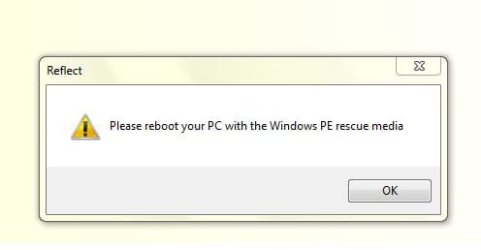
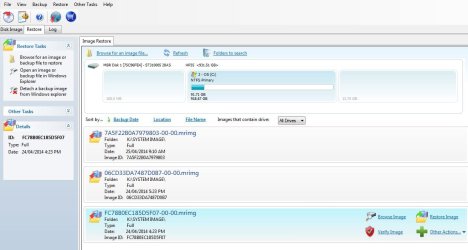
I have the rescue disc in the dvd tray, but when I click on restore, I get the following message shown in the attachment. i have tried several times.
 

Attachments

  • macr.JPG
    macr.JPG
    39.4 KB · Views: 9
  • macr2.JPG
    macr2.JPG
    14.9 KB · Views: 9
  • macr3.JPG
    macr3.JPG
    82.2 KB · Views: 3

My Computer

Computer Manufacturer/Model Number
HPE-400f
OS
Widows 7 home premium 64 bit
CPU
AMD phenom(tm) 11 x 4 processor 3.00 GHz
Motherboard
?
Memory
8.00 GB
Graphics Card(s)
ATI Radeon HD 5450
Sound Card
?
Monitor(s) Displays
HP vs17
Hard Drives
1 TB Sata
Mouse
usb
Internet Speed
download 15 mbps
Back
Top