Solved I E Not Working in W7 Now ?

Del 80

New member
Local time
7:17 PM
Messages
80
Location
England
Someone has given me another old Samsung notebook, running W7.......it's not been switched on for ages, it still works, but I can't get I E to work at all......tried everything that's suggested online to no avail, it just says "I E cannot display the webpage"......I know that W7 is no longer supported, but is it too late to get it working ?.......Thanks.
 

My Computer

Computer type
Laptop
Computer Manufacturer/Model Number
Dell Inspiron 1545 / Toshiba Satellite
OS
Windows 10
Memory
4 GB
Antivirus
Windows Defender
Browser
Microsoft Edge
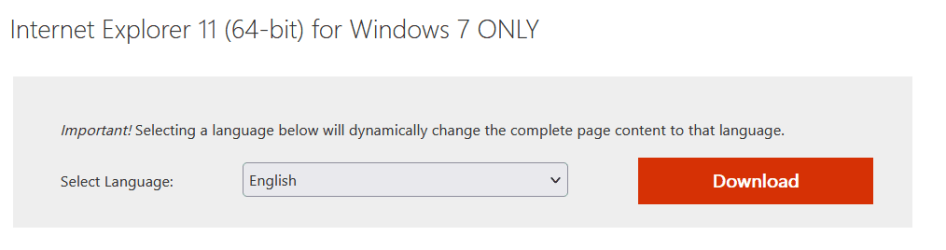
Internet Explorer 11.0.290 (current version) works fine, even if you start from scratch and do a clean re-install of Windows 7.

If that Samsung laptop has not been used in ages, its IE may be a very outdated version.

Load IE and ignore the "IE cannot display the webpage" message, then click "Help - About IE".

Which version is listed in the small window that appears?
 

Attachments

  • Capture.JPG
    Capture.JPG
    18.8 KB · Views: 2

My Computer

Computer type
PC/Desktop
Computer Manufacturer/Model Number
Dell OptiPlex 9020
OS
Windows 7 Professional SP1 64-bit
CPU
Intel Core i7-4790 3.60 GHz
Memory
32 GB DDR3-1600 MHz
Graphics Card(s)
Integrated Intel HD Graphics 4600
Monitor(s) Displays
Viewsonic 32" LCD
Hard Drives
Kingston SATA 3 240 GB SSD
Internet Speed
Spectrum Internet 1000 Mbps
It says Internet Explorer 8......so I guess it's well out of date ? How do I update it please ?......bearing in mind that I can't get online.......
 

My Computer

Computer type
Laptop
Computer Manufacturer/Model Number
Dell Inspiron 1545 / Toshiba Satellite
OS
Windows 10
Memory
4 GB
Antivirus
Windows Defender
Browser
Microsoft Edge
you can go EDGE (a new Microsoft product), or IE 11, same family.

Anyway, Microsoft products are abandoning Windows 7.
 

My Computers

System One System Two

  • Computer type
    PC/Desktop
    Computer Manufacturer/Model Number
    HP Elite 800 G5
    OS
    Windows 7 Pro 64-bit
    CPU
    I7-9700
    Memory
    32 GB
  • Computer type
    Laptop
    System Manufacturer/Model Number
    ASUS UX305C
    OS
    Windows 7 Pro 64-bit
looks like SP1 is also not on that comp....it comes with IE9 as default
your going to need a W7 SP1 iso and then update either using DISM++ or Simplex
 

My Computer

Computer type
PC/Desktop
Computer Manufacturer/Model Number
medionl/Aspire 6930G/acer x55a
OS
W7 home premium 32bit/W7HP 64bit/w10 tp insider ring
CPU
E5300 dual core
Motherboard
medion MS7366
Memory
3gb
Graphics Card(s)
Nvidia Geforce 7100 Nforce 630i
Monitor(s) Displays
avixc
Internet Speed
n (isp resticted to 72)
Antivirus
mse/pands
Browser
palemoon
Other Info
Belkin Fd7050 n USB using Railink RT2870 drivers, more upto date
That Samsung laptop is much more out of date than I assumed it would be.

I agree with torchwood.

A clean install of Windows 7 SP1 and then updating it with Simplix Update Pack 23.3.15 would be the best way to go.
 

My Computer

Computer type
PC/Desktop
Computer Manufacturer/Model Number
Dell OptiPlex 9020
OS
Windows 7 Professional SP1 64-bit
CPU
Intel Core i7-4790 3.60 GHz
Memory
32 GB DDR3-1600 MHz
Graphics Card(s)
Integrated Intel HD Graphics 4600
Monitor(s) Displays
Viewsonic 32" LCD
Hard Drives
Kingston SATA 3 240 GB SSD
Internet Speed
Spectrum Internet 1000 Mbps
Thanks all for the replies.......I think maybe it is beyond saving......I assume there is no way to update it to SP1 if I can't get online ?.....other than suggested......a shame really as it still works o.k otherwise........technology Huh........
 

My Computer

Computer type
Laptop
Computer Manufacturer/Model Number
Dell Inspiron 1545 / Toshiba Satellite
OS
Windows 10
Memory
4 GB
Antivirus
Windows Defender
Browser
Microsoft Edge
'Have you still got the "CD" you used in 2016.... that'll work
 

My Computer

Computer type
PC/Desktop
Computer Manufacturer/Model Number
medionl/Aspire 6930G/acer x55a
OS
W7 home premium 32bit/W7HP 64bit/w10 tp insider ring
CPU
E5300 dual core
Motherboard
medion MS7366
Memory
3gb
Graphics Card(s)
Nvidia Geforce 7100 Nforce 630i
Monitor(s) Displays
avixc
Internet Speed
n (isp resticted to 72)
Antivirus
mse/pands
Browser
palemoon
Other Info
Belkin Fd7050 n USB using Railink RT2870 drivers, more upto date
Yes, still got it somewhere....but no provision on the machine to play it.......
 

My Computer

Computer type
Laptop
Computer Manufacturer/Model Number
Dell Inspiron 1545 / Toshiba Satellite
OS
Windows 10
Memory
4 GB
Antivirus
Windows Defender
Browser
Microsoft Edge
if you have another machine that works and a usb stick, what is stopping you from creating a bootable win 7 usb stick and downloading simplix on that other machine ?

either copy the contents of the 2016 "cd" onto a fat32 formatted usb stick

or download installation iso ( that includes sp1 ) from tinternet and extract to usb stick

plonk the updatepack or dism++ or whatever on the usb stick as well.

plug the usb stick in the sick machine and boot from it to install win7

after installation you should be able access the other files that are on the usb stick.
 

My Computers

System One System Two

  • Computer type
    PC/Desktop
    OS
    7 X64
    CPU
    i5 8400
    Motherboard
    gigabyte b365m ds3h
    Memory
    2x8gb 3200mhz
    Hard Drives
    various
    PSU
    pure power 11 400w cm
    Case
    Coolermaster
    Cooling
    cryorig m9i
  • Computer type
    PC/Desktop
    OS
    7x64
    CPU
    g5400
    Motherboard
    ga b365m ds3h
    Memory
    8gb ddr4 2400
    PSU
    xfx pro 450w
Just looking at copying the installation disc (if I can find it) onto a usb flash drive........
 

My Computer

Computer type
Laptop
Computer Manufacturer/Model Number
Dell Inspiron 1545 / Toshiba Satellite
OS
Windows 10
Memory
4 GB
Antivirus
Windows Defender
Browser
Microsoft Edge
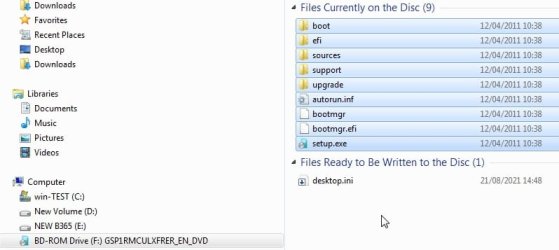
copy the contents, the files and folders highlighted in blue

disc-contents.jpg

- - - Updated - - -

might be worth checking the usb stick with bootice

View attachment BOOTICE-1.3.4x86.zip

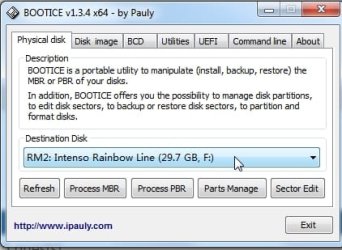
select usb stick in the dropdown

bootice-usbstick1.jpg


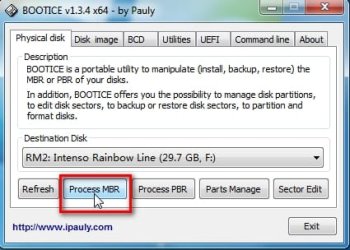
clcik process mbr

bootice-usbstick2.jpg

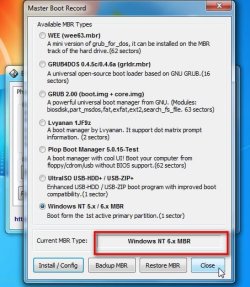
it should say NT6

bootice-usbstick3.jpg


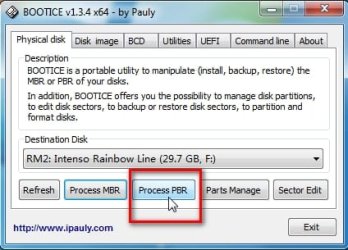
click process pbr

bootice-usbstick4.jpg


it should say bootmgr boot record

bootice-usbstick5.jpg


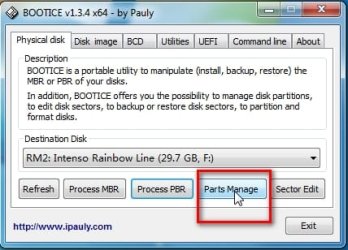
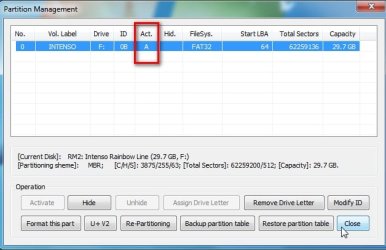
click parts manage

bootice-usbstick6.jpg


it should have A in that column to indicate it is marked active

bootice-usbstick7.jpg
 

My Computers

System One System Two

  • Computer type
    PC/Desktop
    OS
    7 X64
    CPU
    i5 8400
    Motherboard
    gigabyte b365m ds3h
    Memory
    2x8gb 3200mhz
    Hard Drives
    various
    PSU
    pure power 11 400w cm
    Case
    Coolermaster
    Cooling
    cryorig m9i
  • Computer type
    PC/Desktop
    OS
    7x64
    CPU
    g5400
    Motherboard
    ga b365m ds3h
    Memory
    8gb ddr4 2400
    PSU
    xfx pro 450w

My Computers

System One System Two

  • Computer type
    Laptop
    Computer Manufacturer/Model Number
    Toshiba satellite C650D
    OS
    Windows 7 Home Premium x64
    CPU
    AMD V120
    Memory
    4GB
    Internet Speed
    150 Mbps
    Antivirus
    MSE
    Browser
    IE11, Edge, Firefox
    Other Info
    I also have W7 Pro on my System Two, and several W7 Hyper-V VMs. My other machines run Windows 10/11. Their specs are in my Ten Forums & Eleven Forum profiles.
  • Computer type
    Laptop
    System Manufacturer/Model Number
    Lenovo Thinkpad T430
    OS
    Windows 7 Pro x64
    CPU
    Intel i5-3320M
    Memory
    8 GB
    Hard Drives
    250GB Samsung SSD 860 EVO
    Other Info
    Antivirus: MSE
Thank you, it is only 32bit........I have decided not to pursue it........
 

My Computer

Computer type
Laptop
Computer Manufacturer/Model Number
Dell Inspiron 1545 / Toshiba Satellite
OS
Windows 10
Memory
4 GB
Antivirus
Windows Defender
Browser
Microsoft Edge

My Computer

Computer type
PC/Desktop
Computer Manufacturer/Model Number
Dell OptiPlex 9020
OS
Windows 7 Professional SP1 64-bit
CPU
Intel Core i7-4790 3.60 GHz
Memory
32 GB DDR3-1600 MHz
Graphics Card(s)
Integrated Intel HD Graphics 4600
Monitor(s) Displays
Viewsonic 32" LCD
Hard Drives
Kingston SATA 3 240 GB SSD
Internet Speed
Spectrum Internet 1000 Mbps

My Computers

System One System Two

  • Computer type
    PC/Desktop
    OS
    7 X64
    CPU
    i5 8400
    Motherboard
    gigabyte b365m ds3h
    Memory
    2x8gb 3200mhz
    Hard Drives
    various
    PSU
    pure power 11 400w cm
    Case
    Coolermaster
    Cooling
    cryorig m9i
  • Computer type
    PC/Desktop
    OS
    7x64
    CPU
    g5400
    Motherboard
    ga b365m ds3h
    Memory
    8gb ddr4 2400
    PSU
    xfx pro 450w
Back
Top