I hate shortcuts that don't do anything

allandross

New member
Local time
11:32 AM
Messages
9
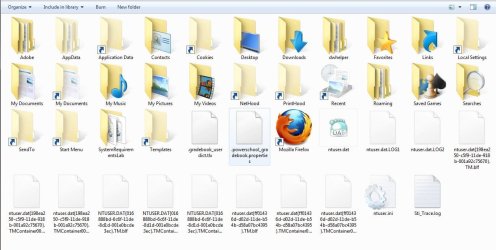
When you have your user folder, I notice "My Documents" which lets me see all my documents, but there is a lot of shortcuts to the same places. It pisses me off that I see "My documents" and click on it, only to receive a nasty message and then I see it is the shortcut. Why is the shortcut there if it doesn't work? All I want to see is the four libraries: Documents, videos, pictures and music. I don't want to see all those shortcuts, especially since most of them don't work. How can I get rid of them????:(
 

Attachments

  • screen.jpg
    screen.jpg
    91.6 KB · Views: 33
Last edited:

My Computer My Computer

Computer Manufacturer/Model Number
ASUS G1S
OS
Windows 7RC x64
CPU
Duo Core
Motherboard
ASUS
Memory
4 GB
Graphics Card(s)
NVidia GeForce 8600M GT
Screen Resolution
1650
Hard Drives
2x 320GB
Internet Speed
2M download
When you have your user folder, I notice "My Documents" which lets me see all my documents, but there is a lot of shortcuts to the same places. It pisses me off that I see "My documents" and click on it, only to receive a nasty message and then I see it is the shortcut. Why is the shortcut there if it doesn't work? All I want to see is the four libraries: Documents, videos, pictures and music. I don't want to see all those shortcuts, especially since most of them don't work. How can I get rid of them????:(
Could you post a screenshot?

You can edit the shortcuts path by right clicking on the shortcut>properties>Change Target
 

My Computer My Computer

Computer Manufacturer/Model Number
Blue Shards 1.0
OS
Windows 7 Ultimate 64bit
CPU
AMD Phenom II 555 Black Edition Quad Core OC'd to 4.0GHz
Motherboard
ASUS M4A88T-M
Memory
G Skill RipJaw 1333MHz 4GB
Graphics Card(s)
ATI raideon 4250 HD/XFX ATI Radeon 1GB HD4650
Sound Card
Realteck HD Audio
Monitor(s) Displays
2x 22" Widescreen HD Monitors
Hard Drives
500GB Sata 7500RPM
80GB IDE
PSU
850W OCUK Modular
Case
Antec Dark Fleet DF-30
Cooling
Titan Fenrir Pro (CPU)
Keyboard
Logitech Wireless
Mouse
Logitech Wireless
Internet Speed
24Meg
Other Info
Getting soon-
2TB 7200RPM HDD
+8GB RAM
30GB SSD
HD6950/70
I hate it when people assume they have complete information.

Those little shortcuts are normally hidden and are there for backwards compatibility reasons.

If you go under File Explorer's Folder options and check "Hide Protected Operating system files," you won't see them.
 

My Computer My Computer

OS
Windows 7
Solved

That was it...I had done that way back when I installed, but I must have unchecked that option somewhere. Thanks for your help.
 

My Computer My Computer

Computer Manufacturer/Model Number
ASUS G1S
OS
Windows 7RC x64
CPU
Duo Core
Motherboard
ASUS
Memory
4 GB
Graphics Card(s)
NVidia GeForce 8600M GT
Screen Resolution
1650
Hard Drives
2x 320GB
Internet Speed
2M download
Back
Top