Solved I have to save attachments more than once to get them to save

paxlaw

New member
Local time
4:52 PM
Messages
4
This just started happening a few weeks ago...when creating pdf and doc files, every time I save them as attachments, the file I am attempting to save gets replaced with a prior attachment and I have to go through the process over and over again until the correct content gets saved. Any workarounds for this? It's irritating and cuts into productivity.
 

My Computer My Computer

At a glance

Microsoft Windows 7 Professional 32-bitIntel(R) Core(TM)2 Duo CPU E7500 @ 2.93GHz4.00 GBNVIDIA GeForce 9300 GE
Computer Manufacturer/Model Number
Dell Desktop Optiplex 380
OS
Microsoft Windows 7 Professional 32-bit
CPU
Intel(R) Core(TM)2 Duo CPU E7500 @ 2.93GHz
Motherboard
Dell Inc. 0HN7XN
Memory
4.00 GB
Graphics Card(s)
NVIDIA GeForce 9300 GE
Sound Card
Realtek High Definition Audio
Screen Resolution
1920 x 1080 x 32 bits (4294967296 colors) @ 60 Hz
Hard Drives
WDC WD3200AAKS-75L9A0 ATA Device
help us out here:

Update your SevenForums System Specs
User CP (3rd item in the top menu bar) |
Your Profile | Edit System Spec
(left-hand column)

To gather info, use SIW or Speccy or System Info

Add the word laptop or desktop or netbook to the
“system manufacturer” block, for example,
Toshiba Satellite L305D notebook.

Provide full windows version info, for example:
MS Windows 7 Ultimate SP1 64-bit

Use the “Other Info” block for Optical Reader,
Mouse, touchpad, wifi adapter, speakers, monitor, etc

Scroll down and click on the SAVE CHANGES button.
 

My Computer My Computer

At a glance

MS Windows 7 Ultimate SP1 64-bitAMD A10-4600M6.00 GB Dual-Channel DDR3 @ 798MHz (11-11-12-28)AMD Radeon HD 7660G
Computer Manufacturer/Model Number
Toshiba Satellite S875D-S7239 laptop
OS
MS Windows 7 Ultimate SP1 64-bit
CPU
AMD A10-4600M
Motherboard
AMD Pumori (Socket FT1)
Memory
6.00 GB Dual-Channel DDR3 @ 798MHz (11-11-12-28)
Graphics Card(s)
AMD Radeon HD 7660G
Sound Card
High Definition Audio Device
Monitor(s) Displays
Generic PnP Monitor (1600x900@60Hz)
Screen Resolution
1600x900@60Hz
Hard Drives
SSD 119GB Corsair CSSD-V128GB2 ATA Device
Keyboard
Standard PS/2 Keyboard
Mouse
HP Wireless Optical Mobile Mouse Model FHA-3410
Internet Speed
What the local pub, local coffee shop offers.
Other Info
Optical Drive:MATSHITA BD-CMB UJ160B ATA Device


Also have an Asus ha1002xp netbook with Win 7 Ultimate installed.
Hello paxlaw, welcome to the forum. :D

Exactly which software are you using to create the pdf and doc files - e.g. MS Office Word 2010, 2007, 2003 etc. ?
 

My Computer My Computer

At a glance

Windows 7 Home Premium 64bitIntel(R) Core(TM) i3-2120 CPU @ 3.30GHz3.00 GB(1) Intel(R) HD Graphics (2) VNC Mirror Driver
Computer type
PC/Desktop
Computer Manufacturer/Model Number
Packard Bell
OS
Windows 7 Home Premium 64bit
CPU
Intel(R) Core(TM) i3-2120 CPU @ 3.30GHz
Motherboard
Packard Bell IPISB-AG
Memory
3.00 GB
Graphics Card(s)
(1) Intel(R) HD Graphics (2) VNC Mirror Driver
Sound Card
Realtek High Definition Audio
Monitor(s) Displays
AIO LCD
Screen Resolution
1920 x 1080
Hard Drives
WDC WD10EADX-22TDHB0 ATA Device
Fixed hard disk media
4 partitions
931.51 GB
Keyboard
Wireless
Mouse
Wireless
Antivirus
Microsoft Security Essentials
Browser
IE; Firefox
Other Info
Also:
Samsung N220 Plus Netbook - Windows 7 Home
HP laptop
iPad 5
Hi and thanks for the responses! @karlsnooks, I've added my system specs, as much as I can find, anyway. @Irene, I'm using MS Word 2010. This is my work PC; I do not have this issue with my home PC, which is also Windows 7 but 64-bit home edition
 

My Computer My Computer

At a glance

Microsoft Windows 7 Professional 32-bitIntel(R) Core(TM)2 Duo CPU E7500 @ 2.93GHz4.00 GBNVIDIA GeForce 9300 GE
Computer Manufacturer/Model Number
Dell Desktop Optiplex 380
OS
Microsoft Windows 7 Professional 32-bit
CPU
Intel(R) Core(TM)2 Duo CPU E7500 @ 2.93GHz
Motherboard
Dell Inc. 0HN7XN
Memory
4.00 GB
Graphics Card(s)
NVIDIA GeForce 9300 GE
Sound Card
Realtek High Definition Audio
Screen Resolution
1920 x 1080 x 32 bits (4294967296 colors) @ 60 Hz
Hard Drives
WDC WD3200AAKS-75L9A0 ATA Device
Just a couple of things to bear in mind:


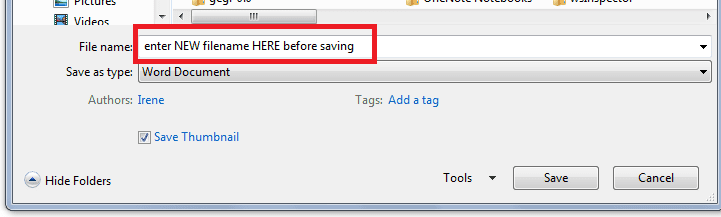
  • Before using: file > save and send > send using email, remember to save the document to a different filename from any previous one sent.

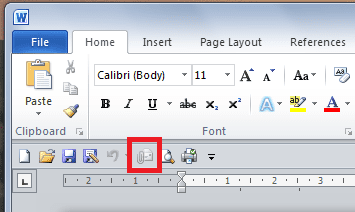
  • Personally, I find the Quick Access Toolbar very useful - you can customize it by adding a small icon which will send the document you have open as an attachment to an email. (see my example below)
Which method do you normally use to send documents?
.
.
 

Attachments

  • filename saving.PNG
    filename saving.PNG
    6.3 KB · Views: 2
  • quick link.PNG
    quick link.PNG
    10.4 KB · Views: 2

My Computer My Computer

At a glance

Windows 7 Home Premium 64bitIntel(R) Core(TM) i3-2120 CPU @ 3.30GHz3.00 GB(1) Intel(R) HD Graphics (2) VNC Mirror Driver
Computer type
PC/Desktop
Computer Manufacturer/Model Number
Packard Bell
OS
Windows 7 Home Premium 64bit
CPU
Intel(R) Core(TM) i3-2120 CPU @ 3.30GHz
Motherboard
Packard Bell IPISB-AG
Memory
3.00 GB
Graphics Card(s)
(1) Intel(R) HD Graphics (2) VNC Mirror Driver
Sound Card
Realtek High Definition Audio
Monitor(s) Displays
AIO LCD
Screen Resolution
1920 x 1080
Hard Drives
WDC WD10EADX-22TDHB0 ATA Device
Fixed hard disk media
4 partitions
931.51 GB
Keyboard
Wireless
Mouse
Wireless
Antivirus
Microsoft Security Essentials
Browser
IE; Firefox
Other Info
Also:
Samsung N220 Plus Netbook - Windows 7 Home
HP laptop
iPad 5
When creaitng docs files, I will use the Save As function under the File tab, but I will either change the file name before saving or sometimes use the same file name and replace an existing one in my system. I have used the Quick Access Toolbar as well with the same results. I have not varied in my method and it used to work until recently, so i don't know what I'm doing (or not doing) that is creating this issue.
 

My Computer My Computer

At a glance

Microsoft Windows 7 Professional 32-bitIntel(R) Core(TM)2 Duo CPU E7500 @ 2.93GHz4.00 GBNVIDIA GeForce 9300 GE
Computer Manufacturer/Model Number
Dell Desktop Optiplex 380
OS
Microsoft Windows 7 Professional 32-bit
CPU
Intel(R) Core(TM)2 Duo CPU E7500 @ 2.93GHz
Motherboard
Dell Inc. 0HN7XN
Memory
4.00 GB
Graphics Card(s)
NVIDIA GeForce 9300 GE
Sound Card
Realtek High Definition Audio
Screen Resolution
1920 x 1080 x 32 bits (4294967296 colors) @ 60 Hz
Hard Drives
WDC WD3200AAKS-75L9A0 ATA Device
Ok, if you are still doing what you always did, then lets try a repair on your Office installation:
Repair or remove Office 2010 - Word - Office.com
.
.

Repair your Office 2010 programs

Repair your Office 2010 programs by doing the following:

  1. Click Start, then click Control Panel.
  2. Click Programs and Features.
  3. Click the Office 2010 program that you want to repair, then click Change.
  4. Click Repair, then click Continue. You might need to restart your computer after the repair is complete.
 

My Computer My Computer

At a glance

Windows 7 Home Premium 64bitIntel(R) Core(TM) i3-2120 CPU @ 3.30GHz3.00 GB(1) Intel(R) HD Graphics (2) VNC Mirror Driver
Computer type
PC/Desktop
Computer Manufacturer/Model Number
Packard Bell
OS
Windows 7 Home Premium 64bit
CPU
Intel(R) Core(TM) i3-2120 CPU @ 3.30GHz
Motherboard
Packard Bell IPISB-AG
Memory
3.00 GB
Graphics Card(s)
(1) Intel(R) HD Graphics (2) VNC Mirror Driver
Sound Card
Realtek High Definition Audio
Monitor(s) Displays
AIO LCD
Screen Resolution
1920 x 1080
Hard Drives
WDC WD10EADX-22TDHB0 ATA Device
Fixed hard disk media
4 partitions
931.51 GB
Keyboard
Wireless
Mouse
Wireless
Antivirus
Microsoft Security Essentials
Browser
IE; Firefox
Other Info
Also:
Samsung N220 Plus Netbook - Windows 7 Home
HP laptop
iPad 5
Thanks Irene, I tried the repair and now I am able to create attachments correctly the first time around as before. :D
 

My Computer My Computer

At a glance

Microsoft Windows 7 Professional 32-bitIntel(R) Core(TM)2 Duo CPU E7500 @ 2.93GHz4.00 GBNVIDIA GeForce 9300 GE
Computer Manufacturer/Model Number
Dell Desktop Optiplex 380
OS
Microsoft Windows 7 Professional 32-bit
CPU
Intel(R) Core(TM)2 Duo CPU E7500 @ 2.93GHz
Motherboard
Dell Inc. 0HN7XN
Memory
4.00 GB
Graphics Card(s)
NVIDIA GeForce 9300 GE
Sound Card
Realtek High Definition Audio
Screen Resolution
1920 x 1080 x 32 bits (4294967296 colors) @ 60 Hz
Hard Drives
WDC WD3200AAKS-75L9A0 ATA Device
Thanks Irene, I tried the repair and now I am able to create attachments correctly the first time around as before. :D
Great news! :D
 

My Computer My Computer

At a glance

Windows 7 Home Premium 64bitIntel(R) Core(TM) i3-2120 CPU @ 3.30GHz3.00 GB(1) Intel(R) HD Graphics (2) VNC Mirror Driver
Computer type
PC/Desktop
Computer Manufacturer/Model Number
Packard Bell
OS
Windows 7 Home Premium 64bit
CPU
Intel(R) Core(TM) i3-2120 CPU @ 3.30GHz
Motherboard
Packard Bell IPISB-AG
Memory
3.00 GB
Graphics Card(s)
(1) Intel(R) HD Graphics (2) VNC Mirror Driver
Sound Card
Realtek High Definition Audio
Monitor(s) Displays
AIO LCD
Screen Resolution
1920 x 1080
Hard Drives
WDC WD10EADX-22TDHB0 ATA Device
Fixed hard disk media
4 partitions
931.51 GB
Keyboard
Wireless
Mouse
Wireless
Antivirus
Microsoft Security Essentials
Browser
IE; Firefox
Other Info
Also:
Samsung N220 Plus Netbook - Windows 7 Home
HP laptop
iPad 5
Back
Top