Solved I keep failing to Restore. Here is the Message. Any advice?

chrstdvd

New member
Member
Local time
10:40 PM
Messages
34
Location
McKenney, Va.
I have spent several intense days trying to figure out file sharing and networking. In the process I have changed so many things and followed so many Tutorials that I can not figure out what I have done.

Yesterday I deleted all documents from the Document Library. I did not think they were literally in that location. Whatever they are all gone. I wondered if I could restore and get them back. Some of them did come back after the first restore.

Then I thought I should just restore to about two weeks ago and I would undo all the changes I have been making and could start over. This is what I get.
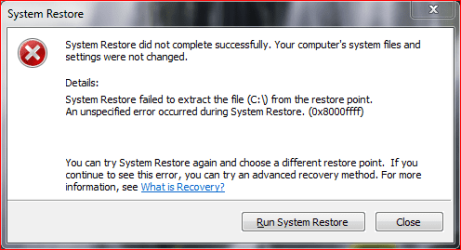
restore.PNG

Can not find Drive C:? I opened My Computer and looked at the Properties of Drive C: for some insight. I found a tab that said Restore previous version. I get a nice list of previous versions that I can open or copy but the restore button is not enabled. I was able to open one of the versions and copy My Documents and I got all my deleted documents back. I saved them to a different drive.

So anyone know what I need to do to get my restore function back on line in case I need to use it later?

Thanks for any help/advice
Billy Boot Camp
 

My Computer My Computer

At a glance

Microsoft Windows 7 Professional 64-bit 7601 ...Intel(R) Core(TM)2 Quad CPU Q8200 @ 2.33GHz6.00 GB(1) Intel(R) G45/G43 Express Chipset (Microso...
Computer type
PC/Desktop
Computer Manufacturer/Model Number
Dell Studio
OS
Microsoft Windows 7 Professional 64-bit 7601 Multiprocessor Free Service Pack 1
CPU
Intel(R) Core(TM)2 Quad CPU Q8200 @ 2.33GHz
Motherboard
Dell Inc. 0M017G
Memory
6.00 GB
Graphics Card(s)
(1) Intel(R) G45/G43 Express Chipset (Microsoft Corporation
Sound Card
(1) High Definition Audio Device (2) High Definition Audio
Monitor(s) Displays
HP2009m
Screen Resolution
1600 x 900 x 32 bits (4294967296 colors) @ 60 Hz
Hard Drives
(1) SAMSUNG HD642JJ ATA Device (2) Generic- Compact Flash USB Device (3) Generic- MS/MS-Pro USB Device (4) Generic- SD/MMC USB Device (5) Generic- SM/xD Picture USB Device
Try system restore from recovery environment
 

My Computer My Computer

At a glance

Microsoft Windows 7 Home Premium 64-bits 7601...Intel(R) Core(TM) i3 CPU M 370 @ 2.40GHz4,00 GBATI Mobility Radeon HD 5400 Series
Computer type
Laptop
Computer Manufacturer/Model Number
ACER ASPIRE 5742G
OS
Microsoft Windows 7 Home Premium 64-bits 7601 Multiprocessor Free Service Pack 1
CPU
Intel(R) Core(TM) i3 CPU M 370 @ 2.40GHz
Motherboard
Acer Aspire 5742G
Memory
4,00 GB
Graphics Card(s)
ATI Mobility Radeon HD 5400 Series
Sound Card
(1) AMD High Definition Audio Device (2) Realtek High Defi
Screen Resolution
1366 x 768 x 32 bits (4294967296 colors) @ 60 Hz
Hard Drives
WDC WD5000BEVT-22ZAT0
Thanks, I just tried that and got the same message. Still stuck.
 

My Computer My Computer

At a glance

Microsoft Windows 7 Professional 64-bit 7601 ...Intel(R) Core(TM)2 Quad CPU Q8200 @ 2.33GHz6.00 GB(1) Intel(R) G45/G43 Express Chipset (Microso...
Computer type
PC/Desktop
Computer Manufacturer/Model Number
Dell Studio
OS
Microsoft Windows 7 Professional 64-bit 7601 Multiprocessor Free Service Pack 1
CPU
Intel(R) Core(TM)2 Quad CPU Q8200 @ 2.33GHz
Motherboard
Dell Inc. 0M017G
Memory
6.00 GB
Graphics Card(s)
(1) Intel(R) G45/G43 Express Chipset (Microsoft Corporation
Sound Card
(1) High Definition Audio Device (2) High Definition Audio
Monitor(s) Displays
HP2009m
Screen Resolution
1600 x 900 x 32 bits (4294967296 colors) @ 60 Hz
Hard Drives
(1) SAMSUNG HD642JJ ATA Device (2) Generic- Compact Flash USB Device (3) Generic- MS/MS-Pro USB Device (4) Generic- SD/MMC USB Device (5) Generic- SM/xD Picture USB Device
Try system restore from recovery environment

So that did not work, but after I went back to restore and undid my last restore and that did work. Something must have happened to with that restore that confused things.

So now I want to restore and here is where I started tinkering around after I installed the AllShare Program. If I restore to this point and it works, I should be back to the way I was and can start over and make notes of what I do so I won't forget.

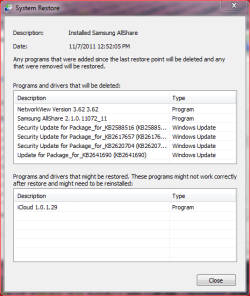
Here is the "Affected Programs screen. You think I should try this restore or just leave well enough alone?
affectedprogramsforrestore.PNG
 

My Computer My Computer

At a glance

Microsoft Windows 7 Professional 64-bit 7601 ...Intel(R) Core(TM)2 Quad CPU Q8200 @ 2.33GHz6.00 GB(1) Intel(R) G45/G43 Express Chipset (Microso...
Computer type
PC/Desktop
Computer Manufacturer/Model Number
Dell Studio
OS
Microsoft Windows 7 Professional 64-bit 7601 Multiprocessor Free Service Pack 1
CPU
Intel(R) Core(TM)2 Quad CPU Q8200 @ 2.33GHz
Motherboard
Dell Inc. 0M017G
Memory
6.00 GB
Graphics Card(s)
(1) Intel(R) G45/G43 Express Chipset (Microsoft Corporation
Sound Card
(1) High Definition Audio Device (2) High Definition Audio
Monitor(s) Displays
HP2009m
Screen Resolution
1600 x 900 x 32 bits (4294967296 colors) @ 60 Hz
Hard Drives
(1) SAMSUNG HD642JJ ATA Device (2) Generic- Compact Flash USB Device (3) Generic- MS/MS-Pro USB Device (4) Generic- SD/MMC USB Device (5) Generic- SM/xD Picture USB Device
create a "restore point" manually and try a system restore to that point. Dos that work?
 

My Computer My Computer

At a glance

Microsoft Windows 7 Home Premium 64-bits 7601...Intel(R) Core(TM) i3 CPU M 370 @ 2.40GHz4,00 GBATI Mobility Radeon HD 5400 Series
Computer type
Laptop
Computer Manufacturer/Model Number
ACER ASPIRE 5742G
OS
Microsoft Windows 7 Home Premium 64-bits 7601 Multiprocessor Free Service Pack 1
CPU
Intel(R) Core(TM) i3 CPU M 370 @ 2.40GHz
Motherboard
Acer Aspire 5742G
Memory
4,00 GB
Graphics Card(s)
ATI Mobility Radeon HD 5400 Series
Sound Card
(1) AMD High Definition Audio Device (2) Realtek High Defi
Screen Resolution
1366 x 768 x 32 bits (4294967296 colors) @ 60 Hz
Hard Drives
WDC WD5000BEVT-22ZAT0
create a "restore point" manually and try a system restore to that point. Dos that work?

Well, in the meantime I discovered that my Quicken program would not launch, so I spent the last few hours getting that fixed with a phone call to Quicken Support. I was running 2009. They gave me a free download of Quicken 2011 to replace my 2009 broken version.

I did create a new restore point as you suggest, but I am afraid to try it in case something else happens.

I think I will drive to town and get an external HD and make a backup of what I have now before I mess with anything else. I can not afford to loose my financial data, so I will get it all backed up external to the computer before I tinker anymore.

Thanks.

Billy Boot Camp
 

My Computer My Computer

At a glance

Microsoft Windows 7 Professional 64-bit 7601 ...Intel(R) Core(TM)2 Quad CPU Q8200 @ 2.33GHz6.00 GB(1) Intel(R) G45/G43 Express Chipset (Microso...
Computer type
PC/Desktop
Computer Manufacturer/Model Number
Dell Studio
OS
Microsoft Windows 7 Professional 64-bit 7601 Multiprocessor Free Service Pack 1
CPU
Intel(R) Core(TM)2 Quad CPU Q8200 @ 2.33GHz
Motherboard
Dell Inc. 0M017G
Memory
6.00 GB
Graphics Card(s)
(1) Intel(R) G45/G43 Express Chipset (Microsoft Corporation
Sound Card
(1) High Definition Audio Device (2) High Definition Audio
Monitor(s) Displays
HP2009m
Screen Resolution
1600 x 900 x 32 bits (4294967296 colors) @ 60 Hz
Hard Drives
(1) SAMSUNG HD642JJ ATA Device (2) Generic- Compact Flash USB Device (3) Generic- MS/MS-Pro USB Device (4) Generic- SD/MMC USB Device (5) Generic- SM/xD Picture USB Device
"system restore" restores your system (not documents) to an earlier day. It completes or it fails .... there is not something as a half restored system!! so don't be afraid
 

My Computer My Computer

At a glance

Microsoft Windows 7 Home Premium 64-bits 7601...Intel(R) Core(TM) i3 CPU M 370 @ 2.40GHz4,00 GBATI Mobility Radeon HD 5400 Series
Computer type
Laptop
Computer Manufacturer/Model Number
ACER ASPIRE 5742G
OS
Microsoft Windows 7 Home Premium 64-bits 7601 Multiprocessor Free Service Pack 1
CPU
Intel(R) Core(TM) i3 CPU M 370 @ 2.40GHz
Motherboard
Acer Aspire 5742G
Memory
4,00 GB
Graphics Card(s)
ATI Mobility Radeon HD 5400 Series
Sound Card
(1) AMD High Definition Audio Device (2) Realtek High Defi
Screen Resolution
1366 x 768 x 32 bits (4294967296 colors) @ 60 Hz
Hard Drives
WDC WD5000BEVT-22ZAT0
"system restore" restores your system (not documents) to an earlier day. It completes or it fails .... there is not something as a half restored system!! so don't be afraid

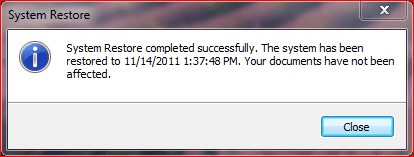
restored.PNG

Yep, it worked. What does this mean. Do I need to delete all the old restore points and start fresh?
 

My Computer My Computer

At a glance

Microsoft Windows 7 Professional 64-bit 7601 ...Intel(R) Core(TM)2 Quad CPU Q8200 @ 2.33GHz6.00 GB(1) Intel(R) G45/G43 Express Chipset (Microso...
Computer type
PC/Desktop
Computer Manufacturer/Model Number
Dell Studio
OS
Microsoft Windows 7 Professional 64-bit 7601 Multiprocessor Free Service Pack 1
CPU
Intel(R) Core(TM)2 Quad CPU Q8200 @ 2.33GHz
Motherboard
Dell Inc. 0M017G
Memory
6.00 GB
Graphics Card(s)
(1) Intel(R) G45/G43 Express Chipset (Microsoft Corporation
Sound Card
(1) High Definition Audio Device (2) High Definition Audio
Monitor(s) Displays
HP2009m
Screen Resolution
1600 x 900 x 32 bits (4294967296 colors) @ 60 Hz
Hard Drives
(1) SAMSUNG HD642JJ ATA Device (2) Generic- Compact Flash USB Device (3) Generic- MS/MS-Pro USB Device (4) Generic- SD/MMC USB Device (5) Generic- SM/xD Picture USB Device
No, if anything you should apportion more HD space to System Restore. I use 20% on my installs: System Protection - Change Disk Space Usage

May I ask what Recovery Environment you used to try System Restore after that advice was given. You want the DVD Repair console or System Repair Disk, not onboard Recovery options via F8 which depend on System files which may be messed up.
 
@gregrocker recovery environment on disk (using F8) is just a winpe environment starting winre.win. What system files does it depend on? It depends on bootmgr and bcd-store but when it starts it has all files in winre.wim. Create a system repair disk is just a copy of that same environment.

So I don't understand your post on this topic. Or am I totally wrong?
 

My Computer My Computer

At a glance

Microsoft Windows 7 Home Premium 64-bits 7601...Intel(R) Core(TM) i3 CPU M 370 @ 2.40GHz4,00 GBATI Mobility Radeon HD 5400 Series
Computer type
Laptop
Computer Manufacturer/Model Number
ACER ASPIRE 5742G
OS
Microsoft Windows 7 Home Premium 64-bits 7601 Multiprocessor Free Service Pack 1
CPU
Intel(R) Core(TM) i3 CPU M 370 @ 2.40GHz
Motherboard
Acer Aspire 5742G
Memory
4,00 GB
Graphics Card(s)
ATI Mobility Radeon HD 5400 Series
Sound Card
(1) AMD High Definition Audio Device (2) Realtek High Defi
Screen Resolution
1366 x 768 x 32 bits (4294967296 colors) @ 60 Hz
Hard Drives
WDC WD5000BEVT-22ZAT0
"system restore" restores your system (not documents) to an earlier day. It completes or it fails .... there is not something as a half restored system!! so don't be afraid

View attachment 183657

Yep, it worked. What does this mean. Do I need to delete all the old restore points and start fresh?

If the last restore point works I would say: Delete all restore points and create a new one manually. Also perform a chkdsk to check for disk errors
chkdsk /f /r c:
this will take a long time to run but checks for bad sectors
 

My Computer My Computer

At a glance

Microsoft Windows 7 Home Premium 64-bits 7601...Intel(R) Core(TM) i3 CPU M 370 @ 2.40GHz4,00 GBATI Mobility Radeon HD 5400 Series
Computer type
Laptop
Computer Manufacturer/Model Number
ACER ASPIRE 5742G
OS
Microsoft Windows 7 Home Premium 64-bits 7601 Multiprocessor Free Service Pack 1
CPU
Intel(R) Core(TM) i3 CPU M 370 @ 2.40GHz
Motherboard
Acer Aspire 5742G
Memory
4,00 GB
Graphics Card(s)
ATI Mobility Radeon HD 5400 Series
Sound Card
(1) AMD High Definition Audio Device (2) Realtek High Defi
Screen Resolution
1366 x 768 x 32 bits (4294967296 colors) @ 60 Hz
Hard Drives
WDC WD5000BEVT-22ZAT0
No, if anything you should apportion more HD space to System Restore. I use 20% on my installs: System Protection - Change Disk Space Usage

May I ask what Recovery Environment you used to try System Restore after that advice was given. You want the DVD Repair console or System Repair Disk, not onboard Recovery options via F8 which depend on System files which may be messed up.

Ok, I increased to 20%. I restarted computer and F12'ed and chose boot from disk. I used my original installation disk and got into recovery and tried a restore. If failed with the same Message as in OP.

Right now the only restore point that I can use is the one I created yesterday.
 

My Computer My Computer

At a glance

Microsoft Windows 7 Professional 64-bit 7601 ...Intel(R) Core(TM)2 Quad CPU Q8200 @ 2.33GHz6.00 GB(1) Intel(R) G45/G43 Express Chipset (Microso...
Computer type
PC/Desktop
Computer Manufacturer/Model Number
Dell Studio
OS
Microsoft Windows 7 Professional 64-bit 7601 Multiprocessor Free Service Pack 1
CPU
Intel(R) Core(TM)2 Quad CPU Q8200 @ 2.33GHz
Motherboard
Dell Inc. 0M017G
Memory
6.00 GB
Graphics Card(s)
(1) Intel(R) G45/G43 Express Chipset (Microsoft Corporation
Sound Card
(1) High Definition Audio Device (2) High Definition Audio
Monitor(s) Displays
HP2009m
Screen Resolution
1600 x 900 x 32 bits (4294967296 colors) @ 60 Hz
Hard Drives
(1) SAMSUNG HD642JJ ATA Device (2) Generic- Compact Flash USB Device (3) Generic- MS/MS-Pro USB Device (4) Generic- SD/MMC USB Device (5) Generic- SM/xD Picture USB Device
"system restore" restores your system (not documents) to an earlier day. It completes or it fails .... there is not something as a half restored system!! so don't be afraid

View attachment 183657

Yep, it worked. What does this mean. Do I need to delete all the old restore points and start fresh?

If the last restore point works I would say: Delete all restore points and create a new one manually. Also perform a chkdsk to check for disk errors
chkdsk /f /r c:
this will take a long time to run but checks for bad sectors

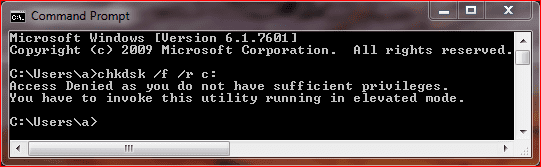
I typed in the chkdsk command above in command window and got this reply.
Cprompt.PNG

So then I went to Computer/Properties/Tools tab and clicked on check disk. I got this response.
Check.PNG

I am the only user on this computer and am logged in as the administrator. I wonder if I have changed a permission someplace that makes the computer think I am not the administrator. I am going to restart the computer and let the scheduled check disk run and then, if I can, study up on this "Computer Administrator" mystery.
 

My Computer My Computer

At a glance

Microsoft Windows 7 Professional 64-bit 7601 ...Intel(R) Core(TM)2 Quad CPU Q8200 @ 2.33GHz6.00 GB(1) Intel(R) G45/G43 Express Chipset (Microso...
Computer type
PC/Desktop
Computer Manufacturer/Model Number
Dell Studio
OS
Microsoft Windows 7 Professional 64-bit 7601 Multiprocessor Free Service Pack 1
CPU
Intel(R) Core(TM)2 Quad CPU Q8200 @ 2.33GHz
Motherboard
Dell Inc. 0M017G
Memory
6.00 GB
Graphics Card(s)
(1) Intel(R) G45/G43 Express Chipset (Microsoft Corporation
Sound Card
(1) High Definition Audio Device (2) High Definition Audio
Monitor(s) Displays
HP2009m
Screen Resolution
1600 x 900 x 32 bits (4294967296 colors) @ 60 Hz
Hard Drives
(1) SAMSUNG HD642JJ ATA Device (2) Generic- Compact Flash USB Device (3) Generic- MS/MS-Pro USB Device (4) Generic- SD/MMC USB Device (5) Generic- SM/xD Picture USB Device

My Computer My Computer

At a glance

Microsoft Windows 7 Home Premium 64-bits 7601...Intel(R) Core(TM) i3 CPU M 370 @ 2.40GHz4,00 GBATI Mobility Radeon HD 5400 Series
Computer type
Laptop
Computer Manufacturer/Model Number
ACER ASPIRE 5742G
OS
Microsoft Windows 7 Home Premium 64-bits 7601 Multiprocessor Free Service Pack 1
CPU
Intel(R) Core(TM) i3 CPU M 370 @ 2.40GHz
Motherboard
Acer Aspire 5742G
Memory
4,00 GB
Graphics Card(s)
ATI Mobility Radeon HD 5400 Series
Sound Card
(1) AMD High Definition Audio Device (2) Realtek High Defi
Screen Resolution
1366 x 768 x 32 bits (4294967296 colors) @ 60 Hz
Hard Drives
WDC WD5000BEVT-22ZAT0
yesterday's restore point is fine. The restore point before that is corrupt. So restoring to that point fails. Going back to an earlier date fails as well because internally it does a restore one by one back in time (sort of).

Why it's corrupt ... I don't know. chkdsk /r /f c:
will check your disk anyway
 

My Computer My Computer

At a glance

Microsoft Windows 7 Home Premium 64-bits 7601...Intel(R) Core(TM) i3 CPU M 370 @ 2.40GHz4,00 GBATI Mobility Radeon HD 5400 Series
Computer type
Laptop
Computer Manufacturer/Model Number
ACER ASPIRE 5742G
OS
Microsoft Windows 7 Home Premium 64-bits 7601 Multiprocessor Free Service Pack 1
CPU
Intel(R) Core(TM) i3 CPU M 370 @ 2.40GHz
Motherboard
Acer Aspire 5742G
Memory
4,00 GB
Graphics Card(s)
ATI Mobility Radeon HD 5400 Series
Sound Card
(1) AMD High Definition Audio Device (2) Realtek High Defi
Screen Resolution
1366 x 768 x 32 bits (4294967296 colors) @ 60 Hz
Hard Drives
WDC WD5000BEVT-22ZAT0
@gregrocker recovery environment on disk (using F8) is just a winpe environment starting winre.win. What system files does it depend on? It depends on bootmgr and bcd-store but when it starts it has all files in winre.wim. Create a system repair disk is just a copy of that same environment.

So I don't understand your post on this topic. Or am I totally wrong?

WinRe will sometimes not work when run from F8 or autostarted from Windows to Startup Repair, chkdsk, etc., yet it will repair using the DVD or Repair CD. My guess it is that the DVD/Repair has its own set of WinRE files which work better in boot environment. What do you think?

I am the only user on this computer and am logged in as the administrator. I wonder if I have changed a permission someplace that makes the computer think I am not the administrator. I am going to restart the computer and let the scheduled check disk run and then, if I can, study up on this "Computer Administrator" mystery.

Open the Command Box by typing CMD in Start Search box, then rightclick on result to Run As Administrator. Easiest to run it from C>Properties>Tools with both boxes checked, but it needs to reboot to dismount the HD. Running it from Command Line is mostly useful from the DVD or Repair CD whcih don't require Run As.
 
@gregrocker recovery environment on disk (using F8) is just a winpe environment starting winre.win. What system files does it depend on? It depends on bootmgr and bcd-store but when it starts it has all files in winre.wim. Create a system repair disk is just a copy of that same environment.

I even have updated winre.wim and afterwards made a system repair disk. All updates are on system repair disk as well. It's just a copy of it! A virus can make winre.wim infected but that's most unlikely.

If windows recovery doesn't start from F8 it's a bcd-problem or bootmgr problem. But if it starts the way it works should be exactly the same. Correct me if I'm wrong
 

My Computer My Computer

At a glance

Microsoft Windows 7 Home Premium 64-bits 7601...Intel(R) Core(TM) i3 CPU M 370 @ 2.40GHz4,00 GBATI Mobility Radeon HD 5400 Series
Computer type
Laptop
Computer Manufacturer/Model Number
ACER ASPIRE 5742G
OS
Microsoft Windows 7 Home Premium 64-bits 7601 Multiprocessor Free Service Pack 1
CPU
Intel(R) Core(TM) i3 CPU M 370 @ 2.40GHz
Motherboard
Acer Aspire 5742G
Memory
4,00 GB
Graphics Card(s)
ATI Mobility Radeon HD 5400 Series
Sound Card
(1) AMD High Definition Audio Device (2) Realtek High Defi
Screen Resolution
1366 x 768 x 32 bits (4294967296 colors) @ 60 Hz
Hard Drives
WDC WD5000BEVT-22ZAT0
Everything you say is true, yet WinRE sometimes doesn't work when it autostarts or is selected from Advanced Boot Options, when it will instead work when booted from the DVD or Repair CD.

Stick around and you'll see.
 
Very strange .... never had that issue
 

My Computer My Computer

At a glance

Microsoft Windows 7 Home Premium 64-bits 7601...Intel(R) Core(TM) i3 CPU M 370 @ 2.40GHz4,00 GBATI Mobility Radeon HD 5400 Series
Computer type
Laptop
Computer Manufacturer/Model Number
ACER ASPIRE 5742G
OS
Microsoft Windows 7 Home Premium 64-bits 7601 Multiprocessor Free Service Pack 1
CPU
Intel(R) Core(TM) i3 CPU M 370 @ 2.40GHz
Motherboard
Acer Aspire 5742G
Memory
4,00 GB
Graphics Card(s)
ATI Mobility Radeon HD 5400 Series
Sound Card
(1) AMD High Definition Audio Device (2) Realtek High Defi
Screen Resolution
1366 x 768 x 32 bits (4294967296 colors) @ 60 Hz
Hard Drives
WDC WD5000BEVT-22ZAT0
OK Gents, I have read all the links provided and followed all your instructions. The check disk procedure took about three hours to run and no errors were detected. While I was waiting for that I went through my old CD"S found that I had created a restore CD long ago. I tried restoring with that to no avail.

I am ready to place the Retail CD that I bought to convert this computer from VISTA to W7 and run the "Repair Your Computer" portion.

My question before I begin is: Should I create another Recovery CD before I attempt this procedure and use it to repair with? After all, I have two years of updates and the SP1 installed on here now; I am not sure, if I should repair with the original CD.
 

My Computer My Computer

At a glance

Microsoft Windows 7 Professional 64-bit 7601 ...Intel(R) Core(TM)2 Quad CPU Q8200 @ 2.33GHz6.00 GB(1) Intel(R) G45/G43 Express Chipset (Microso...
Computer type
PC/Desktop
Computer Manufacturer/Model Number
Dell Studio
OS
Microsoft Windows 7 Professional 64-bit 7601 Multiprocessor Free Service Pack 1
CPU
Intel(R) Core(TM)2 Quad CPU Q8200 @ 2.33GHz
Motherboard
Dell Inc. 0M017G
Memory
6.00 GB
Graphics Card(s)
(1) Intel(R) G45/G43 Express Chipset (Microsoft Corporation
Sound Card
(1) High Definition Audio Device (2) High Definition Audio
Monitor(s) Displays
HP2009m
Screen Resolution
1600 x 900 x 32 bits (4294967296 colors) @ 60 Hz
Hard Drives
(1) SAMSUNG HD642JJ ATA Device (2) Generic- Compact Flash USB Device (3) Generic- MS/MS-Pro USB Device (4) Generic- SD/MMC USB Device (5) Generic- SM/xD Picture USB Device
Back
Top