
Solved I keep losing html file association

OvenMaster

Folding@Home
Guru
Local time
1:15 PM
Messages
757
Location
W. Mass.
Every so often I see a post where people want to break up the link between the .html file and its associated "xxxxfiles" folder that constitutes a saved web page.

Me, I want to KEEP the association but can't. Every time I reboot and every few hours I have to reset the association.

There was a Registry tweak here at Seven Forums that enabled the setting to be seen in Folder View as well as a Microsoft article:
Managing the File System (Windows)
I tried it Microsoft's way and had no luck. I installed the SevenForums tweak but it keeps reverting to breaking up the association. I had no problem with this before a Windows Update Patch Tuesday not too long ago.. July's, I think.

I've attached a screen shot. What I WANT is either item marked in red. What I keep GETTING is the one between the two. I remember settings in Tweak UI for both Win95 and XP that enabled and retained the file association. But now in Win 7, I can't get it to stick. Any ideas are more than welcome.
 

Attachments
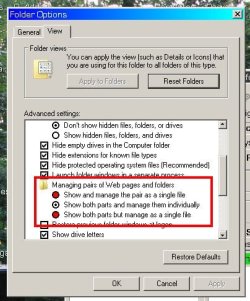
  • folders.jpg
    folders.jpg
    39.7 KB · Views: 9

My Computer My Computer

At a glance

Win10 Pro 64-bitAMD Ryzen 7 3800X32 GB Kingston DDR4-2666MSI nVidia GT 710 (2GB)
Computer type
PC/Desktop
Computer Manufacturer/Model Number
Self-Built
OS
Win10 Pro 64-bit
CPU
AMD Ryzen 7 3800X
Motherboard
Gigabyte X570 UD
Memory
32 GB Kingston DDR4-2666
Graphics Card(s)
MSI nVidia GT 710 (2GB)
Sound Card
Creative Audigy FX 5.1
Monitor(s) Displays
ViewSonic VG2439Smh 24"
Screen Resolution
1920x1080
Hard Drives
3xWD1TB; 1xSeagate 1TB... all spinning rust
PSU
EVGA 100-W1-0500-KR (500w)
Case
SilverStone PS10 (modified)
Cooling
CPU:AMD Wraith Prism. Case:3x Noctua 120mm
Keyboard
Compaq Professional PS/2
Mouse
Microsoft Basic Optical Mouse 2.0
Internet Speed
Fiber 1Gbit/sec down/up
Antivirus
Avast Free
Browser
FF, Chrome
Other Info
2x LG GH24NSC0 DVD burners, Mackie CR3 monitor speakers

My Computer My Computer

At a glance

64-bit Windows 11 Pro for WorkstationsIntel i7-8700K OC'd to 5 GHz64 GB (4x16GB) G.SKILL TridentZ RGB DDR4 3600...ASUS ROG-STRIX-GTX1080TI-O11G-GAMING
Computer type
PC/Desktop
Computer Manufacturer/Model Number
Self built custom
OS
64-bit Windows 11 Pro for Workstations
CPU
Intel i7-8700K OC'd to 5 GHz
Motherboard
ASUS ROG Maximus XI Formula Z390
Memory
64 GB (4x16GB) G.SKILL TridentZ RGB DDR4 3600 MHz
Graphics Card(s)
ASUS ROG-STRIX-GTX1080TI-O11G-GAMING
Sound Card
Integrated
Monitor(s) Displays
2 x Samsung Odyssey G7 27"
Screen Resolution
2560x1440
Hard Drives
1TB Samsung 990 PRO M.2,
4TB Samsung 990 PRO PRO M.2,
TerraMaster F8 SSD Plus NAS
PSU
Seasonic Prime Titanium 850W
Case
Thermaltake Core P3
Cooling
Corsair Hydro H115i
Keyboard
Logitech wireless K800
Mouse
Logitech MX Master 4
Internet Speed
2 Gb/s Download and 100 Mb/s Upload
Antivirus
Malwarebyte Anti-Malware Premium
Browser
Google Chrome
Other Info
Logitech Z625 speaker system,
Logitech BRIO 4K Pro webcam,
HP Color LaserJet Pro MFP M477fdn,
APC SMART-UPS RT 1000 XL - SURT1000XLI,
Galaxy S23 Plus phone
Thank you, Shawn. I've downloaded it and merged it, so I'll keep an eye on things and see what happens and report back after a bit.
Tom
 

My Computer My Computer

At a glance

Win10 Pro 64-bitAMD Ryzen 7 3800X32 GB Kingston DDR4-2666MSI nVidia GT 710 (2GB)
Computer type
PC/Desktop
Computer Manufacturer/Model Number
Self-Built
OS
Win10 Pro 64-bit
CPU
AMD Ryzen 7 3800X
Motherboard
Gigabyte X570 UD
Memory
32 GB Kingston DDR4-2666
Graphics Card(s)
MSI nVidia GT 710 (2GB)
Sound Card
Creative Audigy FX 5.1
Monitor(s) Displays
ViewSonic VG2439Smh 24"
Screen Resolution
1920x1080
Hard Drives
3xWD1TB; 1xSeagate 1TB... all spinning rust
PSU
EVGA 100-W1-0500-KR (500w)
Case
SilverStone PS10 (modified)
Cooling
CPU:AMD Wraith Prism. Case:3x Noctua 120mm
Keyboard
Compaq Professional PS/2
Mouse
Microsoft Basic Optical Mouse 2.0
Internet Speed
Fiber 1Gbit/sec down/up
Antivirus
Avast Free
Browser
FF, Chrome
Other Info
2x LG GH24NSC0 DVD burners, Mackie CR3 monitor speakers
If it keeps changing back it could be spyware. I'd run full scans with Malwarebytes and SuperAntiSpyware.

Check your browsers Add-Ons that only Flash is enabled, only search is Google with others prohibited.

If browsers are infested with Add-ons and search there may be programs needing uninstall in Control Panel, before running those scans mentioned which will finish off what's left in registry.

Did you change your graphics to the ugly Win2000 theme? I'd set an Aero theme in Control Panel>Personalize, maybe set up a slideshow, to enjoy Win7's awesome beauty. If it won't take Aero run it's Troubleshooter - type Aero in Start Search box.
 
If it keeps changing back it could be spyware. I'd run full scans with Malwarebytes and SuperAntiSpyware.

Check your browsers Add-Ons that only Flash is enabled, only search is Google with others prohibited.

If browsers are infested with Add-ons and search there may be programs needing uninstall in Control Panel, before running those scans mentioned which will finish off what's left in registry.

Did you change your graphics to the ugly Win2000 theme? I'd set an Aero theme in Control Panel>Personalize, maybe set up a slideshow, to enjoy Win7's awesome beauty. If it won't take Aero run it's Troubleshooter - type Aero in Start Search box.
Yes, I changed my graphics to the Classic theme because I loathe Aero's fonts and appearance, and I am unable to switch off ClearType when Aero is enabled. I have used the Classic theme since my Win95 days. In fact, changing my theme is the very first thing I do with a fresh install. I simply do not find Aero attractive.

I run Malwarebytes and SuperAntiSpyware weekly. I did get a couple of adware cookies found in a few of my apps over a month ago, and I zapped 'em.
Will check everything else later this evening.
 
Last edited:

My Computer My Computer

At a glance

Win10 Pro 64-bitAMD Ryzen 7 3800X32 GB Kingston DDR4-2666MSI nVidia GT 710 (2GB)
Computer type
PC/Desktop
Computer Manufacturer/Model Number
Self-Built
OS
Win10 Pro 64-bit
CPU
AMD Ryzen 7 3800X
Motherboard
Gigabyte X570 UD
Memory
32 GB Kingston DDR4-2666
Graphics Card(s)
MSI nVidia GT 710 (2GB)
Sound Card
Creative Audigy FX 5.1
Monitor(s) Displays
ViewSonic VG2439Smh 24"
Screen Resolution
1920x1080
Hard Drives
3xWD1TB; 1xSeagate 1TB... all spinning rust
PSU
EVGA 100-W1-0500-KR (500w)
Case
SilverStone PS10 (modified)
Cooling
CPU:AMD Wraith Prism. Case:3x Noctua 120mm
Keyboard
Compaq Professional PS/2
Mouse
Microsoft Basic Optical Mouse 2.0
Internet Speed
Fiber 1Gbit/sec down/up
Antivirus
Avast Free
Browser
FF, Chrome
Other Info
2x LG GH24NSC0 DVD burners, Mackie CR3 monitor speakers
Ugh. I lost my post.
According to this article
Web Pages Handling Options Vanished - Toolbox for IT Groups
the Registry tweak is added when a version of Office is installed. But, of course, I don't run Office.
The Wikipedia article shown here
https://en.wikipedia.org/wiki/File_Explorer#Removed_and_changed_features
says this feature was removed in Vista. Great.
Leaving my computer running Folding@Home unattended overnight, I checked the folder association and it had reverted to the default. [shrugs]

At this point, I have decided to simply curse Microsoft and check my Folder options and reset it to where I want it every so often. Perhaps in the future I will write a small batch program to automatically run the Registry tweak to set associations to "1" or "2" every few hours with Task Scheduler.
 

My Computer My Computer

At a glance

Win10 Pro 64-bitAMD Ryzen 7 3800X32 GB Kingston DDR4-2666MSI nVidia GT 710 (2GB)
Computer type
PC/Desktop
Computer Manufacturer/Model Number
Self-Built
OS
Win10 Pro 64-bit
CPU
AMD Ryzen 7 3800X
Motherboard
Gigabyte X570 UD
Memory
32 GB Kingston DDR4-2666
Graphics Card(s)
MSI nVidia GT 710 (2GB)
Sound Card
Creative Audigy FX 5.1
Monitor(s) Displays
ViewSonic VG2439Smh 24"
Screen Resolution
1920x1080
Hard Drives
3xWD1TB; 1xSeagate 1TB... all spinning rust
PSU
EVGA 100-W1-0500-KR (500w)
Case
SilverStone PS10 (modified)
Cooling
CPU:AMD Wraith Prism. Case:3x Noctua 120mm
Keyboard
Compaq Professional PS/2
Mouse
Microsoft Basic Optical Mouse 2.0
Internet Speed
Fiber 1Gbit/sec down/up
Antivirus
Avast Free
Browser
FF, Chrome
Other Info
2x LG GH24NSC0 DVD burners, Mackie CR3 monitor speakers
Just to make sure, did you originally configure using the steps here: Folder Template - Default - Windows 7 Help Forums
No, Greg, I didn't. From the day I installed 7, I also installed ShellFolderFix to enable all my folders to remember their customizations... large icons for some, Details for others, etc.
I can even zero in on the day this associations thing got borked: Patch Tuesday, July 9. All my web download pairs worked perfectly well up until that day.
 

My Computer My Computer

At a glance

Win10 Pro 64-bitAMD Ryzen 7 3800X32 GB Kingston DDR4-2666MSI nVidia GT 710 (2GB)
Computer type
PC/Desktop
Computer Manufacturer/Model Number
Self-Built
OS
Win10 Pro 64-bit
CPU
AMD Ryzen 7 3800X
Motherboard
Gigabyte X570 UD
Memory
32 GB Kingston DDR4-2666
Graphics Card(s)
MSI nVidia GT 710 (2GB)
Sound Card
Creative Audigy FX 5.1
Monitor(s) Displays
ViewSonic VG2439Smh 24"
Screen Resolution
1920x1080
Hard Drives
3xWD1TB; 1xSeagate 1TB... all spinning rust
PSU
EVGA 100-W1-0500-KR (500w)
Case
SilverStone PS10 (modified)
Cooling
CPU:AMD Wraith Prism. Case:3x Noctua 120mm
Keyboard
Compaq Professional PS/2
Mouse
Microsoft Basic Optical Mouse 2.0
Internet Speed
Fiber 1Gbit/sec down/up
Antivirus
Avast Free
Browser
FF, Chrome
Other Info
2x LG GH24NSC0 DVD burners, Mackie CR3 monitor speakers
This is a reason I never use third party programs to do something WIn7 already handles fine for normal use.

All it takes is one Update to bollix the program, it's feature mods and maybe more.

Of course I realize that some users have specialized needs for more than what Win7 features offer. But it's still a risk to mod anything System-wise. I'd keep plenty of space for restore points and System Images.

System Protection - Change Disk Space Usage
Backup Complete Computer - Create an Image Backup
 
Oh, I hear you on the backup images. I consider System Restore to be rather useless... I have it activated, but actually using System Restore to turn back the clock whenever there's been a problem fails every time. Macrium Reflect images have saved the day many times, but by the time I noticed this particular problem (I thought I was doing something wrong and hadn't realized it was something that had been messed up) I had no images dated before July 9.

The thing is, in the grand scheme of things, this html association thing is at most a minor annoyance, compared to some of the other problems I see around here. If I put things in perspective, I really don't have much to complain about, especially when so many others have BSODs, file loss, hardware failure, boot problems, etc.
 
Last edited:

My Computer My Computer

At a glance

Win10 Pro 64-bitAMD Ryzen 7 3800X32 GB Kingston DDR4-2666MSI nVidia GT 710 (2GB)
Computer type
PC/Desktop
Computer Manufacturer/Model Number
Self-Built
OS
Win10 Pro 64-bit
CPU
AMD Ryzen 7 3800X
Motherboard
Gigabyte X570 UD
Memory
32 GB Kingston DDR4-2666
Graphics Card(s)
MSI nVidia GT 710 (2GB)
Sound Card
Creative Audigy FX 5.1
Monitor(s) Displays
ViewSonic VG2439Smh 24"
Screen Resolution
1920x1080
Hard Drives
3xWD1TB; 1xSeagate 1TB... all spinning rust
PSU
EVGA 100-W1-0500-KR (500w)
Case
SilverStone PS10 (modified)
Cooling
CPU:AMD Wraith Prism. Case:3x Noctua 120mm
Keyboard
Compaq Professional PS/2
Mouse
Microsoft Basic Optical Mouse 2.0
Internet Speed
Fiber 1Gbit/sec down/up
Antivirus
Avast Free
Browser
FF, Chrome
Other Info
2x LG GH24NSC0 DVD burners, Mackie CR3 monitor speakers
If System Restore fails every time, even when run from System Recovery Options,
then you have buggyness which is again almost always traced to modding System files but can also be caused by spyware or other infection.

So I'd go over it good with Troubleshooting Steps for Windows 7.

Compare your install to the perfect install in Clean Reinstall - Factory OEM Windows 7 and consider doing a keeper using only the tools and methods given there which compile what works best based on tens of thousands of installs helped with here since beta.
 
Thanks, Greg. I'll take a look.
And when I say System Restore consistently fails for me, I'm talking about every Windows OS I've ever used: 95c, 98SE, XP Home, Vista Home Basic, and 7 Pro 32-bit and Home 64-bit... some with customized GUIs, system changes, even no changes at all. I always get an error message saying words to the effect that System Restore has failed and changes have not been applied. <shrugs>
 

My Computer My Computer

At a glance

Win10 Pro 64-bitAMD Ryzen 7 3800X32 GB Kingston DDR4-2666MSI nVidia GT 710 (2GB)
Computer type
PC/Desktop
Computer Manufacturer/Model Number
Self-Built
OS
Win10 Pro 64-bit
CPU
AMD Ryzen 7 3800X
Motherboard
Gigabyte X570 UD
Memory
32 GB Kingston DDR4-2666
Graphics Card(s)
MSI nVidia GT 710 (2GB)
Sound Card
Creative Audigy FX 5.1
Monitor(s) Displays
ViewSonic VG2439Smh 24"
Screen Resolution
1920x1080
Hard Drives
3xWD1TB; 1xSeagate 1TB... all spinning rust
PSU
EVGA 100-W1-0500-KR (500w)
Case
SilverStone PS10 (modified)
Cooling
CPU:AMD Wraith Prism. Case:3x Noctua 120mm
Keyboard
Compaq Professional PS/2
Mouse
Microsoft Basic Optical Mouse 2.0
Internet Speed
Fiber 1Gbit/sec down/up
Antivirus
Avast Free
Browser
FF, Chrome
Other Info
2x LG GH24NSC0 DVD burners, Mackie CR3 monitor speakers
I sometimes get that message and it succeeds. But I wouldn't accept it as an ordinary bug. It's not.
 
Back
Top