Solved I keep losing Windows

linda3421

New member
Local time
10:15 PM
Messages
32
I know it sounds like I'm stupid and I feel stupid, but if I have maybe 5 or 6 windows open and I leave that page to look up something somewhere else, I can't find the window I was watching when I come back.

Say, for instance I was watching a video on You Tube and I need to go into my library to find some, I can't find the You Tube window when I come back. It's not just You Tube it's anything. Cause sometimes music is still playing, but I can't find the page with the video. I go to the task manager to see what all is open. It's crazy.

Firefox
 

My Computer

Computer type
PC/Desktop
Computer Manufacturer/Model Number
HP
OS
Windows7
Antivirus
malwarebytes
Browser
Firefox
Are you talking about open programs (on task bar) or open web pages (on Firefox tabs)?
In Firefox, when you want to open a web page, you open on a new Window or on a new tab?
 

My Computers

System One System Two

  • Computer type
    PC/Desktop
    Computer Manufacturer/Model Number
    custom build
    OS
    Windows 7 HP 64
    CPU
    i5 6600K - 800MHz to 4200MHz
    Motherboard
    GA-Z170-HD3P
    Memory
    4+4G GSkill DDR4 3000
    Graphics Card(s)
    IG - Intel 530
    Monitor(s) Displays
    Samsung 226BW
    Screen Resolution
    1680x1050
    Hard Drives
    (1) -1 SM951 – 128GB M.2 AHCI PCIe SSD drive for Windows 7 and Lubuntu
    (2) -1 WD SATA 3 - 1T for Data
    (3) -1 WD SATA 3 - 1T for backup
    PSU
    Thermaltake 450W TR2 gold
    Keyboard
    Old and good Chicony mechanical keyboard
    Mouse
    Logitech mX performance - 9 buttons (had to disable some)
    Internet Speed
    500Mb/s
    Browser
    Firefox 64
    Other Info
    TinyWall firewall
  • Computer type
    Laptop
    System Manufacturer/Model Number
    Asus Q550LF
    OS
    Windows 7 Pro
    CPU
    i7-4500U 800MHz to 3.0GHz
    Motherboard
    Asus Q550LF
    Memory
    (4+4)G DDR3 1600
    Graphics Card(s)
    IG intel 4400 + NVIDIA GeForce GT 745M
    Sound Card
    Realtek
    Monitor(s) Displays
    LG Display LP156WF4-SPH1
    Screen Resolution
    1920 x 1080
    Hard Drives
    BX500 120G SSD for Windows and programs +
    1T HDD for data
    Internet Speed
    500 Mb/s
    Browser
    Firefox
    Other Info
    TinyWall firewall
I know about adding tabs. But sometimes like I'm looking for the YouTube I was watching and it not on the tabs...or maybe in that case the screen was full and I need to move the tabs over. But sometimes I keep hearing the music and I can't find any tabs for music....not my media player I guess it's web pages and tabs.++..mostly web pages
 

My Computer

Computer type
PC/Desktop
Computer Manufacturer/Model Number
HP
OS
Windows7
Antivirus
malwarebytes
Browser
Firefox
FF Tabs

"Ctrl + Tab" should let you cycle through your open tabs in Firefox.

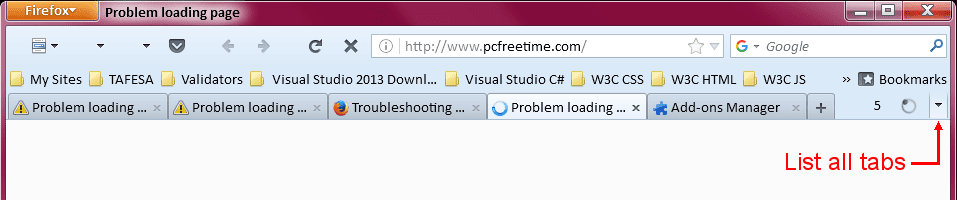
There should also be a "List all tabs" button:
FF - List All Tabs Button.png

You can also go to a specific tab using the "Ctrl" key and the tab's number (1 - 8 are valid numbers).
For example, "Ctrl + 3" should take you to the 3rd tab.

To go to the last tab, use "Ctrl + 9".
 
Last edited:

My Computer

Computer type
PC/Desktop
Computer Manufacturer/Model Number
n/a
OS
W7 Ultimate SP1, LM19.2 MATE, W10 Home 1703, W10 Pro 1703 VM, #All 64 bit
CPU
AMD Phenom II x6 1100T, 3.3 GHz
Motherboard
ASUS M4A88T-M/USB3 (AM3)
Memory
12GB DDR3 1333 G-Skill (4GB x 2), G-Skill (2GB x 2)
Graphics Card(s)
NVIDIA GeForce GTX 660
Sound Card
Realtek?
Monitor(s) Displays
Samsung S23B350
Screen Resolution
1920x1080
Hard Drives
WD Green 2TB (SATA), WD Green 3TB (SATA), WD Blue 4TB (SATA), WD Blue 6TB (SATA)
PSU
Cooler Master
Case
Antec GX300 Tower
Cooling
3x Antec TRICOOL 120mm Fans
Mouse
Wired Optical
Internet Speed
DSL
Antivirus
Avast
Browser
Pale Moon (64 bit)
Other Info
2018-12-27 Upgraded HDDs
2015-12-10 Upgraded case, graphics card, storage
2015-08-15 Upgraded motherboard & RAM
2015-07-15 Upgraded LM17.1 to LM17.2
Back
Top