

Hello,
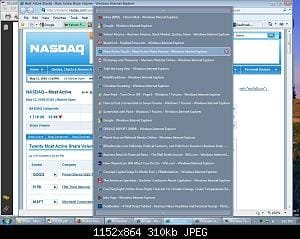
I was reading here that someone did not like the downward list of open items from the taskbar, but preferred a "pane" for each open Window. I have just the opposite problem. When I have "too many" Windows open in IE, it displays them as a list as shown in his picture, which I have attached for clarity. I would like ALL of my programs to do this at ALL times, regardless of whether I have 1 or 20 windows open. Is there a way to set windows to display this way?
Thanks for your help!
Juan
I was reading here that someone did not like the downward list of open items from the taskbar, but preferred a "pane" for each open Window. I have just the opposite problem. When I have "too many" Windows open in IE, it displays them as a list as shown in his picture, which I have attached for clarity. I would like ALL of my programs to do this at ALL times, regardless of whether I have 1 or 20 windows open. Is there a way to set windows to display this way?
Thanks for your help!
Juan
My Computer
- Computer Manufacturer/Model Number
- HP Pavilion Media Center PC m7350n
- OS
- Microsoft Windows 7 Home Premium 32-bit 7601 Multiprocessor Free Service Pack 1
- CPU
- Intel(R) Pentium(R) D CPU 2.80GHz
- Motherboard
- ASUSTek Computer INC. EMERY
- Memory
- 2.00 GB
- Graphics Card(s)
- NVIDIA GeForce 6200SE TurboCache(TM)
- Sound Card
- Realtek High Definition Audio
- Monitor(s) Displays
- HP L1710 LCD Display
- Screen Resolution
- 1280 x 1024 x 32 bits (4294967296 colors) @ 60 Hz
- Hard Drives
- (1) SAMSUNG SP2504C (2) EPSON Stylus Storage USB Device (3) Generic USB CF Reader USB Device (4) Generic USB MS Reader USB Device (5) Generic USB SD Reader USB Device (6) Generic USB SM Reader USB Device (7) Seagate FA GoFlex Desk USB Dev
- Internet Speed
- 20+mbps

 Not possible I guess


