I need help in sorting a text file

reble

New member
Member
VIP
Local time
10:30 PM
Messages
326
Location
Kennewick, Wa
I am a bad speller. So I have a small note pad that I have been writing hard to spell words in as I get the right spelling on each word. As time goes on and I look up a word in the note pad my spelling is getting better. The note pad is a hodgepodge of words, no order of any kind to them, it is sometimes hard to find a word that I know is in there in that mess. The note pad is about 3/4th full now. So I started at page 1 typing the words into a rtf file using Wordpad. The file has 2 columns, see the attached screen capture, when I am done typing all the words in. I want to sort the 2 columns as such. The left column starts at the top with the 1st letter of the 1st word (A) then going down the left column in alphabetical order. About half way the sorting takes up at the top of right column in alphabetical order to (Z). So that way I can use the file search to find the word. I don't know if this setup is possible. If not does anyone have any ideas?
If this makes me look like a stupid clod, so be it.

Steve
 

Attachments

  • Screenshot1.jpg
    Screenshot1.jpg
    66.8 KB · Views: 2

My Computer

Computer type
Laptop
Computer Manufacturer/Model Number
Dell Inspiron 3541
OS
windows 7 home 32 bit, I just changed back from 64 to 32bit
CPU
amc a6-6310, radon r4 graphics 1800mhz with 4 cores
Memory
6.8gb
Graphics Card(s)
not sure off hand
Sound Card
not shure off hand
Monitor(s) Displays
built in lcd
Screen Resolution
1366 x 768
Hard Drives
1 500gb sata internal HDD and 1 250 gb's sata HDD in a USB external USB case.
Keyboard
Wifi with attached wifi mouse
Internet Speed
don't know
Antivirus
Zone Alarm
Browser
Firefox
Other Info
The gateway laptop model MD2614U died because a voltage regulator on the motherboard went poof. The Gateway laptop has been scraped.
Have you got a spreadsheet as it's simple to do in that?
 

My Computer

Computer type
PC/Desktop
OS
win 8 32 bit

My Computer

Computer type
Laptop
Computer Manufacturer/Model Number
Dell Precision 15 7550 Workstation
OS
Windows 10 22H2 Pro
CPU
Intel(R) Xeon W-10885M
Motherboard
Dell
Memory
2x 32 GB DDR4 ECC memory (128 GB max)
Graphics Card(s)
Intel onboard GPU 1080p - Quadro RTX 5000 Max-Q GPU 4K
Hard Drives
500 GB Corsair T500 main M2 SSD
1 TB Intel storage M2 SSD (6 TB max)
Mouse
Logitech MX-25 Bluetooth
Internet Speed
slow
Antivirus
MS
Browser
Pale Moon 33.3.x x64 AVX2 build
I'm pretty good at spelling, but....at least once a day I question my own spelling of some obscure word.
It's easy here, and in most forums, because my Firefox has a built in Spell Checker.

But for other uses, I use two different methods to check the spelling or meaning of a word.

The first method is to open I.E. (which I seldom use) and just type in the word in the search bar. In seconds the search engine (I use http://www.startpage.com) will come up with the correct spelling for me.

Another method I use is a Webster's LARGE PRINT, 'Home, School, Office' dictionary that I keep right
here on my computer desk. I use that when I'm NOT on the internet.

I'd think that having to open up a text file, or even a spreadsheet, and then search for a particular word, would be very time consuming and then counter productive if the word I wanted was not there.

I applaud your inventiveness, but it sounds like you're trying to re-invent the Dictionary. Webster beat you to it. :sarc:

Cheers Mate!
TechnoMage :cool:
 

My Computer

Computer type
PC/Desktop
Computer Manufacturer/Model Number
Various
OS
Win 7 Pro, SP1, x86, Win-11/Pro/64
CPU
AMD
Motherboard
Various
Memory
8GB Crucial
Graphics Card(s)
Various
Sound Card
OnBoard
Monitor(s) Displays
Acer 21.5"
Hard Drives
Crucial SSD, 500 GB
PSU
OEM
Case
SFF Slim Line Case
Cooling
OEM
Keyboard
eMachines
Mouse
Logitech Wireless
Internet Speed
varies
Antivirus
Windows Defender/Super Anti-Spyware
Browser
Firefox

My Computers

System One System Two

  • Computer type
    PC/Desktop
    Computer Manufacturer/Model Number
    custom build
    OS
    Windows 7 HP 64
    CPU
    i5 6600K - 800MHz to 4200MHz
    Motherboard
    GA-Z170-HD3P
    Memory
    4+4G GSkill DDR4 3000
    Graphics Card(s)
    IG - Intel 530
    Monitor(s) Displays
    Samsung 226BW
    Screen Resolution
    1680x1050
    Hard Drives
    (1) -1 SM951 – 128GB M.2 AHCI PCIe SSD drive for Windows 7 and Lubuntu
    (2) -1 WD SATA 3 - 1T for Data
    (3) -1 WD SATA 3 - 1T for backup
    PSU
    Thermaltake 450W TR2 gold
    Keyboard
    Old and good Chicony mechanical keyboard
    Mouse
    Logitech mX performance - 9 buttons (had to disable some)
    Internet Speed
    500Mb/s
    Browser
    Firefox 64
    Other Info
    TinyWall firewall
  • Computer type
    Laptop
    System Manufacturer/Model Number
    Asus Q550LF
    OS
    Windows 7 Pro
    CPU
    i7-4500U 800MHz to 3.0GHz
    Motherboard
    Asus Q550LF
    Memory
    (4+4)G DDR3 1600
    Graphics Card(s)
    IG intel 4400 + NVIDIA GeForce GT 745M
    Sound Card
    Realtek
    Monitor(s) Displays
    LG Display LP156WF4-SPH1
    Screen Resolution
    1920 x 1080
    Hard Drives
    BX500 120G SSD for Windows and programs +
    1T HDD for data
    Internet Speed
    500 Mb/s
    Browser
    Firefox
    Other Info
    TinyWall firewall
to Billmcct, I will look at EditPad Lite.

To Samuria, I don't have spreadsheet. My MS office disk went belly up and I just haven't the time and money to replace it.

Have you got a spreadsheet as it's simple to do in that?

To Megahertz07, I use spellcheck in Firefox. About 20% of the time I am so far off on the spelling because my pronunciation of a word is so far off that Firefox or TinySpell (a prog that runs in the background and catch's miss spelled words and lets me know) can't figure out what I am saying. The note pad Started out as a backup for words that my pronunciation is so far off that I had to use the word in a sentence. And sometimes I still couldn't find it and I had to ask my room mate. He is an excellent speller. The word file when I am done entering the words. The file is going on my Android tablet. Android Firefox isn't as nimble as Windows Firefox.

As Samuria mentioned, on a spreadsheet it is quite simple to do it.

Why don't you use a free dictionary instead of the text file?
I use WordWeb WordWeb: English dictionary, thesaurus, and word finder software.
Always answer you never had an airplane flew (to remain as free)

To TechnoMage2016, I am not trying to re-invent the Dictionary. This is just a backup. I have had to learn in the school of hard knocks. Keep backups for everything.

I applaud your inventiveness, but it sounds like you're trying to re-invent the Dictionary. Webster beat you to it
 

My Computer

Computer type
Laptop
Computer Manufacturer/Model Number
Dell Inspiron 3541
OS
windows 7 home 32 bit, I just changed back from 64 to 32bit
CPU
amc a6-6310, radon r4 graphics 1800mhz with 4 cores
Memory
6.8gb
Graphics Card(s)
not sure off hand
Sound Card
not shure off hand
Monitor(s) Displays
built in lcd
Screen Resolution
1366 x 768
Hard Drives
1 500gb sata internal HDD and 1 250 gb's sata HDD in a USB external USB case.
Keyboard
Wifi with attached wifi mouse
Internet Speed
don't know
Antivirus
Zone Alarm
Browser
Firefox
Other Info
The gateway laptop model MD2614U died because a voltage regulator on the motherboard went poof. The Gateway laptop has been scraped.
A PS: I have been looking for a free word processor that isn't bundled with a bunch of other progs like Excel, Power Point, Office Online and Outlook that meets my needs. I just need the word processor. I am retired. I have no need to keep such files that need the other prog's that come bundled.
 

My Computer

Computer type
Laptop
Computer Manufacturer/Model Number
Dell Inspiron 3541
OS
windows 7 home 32 bit, I just changed back from 64 to 32bit
CPU
amc a6-6310, radon r4 graphics 1800mhz with 4 cores
Memory
6.8gb
Graphics Card(s)
not sure off hand
Sound Card
not shure off hand
Monitor(s) Displays
built in lcd
Screen Resolution
1366 x 768
Hard Drives
1 500gb sata internal HDD and 1 250 gb's sata HDD in a USB external USB case.
Keyboard
Wifi with attached wifi mouse
Internet Speed
don't know
Antivirus
Zone Alarm
Browser
Firefox
Other Info
The gateway laptop model MD2614U died because a voltage regulator on the motherboard went poof. The Gateway laptop has been scraped.
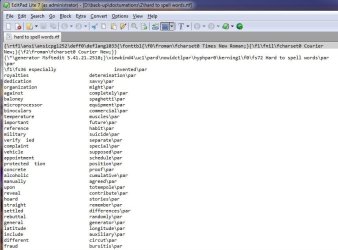
I opened the text file in EditPad Lite and this is what I got. see the attached file. This looks like a raw HTML file to me. The original file is RTF. I looked over the prog and I can't get rid of the coding info.
 

Attachments

  • hard to spell-in editpad.jpg
    hard to spell-in editpad.jpg
    64.1 KB · Views: 3

My Computer

Computer type
Laptop
Computer Manufacturer/Model Number
Dell Inspiron 3541
OS
windows 7 home 32 bit, I just changed back from 64 to 32bit
CPU
amc a6-6310, radon r4 graphics 1800mhz with 4 cores
Memory
6.8gb
Graphics Card(s)
not sure off hand
Sound Card
not shure off hand
Monitor(s) Displays
built in lcd
Screen Resolution
1366 x 768
Hard Drives
1 500gb sata internal HDD and 1 250 gb's sata HDD in a USB external USB case.
Keyboard
Wifi with attached wifi mouse
Internet Speed
don't know
Antivirus
Zone Alarm
Browser
Firefox
Other Info
The gateway laptop model MD2614U died because a voltage regulator on the motherboard went poof. The Gateway laptop has been scraped.

My Computer

Computer type
PC/Desktop
Computer Manufacturer/Model Number
HP Desktop & Compaq Laptop
OS
Win 10 x64, Linux Lite, Win 7 x64, BlackArch, & Kali
Hard Drives
Samsung 850 Pro 256Gb,
Hitachi HDD 1Tb,
Crucial MX SSD 250Gb
Segate 3Tb USB 3.0 Ext. Backup HDD
Internet Speed
150Mbps dn, 20Mbps up
Antivirus
Avast Free, Malwarebytes Anti-Exploit & Anti-Ransomware
Browser
Firefox, Chrome, Opera, & VPN
If you still have your M$ Office product key you can download a fresh copy if Office from Microsoft.

:ditto:

I can try to send a MS office download link if you tell us what is the version and language you want.
 

My Computers

System One System Two

  • Computer type
    PC/Desktop
    Computer Manufacturer/Model Number
    custom build
    OS
    Windows 7 HP 64
    CPU
    i5 6600K - 800MHz to 4200MHz
    Motherboard
    GA-Z170-HD3P
    Memory
    4+4G GSkill DDR4 3000
    Graphics Card(s)
    IG - Intel 530
    Monitor(s) Displays
    Samsung 226BW
    Screen Resolution
    1680x1050
    Hard Drives
    (1) -1 SM951 – 128GB M.2 AHCI PCIe SSD drive for Windows 7 and Lubuntu
    (2) -1 WD SATA 3 - 1T for Data
    (3) -1 WD SATA 3 - 1T for backup
    PSU
    Thermaltake 450W TR2 gold
    Keyboard
    Old and good Chicony mechanical keyboard
    Mouse
    Logitech mX performance - 9 buttons (had to disable some)
    Internet Speed
    500Mb/s
    Browser
    Firefox 64
    Other Info
    TinyWall firewall
  • Computer type
    Laptop
    System Manufacturer/Model Number
    Asus Q550LF
    OS
    Windows 7 Pro
    CPU
    i7-4500U 800MHz to 3.0GHz
    Motherboard
    Asus Q550LF
    Memory
    (4+4)G DDR3 1600
    Graphics Card(s)
    IG intel 4400 + NVIDIA GeForce GT 745M
    Sound Card
    Realtek
    Monitor(s) Displays
    LG Display LP156WF4-SPH1
    Screen Resolution
    1920 x 1080
    Hard Drives
    BX500 120G SSD for Windows and programs +
    1T HDD for data
    Internet Speed
    500 Mb/s
    Browser
    Firefox
    Other Info
    TinyWall firewall
Download and install Libre Office -- it's free. Open Libre Office Calc, and open a new spreadsheet. Copy each column of words, and paste them into the new Calc spreadsheet, so that you end up with one column containing all of the words. Now sort that column.
 

My Computer

Computer type
PC/Desktop
Computer Manufacturer/Model Number
Dell
OS
Linux Mint 18.2 xfce 64-bit (VMWare host) / Windows 8.1 Pro 32-bit (VMWare guest)
CPU
Haswell
Memory
4 GB
Monitor(s) Displays
Acer 23"
Screen Resolution
1920 x 1080
Hard Drives
Two hard drives, 1TB each: One for Linux, one for my data.
Keyboard
IBM Model M
Antivirus
Sophos (Linux), Trend Micro (Windows)
Browser
Firefox, Opera
Other Info
I use Samba to share my data drive with the other computers at my house and with my guest session in VMWare Workstation Player.
Copy each column of words, and paste them into the new Calc spreadsheet, so that you end up with one column containing all of the words. Now sort that column.
Doesn't quite work, as Ive tried this myself before. When I go to copy the words, When I drag mouse down to include next line, the blue highlight goes to the end of line and automatically includes end of line.

To separate the columns in a spreadsheet, first you need to add a comma at the end of every word, and then save documnet as a (.txt) text file, and then open this modified file in the spreadsheet. Then you can highlight a column and cut and paste it where you want.

I opened the text file in EditPad Lite and this is what I got. see the attached file. This looks like a raw HTML file to me. The original file is RTF. I looked over the prog and I can't get rid of the coding info.
Select Find and Replace, and enter "\par" in the find box (without the double quotes), and enter " " (without the double quotes) in the replace box. Then select "Replace All" or use "Replace Next" repeatedly.
 

My Computer

Computer type
PC/Desktop
OS
Windows 7 x64, Vista x64, 8.1 smartphone
CPU
Intel E8400 65W 64-bit
Motherboard
Gigabyte EP45-UD3LR
Memory
DDR2 2 x 2GB, 1GB x 2
Graphics Card(s)
XFX Radeon HD5750
Sound Card
AMD High Definition Audio; Realtek High Definition Audio
Monitor(s) Displays
iiyama prolite X2377HDS
Screen Resolution
1920 x 1080
Hard Drives
500GB 7200 rpm Seagate ST3500413AS 16MB, 500GB 5400 rpm Toshiba MQ02ABF050H 32MB, 200GB 7200 rpm Seagate ST3200820AS 8MB, 2TB 7200 rpm Western Digital WD20EZRX 64MB
PSU
Enermax Liberty Modular
Case
Antec P193 Midi Tower
Keyboard
Mionix ZIBAL 60
Mouse
Razer USB 2.0 Diamondback Mouse or Huion Graphics Tablet
Browser
Internet Explorer, Lunascape, Firefox, Opera, Avast Safezone
You should be able to highlight and copy an entire column in the text file, then click on one cell in the spreadsheet, then choose Paste. You don't need to drag the mouse down to include the next line; Calc should paste each word into its own separate cell.
 

My Computer

Computer type
PC/Desktop
Computer Manufacturer/Model Number
Dell
OS
Linux Mint 18.2 xfce 64-bit (VMWare host) / Windows 8.1 Pro 32-bit (VMWare guest)
CPU
Haswell
Memory
4 GB
Monitor(s) Displays
Acer 23"
Screen Resolution
1920 x 1080
Hard Drives
Two hard drives, 1TB each: One for Linux, one for my data.
Keyboard
IBM Model M
Antivirus
Sophos (Linux), Trend Micro (Windows)
Browser
Firefox, Opera
Other Info
I use Samba to share my data drive with the other computers at my house and with my guest session in VMWare Workstation Player.
Nope, I tried again, it wont do a column for me, as the highlight automatically includes the entire line when I move the cursor down.

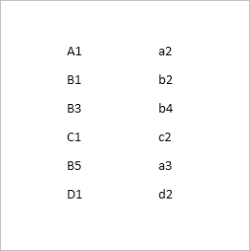
tabular text.PNG

From the picture, if I were to highlight A1, then move the cursor to the end of D1 all the labels on the right side also get highlighted (this is in Word).

I think I can highlight all the text and then do "Insert Table" followed by "Convert Text to Table" that separates into columns that way.
 

My Computer

Computer type
PC/Desktop
OS
Windows 7 x64, Vista x64, 8.1 smartphone
CPU
Intel E8400 65W 64-bit
Motherboard
Gigabyte EP45-UD3LR
Memory
DDR2 2 x 2GB, 1GB x 2
Graphics Card(s)
XFX Radeon HD5750
Sound Card
AMD High Definition Audio; Realtek High Definition Audio
Monitor(s) Displays
iiyama prolite X2377HDS
Screen Resolution
1920 x 1080
Hard Drives
500GB 7200 rpm Seagate ST3500413AS 16MB, 500GB 5400 rpm Toshiba MQ02ABF050H 32MB, 200GB 7200 rpm Seagate ST3200820AS 8MB, 2TB 7200 rpm Western Digital WD20EZRX 64MB
PSU
Enermax Liberty Modular
Case
Antec P193 Midi Tower
Keyboard
Mionix ZIBAL 60
Mouse
Razer USB 2.0 Diamondback Mouse or Huion Graphics Tablet
Browser
Internet Explorer, Lunascape, Firefox, Opera, Avast Safezone
I didn't know I could get a replacement MS office by saving the product key. Anyways It was MS office 97 and in English. I threw out the cd and scraped the product key off the jewel case when the cd went bad.

:ditto:

I can try to send a MS office download link if you tell us what is the version and language you want.
 

My Computer

Computer type
Laptop
Computer Manufacturer/Model Number
Dell Inspiron 3541
OS
windows 7 home 32 bit, I just changed back from 64 to 32bit
CPU
amc a6-6310, radon r4 graphics 1800mhz with 4 cores
Memory
6.8gb
Graphics Card(s)
not sure off hand
Sound Card
not shure off hand
Monitor(s) Displays
built in lcd
Screen Resolution
1366 x 768
Hard Drives
1 500gb sata internal HDD and 1 250 gb's sata HDD in a USB external USB case.
Keyboard
Wifi with attached wifi mouse
Internet Speed
don't know
Antivirus
Zone Alarm
Browser
Firefox
Other Info
The gateway laptop model MD2614U died because a voltage regulator on the motherboard went poof. The Gateway laptop has been scraped.
A PS: I have been looking for a free word processor that isn't bundled with a bunch of other progs like Excel, Power Point, Office Online and Outlook that meets my needs. I just need the word processor. I am retired. I have no need to keep such files that need the other prog's that come bundled.

What functionality do you need? Is WordPad sufficient?

Or... Word Starter of course is bundled with Excel Starter as Microsoft Office Starter, but the other apps in that bundle don't get in the way... and it ships free with many Win7 machines... "gentle overkill" ;)
 

My Computer

Computer type
Laptop
Computer Manufacturer/Model Number
HP G56
OS
Windows 7 Home Premium 64-bit
CPU
Celeron 900
Memory
3GB
Mouse
Logitech M210 + K260 keyboard, cordless via USB
Internet Speed
Wi-fi constrained
Antivirus
MSSE (+ Malwarebytes)
Browser
Firefox 68, IE11, Chrome (in decreasing frequency of use)
Other Info
Fortunate enough to successfully apply monthly updates for several months... now VERY concerned about losing my device to 4515206 or 4474419. Advice??
WordPad almost foots the bill. WordPad's default font is Calibri and size is 11. I would like to change the default font and size. WordPad doesn't have the sort cmd period. And WordPad can only read TXT and RTF files. WordPad doesn't know what to do with the codes that are in *.doc and*.docx and so on. And when you said "Word Starter" it triggered a memory about an old word processor that I used to use called "Word Star". Word Star back then was a freeware stand alone word processor. If it still is, I have no ides.

What functionality do you need? Is WordPad sufficient?

Or... Word Starter of course is bundled with Excel Starter as Microsoft Office Starter, but the other apps in that bundle don't get in the way... and it ships free with many Win7 machines... "gentle overkill" ;)
 

My Computer

Computer type
Laptop
Computer Manufacturer/Model Number
Dell Inspiron 3541
OS
windows 7 home 32 bit, I just changed back from 64 to 32bit
CPU
amc a6-6310, radon r4 graphics 1800mhz with 4 cores
Memory
6.8gb
Graphics Card(s)
not sure off hand
Sound Card
not shure off hand
Monitor(s) Displays
built in lcd
Screen Resolution
1366 x 768
Hard Drives
1 500gb sata internal HDD and 1 250 gb's sata HDD in a USB external USB case.
Keyboard
Wifi with attached wifi mouse
Internet Speed
don't know
Antivirus
Zone Alarm
Browser
Firefox
Other Info
The gateway laptop model MD2614U died because a voltage regulator on the motherboard went poof. The Gateway laptop has been scraped.
Word Starter didn't come with the copy of Windows 7 Home that I have. I got this Win7 at Walmart about 4 to 5 yrs ago.
 

My Computer

Computer type
Laptop
Computer Manufacturer/Model Number
Dell Inspiron 3541
OS
windows 7 home 32 bit, I just changed back from 64 to 32bit
CPU
amc a6-6310, radon r4 graphics 1800mhz with 4 cores
Memory
6.8gb
Graphics Card(s)
not sure off hand
Sound Card
not shure off hand
Monitor(s) Displays
built in lcd
Screen Resolution
1366 x 768
Hard Drives
1 500gb sata internal HDD and 1 250 gb's sata HDD in a USB external USB case.
Keyboard
Wifi with attached wifi mouse
Internet Speed
don't know
Antivirus
Zone Alarm
Browser
Firefox
Other Info
The gateway laptop model MD2614U died because a voltage regulator on the motherboard went poof. The Gateway laptop has been scraped.
I have downloaded Libre Office and installed it. I have learned how to make the 2 columns ( now I have learned to spell column without having to looking it up. That's how I learn new things, hands on). But I still can't select and copy just the left column of words I can only highlight and copy both columns on a single page.
 

My Computer

Computer type
Laptop
Computer Manufacturer/Model Number
Dell Inspiron 3541
OS
windows 7 home 32 bit, I just changed back from 64 to 32bit
CPU
amc a6-6310, radon r4 graphics 1800mhz with 4 cores
Memory
6.8gb
Graphics Card(s)
not sure off hand
Sound Card
not shure off hand
Monitor(s) Displays
built in lcd
Screen Resolution
1366 x 768
Hard Drives
1 500gb sata internal HDD and 1 250 gb's sata HDD in a USB external USB case.
Keyboard
Wifi with attached wifi mouse
Internet Speed
don't know
Antivirus
Zone Alarm
Browser
Firefox
Other Info
The gateway laptop model MD2614U died because a voltage regulator on the motherboard went poof. The Gateway laptop has been scraped.
When you do the copy from the text file into the spreadsheet application are you getting both columns in only one column? If so, and to be expected, you need to do the LibreOffice equivalent of 'text to columns' to split your two columns into the two spreadsheet columns. I don't use LO, but a quick search shows to use Data / Text to Columns.
 

My Computer

Computer type
PC/Desktop
OS
Windows 7 Ultimate x64
Back
Top