
crankypenguin
qbasic gorillas champ
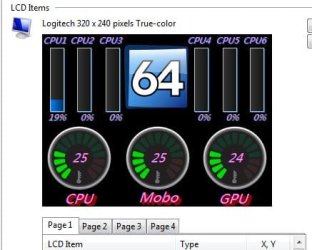
I use a program called aida64 and I could really use some templates or perhaps a program to help me make my own. I use it with a Logitech G-19 Keyboard and want to be able to create my own icons to fit into a 320x240 True color pixel LCD screen. I will show a demonstration of what I created on my own. Basically I want to be able to create icons like that 64 logo in the middle. Windows Paint just does not cut it, and I am not really graphically inclined so any help is appreciated. These would have to be really small icons as I would put other stuff along side them. The lcd panel has 4 screens I can flip through. That is just one, still in beta phase.
Attachments
My Computer
At a glance
Windows 7 Ultimate x64FX 8350 @ 4.8ghz, turbo clocked to 5.4ghzMushkin Enhanced Blackline 16GB 1760mhz 10-10...Gigabyte-660 Windforce OC- GPU Clock 1212MHz ...
- Computer type
- PC/Desktop
- Computer Manufacturer/Model Number
- Custom Build
- OS
- Windows 7 Ultimate x64
- CPU
- FX 8350 @ 4.8ghz, turbo clocked to 5.4ghz
- Motherboard
- Asus Sabertooth FX990 Gen 3.0 R2.0
- Memory
- Mushkin Enhanced Blackline 16GB 1760mhz 10-10-9-24 T1
- Graphics Card(s)
- Gigabyte-660 Windforce OC- GPU Clock 1212MHz /3504MHz ram
- Sound Card
- Creative Sound Blaster Recon3D PCIe Sound Card
- Monitor(s) Displays
- Samsung SyncMaster S27B350H (HDMI)
- Screen Resolution
- 1920x1080 60HZ
- Hard Drives
- 1 x SSD Crucial M4 256GB (Primary OS)
3 x HDD WD 1TB
4 x HDD 2TB
1 x HDD 160GB (Secondary Backup OS)
Raid SATA III 6GB/s 4-port PCI-e Controller Card, Marvel 88SE9215 chipset
- PSU
- Chieftec-650-14CS (Modular) 80 Plus Gold-650 Watt
- Case
- Akasa Venom Toxic Gaming Big tower ( Custom Black ) Ver 2.0
- Cooling
- Water 2.0 PRO / GEIL Cyclone VRM / 6x120mm 2x220mm 2x140mm
- Keyboard
- Logitech G19
- Mouse
- Wireless Notebook Presenter Mouse 8000
- Internet Speed
- Fiber GBS
- Antivirus
- Don't Announce it to the world :)
- Browser
- Gotta have at least 1!


