Solved I need to convert a primary Windows partition into logical

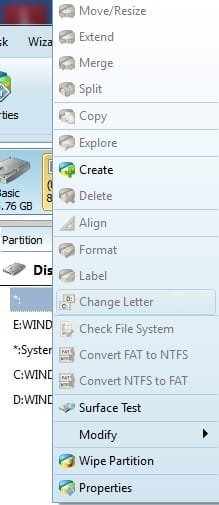
Yes, from the Partition Wizard boot disk you can rightclick the Unallocated 8 mg to create a Logical partition, label it Ubuntu Whatever, OK and Apply the step.

Then rightclick the new Logical partition to Extend, borrow as much space as you want from C to add to the new partition, OK and Apply.
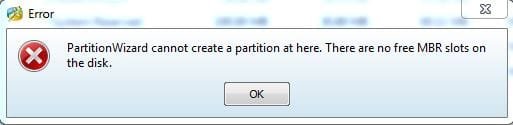
 
Seems that i cannot create a new partition from the remaining 7mb unallocated space. When i try to create it, using PW boot disk i get the message 'cannot create a partition at here. There are no free MBR slots on the disk.' Should i wipe it ? Or what should i do next, if it's possible ?

Capture.JPG

Capture2.jpg
 

My Computer My Computer

At a glance

Windows 7 Home Premium x64Intel i54GB
Computer type
Laptop
Computer Manufacturer/Model Number
SONY VAIO
OS
Windows 7 Home Premium x64
CPU
Intel i5
Memory
4GB
Hard Drives
TOSHIBA 500GB
Antivirus
MSE
Browser
Mozilla Firefox
I couldn't select Logical for the parition type because i haven't that option. The message appeared as soos as i clicked 'Create' button. The partiton don't shows up in Disk Mgmt.

Capture.JPG
 

My Computer My Computer

At a glance

Windows 7 Home Premium x64Intel i54GB
Computer type
Laptop
Computer Manufacturer/Model Number
SONY VAIO
OS
Windows 7 Home Premium x64
CPU
Intel i5
Memory
4GB
Hard Drives
TOSHIBA 500GB
Antivirus
MSE
Browser
Mozilla Firefox
It's probably mistakenly reported space.

What I'd do is shrink XP in Disk Mgmt by 2-3 gb, create a partition there to extend with the desired space from Win7 using PW. You can later adjust the space from any partition using the same tool
 
Task completed ! I managed to create a new partiton from XP and 7 (extend) as you said. I didn't know it was so easy. Thanks for your help ! You're a true professional.
 

My Computer My Computer

At a glance

Windows 7 Home Premium x64Intel i54GB
Computer type
Laptop
Computer Manufacturer/Model Number
SONY VAIO
OS
Windows 7 Home Premium x64
CPU
Intel i5
Memory
4GB
Hard Drives
TOSHIBA 500GB
Antivirus
MSE
Browser
Mozilla Firefox
I'm a bit late, sorry. I've done a capture from Disk Management as you said. The first 3 partitions are Ubuntu's, wich requires 3 different partitions (root, swap and home) in order to be installed. By the way, it's not really a problem, but i have something wich bothers me: Windows XP shows the 'System Reserved' partiton (labeled C) in 'My Computer'. It's a bit annoying because programs tend to install there, because they think C is the partiton where is Windows XP installed (instead, Windows XP is listed as D). It is possible to hide it ? I've tried from Disk Mgmt but it's not possible.

Capture.JPG
 

My Computer My Computer

At a glance

Windows 7 Home Premium x64Intel i54GB
Computer type
Laptop
Computer Manufacturer/Model Number
SONY VAIO
OS
Windows 7 Home Premium x64
CPU
Intel i5
Memory
4GB
Hard Drives
TOSHIBA 500GB
Antivirus
MSE
Browser
Mozilla Firefox
Right click System Reserved in XP Disk Mgmt to remove its Drive letter. http://www.sevenforums.com/tutorials/82994-drive-letter-add-change-remove-windows.html

Let us see an XP Disk Management screenshot. Press keyboard Print Screen button from DM, then open Paint to paste it in, save and attach Paint file using paper clip in Reply box. http://www.sevenforums.com/tutorials/9717-screenshot-paint.html

Not sure how you have so many Primary partitions exceeding 4 Limit unless Linux formatting permits a variance.
 
I cannot remove the System Reserved's C letter from Disk Mgmt because i get this error: "Windows cannot remove the drive letter of your system volume or boot volume". Regarding Ubuntu's partitons wich are listed primary in Windows 7 Disk Mgmt, maybe they're wrong listed - i think.

Capture.JPG
 

My Computer My Computer

At a glance

Windows 7 Home Premium x64Intel i54GB
Computer type
Laptop
Computer Manufacturer/Model Number
SONY VAIO
OS
Windows 7 Home Premium x64
CPU
Intel i5
Memory
4GB
Hard Drives
TOSHIBA 500GB
Antivirus
MSE
Browser
Mozilla Firefox
If XP wont' let you remove the drive letter then leave it but be alert to not let anything write to the System Reserved partition. I don't know why it's C in the first place since XP should have taken that letter during the booted install. Normally when XP is installed second, it will steal the boot from Win7 until Win7 is repaired and XP added to a Dual Boot using EasyBCD.

But if you don't mind it being lettered this way and performance is normal then you can leave it while guarding against anything writing to C during program installs, backups, etc.
 
If you say so, i'll leave it. Yes, XP was installed after Windows 7, it stole the boot from Windows 7 but i repaired it with EasyBCD.
 

My Computer My Computer

At a glance

Windows 7 Home Premium x64Intel i54GB
Computer type
Laptop
Computer Manufacturer/Model Number
SONY VAIO
OS
Windows 7 Home Premium x64
CPU
Intel i5
Memory
4GB
Hard Drives
TOSHIBA 500GB
Antivirus
MSE
Browser
Mozilla Firefox
Back
Top