
I removed U3 from FD, but it has old name still?

This is really weird, I'm still having the issue of the U3 name, JScience showing up on my computer.

I've tried it on the MAC's at school & my buddy's computer & they both showed up as JohnnyScience

Then I formatted to a Fat32 on my buddy's computer & then reformatted on mine to NTFS with a different letter for the drive & yet still showing up as JScience?

What the hell?
 

My Computer My Computer

At a glance

Windows 7 64 & Ubuntu 64Intel Quad Core Q6600 2.40GHz8gNvidia 9600 GT & 9800 GT
Computer Manufacturer/Model Number
Built it myself
OS
Windows 7 64 & Ubuntu 64
CPU
Intel Quad Core Q6600 2.40GHz
Motherboard
Asus
Memory
8g
Graphics Card(s)
Nvidia 9600 GT & 9800 GT
Sound Card
Turtle Beach 5.1
Monitor(s) Displays
Three 19" Dell's & one 46" Samsung 750
I was reading this thread and I am glad I remember it or I would not have paid close attention to what was going on with my USB drive.

I don't know if this related but I noticed something the other day. I have a Cruzer 32GB USB drive that I bought new. I put it in my Windows 7 machine and named it and then put files on it and never had an issue. The other day I put the USB drive in a Windows XP Professional machine (I had never used in any other machine or OS) and the name of the drive wasn’t there. I thought that it was weird but no matter what I did the name was not there (i.e. Windows Explorer, Command Prompt, Disk Manager etc.). So without missing a beat I figured it had somehow been erased and I just renamed it on the Windows XP machine. What I did not realize is that I misspelled the name and even after using it for an hour I had not noticed the mistake. The next time I put it in my Windows 7 machine I noticed the name was misspelled so I renamed it. What happened next it what you are experiencing. The name stayed spelled wrong no matter what I did. I took it with me to work found a Windows XP machine and renamed it spelling it correctly. Now the drive is correct on my Windows 7 machine. However a side effect of all of this is now some times on some Windows XP machines the name will not show up at all. It does on my Windows 7 machine and it does on most Windows XP machines but once and a while it does not show up on some Window XP machines.

I don’t know if this helps but have you tried renaming it on a Windows XP machine??
 

My Computer My Computer

At a glance

Windows 7 Enterprise (x64); Windows Server 20...16GB
Computer type
PC/Desktop
Computer Manufacturer/Model Number
Dell OP7010
OS
Windows 7 Enterprise (x64); Windows Server 2008 R2 (x64)
Memory
16GB
Monitor(s) Displays
4 Dell 24" LCD
Screen Resolution
1280x1024
Keyboard
Dell
Mouse
Dell Optical
Internet Speed
40meg
I was reading this thread and I am glad I remember it or I would not have paid close attention to what was going on with my USB drive.

I don't know if this related but I noticed something the other day. I have a Cruzer 32GB USB drive that I bought new. I put it in my Windows 7 machine and named it and then put files on it and never had an issue. The other day I put the USB drive in a Windows XP Professional machine (I had never used in any other machine or OS) and the name of the drive wasn’t there. I thought that it was weird but no matter what I did the name was not there (i.e. Windows Explorer, Command Prompt, Disk Manager etc.). So without missing a beat I figured it had somehow been erased and I just renamed it on the Windows XP machine. What I did not realize is that I misspelled the name and even after using it for an hour I had not noticed the mistake. The next time I put it in my Windows 7 machine I noticed the name was misspelled so I renamed it. What happened next it what you are experiencing. The name stayed spelled wrong no matter what I did. I took it with me to work found a Windows XP machine and renamed it spelling it correctly. Now the drive is correct on my Windows 7 machine. However a side effect of all of this is now some times on some Windows XP machines the name will not show up at all. It does on my Windows 7 machine and it does on most Windows XP machines but once and a while it does not show up on some Window XP machines.

I don’t know if this helps but have you tried renaming it on a Windows XP machine??

Yeah my friends computer I used is running XP Pro. I couldnt change it to the full JohnnyScience because there was a character limit in XP I think.

But regardless I changed it, formatted & as soon as I plugged it back in my computer the old name came up. Even after formatting it again on my win7 computer still the U3 name.

I think I'm going to contact Sandisk & see if they will send me a new one...
 

My Computer My Computer

At a glance

Windows 7 64 & Ubuntu 64Intel Quad Core Q6600 2.40GHz8gNvidia 9600 GT & 9800 GT
Computer Manufacturer/Model Number
Built it myself
OS
Windows 7 64 & Ubuntu 64
CPU
Intel Quad Core Q6600 2.40GHz
Motherboard
Asus
Memory
8g
Graphics Card(s)
Nvidia 9600 GT & 9800 GT
Sound Card
Turtle Beach 5.1
Monitor(s) Displays
Three 19" Dell's & one 46" Samsung 750
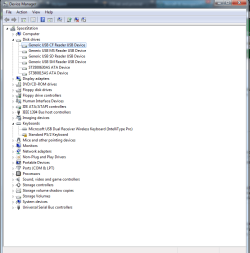
Any ideas where else this file can be located that is still naming the flash drive with the U3 name while its plugged into my home computer?
 

My Computer My Computer

At a glance

Windows 7 64 & Ubuntu 64Intel Quad Core Q6600 2.40GHz8gNvidia 9600 GT & 9800 GT
Computer Manufacturer/Model Number
Built it myself
OS
Windows 7 64 & Ubuntu 64
CPU
Intel Quad Core Q6600 2.40GHz
Motherboard
Asus
Memory
8g
Graphics Card(s)
Nvidia 9600 GT & 9800 GT
Sound Card
Turtle Beach 5.1
Monitor(s) Displays
Three 19" Dell's & one 46" Samsung 750
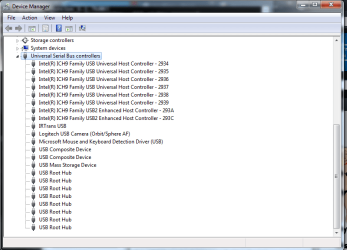
just a suggestion - have you tried changing the drive letter associated with the drive?
i've seen some 'stickiness' due to the drive letter.

and of course, there's the unplug drive, open a command prompt and do "set devmgr_show_nonpresent_devices=1 && devmgmt.msc" - then show hidden devices in device manager and remove the ghosted out drive
 

My Computer My Computer

At a glance

Windows 7 Ultimate x64Core i7 960Corsair XMS3 DDR3-1600 - 12 GBeVGA GTX 275 1792 MB
OS
Windows 7 Ultimate x64
CPU
Core i7 960
Motherboard
ASUS P6TD Deluxe
Memory
Corsair XMS3 DDR3-1600 - 12 GB
Graphics Card(s)
eVGA GTX 275 1792 MB
Sound Card
Onboard HD etc
Monitor(s) Displays
Dell SP2208WFP
Hard Drives
Western Digital Caviar Black 1 TB x 2 (RAID-1)
PSU
BFG EX-1200
Case
CoolerMaster HAF 922
Cooling
Thermalright Ultra 120 Extreme with Noctua NH-12 Fan
Keyboard
MS Natural (you know, like the ones you find in nature...)
Mouse
MS Intellimouse Explorer
just a suggestion - have you tried changing the drive letter associated with the drive?
i've seen some 'stickiness' due to the drive letter.

and of course, there's the unplug drive, open a command prompt and do "set devmgr_show_nonpresent_devices=1 && devmgmt.msc" - then show hidden devices in device manager and remove the ghosted out drive

Yes I've tried changing the drive letter as well. No dice.

Whats this second suggestion you are telling me to do? I'm not familiar with what it does?

You think it will get rid of my problem?
 

My Computer My Computer

At a glance

Windows 7 64 & Ubuntu 64Intel Quad Core Q6600 2.40GHz8gNvidia 9600 GT & 9800 GT
Computer Manufacturer/Model Number
Built it myself
OS
Windows 7 64 & Ubuntu 64
CPU
Intel Quad Core Q6600 2.40GHz
Motherboard
Asus
Memory
8g
Graphics Card(s)
Nvidia 9600 GT & 9800 GT
Sound Card
Turtle Beach 5.1
Monitor(s) Displays
Three 19" Dell's & one 46" Samsung 750
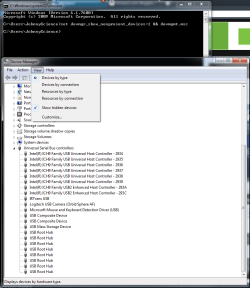
well, windows keeps a history of every device connected - even after it's unplugged.
however, just opening device manager will not show you previously connected devices that arent connected at that very moment (even if you choose to show hidden)

however, if you set that variable in the the way i listed above - and as long as you keep that command prompt window open (while you have device manager open), you can see the previously connected devices.

i dont know for certain if it'll work - but it's worth a shot. it's what i would do if faced with your issue.
 

My Computer My Computer

At a glance

Windows 7 Ultimate x64Core i7 960Corsair XMS3 DDR3-1600 - 12 GBeVGA GTX 275 1792 MB
OS
Windows 7 Ultimate x64
CPU
Core i7 960
Motherboard
ASUS P6TD Deluxe
Memory
Corsair XMS3 DDR3-1600 - 12 GB
Graphics Card(s)
eVGA GTX 275 1792 MB
Sound Card
Onboard HD etc
Monitor(s) Displays
Dell SP2208WFP
Hard Drives
Western Digital Caviar Black 1 TB x 2 (RAID-1)
PSU
BFG EX-1200
Case
CoolerMaster HAF 922
Cooling
Thermalright Ultra 120 Extreme with Noctua NH-12 Fan
Keyboard
MS Natural (you know, like the ones you find in nature...)
Mouse
MS Intellimouse Explorer
just a suggestion - have you tried changing the drive letter associated with the drive?
i've seen some 'stickiness' due to the drive letter.

and of course, there's the unplug drive, open a command prompt and do "set devmgr_show_nonpresent_devices=1 && devmgmt.msc" - then show hidden devices in device manager and remove the ghosted out drive

Ok so I unplugged it & ran that code & couldnt see a ghosted drive? Was I in the wrong section?
 

Attachments

  • Untitled.png
    Untitled.png
    27.8 KB · Views: 5

My Computer My Computer

At a glance

Windows 7 64 & Ubuntu 64Intel Quad Core Q6600 2.40GHz8gNvidia 9600 GT & 9800 GT
Computer Manufacturer/Model Number
Built it myself
OS
Windows 7 64 & Ubuntu 64
CPU
Intel Quad Core Q6600 2.40GHz
Motherboard
Asus
Memory
8g
Graphics Card(s)
Nvidia 9600 GT & 9800 GT
Sound Card
Turtle Beach 5.1
Monitor(s) Displays
Three 19" Dell's & one 46" Samsung 750
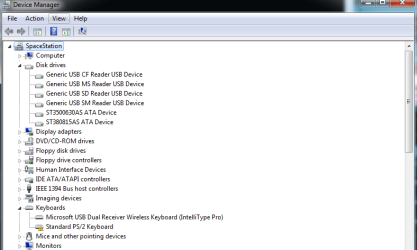
check under Universal Serial Bus controllers
 

My Computer My Computer

At a glance

Windows 7 build 7100 x86Intel Core 2 Duo 2.1GHz3GBIntel(TM) Graphics Media Accelerator X4500HD
Computer Manufacturer/Model Number
Dell Inspiron 1545
OS
Windows 7 build 7100 x86
CPU
Intel Core 2 Duo 2.1GHz
Motherboard
GM45 chipset
Memory
3GB
Graphics Card(s)
Intel(TM) Graphics Media Accelerator X4500HD
Sound Card
Realtek HD
Monitor(s) Displays
15.6" WLED 720p
Screen Resolution
1366x768
Hard Drives
320GB 5400rpm hard drive

Attachments

  • Untitled.png
    Untitled.png
    21.2 KB · Views: 3

My Computer My Computer

At a glance

Windows 7 64 & Ubuntu 64Intel Quad Core Q6600 2.40GHz8gNvidia 9600 GT & 9800 GT
Computer Manufacturer/Model Number
Built it myself
OS
Windows 7 64 & Ubuntu 64
CPU
Intel Quad Core Q6600 2.40GHz
Motherboard
Asus
Memory
8g
Graphics Card(s)
Nvidia 9600 GT & 9800 GT
Sound Card
Turtle Beach 5.1
Monitor(s) Displays
Three 19" Dell's & one 46" Samsung 750
you did leave the command prompt window open, right?

also, -> view -> show hidden devices

now you should see some ghosted/greyed out things
 

My Computer My Computer

At a glance

Windows 7 Ultimate x64Core i7 960Corsair XMS3 DDR3-1600 - 12 GBeVGA GTX 275 1792 MB
OS
Windows 7 Ultimate x64
CPU
Core i7 960
Motherboard
ASUS P6TD Deluxe
Memory
Corsair XMS3 DDR3-1600 - 12 GB
Graphics Card(s)
eVGA GTX 275 1792 MB
Sound Card
Onboard HD etc
Monitor(s) Displays
Dell SP2208WFP
Hard Drives
Western Digital Caviar Black 1 TB x 2 (RAID-1)
PSU
BFG EX-1200
Case
CoolerMaster HAF 922
Cooling
Thermalright Ultra 120 Extreme with Noctua NH-12 Fan
Keyboard
MS Natural (you know, like the ones you find in nature...)
Mouse
MS Intellimouse Explorer
you did leave the command prompt window open, right?

also, -> view -> show hidden devices

now you should see some ghosted/greyed out things

I think I forgot to do that before, a couple more things popped up, but no ghosted ones?

And yes cmd prompt was still open.

Ideas on which one it is?
 

Attachments

  • Untitled2.png
    Untitled2.png
    35.8 KB · Views: 4

My Computer My Computer

At a glance

Windows 7 64 & Ubuntu 64Intel Quad Core Q6600 2.40GHz8gNvidia 9600 GT & 9800 GT
Computer Manufacturer/Model Number
Built it myself
OS
Windows 7 64 & Ubuntu 64
CPU
Intel Quad Core Q6600 2.40GHz
Motherboard
Asus
Memory
8g
Graphics Card(s)
Nvidia 9600 GT & 9800 GT
Sound Card
Turtle Beach 5.1
Monitor(s) Displays
Three 19" Dell's & one 46" Samsung 750
look under disk drives please...see any there?
 

My Computer My Computer

At a glance

Windows 7 Ultimate x64Core i7 960Corsair XMS3 DDR3-1600 - 12 GBeVGA GTX 275 1792 MB
OS
Windows 7 Ultimate x64
CPU
Core i7 960
Motherboard
ASUS P6TD Deluxe
Memory
Corsair XMS3 DDR3-1600 - 12 GB
Graphics Card(s)
eVGA GTX 275 1792 MB
Sound Card
Onboard HD etc
Monitor(s) Displays
Dell SP2208WFP
Hard Drives
Western Digital Caviar Black 1 TB x 2 (RAID-1)
PSU
BFG EX-1200
Case
CoolerMaster HAF 922
Cooling
Thermalright Ultra 120 Extreme with Noctua NH-12 Fan
Keyboard
MS Natural (you know, like the ones you find in nature...)
Mouse
MS Intellimouse Explorer
look under disk drives please...see any there?

I have hidden folders checked...

You did say to have the flash drive UNplugged right?
 

Attachments

  • Untitled.png
    Untitled.png
    16.9 KB · Views: 6

My Computer My Computer

At a glance

Windows 7 64 & Ubuntu 64Intel Quad Core Q6600 2.40GHz8gNvidia 9600 GT & 9800 GT
Computer Manufacturer/Model Number
Built it myself
OS
Windows 7 64 & Ubuntu 64
CPU
Intel Quad Core Q6600 2.40GHz
Motherboard
Asus
Memory
8g
Graphics Card(s)
Nvidia 9600 GT & 9800 GT
Sound Card
Turtle Beach 5.1
Monitor(s) Displays
Three 19" Dell's & one 46" Samsung 750
yes - and with it unplugged, the drive should still be listed but ghosted/greyed out
 

My Computer My Computer

At a glance

Windows 7 Ultimate x64Core i7 960Corsair XMS3 DDR3-1600 - 12 GBeVGA GTX 275 1792 MB
OS
Windows 7 Ultimate x64
CPU
Core i7 960
Motherboard
ASUS P6TD Deluxe
Memory
Corsair XMS3 DDR3-1600 - 12 GB
Graphics Card(s)
eVGA GTX 275 1792 MB
Sound Card
Onboard HD etc
Monitor(s) Displays
Dell SP2208WFP
Hard Drives
Western Digital Caviar Black 1 TB x 2 (RAID-1)
PSU
BFG EX-1200
Case
CoolerMaster HAF 922
Cooling
Thermalright Ultra 120 Extreme with Noctua NH-12 Fan
Keyboard
MS Natural (you know, like the ones you find in nature...)
Mouse
MS Intellimouse Explorer
hmm well I had it unplugged... so now what since its not there?
 

My Computer My Computer

At a glance

Windows 7 64 & Ubuntu 64Intel Quad Core Q6600 2.40GHz8gNvidia 9600 GT & 9800 GT
Computer Manufacturer/Model Number
Built it myself
OS
Windows 7 64 & Ubuntu 64
CPU
Intel Quad Core Q6600 2.40GHz
Motherboard
Asus
Memory
8g
Graphics Card(s)
Nvidia 9600 GT & 9800 GT
Sound Card
Turtle Beach 5.1
Monitor(s) Displays
Three 19" Dell's & one 46" Samsung 750
bump
 

My Computer My Computer

At a glance

Windows 7 64 & Ubuntu 64Intel Quad Core Q6600 2.40GHz8gNvidia 9600 GT & 9800 GT
Computer Manufacturer/Model Number
Built it myself
OS
Windows 7 64 & Ubuntu 64
CPU
Intel Quad Core Q6600 2.40GHz
Motherboard
Asus
Memory
8g
Graphics Card(s)
Nvidia 9600 GT & 9800 GT
Sound Card
Turtle Beach 5.1
Monitor(s) Displays
Three 19" Dell's & one 46" Samsung 750
Well as stated,, Learn how to use USBDeview to uninstall the USB device.
It is the best way that I have found to clean up bogus USB devices.
Take the time to learn how to use it,, it will probably help you fix this problem much easier.
It has been recently updated to 1.56. And is probably the single most awesome tool for USB devices ever created.

Also,, try this

save the following text to the root of the thumb drive as a file called autorun.ini

Code:
[Autorun]
Label=JScience
Pull the stick out and put back in.
Check the name
 

My Computer My Computer

At a glance

Win 7 Ultimate 32bitC2D E6600 2.4Ghz4G Kingston KHX5400D2EVGA GTX 570 HD SC (012-P3-1573-KR)
Computer Manufacturer/Model Number
Self Built
OS
Win 7 Ultimate 32bit
CPU
C2D E6600 2.4Ghz
Motherboard
Intel D965WH
Memory
4G Kingston KHX5400D2
Graphics Card(s)
EVGA GTX 570 HD SC (012-P3-1573-KR)
Sound Card
On-Board
Monitor(s) Displays
Samsung 226BW
Screen Resolution
1680 x 1050
Hard Drives
2 x 250 Seagate Barracuda
2 x 500 Seagate Barracuda (Raid1)
PSU
Corsair TX750W
Case
In-Win C589
Cooling
Stock Intel Cooling
As a general comment:

Tepid -- you are 100% correct in recommending FAT32 as a "universal" format. I don't know what bridge some of these people lived under but always use Fat32 when going cross-platform.

Now I do not have usb 3.0, but I do know that if using DiskPart, you run their CLEAN ALL command, then you can solve many problems. I can not say that what the situation is here since I do not have the corresponding hardware.
 

My Computer My Computer

At a glance

MS Windows 7 Ultimate SP1 64-bitAMD A10-4600M6.00 GB Dual-Channel DDR3 @ 798MHz (11-11-12-28)AMD Radeon HD 7660G
Computer Manufacturer/Model Number
Toshiba Satellite S875D-S7239 laptop
OS
MS Windows 7 Ultimate SP1 64-bit
CPU
AMD A10-4600M
Motherboard
AMD Pumori (Socket FT1)
Memory
6.00 GB Dual-Channel DDR3 @ 798MHz (11-11-12-28)
Graphics Card(s)
AMD Radeon HD 7660G
Sound Card
High Definition Audio Device
Monitor(s) Displays
Generic PnP Monitor (1600x900@60Hz)
Screen Resolution
1600x900@60Hz
Hard Drives
SSD 119GB Corsair CSSD-V128GB2 ATA Device
Keyboard
Standard PS/2 Keyboard
Mouse
HP Wireless Optical Mobile Mouse Model FHA-3410
Internet Speed
What the local pub, local coffee shop offers.
Other Info
Optical Drive:MATSHITA BD-CMB UJ160B ATA Device


Also have an Asus ha1002xp netbook with Win 7 Ultimate installed.
Back
Top