I think I deleted my IE 64 and now im trying to get it back

Lets try this. Go to Control Panel\All Control Panel Items\Programs and Features, left pane and click the Turn Windows Features on or Off. and follow the steps below. After clicking OK it will "think" for a bit.
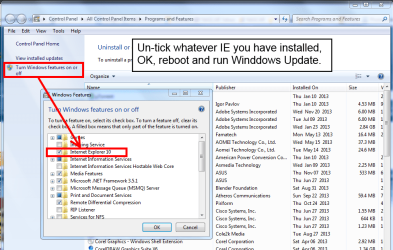
remove.PNG
 

My Computer My Computer

At a glance

Windows 7 Ultimate X64 SP1Intel i5-2550K, Differing ~4.4-4.8GHz No buil...16GB G.Skill Sniper 1866MHz @ 2133MHz 2x8GBASUS GTX650TIB-DC2OC-2GD5, (650TI Boost)
Computer type
PC/Desktop
Computer Manufacturer/Model Number
Home Built Desktop By DataTech
OS
Windows 7 Ultimate X64 SP1
CPU
Intel i5-2550K, Differing ~4.4-4.8GHz No built in GPU
Motherboard
ASUS P8Z68-V PRO/GEN3
Memory
16GB G.Skill Sniper 1866MHz @ 2133MHz 2x8GB
Graphics Card(s)
ASUS GTX650TIB-DC2OC-2GD5, (650TI Boost)
Sound Card
Onboard Realtek 5-1
Monitor(s) Displays
Samsung P2570HD
Screen Resolution
1920x1080
Hard Drives
Samsung 840 Pro 256GB SSD for OS, 500GB Seagate Constellation (Enterprise drive) for Data
PSU
Corsair HX650W
Case
Inwin Dragon Rider
Cooling
Hyper 212 EVO w/two Noctua fans, push-pull, @1300 RPM
Keyboard
E-Z Eyes, bright yellow keys with large characters
Mouse
steelseries SENSEI Laser Pro Gaming
Internet Speed
48-51Mbs Mbs down, 11 Mbs up Xfinity Cable
Antivirus
Norton Internet Security 2013
Browser
IE 10, Opera, Pale Moon if needed
Other Info
4 case fans, LG BluRay-RE, ASUS DVD-RW, Mr. Fusion power supply, 1.21 gigawatts.
Lets try this. Go to Control Panel\All Control Panel Items\Programs and Features, left pane and click the Turn Windows Features on or Off. and follow the steps below. After clicking OK it will "think" for a bit.

View attachment 295027

I tried that and ran update and it didnt pick anything up except malicious software removal tool. I wanna try and avoid doing a restore if I can cuz i installed alot of things after (fresh install) and didnt realize something was wrong. I wonder if I just delete the ie regestries and the ie folders if it willlet me install. I cant reinstall it cuz its telling me i have the current version and t doesnt allow me to repair it. windows is retarded
 

My Computer My Computer

At a glance

win 7 home premium 641.6 dual4gbuk
Computer Manufacturer/Model Number
asus
OS
win 7 home premium 64
CPU
1.6 dual
Motherboard
uk
Memory
4gb
Graphics Card(s)
uk
Sound Card
bang and oulfson
Hard Drives
ssd
See post #20,
Restoring the Previous version is your best option,
Cheers.
 

My Computer My Computer

At a glance

Win-7-Pro64bit 7-H-Prem-64biti7-5930K 2nd i9-9940x both water blocked VRM'...Trident-z 3200C14 2nd Trident-z 3600C16EVGA 1080ti ftw3 2nd Titan Xp both water blocked
Computer type
PC/Desktop
Computer Manufacturer/Model Number
Custom assembled by me :}
OS
Win-7-Pro64bit 7-H-Prem-64bit
CPU
i7-5930K 2nd i9-9940x both water blocked VRM's too
Motherboard
ASUS SABERTOOTH X99 2nd ASUS x299 Apex
Memory
Trident-z 3200C14 2nd Trident-z 3600C16
Graphics Card(s)
EVGA 1080ti ftw3 2nd Titan Xp both water blocked
Sound Card
Built-in Realtek
Monitor(s) Displays
1-AOC G2460PG 24"G-Sync 144Hz/ 2nd 1-ASUS VG248QE 24" 144Hz
Screen Resolution
1920 x 1080 144Hz
Hard Drives
2-Samsung M.2 Evo & Evo Plus
2-Samsung 850 EVO 500GB SSD's/ 3-2.5 W.D. Black 1tb-&3-1tb/3-3.5 WD Black 1tb hdd's
PSU
EVGA SuperNOVA 1000-P2 2nd 1200-P2
Case
2-Corsair Obsidian Series 450D Black ATX Mid Tower
Cooling
Custom water loops
Keyboard
Logitech G710+/ 2nd Logitech G910
Mouse
2-RedDragon M901 Perdition 16400 dpi Gaming mouse = wired
Internet Speed
Comcast Ping 19ms 89.31mbps download speed 6.12mbps upload
Antivirus
Malwarebytes Pro/ Superantispyware Pro
Browser
FireFox & Pale moon
Other Info
2nd ASUS X299 Apex/Intel i9-9940x with Custom water loop/7H-Prem-x64/Corsair 450D case/Ram Trident-z 3600C16 4x8gb / Samsung970Evo plus 500gb SSD/Dual ssd EZ swap evo/PSU EVGA SuperNova 1200w-P2 80+Platinum/GPU Titan Xp /8-ML-140 on push-pull on 2-280GTX rads
Yes, you have circled the 64bit parent process.

Yes, you have circled the 32bit children processes.

Can you show a screenshot of the EPM setting?

Could I bother you for a screenshot of the EPM setting?
 

My Computer My Computer

At a glance

W7 Pro SP1 64biti78GBIntel HD Graphics
Computer type
Laptop
Computer Manufacturer/Model Number
Employer provided Dell Latitude
OS
W7 Pro SP1 64bit
CPU
i7
Memory
8GB
Graphics Card(s)
Intel HD Graphics
Hard Drives
crappy SSD
Antivirus
Employer mandated Symantec Endpoint Protection
Browser
Pale Moon 64bit, IE11 64bit & Chrome 64bit
Removing the checkmark as shown should revert you back to what ever you previously had, I've done it and it worked but is was with IE7 and IE8, IE8 was crappy.
 

My Computer My Computer

At a glance

Windows 7 Ultimate X64 SP1Intel i5-2550K, Differing ~4.4-4.8GHz No buil...16GB G.Skill Sniper 1866MHz @ 2133MHz 2x8GBASUS GTX650TIB-DC2OC-2GD5, (650TI Boost)
Computer type
PC/Desktop
Computer Manufacturer/Model Number
Home Built Desktop By DataTech
OS
Windows 7 Ultimate X64 SP1
CPU
Intel i5-2550K, Differing ~4.4-4.8GHz No built in GPU
Motherboard
ASUS P8Z68-V PRO/GEN3
Memory
16GB G.Skill Sniper 1866MHz @ 2133MHz 2x8GB
Graphics Card(s)
ASUS GTX650TIB-DC2OC-2GD5, (650TI Boost)
Sound Card
Onboard Realtek 5-1
Monitor(s) Displays
Samsung P2570HD
Screen Resolution
1920x1080
Hard Drives
Samsung 840 Pro 256GB SSD for OS, 500GB Seagate Constellation (Enterprise drive) for Data
PSU
Corsair HX650W
Case
Inwin Dragon Rider
Cooling
Hyper 212 EVO w/two Noctua fans, push-pull, @1300 RPM
Keyboard
E-Z Eyes, bright yellow keys with large characters
Mouse
steelseries SENSEI Laser Pro Gaming
Internet Speed
48-51Mbs Mbs down, 11 Mbs up Xfinity Cable
Antivirus
Norton Internet Security 2013
Browser
IE 10, Opera, Pale Moon if needed
Other Info
4 case fans, LG BluRay-RE, ASUS DVD-RW, Mr. Fusion power supply, 1.21 gigawatts.

My Computer My Computer

At a glance

win 7 home premium 641.6 dual4gbuk
Computer Manufacturer/Model Number
asus
OS
win 7 home premium 64
CPU
1.6 dual
Motherboard
uk
Memory
4gb
Graphics Card(s)
uk
Sound Card
bang and oulfson
Hard Drives
ssd
Here's the links showing it,
http://www.sevenforums.com/tutorials/280434-internet-explorer-10-enable-32-bit-64-bit-ie10-windows-7-a.html#post2312336
http://blogs.msdn.com/b/ieinternals/archive/2012/03/23/understanding-ie10-enhanced-protected-mode-network-security-addons-cookies-metro-desktop.aspx
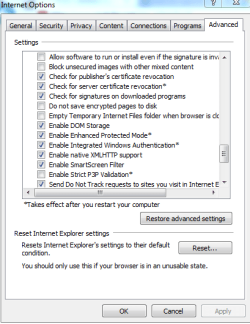
Otherwise Open Internet explorer and click on Gear symbol and Internet options,
Once on the Internet options page,
Go to the Advanced tab or section,
Scroll down the list nearly to the bottom and Enhanced protection mode is listed,
I don't know of any other settings page where it's listed other than this one,
See if it's Checked or Unchecked.
You have to click on Apply and Okay before leaving the Internet options page,
Any changes do not take effect unless you close All Browser windows.
Then re-open Internet explorer.
 

My Computer My Computer

At a glance

Win-7-Pro64bit 7-H-Prem-64biti7-5930K 2nd i9-9940x both water blocked VRM'...Trident-z 3200C14 2nd Trident-z 3600C16EVGA 1080ti ftw3 2nd Titan Xp both water blocked
Computer type
PC/Desktop
Computer Manufacturer/Model Number
Custom assembled by me :}
OS
Win-7-Pro64bit 7-H-Prem-64bit
CPU
i7-5930K 2nd i9-9940x both water blocked VRM's too
Motherboard
ASUS SABERTOOTH X99 2nd ASUS x299 Apex
Memory
Trident-z 3200C14 2nd Trident-z 3600C16
Graphics Card(s)
EVGA 1080ti ftw3 2nd Titan Xp both water blocked
Sound Card
Built-in Realtek
Monitor(s) Displays
1-AOC G2460PG 24"G-Sync 144Hz/ 2nd 1-ASUS VG248QE 24" 144Hz
Screen Resolution
1920 x 1080 144Hz
Hard Drives
2-Samsung M.2 Evo & Evo Plus
2-Samsung 850 EVO 500GB SSD's/ 3-2.5 W.D. Black 1tb-&3-1tb/3-3.5 WD Black 1tb hdd's
PSU
EVGA SuperNOVA 1000-P2 2nd 1200-P2
Case
2-Corsair Obsidian Series 450D Black ATX Mid Tower
Cooling
Custom water loops
Keyboard
Logitech G710+/ 2nd Logitech G910
Mouse
2-RedDragon M901 Perdition 16400 dpi Gaming mouse = wired
Internet Speed
Comcast Ping 19ms 89.31mbps download speed 6.12mbps upload
Antivirus
Malwarebytes Pro/ Superantispyware Pro
Browser
FireFox & Pale moon
Other Info
2nd ASUS X299 Apex/Intel i9-9940x with Custom water loop/7H-Prem-x64/Corsair 450D case/Ram Trident-z 3600C16 4x8gb / Samsung970Evo plus 500gb SSD/Dual ssd EZ swap evo/PSU EVGA SuperNova 1200w-P2 80+Platinum/GPU Titan Xp /8-ML-140 on push-pull on 2-280GTX rads

My Computer My Computer

At a glance

Windows 7 Ultimate X64 SP1Intel i5-2550K, Differing ~4.4-4.8GHz No buil...16GB G.Skill Sniper 1866MHz @ 2133MHz 2x8GBASUS GTX650TIB-DC2OC-2GD5, (650TI Boost)
Computer type
PC/Desktop
Computer Manufacturer/Model Number
Home Built Desktop By DataTech
OS
Windows 7 Ultimate X64 SP1
CPU
Intel i5-2550K, Differing ~4.4-4.8GHz No built in GPU
Motherboard
ASUS P8Z68-V PRO/GEN3
Memory
16GB G.Skill Sniper 1866MHz @ 2133MHz 2x8GB
Graphics Card(s)
ASUS GTX650TIB-DC2OC-2GD5, (650TI Boost)
Sound Card
Onboard Realtek 5-1
Monitor(s) Displays
Samsung P2570HD
Screen Resolution
1920x1080
Hard Drives
Samsung 840 Pro 256GB SSD for OS, 500GB Seagate Constellation (Enterprise drive) for Data
PSU
Corsair HX650W
Case
Inwin Dragon Rider
Cooling
Hyper 212 EVO w/two Noctua fans, push-pull, @1300 RPM
Keyboard
E-Z Eyes, bright yellow keys with large characters
Mouse
steelseries SENSEI Laser Pro Gaming
Internet Speed
48-51Mbs Mbs down, 11 Mbs up Xfinity Cable
Antivirus
Norton Internet Security 2013
Browser
IE 10, Opera, Pale Moon if needed
Other Info
4 case fans, LG BluRay-RE, ASUS DVD-RW, Mr. Fusion power supply, 1.21 gigawatts.
Yes, you have circled the 64bit parent process.

Yes, you have circled the 32bit children processes.

Can you show a screenshot of the EPM setting?

Could I bother you for a screenshot of the EPM setting?

can you direct me how to get to the epm screen again?

IE-EPM.png

If you can stand to watch the two videos that ThrashZone linked to, you will see how Process Explorer shows the parent process and the indented children. Sadly, those two videos don't actually show checking the option for EPM. Those steps are in the tutorial a few posts up.
 

My Computer My Computer

At a glance

W7 Pro SP1 64biti78GBIntel HD Graphics
Computer type
Laptop
Computer Manufacturer/Model Number
Employer provided Dell Latitude
OS
W7 Pro SP1 64bit
CPU
i7
Memory
8GB
Graphics Card(s)
Intel HD Graphics
Hard Drives
crappy SSD
Antivirus
Employer mandated Symantec Endpoint Protection
Browser
Pale Moon 64bit, IE11 64bit & Chrome 64bit
here's the links showing it,
http://www.sevenforums.com/tutorials/280434-internet-explorer-10-enable-32-bit-64-bit-ie10-windows-7-a.html#post2312336
http://blogs.msdn.com/b/ieinternals/archive/2012/03/23/understanding-ie10-enhanced-protected-mode-network-security-addons-cookies-metro-desktop.aspx
otherwise open internet explorer and click on gear symbol and internet options,
once on the internet options page,
go to the advanced tab or section,
scroll down the list nearly to the bottom and enhanced protection mode is listed,
i don't know of any other settings page where it's listed other than this one,
see if it's checked or unchecked.
You have to click on apply and okay before leaving the internet options page,
any changes do not take effect unless you close all browser windows.
Then re-open internet explorer.

here ya go
 

Attachments

  • Capture.PNG
    Capture.PNG
    15.6 KB · Views: 15
  • Capturef.PNG
    Capturef.PNG
    15.1 KB · Views: 15
  • Captureg.PNG
    Captureg.PNG
    12.5 KB · Views: 15

My Computer My Computer

At a glance

win 7 home premium 641.6 dual4gbuk
Computer Manufacturer/Model Number
asus
OS
win 7 home premium 64
CPU
1.6 dual
Motherboard
uk
Memory
4gb
Graphics Card(s)
uk
Sound Card
bang and oulfson
Hard Drives
ssd
Okay I've been trying to get you to use Restore Previous version on the Internet explorer Programs folder for a while now,
No personal files are effected only the Internet explorer folder will be/ hopefully to restore the file you deleted,
Go back to the previous post with the screen shot on it. page #2 post #20.
 

My Computer My Computer

At a glance

Win-7-Pro64bit 7-H-Prem-64biti7-5930K 2nd i9-9940x both water blocked VRM'...Trident-z 3200C14 2nd Trident-z 3600C16EVGA 1080ti ftw3 2nd Titan Xp both water blocked
Computer type
PC/Desktop
Computer Manufacturer/Model Number
Custom assembled by me :}
OS
Win-7-Pro64bit 7-H-Prem-64bit
CPU
i7-5930K 2nd i9-9940x both water blocked VRM's too
Motherboard
ASUS SABERTOOTH X99 2nd ASUS x299 Apex
Memory
Trident-z 3200C14 2nd Trident-z 3600C16
Graphics Card(s)
EVGA 1080ti ftw3 2nd Titan Xp both water blocked
Sound Card
Built-in Realtek
Monitor(s) Displays
1-AOC G2460PG 24"G-Sync 144Hz/ 2nd 1-ASUS VG248QE 24" 144Hz
Screen Resolution
1920 x 1080 144Hz
Hard Drives
2-Samsung M.2 Evo & Evo Plus
2-Samsung 850 EVO 500GB SSD's/ 3-2.5 W.D. Black 1tb-&3-1tb/3-3.5 WD Black 1tb hdd's
PSU
EVGA SuperNOVA 1000-P2 2nd 1200-P2
Case
2-Corsair Obsidian Series 450D Black ATX Mid Tower
Cooling
Custom water loops
Keyboard
Logitech G710+/ 2nd Logitech G910
Mouse
2-RedDragon M901 Perdition 16400 dpi Gaming mouse = wired
Internet Speed
Comcast Ping 19ms 89.31mbps download speed 6.12mbps upload
Antivirus
Malwarebytes Pro/ Superantispyware Pro
Browser
FireFox & Pale moon
Other Info
2nd ASUS X299 Apex/Intel i9-9940x with Custom water loop/7H-Prem-x64/Corsair 450D case/Ram Trident-z 3600C16 4x8gb / Samsung970Evo plus 500gb SSD/Dual ssd EZ swap evo/PSU EVGA SuperNova 1200w-P2 80+Platinum/GPU Titan Xp /8-ML-140 on push-pull on 2-280GTX rads
I do not see anything wrong with the OP's installation of IE11. It appears to be functioning as it should.

There is a 64bit parent and 32bit children. If the OP wants to use an inefficient 64bit plug-in, then the OP needs 64bit children via EPM (but even then - the plug-in might not work).
 

My Computer My Computer

At a glance

W7 Pro SP1 64biti78GBIntel HD Graphics
Computer type
Laptop
Computer Manufacturer/Model Number
Employer provided Dell Latitude
OS
W7 Pro SP1 64bit
CPU
i7
Memory
8GB
Graphics Card(s)
Intel HD Graphics
Hard Drives
crappy SSD
Antivirus
Employer mandated Symantec Endpoint Protection
Browser
Pale Moon 64bit, IE11 64bit & Chrome 64bit
She earlier reported she delete iexplore.exe from her program folder which is the 64 bit folder so with no exe in there it's not operating,
There is a separate exe in programs x86 which manages the 32 bit processes but that's all it does,
Once you switch to epm the other exe file takes over/ so it seems but I can't figure out any other reason for epm not functioning as my prior task manager images showed on I believe page 1 post 6.
 

My Computer My Computer

At a glance

Win-7-Pro64bit 7-H-Prem-64biti7-5930K 2nd i9-9940x both water blocked VRM'...Trident-z 3200C14 2nd Trident-z 3600C16EVGA 1080ti ftw3 2nd Titan Xp both water blocked
Computer type
PC/Desktop
Computer Manufacturer/Model Number
Custom assembled by me :}
OS
Win-7-Pro64bit 7-H-Prem-64bit
CPU
i7-5930K 2nd i9-9940x both water blocked VRM's too
Motherboard
ASUS SABERTOOTH X99 2nd ASUS x299 Apex
Memory
Trident-z 3200C14 2nd Trident-z 3600C16
Graphics Card(s)
EVGA 1080ti ftw3 2nd Titan Xp both water blocked
Sound Card
Built-in Realtek
Monitor(s) Displays
1-AOC G2460PG 24"G-Sync 144Hz/ 2nd 1-ASUS VG248QE 24" 144Hz
Screen Resolution
1920 x 1080 144Hz
Hard Drives
2-Samsung M.2 Evo & Evo Plus
2-Samsung 850 EVO 500GB SSD's/ 3-2.5 W.D. Black 1tb-&3-1tb/3-3.5 WD Black 1tb hdd's
PSU
EVGA SuperNOVA 1000-P2 2nd 1200-P2
Case
2-Corsair Obsidian Series 450D Black ATX Mid Tower
Cooling
Custom water loops
Keyboard
Logitech G710+/ 2nd Logitech G910
Mouse
2-RedDragon M901 Perdition 16400 dpi Gaming mouse = wired
Internet Speed
Comcast Ping 19ms 89.31mbps download speed 6.12mbps upload
Antivirus
Malwarebytes Pro/ Superantispyware Pro
Browser
FireFox & Pale moon
Other Info
2nd ASUS X299 Apex/Intel i9-9940x with Custom water loop/7H-Prem-x64/Corsair 450D case/Ram Trident-z 3600C16 4x8gb / Samsung970Evo plus 500gb SSD/Dual ssd EZ swap evo/PSU EVGA SuperNova 1200w-P2 80+Platinum/GPU Titan Xp /8-ML-140 on push-pull on 2-280GTX rads
She earlier reported she delete iexplore.exe from her program folder which is the 64 bit folder so with no exe in there it's not operating,
~~~
In post #1, thegreattailz states that a pinned shortcut was deleted.
This statement from post #1...
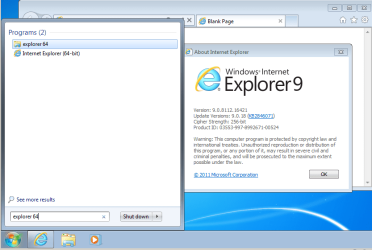
Now when I type EXPLORER 64 nothing comes up.
...does not mean that an exe file has been deleted. This just means that thegreattailz did not know that Microsoft changed the shortcuts to IE starting with IE10.

Here is what users would see when making that shortcut search:

IE9-1.png


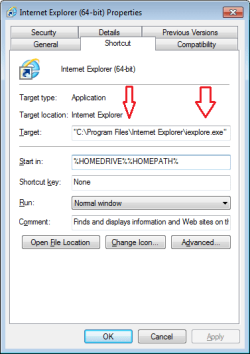
And here are the properties of the IE9-64bit shortcut:

IE9-2.png

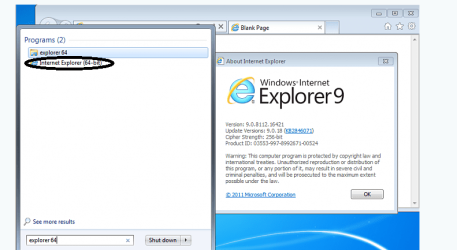
Once IE10 or IE11 is installed on the computer, searching for EXPLORER 64 will no longer return any shortcuts for Internet Explorer. While this might be a confusing change, it is normal. Once IE10 or IE11 is installed on the computer, the default start menu shortcut for IE will start the 64bit version of IE. If you force W7 to start the 32bit version, that version will start the 64bit version and then will exit RAM.


~~~
There is a separate exe in programs x86 which manages the 32 bit processes but that's all it does,
~~~
Once IE10 or IE11 is installed on the computer, that statement is no longer true. The 64bit IE exe manages the 32bit IE processes when EPM is off. That same 64bit IE exe manages the 32bit and 64bit IE processes when EPM is on.


~~~
....I can't figure out any other reason for epm not functioning [for the OP] as my prior task manager images showed on I believe page 1 post 6.
Possible reason 1) a 32bit plug-in is forcing the 64bit parent to always launch 32bit children
Possible reason 2) the OP does not have EPM enabled as claimed in post #9
(Hence my request for a screenshot.)
 

My Computer My Computer

At a glance

W7 Pro SP1 64biti78GBIntel HD Graphics
Computer type
Laptop
Computer Manufacturer/Model Number
Employer provided Dell Latitude
OS
W7 Pro SP1 64bit
CPU
i7
Memory
8GB
Graphics Card(s)
Intel HD Graphics
Hard Drives
crappy SSD
Antivirus
Employer mandated Symantec Endpoint Protection
Browser
Pale Moon 64bit, IE11 64bit & Chrome 64bit
She earlier reported she delete iexplore.exe from her program folder which is the 64 bit folder so with no exe in there it's not operating,
~~~

Thats the file I deleted! I think I understand whats going on... That was the old IE version, and when I upgraded to IE11 no one conveniently told me that file isnt included in the new IE. But that doesn't explain why the 64 bit process is still spawning 32 bit children.
 

Attachments

  • Capture.PNG
    Capture.PNG
    60.5 KB · Views: 0

My Computer My Computer

At a glance

win 7 home premium 641.6 dual4gbuk
Computer Manufacturer/Model Number
asus
OS
win 7 home premium 64
CPU
1.6 dual
Motherboard
uk
Memory
4gb
Graphics Card(s)
uk
Sound Card
bang and oulfson
Hard Drives
ssd
@thegreattailz,
Have you restarted this computer since you enabled EPM?
What antivirus app are you using? Norton...?
 

My Computer My Computer

At a glance

W7 Pro SP1 64biti78GBIntel HD Graphics
Computer type
Laptop
Computer Manufacturer/Model Number
Employer provided Dell Latitude
OS
W7 Pro SP1 64bit
CPU
i7
Memory
8GB
Graphics Card(s)
Intel HD Graphics
Hard Drives
crappy SSD
Antivirus
Employer mandated Symantec Endpoint Protection
Browser
Pale Moon 64bit, IE11 64bit & Chrome 64bit

My Computer My Computer

At a glance

win 7 home premium 641.6 dual4gbuk
Computer Manufacturer/Model Number
asus
OS
win 7 home premium 64
CPU
1.6 dual
Motherboard
uk
Memory
4gb
Graphics Card(s)
uk
Sound Card
bang and oulfson
Hard Drives
ssd
In one of your posts, you shows a screenshot of Task Manager. That screenshot shows LiveUpdate.exe running. Do you know what app this is from?
 

My Computer My Computer

At a glance

W7 Pro SP1 64biti78GBIntel HD Graphics
Computer type
Laptop
Computer Manufacturer/Model Number
Employer provided Dell Latitude
OS
W7 Pro SP1 64bit
CPU
i7
Memory
8GB
Graphics Card(s)
Intel HD Graphics
Hard Drives
crappy SSD
Antivirus
Employer mandated Symantec Endpoint Protection
Browser
Pale Moon 64bit, IE11 64bit & Chrome 64bit
Also, if User Access Control is disabled, you will have 32bit tabs - even with EPM enabled. There is a work around, but I would not suggest it.
 

My Computer My Computer

At a glance

W7 Pro SP1 64biti78GBIntel HD Graphics
Computer type
Laptop
Computer Manufacturer/Model Number
Employer provided Dell Latitude
OS
W7 Pro SP1 64bit
CPU
i7
Memory
8GB
Graphics Card(s)
Intel HD Graphics
Hard Drives
crappy SSD
Antivirus
Employer mandated Symantec Endpoint Protection
Browser
Pale Moon 64bit, IE11 64bit & Chrome 64bit
Also, if User Access Control is disabled, you will have 32bit tabs - even with EPM enabled. There is a work around, but I would not suggest it.


im not sure what live update is, or user access control
 

My Computer My Computer

At a glance

win 7 home premium 641.6 dual4gbuk
Computer Manufacturer/Model Number
asus
OS
win 7 home premium 64
CPU
1.6 dual
Motherboard
uk
Memory
4gb
Graphics Card(s)
uk
Sound Card
bang and oulfson
Hard Drives
ssd
Back
Top