I used TestDisc - now laptop won't boot

ajschenk

New member
Local time
7:19 PM
Messages
5
Hello,

Today I was using TestDisc to try to recover an external hard drive that was hooked to my laptop. I used this set of instructions:

http://www.sevenforums.com/software/190430-regain-lost-drive-using-test-disk-illustrated-guide.html

After a couple of hours, when the steps were complete, I rebooted my machine. It first showed the normal Dell screen where it says "F2 for setup, F12 for Boot options." After that, instead of loading Windows, it flashes a black screen with some writing on it (I can try to capture what it says if needed), and then it goes to a Dell diagnostic screen with three options (Test Memory, Test System, and Exit). If I exit, it just runs through the same process I just described, only to land me on the same diagnostic screen.

I haven't done much of anything else to attempt to correct the problem, mainly because I wouldn't be sure where to start. And the whole reason this happened is a bit puzzling because I was quite certain I was using TestDisc on the external drive. Anyway, if anyone can help I would be GREATLY appreciative.

Thanks
 

My Computer My Computer

At a glance

Windows 7 Home Premium 64 bit
Computer type
Laptop
Computer Manufacturer/Model Number
Dell
OS
Windows 7 Home Premium 64 bit
can you please capture what the writing says, also, you may have clicked the wrong drive by mistake
 

My Computer My Computer

At a glance

Windows 7 Enterprise x64Intel i5 Dual Core
Computer type
Laptop
Computer Manufacturer/Model Number
Dell
OS
Windows 7 Enterprise x64
CPU
Intel i5 Dual Core
Screen Resolution
1366x768
Keyboard
built in Keyboard
Antivirus
System Centre Endpoint Protection
Browser
Google Chrome, Firefox and Internet Explorer
I know little of nothing about a Dell but you could check your boot priority in the bios.
 
Last edited:

My Computer My Computer

At a glance

Windows 10 Pro. 64/ version 1709 Windows 7 Pr...Intel i7-6800K @ 4.3Corsair Platinum 16 gig @2400EVGA GTX 1070 OC
Computer type
PC/Desktop
Computer Manufacturer/Model Number
Home made Desktop
OS
Windows 10 Pro. 64/ version 1709 Windows 7 Pro/64
CPU
Intel i7-6800K @ 4.3
Motherboard
ASUS X-99 Deluxe II
Memory
Corsair Platinum 16 gig @2400
Graphics Card(s)
EVGA GTX 1070 OC
Monitor(s) Displays
Asus 27" LED LCD/VE278Q
Screen Resolution
1920-1080 or 1280-720 HDMI
Hard Drives
INTEL SSD 730-240 Gb Sata 3.0/
PSU
EVGA Platium 1200W
Case
Phanteks Luxe Tempered Glass 8 fans/ one radiator
Cooling
XSPC/ Water Cooled CPU
Keyboard
Das 4 Professional
Mouse
Logitech M705/MX Anywhere 2-S
Internet Speed
100 mbits
Antivirus
Microsoft Security Essentials/ Malwarebytes Premium 3.0/ SAS
Browser
I.E. 11 default/Firefox/ ISP Time Warner Cable/Spectrum
Other Info
LG BluRay Burner/
Sound system-KLipsch-THX/
Icy Dock ssd Hot Swap bays.
Hello,

Sorry about the very long time since I posted about this. Lot going on and I just let things go. The laptop is in the same condition as before, and I haven't done anything to try to fix it.

The screen that comes up black with white text says the following:

Loading DRMK V8.00...
HIMEM.SYS 8.11

DRMK Version 8.00
COMMAND.COM Build 37 - July 28, 2008
DRMK KERNEL Build 15 - Aug 8 2008
Copyright (c) 2006-2008 Dell Inc. All Rights Reserved.


It is possible (and likely) that I selected the wrong drive when I ran the program. I am assuming that is what happened, so now I just want to know if anyone knows how to recover my system from this point. I would like to have access to my drive and the files, rather than reload the OS from scratch, if at all possible. Thanks for taking the time to read.
 

My Computer My Computer

At a glance

Windows 7 Home Premium 64 bit
Computer type
Laptop
Computer Manufacturer/Model Number
Dell
OS
Windows 7 Home Premium 64 bit

My Computers My Computers

  • At a glance

    7 X64i5 84002x8gb 3200mhz
    Computer type
    PC/Desktop
    OS
    7 X64
    CPU
    i5 8400
    Motherboard
    gigabyte b365m ds3h
    Memory
    2x8gb 3200mhz
    Hard Drives
    various
    PSU
    pure power 11 400w cm
    Case
    Coolermaster
    Cooling
    cryorig m9i
  • At a glance

    7x64g54008gb ddr4 2400
    Computer type
    PC/Desktop
    OS
    7x64
    CPU
    g5400
    Motherboard
    ga b365m ds3h
    Memory
    8gb ddr4 2400
    PSU
    xfx pro 450w
By chance would you have a thumb drive or DVD plugged into your computer with DRMK Version 8.00?
If so, unplug it or remove the DVD.
Unplug all usb things except your mouse and keyboard and then try booting.
 

My Computer My Computer

At a glance

Windows 10 Pro. 64/ version 1709 Windows 7 Pr...Intel i7-6800K @ 4.3Corsair Platinum 16 gig @2400EVGA GTX 1070 OC
Computer type
PC/Desktop
Computer Manufacturer/Model Number
Home made Desktop
OS
Windows 10 Pro. 64/ version 1709 Windows 7 Pro/64
CPU
Intel i7-6800K @ 4.3
Motherboard
ASUS X-99 Deluxe II
Memory
Corsair Platinum 16 gig @2400
Graphics Card(s)
EVGA GTX 1070 OC
Monitor(s) Displays
Asus 27" LED LCD/VE278Q
Screen Resolution
1920-1080 or 1280-720 HDMI
Hard Drives
INTEL SSD 730-240 Gb Sata 3.0/
PSU
EVGA Platium 1200W
Case
Phanteks Luxe Tempered Glass 8 fans/ one radiator
Cooling
XSPC/ Water Cooled CPU
Keyboard
Das 4 Professional
Mouse
Logitech M705/MX Anywhere 2-S
Internet Speed
100 mbits
Antivirus
Microsoft Security Essentials/ Malwarebytes Premium 3.0/ SAS
Browser
I.E. 11 default/Firefox/ ISP Time Warner Cable/Spectrum
Other Info
LG BluRay Burner/
Sound system-KLipsch-THX/
Icy Dock ssd Hot Swap bays.
Clap,clap! Excellent suggestion by Layback Bear.( Have to spread my reps a lot.)

It may simply be booting to the disc or the bootable usb/RAM drive that you created. Remove the disc or usb and it should boot into windows.

Did you run TestDisk from a bootable USB pendrive? Bootable CD?

Did you change the boot priority on your machine?

As Layback Bear suggested, remove all USB devices plugged into your machine (except mouse/Keyboard). Also remove any CD/DVD in the optical drive. I will go one step further. Shut down your laptop. Remove the power adaptor from the laptop. Remove the battery. Leave your laptop powerless for a few minutes. As an added measure vent your anger by pressing the power on button on your laptop for a few seconds. All this should remove any residual charge on the laptop or struck bits. Now put the battery back, restore AC power to the laptop and boot.

Is everything OK?
 

My Computer My Computer

At a glance

Windows 7 Home Premium 32 bit
OS
Windows 7 Home Premium 32 bit
Thanks for the clap/clap jumanji!
 

My Computer My Computer

At a glance

Windows 10 Pro. 64/ version 1709 Windows 7 Pr...Intel i7-6800K @ 4.3Corsair Platinum 16 gig @2400EVGA GTX 1070 OC
Computer type
PC/Desktop
Computer Manufacturer/Model Number
Home made Desktop
OS
Windows 10 Pro. 64/ version 1709 Windows 7 Pro/64
CPU
Intel i7-6800K @ 4.3
Motherboard
ASUS X-99 Deluxe II
Memory
Corsair Platinum 16 gig @2400
Graphics Card(s)
EVGA GTX 1070 OC
Monitor(s) Displays
Asus 27" LED LCD/VE278Q
Screen Resolution
1920-1080 or 1280-720 HDMI
Hard Drives
INTEL SSD 730-240 Gb Sata 3.0/
PSU
EVGA Platium 1200W
Case
Phanteks Luxe Tempered Glass 8 fans/ one radiator
Cooling
XSPC/ Water Cooled CPU
Keyboard
Das 4 Professional
Mouse
Logitech M705/MX Anywhere 2-S
Internet Speed
100 mbits
Antivirus
Microsoft Security Essentials/ Malwarebytes Premium 3.0/ SAS
Browser
I.E. 11 default/Firefox/ ISP Time Warner Cable/Spectrum
Other Info
LG BluRay Burner/
Sound system-KLipsch-THX/
Icy Dock ssd Hot Swap bays.
Hello,

I have no discs in the machine, and nothing is plugged in, USB or otherwise (not even mouse/keyboard). I tried the suggestion of disconnecting AC and battery power and pressing the power button for a few seconds, and the problem persists.

Thanks for chiming in. Hopefully you have more suggestions.

I am getting to a point where I was planning to remove the hard drive and put it into my wife's laptop in the 2nd HDD bay (we both have the same model and year laptop, and they each have an empty bay for a 2nd hard drive). I was thinking this would perhaps allow me to access the drive to save my files, and then I could proceed with a more forceful way of recovering my system, even if it means rewriting the hard drive or something like that. What do you guys think of that?

Edit: I ran Testdisc from my hard drive - not a removable drive of any sort. And I did not knowingly change the boot priority.
 
Last edited:

My Computer My Computer

At a glance

Windows 7 Home Premium 64 bit
Computer type
Laptop
Computer Manufacturer/Model Number
Dell
OS
Windows 7 Home Premium 64 bit

My Computer My Computer

At a glance

Windows 7 Ultimate x64
OS
Windows 7 Ultimate x64
Ok, @ajschenk, that was bad luck. Nevertheless it was a knowledgeable suggestion by Layback bear. It worked for many. In your case primafacie TestDisk seems to have screwed up your system drive, for whatever reason.

Go ahead with what you want to do. That also gives you and us an opportunity to look at how the two drives appear in Partition Wizard. Remember SIW2's suggestion to view your drive with bootable Partition Wizard? Now we have a chance to look at the functioning and non functioning drive in the same screenshot.

Now no need for the bootable Partition Wizard. Just install Partition Wizard Free Edition 9.1 on your wife's laptop. And post a screenshot showing both the drives - the very first screen when you launch the application. ( Of course I may see it only tomorrow afternoon. I have a schedule in the morning.)

Now what exactly did you do with TestDisk? Can you elaborate? If you can remember and post the exact steps and the response from TestDisk, we may perhaps be able to pinpoint what could have gone wrong..
 

My Computer My Computer

At a glance

Windows 7 Home Premium 32 bit
OS
Windows 7 Home Premium 32 bit
Hello,

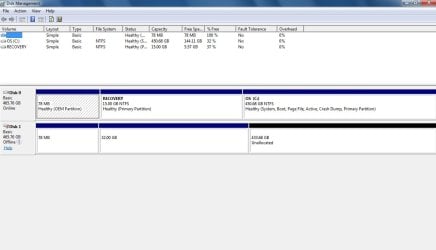
Long time gone again, but I'm back. Inserting the HD into my wife's laptop wasn't as simple as I thought, so I ended up getting a SATA/USB adapter and plugging it in that way. Here is the result in the attachment. Any chance I can recover any files from the unallocated partition?

As to your earlier question, I don't think I did anything to deviate from the steps I posted in the link in my original post.
 

Attachments

  • Disk Management.jpg
    Disk Management.jpg
    56.9 KB · Views: 5

My Computer My Computer

At a glance

Windows 7 Home Premium 64 bit
Computer type
Laptop
Computer Manufacturer/Model Number
Dell
OS
Windows 7 Home Premium 64 bit
OK, a few questions first.
1. What is the exact model No of your Dell laptop and your wife's Dell laptop? I would be pleased if you can show it on the Dell website. Post the link.

2. Did both come with Windows Home Premium 64bit preinstalled?

3. Please read the label on the back of the laptop. Leave aside the Service tag No and express Service Code. Do the rest tally exactly and are the same?

4. Remove the battery and have a look at the COA stickers on both machines. Does it read Windows Home Premium OA. ( Now for your safety note down the product ID of both the machines and keep it safely. These will be required to activate a clean install in future if it becomes necessary.The sticker may become unreadable over time.)

Now what I see in the screenshot: the Recovery Partition on your HDD is 32GB as against 15 GB in your wife's laptop. If both the machines are same in all respects, what this means is a wrong partition table has been written on your HDD and that is why it became unbootable.( The starting LBA of your C: drive has been pushed up by 17GB)

Once you answer all the questions, I shall proceed with correcting the wrong partition table in your HDD.The right partition table will be taken from your wife's HDD.

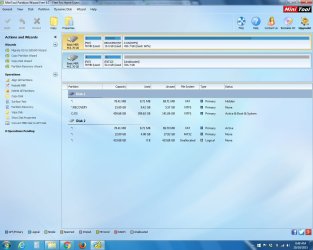
EDIT: I also wanted you to install Partition Wizard and post the screenshot."Now no need for the bootable Partition Wizard. Just install Partition Wizard Free Edition 9.1 on your wife's laptop. And post a screenshot showing both the drives - the very first screen when you launch the application."

Please do it now.
 
Last edited:

My Computer My Computer

At a glance

Windows 7 Home Premium 32 bit
OS
Windows 7 Home Premium 32 bit
Hello again!

Thanks so much for the help. I apologize again for taking so much time between posts.

1. The model is Dell Studio 1737, purchased in 2009 (both are the same). Here is a link to the support page.

Product Support | Dell US

2. Both came with Windows Vista Home Premium, but we upgraded to Windows 7 once that became available.

3. The rest do match each other.

4. The stickers read Windows Vista Home Premium OEMAct.

Is this the screenshot you need?
 

Attachments

  • 9.1 Screenshot.jpg
    9.1 Screenshot.jpg
    106.5 KB · Views: 3

My Computer My Computer

At a glance

Windows 7 Home Premium 64 bit
Computer type
Laptop
Computer Manufacturer/Model Number
Dell
OS
Windows 7 Home Premium 64 bit
OK, Now run Partition Wizard. On the left pane click on Partition Recovery Wizard > Next > Choose thhe working drive in your wife's laptop > Next > Full Disk > Next > Quick Scan > Next and post the screenshot of the window showing all partitions found.

19-10-2015 08-42-46.jpg

Once you have captured the screenshot click on the Cancel button on that Window and close it.

Now run Partition Recovery Wizard on your faulty drive. Instead of Quick Scan select Full Scan, allow Full Scan to complete and post the screenshot of partitions found window. Once you capture the screen, click on the Cancel button to close that Window and close Partition Wizard.

So you will be posting two screenshots 1. Quick Scan results on your wife's drive and 2. Full Scan result on your faulty drive.

Note:

1. Full Scan is likely to take more time. Be patient and wait for it to complete.

2. In both cases you will only capture the screenshots and then cancel it. Do not do anything else until you get further instructions from me after seeing the screenshot.

Now answer this question: Why did you run TestDisk in the first instance? What was your problem?
 

My Computer My Computer

At a glance

Windows 7 Home Premium 32 bit
OS
Windows 7 Home Premium 32 bit
Back
Top