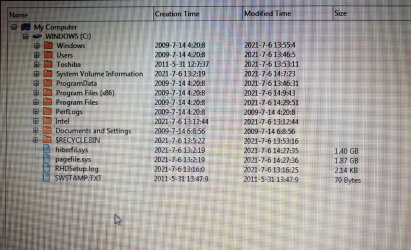
The fault I’m experiencing is Windows will not always automatically boot. In addition, I also have a continually scrolling curser – the video shows this.
Link to google drive photos and a video are:
Drive map
IMG_20210706_143324.jpg - Google Drive
Google Drive: Sign-in
Cursor problem videos
Google Drive: Sign-in
When I turn on, my laptop moves from the Toshiba flashscreen (the one with the F2 and F12 message along the bottom of the screen), to a blank screen with no cursor. If I then hit any key, the cursor appears in the top left and a few seconds later Windows starts to boot and functions normally - about from the cursor problem.
Below is what I’ve done so, all of which have been unsuccessful.
1. Complete reinstall from my recovery drive 7 times.
2. Checked for viruses using COMODO on an external drive – all clear.
3. Checked the boot order and this shows the HDD as top of the list.
4. I’ve gone into the Repair Your Computer. First thing that happens here is that it scroll through all the countries and when it does settle down, I can only scroll down using the arrow keys, but not up. In order to select the correct country I have to use the touchpad.
5. I've uninstalled then reinstalled the synaptic pad drive - didn't work.
6. System Recover Options – Startup Repair. The results are Number of root causes =1; all the error codes are 0x0; and at ‘Root cause found’ it says “Boot status indicates the the OS booted successfully.
7. I’ve run chkdsk /f from the Command Prompt in Repair. Result was “Cannot lock current drive. Windows cannot run disk checking on this volume because it is write protected”
8. SFC -SCANNOW. Result
"There is a system repair pending which requires reboot to complete.."
I've rebooted (this time) 8 times but I still get this message.
9. I’ve tried running the following commands:
Bootrec /Fixboot
Bootrec /Fixmbr
Bootsect /nt60 all /MBR
Bootrec /RebuildBcd, - no joy
10. I’ve also tried running Bootrec.exe. This returned
“total identified Windows installations:0”.
As per the instructions I was following, I then entered the following commands:
Bcdedit /export C:\BCD_Backup – result “operation completed successfully”
ren c:\boot\bcd bcd.old – result “The system cannot find the file specified”
Bootrec /rebuildbcd
Interestingly, Bootrec /rebuildbcd kept entering itself at each command line prompt. After a couple of seconds, I could successfully overwrite it.
11. Phots of drive map with listings attached and also video showing my cursor problems.
Any ideas, please/
Link to google drive photos and a video are:
Drive map
IMG_20210706_143324.jpg - Google Drive
Google Drive: Sign-in
Cursor problem videos
Google Drive: Sign-in
When I turn on, my laptop moves from the Toshiba flashscreen (the one with the F2 and F12 message along the bottom of the screen), to a blank screen with no cursor. If I then hit any key, the cursor appears in the top left and a few seconds later Windows starts to boot and functions normally - about from the cursor problem.
Below is what I’ve done so, all of which have been unsuccessful.
1. Complete reinstall from my recovery drive 7 times.
2. Checked for viruses using COMODO on an external drive – all clear.
3. Checked the boot order and this shows the HDD as top of the list.
4. I’ve gone into the Repair Your Computer. First thing that happens here is that it scroll through all the countries and when it does settle down, I can only scroll down using the arrow keys, but not up. In order to select the correct country I have to use the touchpad.
5. I've uninstalled then reinstalled the synaptic pad drive - didn't work.
6. System Recover Options – Startup Repair. The results are Number of root causes =1; all the error codes are 0x0; and at ‘Root cause found’ it says “Boot status indicates the the OS booted successfully.
7. I’ve run chkdsk /f from the Command Prompt in Repair. Result was “Cannot lock current drive. Windows cannot run disk checking on this volume because it is write protected”
8. SFC -SCANNOW. Result
"There is a system repair pending which requires reboot to complete.."
I've rebooted (this time) 8 times but I still get this message.
9. I’ve tried running the following commands:
Bootrec /Fixboot
Bootrec /Fixmbr
Bootsect /nt60 all /MBR
Bootrec /RebuildBcd, - no joy
10. I’ve also tried running Bootrec.exe. This returned
“total identified Windows installations:0”.
As per the instructions I was following, I then entered the following commands:
Bcdedit /export C:\BCD_Backup – result “operation completed successfully”
ren c:\boot\bcd bcd.old – result “The system cannot find the file specified”
Bootrec /rebuildbcd
Interestingly, Bootrec /rebuildbcd kept entering itself at each command line prompt. After a couple of seconds, I could successfully overwrite it.
11. Phots of drive map with listings attached and also video showing my cursor problems.
Any ideas, please/
My Computers
-
At a glance
Windows 7 Home Premium 64bitIntel (R) Celeron (R) 925RAM 2Gb- Computer type
- Laptop
- Computer Manufacturer/Model Number
- Toshiba Satellite C660
- OS
- Windows 7 Home Premium 64bit
- CPU
- Intel (R) Celeron (R) 925
- Memory
- RAM 2Gb
- Keyboard
- English UK
- Mouse
- M570
- Antivirus
- Bitdefender
- Browser
- Google CROME
-
- Computer type
- PC/Desktop