I want to change my computer layout, need your advice...

JordanJP

New member
Local time
4:41 AM
Messages
296
Hey all,

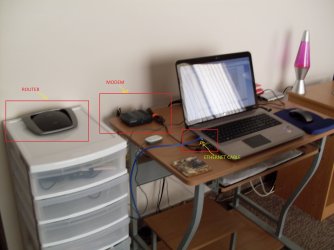
Currently I've got my laptop computer connected to my router via Ethernet, my router is then connected to my modem. I use my laptop as a desktop replacement and it's the only system I've got.

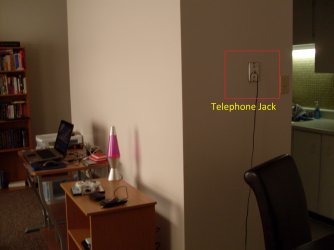
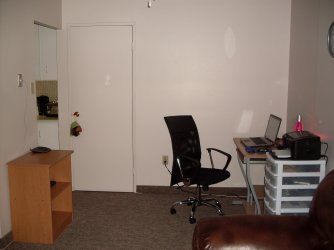
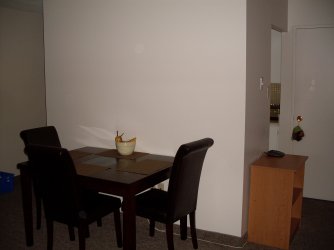
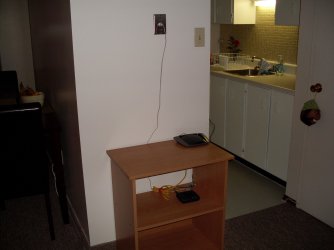
The place that I live in, my apartment is not huge by any means however I want to move my desk to another spot in my apartment. However the issue is where I want to move it, there's no Telephone port to connect my modem and I would have to leave my modem and router possibly at my current location. So essentially the way I'm seeing this is I will be able to move my desk however I'll have to connect to my router wirelessly now as opposed to always having it connected via ethernet.

Is it possible to still configure everything on the router and modem and benefit from the Internet by just a wireless connection ? I thought I read somewhere that you need at least one computer connected via Ethernet at all times in order for stuff to work in your network.

Thanks hope my question is clear enough ! :D

Jordan

PS : Please see the pics for more details hopefully I'm clear in what I want to try and accomplish.

I welcome all your suggestions ! :p
 

Attachments

  • SDC10706.JPG
    SDC10706.JPG
    417.9 KB · Views: 11
  • SDC10707.JPG
    SDC10707.JPG
    411.8 KB · Views: 7
  • SDC10708.JPG
    SDC10708.JPG
    385.3 KB · Views: 5

My Computer My Computer

At a glance

Windows 7 baby ! : DIntel Core i7 720QM @ 1.60GHz6.0GB Dual-Channel DDR3 @ 662MHzATI Mobility Radeon HD 5650
Computer Manufacturer/Model Number
HP Envy 17 4054ca
OS
Windows 7 baby ! : D
CPU
Intel Core i7 720QM @ 1.60GHz
Motherboard
Hewlett-Packard 1449 (CPU)
Memory
6.0GB Dual-Channel DDR3 @ 662MHz
Graphics Card(s)
ATI Mobility Radeon HD 5650
Sound Card
IDT High Definition Audio CODEC
Monitor(s) Displays
Generic PnP Monitor @ 1600x900
Screen Resolution
1600X900
Hard Drives
78.15GB INTEL SSDSA2M080G2GC ATA Device (IDE)
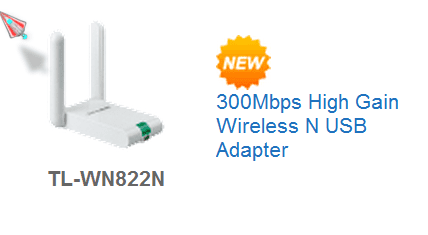
hi no you will not loose any thing by choosing wireless only the speed if you have a router that is wireless n get a wireless n adapter for the usb or a pci card for your motherboard (this is a much better choice ) Wireless LAN
 

Attachments

  • tplink3.PNG
    tplink3.PNG
    7.3 KB · Views: 1
  • tplink2.PNG
    tplink2.PNG
    8.2 KB · Views: 1
  • tplink.PNG
    tplink.PNG
    6 KB · Views: 1

My Computer My Computer

At a glance

Operating System : Windows 7 Home Premium Edi...Processor : Intel Core 2 Quad Q8300 @ 2500 MHzPhysical Memory :8GB Corsair4x 2GB 800MHz C5 ...Video Card : XFX 6700 AMD
Computer Manufacturer/Model Number
packard bell IXTREME M5722
OS
Operating System : Windows 7 Home Premium Edition 6.01.7600 SP1 (x64)
CPU
Processor : Intel Core 2 Quad Q8300 @ 2500 MHz
Motherboard
Mainboard : Packard Bell (Acer EG43M )
Memory
Physical Memory :8GB Corsair4x 2GB 800MHz C5 DDR2
Graphics Card(s)
Video Card : XFX 6700 AMD
Monitor(s) Displays
Maestro 234DL - BenQ V2220 - BenQ VW2420H
Screen Resolution
Current Display :1920x1080p pixels at 60 Hz in HD LED
Hard Drives
Hard Disks : WDC (1000 GB)
Drive C: (Hard Disk) : 428 GB available on 491 GB
Drive D: (Hard Disk) : 426 GB available on 492 GB
SAMSUNG spinpoint HD103SJ 1000.2 GB
(X 2) KINGSTON SSD NOW V 30GB
PSU
XFX ProSeries 550W PSU
Case
PACKARD BELL IXTREME
Cooling
System Blower Current: 150mA Air Flow16CFM ;Akasa 90mm rear
Keyboard
Gigabyte Aivia K8100
Mouse
TRUST-Wireless Laser Mouse - Carbon edition MI-7770C
Internet Speed
TP-LINK > TL-WN951N / AV500 Gigabit Powerline Adapters
Browser
chrome dev
Other Info
EXTRA COOLING>(FAN CONTROLLER) PC Bay Cooler 3 x 40mm fans; Akasa AK-HD-BL Blue hard drive cooler 2 x 40 mm fan 4500 rpm 29.7 dBA
Bios> American Megatrends Inc.
Version : P01-A1
Date : 08/31/2009
Hi,

Short & sweet...If you were to purchase a wireless USB stick then once connected to the router you will have all the internet connectivity you'd normally have from a wired connection.


OS
 

My Computer My Computer

At a glance

Windows 7 Ultimate x64AMD Sempron Dual Core3GBNVIDIA GeForce 6150SE nForce 430
Computer Manufacturer/Model Number
Compaq Desktop
OS
Windows 7 Ultimate x64
CPU
AMD Sempron Dual Core
Memory
3GB
Graphics Card(s)
NVIDIA GeForce 6150SE nForce 430
Screen Resolution
1024x768
Hard Drives
150GB Sata
I thought I read somewhere that you need at least one computer connected via Ethernet at all times in order for stuff to work in your network.

This is not correct. You can have your only laptop connect to your router wirelessly without any connection issue.

Wireless connections can be slower than wired connections. A gigabit router, connected to a laptop with a gigabit NIC, wired using an Cat-6 cable, could "approach" 1000 Mbits per second, while a wireless-n connection, under perfect conditions, could "approach" 300 Mbits per second according to science and advertising. But unless you need the speed you can go with the wireless connection and it will work fine for most uses.

Ugh! 3rd place!
 
Last edited:

My Computer My Computer

At a glance

Windows 7 64 Bit Home Premium SP1i7-3820GSkill F3-14900CL9Q - 16GBEVGA GeForce GTX660 - Driver 352.86
Computer type
PC/Desktop
Computer Manufacturer/Model Number
Home Built - Jan 2013
OS
Windows 7 64 Bit Home Premium SP1
CPU
i7-3820
Motherboard
Asus P9X79-PRO - Bios 4608
Memory
GSkill F3-14900CL9Q - 16GB
Graphics Card(s)
EVGA GeForce GTX660 - Driver 352.86
Sound Card
On board Realtek ALC898
Monitor(s) Displays
Acer S271HL
Screen Resolution
1920 x 1080
Hard Drives
#1- Samsung 840 Pro Series
#2- Western Digital WD1002FAEX Sata3 Black
#3- Western Digital WD1002FAEX Sata3 Black
PSU
Corsair CMPSU-850TX-V2 - 850 watt (by Seasonic)
Case
Corsair Obsidian 550D
Cooling
Standard 3 120mm case fans, Cooler Master Hyper 212 EVO
Keyboard
MS KC-0405
Mouse
Intellimouse 5-button
Internet Speed
56 Mbits/Sec (on a good day)
Antivirus
Avast & Malwarebytes
Browser
Firefox
Other Info
Asus DVD - DRW-24B1ST 24X

My Computer My Computer

At a glance

Operating System : Windows 7 Home Premium Edi...Processor : Intel Core 2 Quad Q8300 @ 2500 MHzPhysical Memory :8GB Corsair4x 2GB 800MHz C5 ...Video Card : XFX 6700 AMD
Computer Manufacturer/Model Number
packard bell IXTREME M5722
OS
Operating System : Windows 7 Home Premium Edition 6.01.7600 SP1 (x64)
CPU
Processor : Intel Core 2 Quad Q8300 @ 2500 MHz
Motherboard
Mainboard : Packard Bell (Acer EG43M )
Memory
Physical Memory :8GB Corsair4x 2GB 800MHz C5 DDR2
Graphics Card(s)
Video Card : XFX 6700 AMD
Monitor(s) Displays
Maestro 234DL - BenQ V2220 - BenQ VW2420H
Screen Resolution
Current Display :1920x1080p pixels at 60 Hz in HD LED
Hard Drives
Hard Disks : WDC (1000 GB)
Drive C: (Hard Disk) : 428 GB available on 491 GB
Drive D: (Hard Disk) : 426 GB available on 492 GB
SAMSUNG spinpoint HD103SJ 1000.2 GB
(X 2) KINGSTON SSD NOW V 30GB
PSU
XFX ProSeries 550W PSU
Case
PACKARD BELL IXTREME
Cooling
System Blower Current: 150mA Air Flow16CFM ;Akasa 90mm rear
Keyboard
Gigabyte Aivia K8100
Mouse
TRUST-Wireless Laser Mouse - Carbon edition MI-7770C
Internet Speed
TP-LINK > TL-WN951N / AV500 Gigabit Powerline Adapters
Browser
chrome dev
Other Info
EXTRA COOLING>(FAN CONTROLLER) PC Bay Cooler 3 x 40mm fans; Akasa AK-HD-BL Blue hard drive cooler 2 x 40 mm fan 4500 rpm 29.7 dBA
Bios> American Megatrends Inc.
Version : P01-A1
Date : 08/31/2009
Well thanks for all your advice gentlemen, I'm going to move my shit now and see how well I like the layout. When I'm finished I'll report back with my thoughts. Might as well try it out what do I have to lose ? Except time... :p
 

My Computer My Computer

At a glance

Windows 7 baby ! : DIntel Core i7 720QM @ 1.60GHz6.0GB Dual-Channel DDR3 @ 662MHzATI Mobility Radeon HD 5650
Computer Manufacturer/Model Number
HP Envy 17 4054ca
OS
Windows 7 baby ! : D
CPU
Intel Core i7 720QM @ 1.60GHz
Motherboard
Hewlett-Packard 1449 (CPU)
Memory
6.0GB Dual-Channel DDR3 @ 662MHz
Graphics Card(s)
ATI Mobility Radeon HD 5650
Sound Card
IDT High Definition Audio CODEC
Monitor(s) Displays
Generic PnP Monitor @ 1600x900
Screen Resolution
1600X900
Hard Drives
78.15GB INTEL SSDSA2M080G2GC ATA Device (IDE)
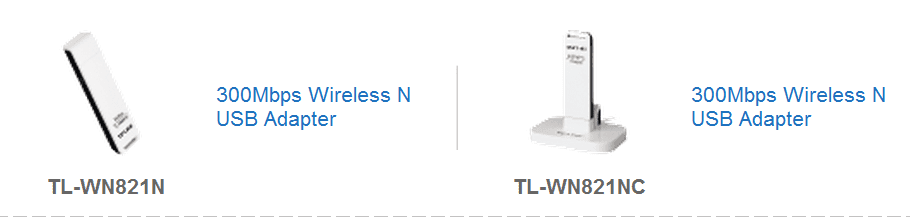
post back and let us no what you choose etc:)
 

My Computer My Computer

At a glance

Operating System : Windows 7 Home Premium Edi...Processor : Intel Core 2 Quad Q8300 @ 2500 MHzPhysical Memory :8GB Corsair4x 2GB 800MHz C5 ...Video Card : XFX 6700 AMD
Computer Manufacturer/Model Number
packard bell IXTREME M5722
OS
Operating System : Windows 7 Home Premium Edition 6.01.7600 SP1 (x64)
CPU
Processor : Intel Core 2 Quad Q8300 @ 2500 MHz
Motherboard
Mainboard : Packard Bell (Acer EG43M )
Memory
Physical Memory :8GB Corsair4x 2GB 800MHz C5 DDR2
Graphics Card(s)
Video Card : XFX 6700 AMD
Monitor(s) Displays
Maestro 234DL - BenQ V2220 - BenQ VW2420H
Screen Resolution
Current Display :1920x1080p pixels at 60 Hz in HD LED
Hard Drives
Hard Disks : WDC (1000 GB)
Drive C: (Hard Disk) : 428 GB available on 491 GB
Drive D: (Hard Disk) : 426 GB available on 492 GB
SAMSUNG spinpoint HD103SJ 1000.2 GB
(X 2) KINGSTON SSD NOW V 30GB
PSU
XFX ProSeries 550W PSU
Case
PACKARD BELL IXTREME
Cooling
System Blower Current: 150mA Air Flow16CFM ;Akasa 90mm rear
Keyboard
Gigabyte Aivia K8100
Mouse
TRUST-Wireless Laser Mouse - Carbon edition MI-7770C
Internet Speed
TP-LINK > TL-WN951N / AV500 Gigabit Powerline Adapters
Browser
chrome dev
Other Info
EXTRA COOLING>(FAN CONTROLLER) PC Bay Cooler 3 x 40mm fans; Akasa AK-HD-BL Blue hard drive cooler 2 x 40 mm fan 4500 rpm 29.7 dBA
Bios> American Megatrends Inc.
Version : P01-A1
Date : 08/31/2009
Well I did change my layout and I think I like it for the time being ! However I do have a bit of a small issue, I think. Seeing how now I'm only using a wireless connection to connect to the Internet, which is wireless N btw. I find that my wireless performance in Multiplayer games is sometimes laggy. I mean earlier I was testing it out playing a game called Alien Swarm on Steam and I lost the connection after a few minutes.

Have you guys got any tips on how I can improve my wireless connection ? My signal is Excellent according to Windows. All bars are showing and I'm only a few feet away from my router, in the back of me.

PS

See the pics I posted !
 

Attachments

  • SDC10709.jpg
    SDC10709.jpg
    381 KB · Views: 5
  • SDC10711.jpg
    SDC10711.jpg
    306.4 KB · Views: 5
  • SDC10712.jpg
    SDC10712.jpg
    360.2 KB · Views: 7

My Computer My Computer

At a glance

Windows 7 baby ! : DIntel Core i7 720QM @ 1.60GHz6.0GB Dual-Channel DDR3 @ 662MHzATI Mobility Radeon HD 5650
Computer Manufacturer/Model Number
HP Envy 17 4054ca
OS
Windows 7 baby ! : D
CPU
Intel Core i7 720QM @ 1.60GHz
Motherboard
Hewlett-Packard 1449 (CPU)
Memory
6.0GB Dual-Channel DDR3 @ 662MHz
Graphics Card(s)
ATI Mobility Radeon HD 5650
Sound Card
IDT High Definition Audio CODEC
Monitor(s) Displays
Generic PnP Monitor @ 1600x900
Screen Resolution
1600X900
Hard Drives
78.15GB INTEL SSDSA2M080G2GC ATA Device (IDE)
i hate playing multi player games over wireless.. some people claim it can be fine.. but i always find that gaming works much better over a wired connection
 

My Computer My Computer

At a glance

Windows 7 64-bit HomeIntel Core i7-870 Lynnfield 2.93 Ghz8GB 4x2 A-Data 1333 MhzHIS Radeon HD 5850 1GB
Computer type
PC/Desktop
Computer Manufacturer/Model Number
My First Build
OS
Windows 7 64-bit Home
CPU
Intel Core i7-870 Lynnfield 2.93 Ghz
Motherboard
Asus P7P55D-E Pro
Memory
8GB 4x2 A-Data 1333 Mhz
Graphics Card(s)
HIS Radeon HD 5850 1GB
Sound Card
Onboard
Monitor(s) Displays
Dell S2440L 24"
Screen Resolution
1080p
Hard Drives
120 GB Intel X25-M SATA Solid State Drive ///
1 TB Western Digital Caviar Black SATA 6gb/s 7200rpm Drive
PSU
Corsair 650TX 650 Watt
Case
Antec Three Hundred
Cooling
Stock Intel /// 4 Antec Case Fans /// NZXT Sentry-2
Keyboard
Logitech LX 710
Mouse
Logitech LX 710
Other Info
LG Blu-Ray Drive
TVeblen, while having a gigabit switch is nice, if it's only for one PC (as the OP has) it's not necessary. Home internet will come nowhere NEAR saturating even a 100 Mbit router connection. Heck, I have 2 PCs and streaming media from one to the other is FINE even on a WRT54GL (100 Mbit wired connections).
 

My Computer My Computer

At a glance

Windows 7 Home Premium x64Phenom II X4 955 BE8 GB OCZ BE 1667EVGA GeForce GTX470 SC
Computer Manufacturer/Model Number
Home built
OS
Windows 7 Home Premium x64
CPU
Phenom II X4 955 BE
Motherboard
Asus Sabertooth 990FX
Memory
8 GB OCZ BE 1667
Graphics Card(s)
EVGA GeForce GTX470 SC
Monitor(s) Displays
BenQ 19"
Screen Resolution
1280x1024
Hard Drives
256 GB OCZ Vertex 3 SSD
2x WD 1 TB
1x WD 2 TB
PSU
Thermaltake 850W
Case
Coolermaster Cosmos 1000
Cooling
Air
Keyboard
Logitech
Mouse
Cyborg R.A.T 7
Internet Speed
Standard RR
Cordless phones in the 2.4 GHz band and other wireless networks near by can cause interference. Here is a cool little app that might help. inSSIDer Wi-Fi Scanner | MetaGeek Run this on your laptop to see how many other wifi networks are close by. Once you have it running you may see a channel that is less occupied by other networks. Then you just manually set your router to that channel. You can also play around with adjusting your antenna(s) on the router to get the best signal. This app will also show you if you are correctly setup for full N speeds. Once you find your SSID in the list check the max rate column to see if you are listed as 300(N).If your wireless N is capable of using the 5 GHz band that may also help. It's probably less occupied, at least for now. The only thing you don't want to do over wireless is update the firmware on the router.
 

My Computer My Computer

At a glance

Windows 10 Education 64 bitAMD Phenom II X4 980 Black Edition Deneb 3.7GHz8GB 4GBx2 Kingston PC10600 DDR3 1333 MemoryZotac NVIDIA Geforce GT640 2 Gig DDR3 PCIe
Computer type
PC/Desktop
Computer Manufacturer/Model Number
Home Built
OS
Windows 10 Education 64 bit
CPU
AMD Phenom II X4 980 Black Edition Deneb 3.7GHz
Motherboard
Asus M4N68T-M V2 µATX Motherboard
Memory
8GB 4GBx2 Kingston PC10600 DDR3 1333 Memory
Graphics Card(s)
Zotac NVIDIA Geforce GT640 2 Gig DDR3 PCIe
Sound Card
VIA VT1708s High Definition Audio 8-channel Onboard
Monitor(s) Displays
22" LG E2242 1080p and 2 19" I-INC AG191D
Screen Resolution
1280x1024 - 1920x1080 - 1280x1024
Hard Drives
Crucial M100 256 GB SSD and 500 GB WD Blue SATA
PSU
Thermaltake TR 620
Case
Power Up Black ATX Mid-Tower Case
Cooling
Stock heatsink and fan
Keyboard
Logitech Wireless K350 Wave
Mouse
Logitech Wireless M570 Trackman Wheel
Internet Speed
80 Mbps Down 30 Mbps Up
Antivirus
Windows Defender
Browser
Internet Explorer 11
Other Info
HP DVD1040e Lightscribe - External USB2
Just make sure you don't have any major appliances between your router and your computer, which you don't. Refrigerators and the like are not a wireless signal's friend.

Looks much cleaner now :D
 

My Computer My Computer

At a glance

W7 Professional x64AMD Athlon II X3 445 Rana 3.10 GHzPNY XLR DDR3 1600 4x2GBNVIDIA GeForce GTS 450 (fermi) 1GB GDDR5
Computer Manufacturer/Model Number
Pugh Technologies
OS
W7 Professional x64
CPU
AMD Athlon II X3 445 Rana 3.10 GHz
Motherboard
MSI 870A-G54
Memory
PNY XLR DDR3 1600 4x2GB
Graphics Card(s)
NVIDIA GeForce GTS 450 (fermi) 1GB GDDR5
Sound Card
Realtek ALC892 onboard
Monitor(s) Displays
ASUS VE205t, Viewsonic VX2035WM
Screen Resolution
1600x900, 1600x1050
Hard Drives
977GB Hitachi Hitachi HDS721010CLA332
244GB Western Digital WDC WD2500AAJS-65B4A0
488GB Western Digital WDC WD5000AAJS-00A8B0
488GB Western Digital WDC WD5000AAKS-00UU3A0
PSU
Antec EarthWatts EA650 650W
Case
ThermalTake Armor A90 Mid Tower
Cooling
3x 120mm in, 1x 120mm & 200mm out, self built hydro-cooler
Keyboard
Logitec 55
Mouse
Razer Deathadder
Internet Speed
20 Mbps D/L, 9 Mbps U/L
TVeblen, while having a gigabit switch is nice, if it's only for one PC (as the OP has) it's not necessary. Home internet will come nowhere NEAR saturating even a 100 Mbit router connection. Heck, I have 2 PCs and streaming media from one to the other is FINE even on a WRT54GL (100 Mbit wired connections).

So essentially you're saying that I should have no issue with my wireless connection then eh ? Windows says the speed is 130 Mbps :D
 

My Computer My Computer

At a glance

Windows 7 baby ! : DIntel Core i7 720QM @ 1.60GHz6.0GB Dual-Channel DDR3 @ 662MHzATI Mobility Radeon HD 5650
Computer Manufacturer/Model Number
HP Envy 17 4054ca
OS
Windows 7 baby ! : D
CPU
Intel Core i7 720QM @ 1.60GHz
Motherboard
Hewlett-Packard 1449 (CPU)
Memory
6.0GB Dual-Channel DDR3 @ 662MHz
Graphics Card(s)
ATI Mobility Radeon HD 5650
Sound Card
IDT High Definition Audio CODEC
Monitor(s) Displays
Generic PnP Monitor @ 1600x900
Screen Resolution
1600X900
Hard Drives
78.15GB INTEL SSDSA2M080G2GC ATA Device (IDE)
thanks for all your input guys ! alphanumeric I'll look into that little app you mentioned !
 

My Computer My Computer

At a glance

Windows 7 baby ! : DIntel Core i7 720QM @ 1.60GHz6.0GB Dual-Channel DDR3 @ 662MHzATI Mobility Radeon HD 5650
Computer Manufacturer/Model Number
HP Envy 17 4054ca
OS
Windows 7 baby ! : D
CPU
Intel Core i7 720QM @ 1.60GHz
Motherboard
Hewlett-Packard 1449 (CPU)
Memory
6.0GB Dual-Channel DDR3 @ 662MHz
Graphics Card(s)
ATI Mobility Radeon HD 5650
Sound Card
IDT High Definition Audio CODEC
Monitor(s) Displays
Generic PnP Monitor @ 1600x900
Screen Resolution
1600X900
Hard Drives
78.15GB INTEL SSDSA2M080G2GC ATA Device (IDE)
Cordless phones in the 2.4 GHz band and other wireless networks near by can cause interference. Here is a cool little app that might help. inSSIDer Wi-Fi Scanner | MetaGeek Run this on your laptop to see how many other wifi networks are close by. Once you have it running you may see a channel that is less occupied by other networks. Then you just manually set your router to that channel. You can also play around with adjusting your antenna(s) on the router to get the best signal. This app will also show you if you are correctly setup for full N speeds. Once you find your SSID in the list check the max rate column to see if you are listed as 300(N).If your wireless N is capable of using the 5 GHz band that may also help. It's probably less occupied, at least for now. The only thing you don't want to do over wireless is update the firmware on the router.

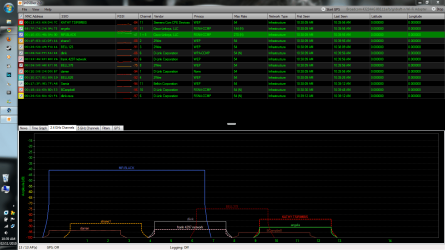
Hey this is what it gave me. Should I be concerned about anything ? :p
 

Attachments

  • Capture.PNG
    Capture.PNG
    67.2 KB · Views: 14

My Computer My Computer

At a glance

Windows 7 baby ! : DIntel Core i7 720QM @ 1.60GHz6.0GB Dual-Channel DDR3 @ 662MHzATI Mobility Radeon HD 5650
Computer Manufacturer/Model Number
HP Envy 17 4054ca
OS
Windows 7 baby ! : D
CPU
Intel Core i7 720QM @ 1.60GHz
Motherboard
Hewlett-Packard 1449 (CPU)
Memory
6.0GB Dual-Channel DDR3 @ 662MHz
Graphics Card(s)
ATI Mobility Radeon HD 5650
Sound Card
IDT High Definition Audio CODEC
Monitor(s) Displays
Generic PnP Monitor @ 1600x900
Screen Resolution
1600X900
Hard Drives
78.15GB INTEL SSDSA2M080G2GC ATA Device (IDE)
-40db is a good strong signal, I'm getting about -50db on my PC upstairs, my routers in my basement. Your router's using 2 channels which is normal for full N. Not sure why it says 270(N) though as mine says 300(N). My router and wifi card are both D-Link, DIR-655 and a DWA-552 with a ANT24-0230 added. As you can see a lot of the channels overlap so it can get pretty cluttered. The only channels that don't overlap with each other are 1, 6 and 11, so they get used a lot. Only time will tell. The other wifi networks signals are a lot lower than yours so that should reduce interference.
 

My Computer My Computer

At a glance

Windows 10 Education 64 bitAMD Phenom II X4 980 Black Edition Deneb 3.7GHz8GB 4GBx2 Kingston PC10600 DDR3 1333 MemoryZotac NVIDIA Geforce GT640 2 Gig DDR3 PCIe
Computer type
PC/Desktop
Computer Manufacturer/Model Number
Home Built
OS
Windows 10 Education 64 bit
CPU
AMD Phenom II X4 980 Black Edition Deneb 3.7GHz
Motherboard
Asus M4N68T-M V2 µATX Motherboard
Memory
8GB 4GBx2 Kingston PC10600 DDR3 1333 Memory
Graphics Card(s)
Zotac NVIDIA Geforce GT640 2 Gig DDR3 PCIe
Sound Card
VIA VT1708s High Definition Audio 8-channel Onboard
Monitor(s) Displays
22" LG E2242 1080p and 2 19" I-INC AG191D
Screen Resolution
1280x1024 - 1920x1080 - 1280x1024
Hard Drives
Crucial M100 256 GB SSD and 500 GB WD Blue SATA
PSU
Thermaltake TR 620
Case
Power Up Black ATX Mid-Tower Case
Cooling
Stock heatsink and fan
Keyboard
Logitech Wireless K350 Wave
Mouse
Logitech Wireless M570 Trackman Wheel
Internet Speed
80 Mbps Down 30 Mbps Up
Antivirus
Windows Defender
Browser
Internet Explorer 11
Other Info
HP DVD1040e Lightscribe - External USB2
TVeblen, while having a gigabit switch is nice, if it's only for one PC (as the OP has) it's not necessary. Home internet will come nowhere NEAR saturating even a 100 Mbit router connection. Heck, I have 2 PCs and streaming media from one to the other is FINE even on a WRT54GL (100 Mbit wired connections).

:huh: I never mentioned a switch.
 

My Computer My Computer

At a glance

Windows 7 64 Bit Home Premium SP1i7-3820GSkill F3-14900CL9Q - 16GBEVGA GeForce GTX660 - Driver 352.86
Computer type
PC/Desktop
Computer Manufacturer/Model Number
Home Built - Jan 2013
OS
Windows 7 64 Bit Home Premium SP1
CPU
i7-3820
Motherboard
Asus P9X79-PRO - Bios 4608
Memory
GSkill F3-14900CL9Q - 16GB
Graphics Card(s)
EVGA GeForce GTX660 - Driver 352.86
Sound Card
On board Realtek ALC898
Monitor(s) Displays
Acer S271HL
Screen Resolution
1920 x 1080
Hard Drives
#1- Samsung 840 Pro Series
#2- Western Digital WD1002FAEX Sata3 Black
#3- Western Digital WD1002FAEX Sata3 Black
PSU
Corsair CMPSU-850TX-V2 - 850 watt (by Seasonic)
Case
Corsair Obsidian 550D
Cooling
Standard 3 120mm case fans, Cooler Master Hyper 212 EVO
Keyboard
MS KC-0405
Mouse
Intellimouse 5-button
Internet Speed
56 Mbits/Sec (on a good day)
Antivirus
Avast & Malwarebytes
Browser
Firefox
Other Info
Asus DVD - DRW-24B1ST 24X
I suggest the purchase of a long Cat5 or 6 cable to keep coiled up and when gaming aggressively just connect your laptop via the cable and when surfing and emailing and such when the fastest speeds aren't as important than go wireless and be free !
 

My Computer My Computer

At a glance

Windows 7 Ultimate 64i7 3770k OC'd 4.6 @ 1.17v, also FX 8120 & i5 ...32 gb G.Skill Sniper DDR3 10-12-12-31 @ 2133XFX Radeon 7870 2GB DDR5
Computer type
PC/Desktop
Computer Manufacturer/Model Number
A blend of brains, brawn and dumb luck.
OS
Windows 7 Ultimate 64
CPU
i7 3770k OC'd 4.6 @ 1.17v, also FX 8120 & i5 miniITX
Motherboard
MSI P67A-GD80 b3
Memory
32 gb G.Skill Sniper DDR3 10-12-12-31 @ 2133
Graphics Card(s)
XFX Radeon 7870 2GB DDR5
Sound Card
Sound Blaster Z Series Card
Monitor(s) Displays
(2) LG LED 23" 1920 x 1080 2ms Monitors via mini d-port
Screen Resolution
1680 X 1050 p
Hard Drives
Samsung 256 gb 830 SSD sata III
(1) 1 tb WD Black
(2) 1 tb Hitachi deskmates/sata II
(2) 1 tb WD green/sata II
(2) 3 tb Seagate Barracuda
(1) 120 gb OCZ Vertex SS
(1) Drobo 5N w/5 Seagate 3tb
PSU
EVGA modular 1000G2 80% gold rating & APC 1200 RS
Case
CoolerMaster Storm Styker
Cooling
7 case fans 140mm & 120mm, NZXT Kraken X60
Keyboard
(2) Logitech Illuminated Keyboards (1) usb (1) wireless
Mouse
Logitech G700 & T-BC21 - nano nx for the laptop
Internet Speed
Basic 120mbps down
Antivirus
Trend Micro Titanium Max Security & Malwarebytes Premium
Browser
Chrome and IE 10
Other Info
5 Noctua case fans + 3 Noctua in p/p on NZXT cooler
Integrated hot swap drive bays for 2.5" Drives
(2) Lite-on dvd/cd/Blu Ray optical 22X
Integrated fan controller and led on/off
HP Officejet Pro 8630 all-n-one
Hot-swappable 3.5" hard drive bay
Netgear Nighthawk router
Asus USB 3 & sata 6 PCIe card
Vantec IDE to sata adptr./Ultra sata adptr
Lenovo L420 i5 lappy with m sata
Drobo 5N advanced NAS
I do this as Linnemeyerhere has suggested. For general daily use, I just use wireless, but sometimes when gaming online, I will hookup the ethernet cable so I know there is no lag. This keeps the cords uncluttered for daily use, and then allows fast connection as well when it is needed.
 

My Computer My Computer

At a glance

Win7 Home Premium 64xIntel Core 2 Duo P7450 / 2.13 GHz (2.29 with ...4 GB PC-6400 Hyundai (2X2) at 800MhzNVIDIA GeForce GTX 260M 1GB DDR3 VRAM
Computer type
Laptop
Computer Manufacturer/Model Number
ASUS G60-RBBX05
OS
Win7 Home Premium 64x
CPU
Intel Core 2 Duo P7450 / 2.13 GHz (2.29 with Extreme Turbo)
Memory
4 GB PC-6400 Hyundai (2X2) at 800Mhz
Graphics Card(s)
NVIDIA GeForce GTX 260M 1GB DDR3 VRAM
Monitor(s) Displays
16" LED Backlit
Screen Resolution
1366 x 768 on laptop 1600x1050 max res on 22" external mon
Hard Drives
OCZ Agility 3 60GB SSD / 320 GB - Serial ATA-150 - 7200 rpm
PSU
6-cell Lithium ion { lasts 1.5 hours }
Case
ASUS G60 Laptop
Keyboard
Chicklet type back-lit (white light) keyboard
Mouse
Logitech G9 Laser Mouse 3200dpi and 1000 reports per minute
Internet Speed
Comcast 8.60mb/s up - 3.11mb/s down
Antivirus
MSE
Browser
Firefox
Other Info
General mid-budget gaming Comp. Low batterylife - High FrameRates - currently overheating problems :(

2nd Rig: Case: Rosewill BLACKHAWK Gaming ATX Mid Tower Computer Case

Mobo: GIGABYTE GA-990FXA-UD3
CPU: AMD FX-6200 Zambezi 3.8GHz (4.1GHz Turbo)
Heatsink: COOLER MASTER V8 CPU Cooler
RAM: Patriot Viper 3 8GB (2 x 4GB) 240-Pin DDR3 SDRAM 1866 (PC3 15000)
GPU: SAPPHIRE Radeon HD 6850 1GB 2
TVeblen, while having a gigabit switch is nice, if it's only for one PC (as the OP has) it's not necessary. Home internet will come nowhere NEAR saturating even a 100 Mbit router connection. Heck, I have 2 PCs and streaming media from one to the other is FINE even on a WRT54GL (100 Mbit wired connections).

:huh: I never mentioned a switch.


"Gigabit router" implies a router with a built-in gigabit switch. I stand by what I said...
 

My Computer My Computer

At a glance

Windows 7 Home Premium x64Phenom II X4 955 BE8 GB OCZ BE 1667EVGA GeForce GTX470 SC
Computer Manufacturer/Model Number
Home built
OS
Windows 7 Home Premium x64
CPU
Phenom II X4 955 BE
Motherboard
Asus Sabertooth 990FX
Memory
8 GB OCZ BE 1667
Graphics Card(s)
EVGA GeForce GTX470 SC
Monitor(s) Displays
BenQ 19"
Screen Resolution
1280x1024
Hard Drives
256 GB OCZ Vertex 3 SSD
2x WD 1 TB
1x WD 2 TB
PSU
Thermaltake 850W
Case
Coolermaster Cosmos 1000
Cooling
Air
Keyboard
Logitech
Mouse
Cyborg R.A.T 7
Internet Speed
Standard RR
Back
Top