
Solved I would like to know what my USB port descriptors mean

MetalMan228

New member
Member
VIP
Local time
10:42 PM
Messages
265
Location
Lancaster PA
Hello all, I am hoping someone can decipher my USB port descriptors.

My PC documentation states that all USB ports are 2.0 which is nice. The reason for woundering is if any 2.0 port may be better than another for use with a FULL bus speed, (which is even higher than HIGH)

I just installed a new USB DAC and was trying to figure which port would be best in terms of sound quality.

My rear ports, (3 of 4) use the descriptor: Standard OpenHCD USB Host Controller.

My front ports (2) and one rear port: Standard Enhanced PCI to USB Host Controller.

Currently the DAC in connected to a standard port. Would this device work better with an enhanced port, even if both are 2.0?
 

My Computer My Computer

At a glance

Windows 7 professional 64 bitAMD Athlon(tm) II X2 220 Processor3GBNVIDIA GeForce 6150SE nForce 430
Computer type
PC/Desktop
Computer Manufacturer/Model Number
HP 505B B2C02UT Business Desktop
OS
Windows 7 professional 64 bit
CPU
AMD Athlon(tm) II X2 220 Processor
Motherboard
PEGATRON (2A99)
Memory
3GB
Graphics Card(s)
NVIDIA GeForce 6150SE nForce 430
Sound Card
Realtek ALC662 High Definition Audio (OEM)
Monitor(s) Displays
OEM Dell CRT
Screen Resolution
N/A
Hard Drives
(1) NCQ Smart IV 500GB Hard Drive - 7,200RPM - SATA 3.0Gb/s

HP LightScribe CD/DVD burner
PSU
OEM HP 300 watt
Case
OEM
Cooling
OEM
Keyboard
wired Logitech K120
Mouse
wired M100 mouse
Internet Speed
G5 High Speed Internet
Antivirus
ZoneAlarm Extreme Security
Browser
FF36.04 IE11
Other Info
JRivers Media Center v17

AudioQuest dragonfly DAC V1.2

Mackie MR5 Studio Monitors

My Computer My Computer

At a glance

Windows 7 Ultimate 64-bit, Windows 8.1 64-bit...
Computer type
PC/Desktop
Computer Manufacturer/Model Number
Customs, Dell, Gateway, HP, Toshiba, Acer, ASUS
OS
Windows 7 Ultimate 64-bit, Windows 8.1 64-bit, Mac OS X 10.10, Linux Mint 17, Windows 10 Pro TP
Keyboard
Microsoft
Mouse
Microsoft
That was good information. I guess that means my standard ports are 1.0 and the enhanced are 2.0, but i am not sure whether or not the 2.0 ports are full speed or high speed.
 

My Computer My Computer

At a glance

Windows 7 professional 64 bitAMD Athlon(tm) II X2 220 Processor3GBNVIDIA GeForce 6150SE nForce 430
Computer type
PC/Desktop
Computer Manufacturer/Model Number
HP 505B B2C02UT Business Desktop
OS
Windows 7 professional 64 bit
CPU
AMD Athlon(tm) II X2 220 Processor
Motherboard
PEGATRON (2A99)
Memory
3GB
Graphics Card(s)
NVIDIA GeForce 6150SE nForce 430
Sound Card
Realtek ALC662 High Definition Audio (OEM)
Monitor(s) Displays
OEM Dell CRT
Screen Resolution
N/A
Hard Drives
(1) NCQ Smart IV 500GB Hard Drive - 7,200RPM - SATA 3.0Gb/s

HP LightScribe CD/DVD burner
PSU
OEM HP 300 watt
Case
OEM
Cooling
OEM
Keyboard
wired Logitech K120
Mouse
wired M100 mouse
Internet Speed
G5 High Speed Internet
Antivirus
ZoneAlarm Extreme Security
Browser
FF36.04 IE11
Other Info
JRivers Media Center v17

AudioQuest dragonfly DAC V1.2

Mackie MR5 Studio Monitors
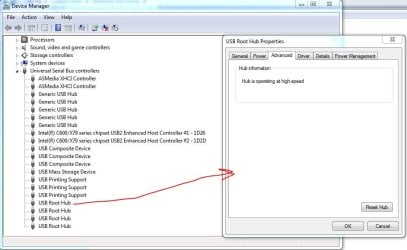
Go to Device Manager and right click on any one of your USB hubs. Choose Properties and go to the Advanced Tab. Your hub speed will be shown there.
There can be up to 4 USB ports connected to one hub.


-
 

Attachments

  • Capture.JPG
    Capture.JPG
    64.8 KB · Views: 1

My Computer My Computer

At a glance

Windows 7 64 Bit Home Premium SP1i7-3820GSkill F3-14900CL9Q - 16GBEVGA GeForce GTX660 - Driver 352.86
Computer type
PC/Desktop
Computer Manufacturer/Model Number
Home Built - Jan 2013
OS
Windows 7 64 Bit Home Premium SP1
CPU
i7-3820
Motherboard
Asus P9X79-PRO - Bios 4608
Memory
GSkill F3-14900CL9Q - 16GB
Graphics Card(s)
EVGA GeForce GTX660 - Driver 352.86
Sound Card
On board Realtek ALC898
Monitor(s) Displays
Acer S271HL
Screen Resolution
1920 x 1080
Hard Drives
#1- Samsung 840 Pro Series
#2- Western Digital WD1002FAEX Sata3 Black
#3- Western Digital WD1002FAEX Sata3 Black
PSU
Corsair CMPSU-850TX-V2 - 850 watt (by Seasonic)
Case
Corsair Obsidian 550D
Cooling
Standard 3 120mm case fans, Cooler Master Hyper 212 EVO
Keyboard
MS KC-0405
Mouse
Intellimouse 5-button
Internet Speed
56 Mbits/Sec (on a good day)
Antivirus
Avast & Malwarebytes
Browser
Firefox
Other Info
Asus DVD - DRW-24B1ST 24X
Go to Device Manager and right click on any one of your USB hubs. Choose Properties and go to the Advanced Tab. Your hub speed will be shown there.
There can be up to 4 USB ports connected to one hub.
-
When you connect a USB device to a physical USB port, the subsequent connection from physical USB port to USB Controller is a dynamic Windows decision. (Root hubs are part of the controller and reside on the motherboard)

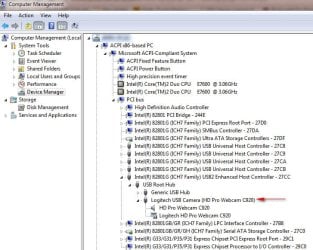
For the full picture, in Device Manager, click View->Devices by connection. Expand ACPI devices until you get down to the PCI Bus. Expand the PCI bus till you see the USB controllers. Expand USB Controllers so you can see which controller your device is connected to. You can then verify
  • If it's connected to the right type of controller (e.g. sometimes Windows may connect 2.0 device to a 1.1 controller. That's when you can get a "This device can perform faster" pop up message)
  • Then you'll also know which one of the many Root Hubs to check for Hi Performance
p.s. Note 2.0 Controllers will have 2.0 or the word Enhanced as part of its name

In my attachment, you can verify my web cam has been correctly connected to a 2.0 controller You also know which Root Hub is part of that controller.
 

Attachments

  • 2015-01-02_075509.jpg
    2015-01-02_075509.jpg
    76.6 KB · Views: 3

My Computer My Computer

At a glance

Desk 1: Win 7 Pro x32; Desk 2: Windows 10 x64
Computer type
PC/Desktop
Computer Manufacturer/Model Number
Dell Optiplex 360 and Optiplex 755
OS
Desk 1: Win 7 Pro x32; Desk 2: Windows 10 x64
Hard Drives
500GB Crucial SSD in both Desktops
Other Info
Buffalo 6TB NAS, Raid 1
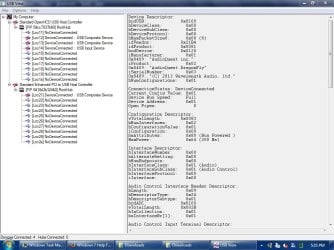
I actually have done as you guys wanted me to do, but my PC would not disclose which device is attached too each port, nor will it tell me the speed. I installed usbview and now i can see which port goes to which device as well as the speed of the device attached to the port, but not port speed. This is the reason for my thread. I did not know if the Standard Enhanced PCI to USB Host Controller ports support FULL speed as my DAC is full speed.

And, will it make a difference if my PC may run a device thru a different controller than the one its plugged into?

Here is a screenshot of usbview with the DAC highlighted.
 

Attachments

  • SP32-20150102-175527.jpg
    SP32-20150102-175527.jpg
    98.7 KB · Views: 2

My Computer My Computer

At a glance

Windows 7 professional 64 bitAMD Athlon(tm) II X2 220 Processor3GBNVIDIA GeForce 6150SE nForce 430
Computer type
PC/Desktop
Computer Manufacturer/Model Number
HP 505B B2C02UT Business Desktop
OS
Windows 7 professional 64 bit
CPU
AMD Athlon(tm) II X2 220 Processor
Motherboard
PEGATRON (2A99)
Memory
3GB
Graphics Card(s)
NVIDIA GeForce 6150SE nForce 430
Sound Card
Realtek ALC662 High Definition Audio (OEM)
Monitor(s) Displays
OEM Dell CRT
Screen Resolution
N/A
Hard Drives
(1) NCQ Smart IV 500GB Hard Drive - 7,200RPM - SATA 3.0Gb/s

HP LightScribe CD/DVD burner
PSU
OEM HP 300 watt
Case
OEM
Cooling
OEM
Keyboard
wired Logitech K120
Mouse
wired M100 mouse
Internet Speed
G5 High Speed Internet
Antivirus
ZoneAlarm Extreme Security
Browser
FF36.04 IE11
Other Info
JRivers Media Center v17

AudioQuest dragonfly DAC V1.2

Mackie MR5 Studio Monitors
The reason for woundering is if any 2.0 port may be better than another for use with a FULL bus speed, (which is even higher than HIGH)
I just noticed this statement in your first post. You have it wrong. USB 2.0 FULL speed is slower then HIGH speed

That said, by definition, any USB 2.0 port can operate at either Full or High speed. It depends on the connected device.

In your screen shot, your AudioQuest Dragonfly is connected to a port on a USB 2.0 Controller. If you look at the Connection Status data, you'll see it's connected with Device Bus Speed= FULL. It appears the DAC is a USB 2.0 full speed device
 

My Computer My Computer

At a glance

Desk 1: Win 7 Pro x32; Desk 2: Windows 10 x64
Computer type
PC/Desktop
Computer Manufacturer/Model Number
Dell Optiplex 360 and Optiplex 755
OS
Desk 1: Win 7 Pro x32; Desk 2: Windows 10 x64
Hard Drives
500GB Crucial SSD in both Desktops
Other Info
Buffalo 6TB NAS, Raid 1
Ok, I think you are correct, I am wrong!! Sorry about that, I had it backwards.

So would connecting this DAC to an enhanced port offer any performance benefits over a std port?

(or at least offer the DAC an opportunity for increased performance?)
 

My Computer My Computer

At a glance

Windows 7 professional 64 bitAMD Athlon(tm) II X2 220 Processor3GBNVIDIA GeForce 6150SE nForce 430
Computer type
PC/Desktop
Computer Manufacturer/Model Number
HP 505B B2C02UT Business Desktop
OS
Windows 7 professional 64 bit
CPU
AMD Athlon(tm) II X2 220 Processor
Motherboard
PEGATRON (2A99)
Memory
3GB
Graphics Card(s)
NVIDIA GeForce 6150SE nForce 430
Sound Card
Realtek ALC662 High Definition Audio (OEM)
Monitor(s) Displays
OEM Dell CRT
Screen Resolution
N/A
Hard Drives
(1) NCQ Smart IV 500GB Hard Drive - 7,200RPM - SATA 3.0Gb/s

HP LightScribe CD/DVD burner
PSU
OEM HP 300 watt
Case
OEM
Cooling
OEM
Keyboard
wired Logitech K120
Mouse
wired M100 mouse
Internet Speed
G5 High Speed Internet
Antivirus
ZoneAlarm Extreme Security
Browser
FF36.04 IE11
Other Info
JRivers Media Center v17

AudioQuest dragonfly DAC V1.2

Mackie MR5 Studio Monitors
The specs on this motherboard state 4 USB 2.0 ports on the rear,

One thing I missed on your post in the audio section. System Specs list 3GB of RAM. The motherboard specs list 4GB max. You list Win 7 64 bit OS. 64 bit OS uses more basic memory than a 32 bit and the main plus of a 64 bit OS is that it will address more than 4GB of RAM.
 

My Computer My Computer

At a glance

Windows 10 64 bitIntel i7 6700K16GB Corsair DominatorIntel CPU Graphics
Computer type
PC/Desktop
Computer Manufacturer/Model Number
My Own Build
OS
Windows 10 64 bit
CPU
Intel i7 6700K
Motherboard
ASUS ROG Maximus VIII Hero
Memory
16GB Corsair Dominator
Graphics Card(s)
Intel CPU Graphics
Sound Card
RealTek
Monitor(s) Displays
27" Dell S2719dgf
Screen Resolution
2560X1440
Hard Drives
1 TB Samsung 850 EVO SSD for Win 10 Pro
500GB Samsung 850 EVO SSD for Win 10 Insider
2 TB drive for backup
PSU
EVGA Supernova 750G2
Case
BeQuiet Silent Base 600
Cooling
Deepcool Captain 120EX
Keyboard
Microsoft Wireless 2000
Mouse
Microsoft wireless
Internet Speed
100 MB/sec (Cable)
Antivirus
Microsoft Defender and Malwarebytes
Browser
Edge/Firefox
Other Info
Cakewalk (Sonar) by BandLab and Studio One 4.1 Pro recording studio software. MOTU 896Mk3 Hybrid recording interface, Frontier Tranzport wireless control unit, Behringer X-Touch Control Surface.
Five USB connected optical drives for CD Audio production using Nero BurningROM
Yes, I only have the stock memory on the board. Would buying/installing more memory help out my situation?
 

My Computer My Computer

At a glance

Windows 7 professional 64 bitAMD Athlon(tm) II X2 220 Processor3GBNVIDIA GeForce 6150SE nForce 430
Computer type
PC/Desktop
Computer Manufacturer/Model Number
HP 505B B2C02UT Business Desktop
OS
Windows 7 professional 64 bit
CPU
AMD Athlon(tm) II X2 220 Processor
Motherboard
PEGATRON (2A99)
Memory
3GB
Graphics Card(s)
NVIDIA GeForce 6150SE nForce 430
Sound Card
Realtek ALC662 High Definition Audio (OEM)
Monitor(s) Displays
OEM Dell CRT
Screen Resolution
N/A
Hard Drives
(1) NCQ Smart IV 500GB Hard Drive - 7,200RPM - SATA 3.0Gb/s

HP LightScribe CD/DVD burner
PSU
OEM HP 300 watt
Case
OEM
Cooling
OEM
Keyboard
wired Logitech K120
Mouse
wired M100 mouse
Internet Speed
G5 High Speed Internet
Antivirus
ZoneAlarm Extreme Security
Browser
FF36.04 IE11
Other Info
JRivers Media Center v17

AudioQuest dragonfly DAC V1.2

Mackie MR5 Studio Monitors
I just tried to move my DAC to an enhanced port, but every time i do that it reverts back to std port. MY Canon printer was connected to an enhanced port, but when i switched the position of attached devices the enhanced port "followed" the printer. No matter what port i hook the DAC to it will not be an enhanced one.

Therefore my thread about what the different port names mean is meaningless
 

My Computer My Computer

At a glance

Windows 7 professional 64 bitAMD Athlon(tm) II X2 220 Processor3GBNVIDIA GeForce 6150SE nForce 430
Computer type
PC/Desktop
Computer Manufacturer/Model Number
HP 505B B2C02UT Business Desktop
OS
Windows 7 professional 64 bit
CPU
AMD Athlon(tm) II X2 220 Processor
Motherboard
PEGATRON (2A99)
Memory
3GB
Graphics Card(s)
NVIDIA GeForce 6150SE nForce 430
Sound Card
Realtek ALC662 High Definition Audio (OEM)
Monitor(s) Displays
OEM Dell CRT
Screen Resolution
N/A
Hard Drives
(1) NCQ Smart IV 500GB Hard Drive - 7,200RPM - SATA 3.0Gb/s

HP LightScribe CD/DVD burner
PSU
OEM HP 300 watt
Case
OEM
Cooling
OEM
Keyboard
wired Logitech K120
Mouse
wired M100 mouse
Internet Speed
G5 High Speed Internet
Antivirus
ZoneAlarm Extreme Security
Browser
FF36.04 IE11
Other Info
JRivers Media Center v17

AudioQuest dragonfly DAC V1.2

Mackie MR5 Studio Monitors
No matter what port i hook the DAC to it will not be an enhanced one
That does suggest the limitation is with the DAC but it could be working as designed.
 

My Computer My Computer

At a glance

Windows 7 Ultimate 64-bit, Windows 8.1 64-bit...
Computer type
PC/Desktop
Computer Manufacturer/Model Number
Customs, Dell, Gateway, HP, Toshiba, Acer, ASUS
OS
Windows 7 Ultimate 64-bit, Windows 8.1 64-bit, Mac OS X 10.10, Linux Mint 17, Windows 10 Pro TP
Keyboard
Microsoft
Mouse
Microsoft
Comment about the memory. According to Pegatron the maximum memory on your motherboard is only 4GB. Upgrading from 3 to 4GB will get you a little extra memory for programs, but it has the memory limitation. If you want it for gaming, you will need to upgrade to a different PC.
 

My Computer My Computer

At a glance

Windows 10 64 bitIntel i7 6700K16GB Corsair DominatorIntel CPU Graphics
Computer type
PC/Desktop
Computer Manufacturer/Model Number
My Own Build
OS
Windows 10 64 bit
CPU
Intel i7 6700K
Motherboard
ASUS ROG Maximus VIII Hero
Memory
16GB Corsair Dominator
Graphics Card(s)
Intel CPU Graphics
Sound Card
RealTek
Monitor(s) Displays
27" Dell S2719dgf
Screen Resolution
2560X1440
Hard Drives
1 TB Samsung 850 EVO SSD for Win 10 Pro
500GB Samsung 850 EVO SSD for Win 10 Insider
2 TB drive for backup
PSU
EVGA Supernova 750G2
Case
BeQuiet Silent Base 600
Cooling
Deepcool Captain 120EX
Keyboard
Microsoft Wireless 2000
Mouse
Microsoft wireless
Internet Speed
100 MB/sec (Cable)
Antivirus
Microsoft Defender and Malwarebytes
Browser
Edge/Firefox
Other Info
Cakewalk (Sonar) by BandLab and Studio One 4.1 Pro recording studio software. MOTU 896Mk3 Hybrid recording interface, Frontier Tranzport wireless control unit, Behringer X-Touch Control Surface.
Five USB connected optical drives for CD Audio production using Nero BurningROM
Yes, I am going to guess the limitation is with the DAC, as I was in error about full vs high speed.

No, this PC will not be used for gaming, a normal multi-use home application, with music too.

Thanks for every ones excellent input!! :)
 

My Computer My Computer

At a glance

Windows 7 professional 64 bitAMD Athlon(tm) II X2 220 Processor3GBNVIDIA GeForce 6150SE nForce 430
Computer type
PC/Desktop
Computer Manufacturer/Model Number
HP 505B B2C02UT Business Desktop
OS
Windows 7 professional 64 bit
CPU
AMD Athlon(tm) II X2 220 Processor
Motherboard
PEGATRON (2A99)
Memory
3GB
Graphics Card(s)
NVIDIA GeForce 6150SE nForce 430
Sound Card
Realtek ALC662 High Definition Audio (OEM)
Monitor(s) Displays
OEM Dell CRT
Screen Resolution
N/A
Hard Drives
(1) NCQ Smart IV 500GB Hard Drive - 7,200RPM - SATA 3.0Gb/s

HP LightScribe CD/DVD burner
PSU
OEM HP 300 watt
Case
OEM
Cooling
OEM
Keyboard
wired Logitech K120
Mouse
wired M100 mouse
Internet Speed
G5 High Speed Internet
Antivirus
ZoneAlarm Extreme Security
Browser
FF36.04 IE11
Other Info
JRivers Media Center v17

AudioQuest dragonfly DAC V1.2

Mackie MR5 Studio Monitors
USB 2.0 "full" speed is the same as the maximum speed you can get from USB 1.1

I couldn't tell which device you had highlighted in your USBView snapshot which revealed the descriptor data so I couldn't tell which controller it's connected to (the Enhanced controller is USB 2.0). But in any case, both USB 1.1 and USB 2.0 controllers support "full" speed so it shouldn't make any difference. Also note the Connection status in USBView indicates you're DAC is getting a full speed connection.

IMHO Adding more memory to your PC can give you better overall PC performance if you have many things running concurrently but your DAC is already running at maximum speed so i wouldn't expect any change there.
 

My Computer My Computer

At a glance

Desk 1: Win 7 Pro x32; Desk 2: Windows 10 x64
Computer type
PC/Desktop
Computer Manufacturer/Model Number
Dell Optiplex 360 and Optiplex 755
OS
Desk 1: Win 7 Pro x32; Desk 2: Windows 10 x64
Hard Drives
500GB Crucial SSD in both Desktops
Other Info
Buffalo 6TB NAS, Raid 1
Back
Top