Icon arrangement

Isotope

New member
Local time
11:47 PM
Messages
10
This is my first post, please bear with me :confused:

I've done quite a few searches on Google in addition to these forums on the topic of desktop icon arrangement.

Basically, I want Windows to auto arrange my icons on the right side of my screen by default rather than the left. I want to avoid using a 3rd party program, because those usually are just "trial" versions and keep annoying me to buy the whole program.

Thanks!
 

My Computer

OS
Windows 7 Premium 64bit
It is not the answer but have you used fences?
 

My Computer

Computer type
PC/Desktop
Computer Manufacturer/Model Number
GIGABYTE Rig (Custom)
OS
Windows 7 Professional (x64/SP1) /Linux Mint 16
CPU
Intel i5-3570k 3.40 GHz @ 4.6 GHz
Motherboard
GIGABYTE Z77X-D3H
Memory
8GB (2133MHz) DDR3
Graphics Card(s)
Asus GTX560 Ti (Nvidia)
Monitor(s) Displays
HP 23", Acer 19" and a Dell 17"
Screen Resolution
1080p, 1440x900 and 1280x1024
Hard Drives
Sandisk Extreme 120GB (SSD), WD 2TB green and 4 other HDDs
PSU
Antec 620w High Current Gamer
Case
Corsair Obsidian 600D
Cooling
CPU - Antec KÜHLER H₂O 920
Keyboard
Steelseries 6Gv2
Mouse
Roccat LUA
Internet Speed
4 - 6mb/s
Antivirus
ESET NOD32
Browser
Chrome/Firefox
Other Info
Intel Gigabit CT (PCIE NIC) and Thinkpad T61p,
You could click on desktop, uncheck auto arrange, highlight all icons, and drag to new location on right. Other than that, I don't know how to auto arrange icons from future installs to the right.
 

My Computer

Computer Manufacturer/Model Number
Dell and Custom
OS
Systems 1 and 2: Windows 7 Enterprise x64, Win 8 Developer
CPU
System 1: i7 [email protected], System 2: AMD FX-4100 Zambezi 3.6G
Motherboard
System 1:Dell 06NWYK System 2: ASUS M5A97 AM3+
Memory
System 1: 8GB System 2: 8GB
Graphics Card(s)
System 1: ATI FirePro V4800 System 2: Radeon HD 6850
Sound Card
System 1: onboard System 2: onboard
Monitor(s) Displays
System1: Viewsonic HDMI 24"
Screen Resolution
System 1: 1920x1080 System 2: 1920x1080
Hard Drives
System 1: Mirrored .5B drives System 2: Seagate Barracuda ST1000DM003 1TB 7200 RPM 64MB Cache SATA 6.0Gb/s
Case
System 1: Dell System 2: Cooler Master
Internet Speed
10 MBPS
I've used fences before and didn't like it. It didn't have the functionality I needed. Also, I know I can just manually arrange the icons, but I'd like it to auto arrange to the right automatically.
 

My Computer

OS
Windows 7 Premium 64bit
It would make sense for MS to allow icons to flush up, down, left or right. Don't know how this can be done automatically.
 

My Computer

Computer Manufacturer/Model Number
Dell and Custom
OS
Systems 1 and 2: Windows 7 Enterprise x64, Win 8 Developer
CPU
System 1: i7 [email protected], System 2: AMD FX-4100 Zambezi 3.6G
Motherboard
System 1:Dell 06NWYK System 2: ASUS M5A97 AM3+
Memory
System 1: 8GB System 2: 8GB
Graphics Card(s)
System 1: ATI FirePro V4800 System 2: Radeon HD 6850
Sound Card
System 1: onboard System 2: onboard
Monitor(s) Displays
System1: Viewsonic HDMI 24"
Screen Resolution
System 1: 1920x1080 System 2: 1920x1080
Hard Drives
System 1: Mirrored .5B drives System 2: Seagate Barracuda ST1000DM003 1TB 7200 RPM 64MB Cache SATA 6.0Gb/s
Case
System 1: Dell System 2: Cooler Master
Internet Speed
10 MBPS
I'm open to a reghack if that's needed.
 

My Computer

OS
Windows 7 Premium 64bit
Dude never EVER edit your registry or let anyone edit it unless a qualified professional is doing it for you. I once wanted to do something to my computer which you can't do otherwise, and I read a tutorial for it involving editing the registry and I crippled my computer and had to reinstall.
 

My Computer

Computer Manufacturer/Model Number
Acer
OS
MS Windows 7 Home Premium 64-bit
CPU
Intel Pentium T4300 @ 2.10GHz
Motherboard
Acer Aspire 5732Z (uPGA-478)
Memory
3.00GB Dual-Channel DDR3 @ 399MHz (6-6-6-15)
Graphics Card(s)
Mobile Intel(R) 4 Series Express Chipset Family
Sound Card
Realtek High Definition Audio
Monitor(s) Displays
Generic PnP Monitor
Screen Resolution
1366x768
Hard Drives
244GB Hitachi HTS545025B9A300 (IDE)
What a joke, editing your registry is a peice of cake. Unless you're a total tool (and I'm not saying you are, we all make mistakes) you won't mess anything up. In the end it really depends on what you are editing.
 

My Computer

OS
Windows 7 Premium 64bit
What a joke, editing your registry is a peice of cake. Unless you're a total tool (and I'm not saying you are, we all make mistakes) you won't mess anything up. In the end it really depends on what you are editing.

I wouldn't say it's a piece of cake. We have people who come to this forum b/c they have used regedit32 and forgot to backup their registry. Even why I make a registry change, I'm sure to check MS or other reputable sources.
 

My Computer

Computer Manufacturer/Model Number
Dell and Custom
OS
Systems 1 and 2: Windows 7 Enterprise x64, Win 8 Developer
CPU
System 1: i7 [email protected], System 2: AMD FX-4100 Zambezi 3.6G
Motherboard
System 1:Dell 06NWYK System 2: ASUS M5A97 AM3+
Memory
System 1: 8GB System 2: 8GB
Graphics Card(s)
System 1: ATI FirePro V4800 System 2: Radeon HD 6850
Sound Card
System 1: onboard System 2: onboard
Monitor(s) Displays
System1: Viewsonic HDMI 24"
Screen Resolution
System 1: 1920x1080 System 2: 1920x1080
Hard Drives
System 1: Mirrored .5B drives System 2: Seagate Barracuda ST1000DM003 1TB 7200 RPM 64MB Cache SATA 6.0Gb/s
Case
System 1: Dell System 2: Cooler Master
Internet Speed
10 MBPS
Anyways, back to the subject.

So nothing eh? Is fences my only options?
 

My Computer

OS
Windows 7 Premium 64bit
Probably, I used fences before and I didn't like it. I think your only option is to try searching on microsoft help and support.
 

My Computer

Computer Manufacturer/Model Number
Acer
OS
MS Windows 7 Home Premium 64-bit
CPU
Intel Pentium T4300 @ 2.10GHz
Motherboard
Acer Aspire 5732Z (uPGA-478)
Memory
3.00GB Dual-Channel DDR3 @ 399MHz (6-6-6-15)
Graphics Card(s)
Mobile Intel(R) 4 Series Express Chipset Family
Sound Card
Realtek High Definition Audio
Monitor(s) Displays
Generic PnP Monitor
Screen Resolution
1366x768
Hard Drives
244GB Hitachi HTS545025B9A300 (IDE)
Anyways, back to the subject.

So nothing eh? Is fences my only options?

There may be a solution but fences is only good if you have a lot of icons on a good sized monitor.

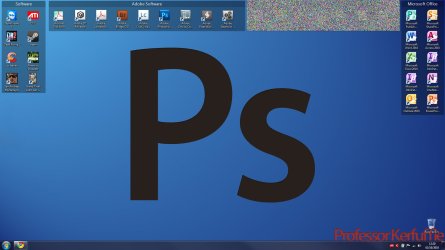
Have a look how I use it but some have been pixelated
 

Attachments

  • Screenshot.jpg
    Screenshot.jpg
    161.9 KB · Views: 22

My Computer

Computer type
PC/Desktop
Computer Manufacturer/Model Number
GIGABYTE Rig (Custom)
OS
Windows 7 Professional (x64/SP1) /Linux Mint 16
CPU
Intel i5-3570k 3.40 GHz @ 4.6 GHz
Motherboard
GIGABYTE Z77X-D3H
Memory
8GB (2133MHz) DDR3
Graphics Card(s)
Asus GTX560 Ti (Nvidia)
Monitor(s) Displays
HP 23", Acer 19" and a Dell 17"
Screen Resolution
1080p, 1440x900 and 1280x1024
Hard Drives
Sandisk Extreme 120GB (SSD), WD 2TB green and 4 other HDDs
PSU
Antec 620w High Current Gamer
Case
Corsair Obsidian 600D
Cooling
CPU - Antec KÜHLER H₂O 920
Keyboard
Steelseries 6Gv2
Mouse
Roccat LUA
Internet Speed
4 - 6mb/s
Antivirus
ESET NOD32
Browser
Chrome/Firefox
Other Info
Intel Gigabit CT (PCIE NIC) and Thinkpad T61p,
I'd use fences if I could have the items arrange to the right side of the boxes you create. At the moment, they all just auto-arrange to the top side of the box.

I really just want to have my icons as they are on a Mac, no special boxes, just everything on the right side.
 

My Computer

OS
Windows 7 Premium 64bit
Back
Top