Icon Cache - Rebuild

How to Rebuild the Icon Cache in Windows

   Information
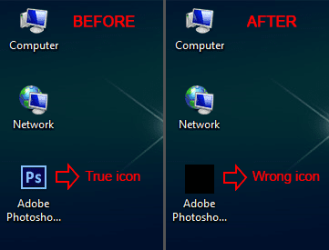
If one or more of your icons are not displaying correctly, or that your icon cache is corrupted, then you might consider rebuilding the icon cache to reset and reload the icon images into the icon cache in Vista, Windows 7, and Windows 8.

   Note
This will not help with any of the following icon issues:
  • A shortcut's icon that is not displayed properly due to the source of the shortcut being moved or deleted. You may need to recreate a new shortcut directly from the source (ex: program's exe) file to replace it instead.
  • All icons for a specific file extension display the wrong icon. This may be due to setting the wrong association for what program to open the file extension instead. You can restore the default file extension's associations to fix this icon instead.


OPTION ONE

Automatically Rebuild the Icon Cache


1. Click/tap on the download button below to download the file below.
Rebuild_Icon_Cache.bat

Download


2. Save the file to your desktop, and run it.

3. Click/tap on Run when prompted.

4. Follow the instructions in the command prompt to rebuild the Icon Cache. (see screenshot below)
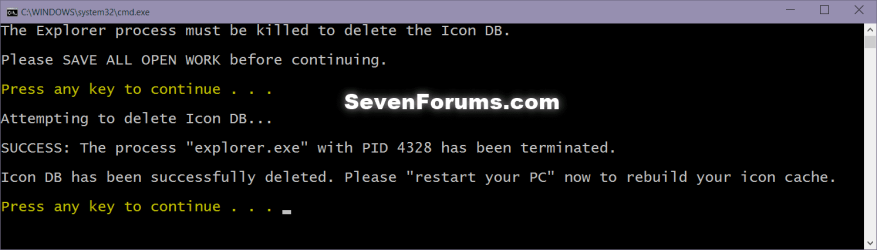
Icon_cache_command.png
5. Restart your computer to generate a new IconCache.db file.

6. If the icons are still not displaying properly, then download and merge the ICO option in this tutorial for Windows 7 or Windows 8 to restore the default associations of .ico (icon) files.


OPTION TWO

To Manually Rebuild the Icon Cache using the Command Prompt


1. Close and save anything that you are working on. This command will kill explorer and restart the computer when completed.

2. Open a command prompt in Windows 7 or Windows 8.

3. In the command prompt, Copy and paste each command line below exactly as is one at a time and press enter after each command.
:warn:WARNING: The last command will restart the computer, so be sure to close and save anything that you are working on first.
  • ie4uinit.exe -ClearIconCache
  • taskkill /IM explorer.exe /F
  • DEL "%localappdata%\IconCache.db" /A
  • DEL "%localappdata%\Microsoft\Windows\Explorer\iconcache*" /A
  • shutdown /r /f /t 00
4. The IconCache.db file has now been rebuilt.

5. If the icons are still not displaying properly, then download and merge the ICO option in this tutorial for Windows 7 or Windows 8 to restore the default associations of .ico (icon) files.

That's it,
Shawn


Attachments

Last edited:
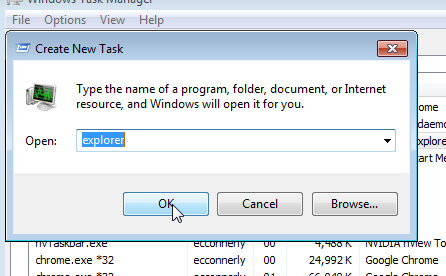
You don't have to restart after using Icon Cache Rebuild. Mine disappeared along with my taskbar and nothing was happening, so I hit ctrl+alt+del, then start task manager. Next click "File" then "New Task (Run) and type: explorer.exe then click ok. All my icons were restored. :geek:
 
Last edited:

My Computer

Computer type
PC/Desktop
Computer Manufacturer/Model Number
custom build
OS
Windows 7 Ultimate X64
CPU
FX-8350
Motherboard
ASUS Crosshair IV Formula
Memory
PNY 16GB (4X4)
Graphics Card(s)
Powercolor 7950 3gb ddr5 384-bit
Hard Drives
2TB
Antivirus
Windows Defender
Browser
Firefox
Hello Michaell, and welcome to Seven Forums. :)

Restarting the computer is required to have the deleted %localappdata%\IconCache.db file recreated.
 

My Computer

Computer type
PC/Desktop
Computer Manufacturer/Model Number
Self built custom
OS
64-bit Windows 11 Pro for Workstations
CPU
Intel i7-8700K OC'd to 5 GHz
Motherboard
ASUS ROG Maximus XI Formula Z390
Memory
64 GB (4x16GB) G.SKILL TridentZ RGB DDR4 3600 MHz
Graphics Card(s)
ASUS ROG-STRIX-GTX1080TI-O11G-GAMING
Sound Card
Integrated
Monitor(s) Displays
2 x Samsung Odyssey G7 27"
Screen Resolution
2560x1440
Hard Drives
1TB Samsung 990 PRO M.2,
4TB Samsung 990 PRO PRO M.2,
TerraMaster F8 SSD Plus NAS
PSU
Seasonic Prime Titanium 850W
Case
Thermaltake Core P3
Cooling
Corsair Hydro H115i
Keyboard
Logitech wireless K800
Mouse
Logitech MX Master 4
Internet Speed
2 Gb/s Download and 100 Mb/s Upload
Antivirus
Malwarebyte Anti-Malware Premium
Browser
Google Chrome
Other Info
Logitech Z625 speaker system,
Logitech BRIO 4K Pro webcam,
HP Color LaserJet Pro MFP M477fdn,
APC SMART-UPS RT 1000 XL - SURT1000XLI,
Galaxy S23 Plus phone
Can i do it in safe mode?
 

My Computers

System One System Two

  • Computer type
    PC/Desktop
    Computer Manufacturer/Model Number
    PRO904059
    OS
    Linux Lite
    CPU
    Intel(R) Core(TM) i5-7300U CPU @ 2.60GHz 2.71 GHz
    Memory
    8.00 GB (7.87 GB usable)
    Hard Drives
    250 GB solid state drive
    Antivirus
    ESET Smart Security Premium
    Browser
    Firefox ESR
  • Computer type
    PC/Desktop
    System Manufacturer/Model Number
    Dell OptiPlex 9020
    OS
    Windows 10 Pro 21H2
    CPU
    Intel(R) Core(TM) i5-4590 CPU @ 3.30GHz
    Memory
    8.00 GB
    Graphics Card(s)
    Nvidia Quadro K620
    Browser
    Firefox ESR
Hello f234948, :)

Yes, you sure can.
 

My Computer

Computer type
PC/Desktop
Computer Manufacturer/Model Number
Self built custom
OS
64-bit Windows 11 Pro for Workstations
CPU
Intel i7-8700K OC'd to 5 GHz
Motherboard
ASUS ROG Maximus XI Formula Z390
Memory
64 GB (4x16GB) G.SKILL TridentZ RGB DDR4 3600 MHz
Graphics Card(s)
ASUS ROG-STRIX-GTX1080TI-O11G-GAMING
Sound Card
Integrated
Monitor(s) Displays
2 x Samsung Odyssey G7 27"
Screen Resolution
2560x1440
Hard Drives
1TB Samsung 990 PRO M.2,
4TB Samsung 990 PRO PRO M.2,
TerraMaster F8 SSD Plus NAS
PSU
Seasonic Prime Titanium 850W
Case
Thermaltake Core P3
Cooling
Corsair Hydro H115i
Keyboard
Logitech wireless K800
Mouse
Logitech MX Master 4
Internet Speed
2 Gb/s Download and 100 Mb/s Upload
Antivirus
Malwarebyte Anti-Malware Premium
Browser
Google Chrome
Other Info
Logitech Z625 speaker system,
Logitech BRIO 4K Pro webcam,
HP Color LaserJet Pro MFP M477fdn,
APC SMART-UPS RT 1000 XL - SURT1000XLI,
Galaxy S23 Plus phone
ok cool thanks for the reply Brink
 

My Computers

System One System Two

  • Computer type
    PC/Desktop
    Computer Manufacturer/Model Number
    PRO904059
    OS
    Linux Lite
    CPU
    Intel(R) Core(TM) i5-7300U CPU @ 2.60GHz 2.71 GHz
    Memory
    8.00 GB (7.87 GB usable)
    Hard Drives
    250 GB solid state drive
    Antivirus
    ESET Smart Security Premium
    Browser
    Firefox ESR
  • Computer type
    PC/Desktop
    System Manufacturer/Model Number
    Dell OptiPlex 9020
    OS
    Windows 10 Pro 21H2
    CPU
    Intel(R) Core(TM) i5-4590 CPU @ 3.30GHz
    Memory
    8.00 GB
    Graphics Card(s)
    Nvidia Quadro K620
    Browser
    Firefox ESR
Thank you- it fixed mine

Thank you for the icon rebuild instructions.

I too was suffering from a never ending scan in Windows Explorer and icons with no pictures after I did a Windows update. Following the manual instructions posted solved my issue.
 

My Computer

OS
Windows 7 Professional 64 bit
You're most welcome Jerry. I'm glad it could help. :)
 

My Computer

Computer type
PC/Desktop
Computer Manufacturer/Model Number
Self built custom
OS
64-bit Windows 11 Pro for Workstations
CPU
Intel i7-8700K OC'd to 5 GHz
Motherboard
ASUS ROG Maximus XI Formula Z390
Memory
64 GB (4x16GB) G.SKILL TridentZ RGB DDR4 3600 MHz
Graphics Card(s)
ASUS ROG-STRIX-GTX1080TI-O11G-GAMING
Sound Card
Integrated
Monitor(s) Displays
2 x Samsung Odyssey G7 27"
Screen Resolution
2560x1440
Hard Drives
1TB Samsung 990 PRO M.2,
4TB Samsung 990 PRO PRO M.2,
TerraMaster F8 SSD Plus NAS
PSU
Seasonic Prime Titanium 850W
Case
Thermaltake Core P3
Cooling
Corsair Hydro H115i
Keyboard
Logitech wireless K800
Mouse
Logitech MX Master 4
Internet Speed
2 Gb/s Download and 100 Mb/s Upload
Antivirus
Malwarebyte Anti-Malware Premium
Browser
Google Chrome
Other Info
Logitech Z625 speaker system,
Logitech BRIO 4K Pro webcam,
HP Color LaserJet Pro MFP M477fdn,
APC SMART-UPS RT 1000 XL - SURT1000XLI,
Galaxy S23 Plus phone
it gives me a error, i have tried everything like temporary disable antivirus, etc.,
rebuild_icon_cache_error.png
 

My Computers

System One System Two

  • Computer type
    PC/Desktop
    Computer Manufacturer/Model Number
    PRO904059
    OS
    Linux Lite
    CPU
    Intel(R) Core(TM) i5-7300U CPU @ 2.60GHz 2.71 GHz
    Memory
    8.00 GB (7.87 GB usable)
    Hard Drives
    250 GB solid state drive
    Antivirus
    ESET Smart Security Premium
    Browser
    Firefox ESR
  • Computer type
    PC/Desktop
    System Manufacturer/Model Number
    Dell OptiPlex 9020
    OS
    Windows 10 Pro 21H2
    CPU
    Intel(R) Core(TM) i5-4590 CPU @ 3.30GHz
    Memory
    8.00 GB
    Graphics Card(s)
    Nvidia Quadro K620
    Browser
    Firefox ESR
Hello f23948, :)

That is normal for those few .db files, and nothing to worry about.

Did rebuilding the icon cache and restarting the PC help with your icon issue?
 

My Computer

Computer type
PC/Desktop
Computer Manufacturer/Model Number
Self built custom
OS
64-bit Windows 11 Pro for Workstations
CPU
Intel i7-8700K OC'd to 5 GHz
Motherboard
ASUS ROG Maximus XI Formula Z390
Memory
64 GB (4x16GB) G.SKILL TridentZ RGB DDR4 3600 MHz
Graphics Card(s)
ASUS ROG-STRIX-GTX1080TI-O11G-GAMING
Sound Card
Integrated
Monitor(s) Displays
2 x Samsung Odyssey G7 27"
Screen Resolution
2560x1440
Hard Drives
1TB Samsung 990 PRO M.2,
4TB Samsung 990 PRO PRO M.2,
TerraMaster F8 SSD Plus NAS
PSU
Seasonic Prime Titanium 850W
Case
Thermaltake Core P3
Cooling
Corsair Hydro H115i
Keyboard
Logitech wireless K800
Mouse
Logitech MX Master 4
Internet Speed
2 Gb/s Download and 100 Mb/s Upload
Antivirus
Malwarebyte Anti-Malware Premium
Browser
Google Chrome
Other Info
Logitech Z625 speaker system,
Logitech BRIO 4K Pro webcam,
HP Color LaserJet Pro MFP M477fdn,
APC SMART-UPS RT 1000 XL - SURT1000XLI,
Galaxy S23 Plus phone
did restarted computer 3 times, and it's working now
 

My Computers

System One System Two

  • Computer type
    PC/Desktop
    Computer Manufacturer/Model Number
    PRO904059
    OS
    Linux Lite
    CPU
    Intel(R) Core(TM) i5-7300U CPU @ 2.60GHz 2.71 GHz
    Memory
    8.00 GB (7.87 GB usable)
    Hard Drives
    250 GB solid state drive
    Antivirus
    ESET Smart Security Premium
    Browser
    Firefox ESR
  • Computer type
    PC/Desktop
    System Manufacturer/Model Number
    Dell OptiPlex 9020
    OS
    Windows 10 Pro 21H2
    CPU
    Intel(R) Core(TM) i5-4590 CPU @ 3.30GHz
    Memory
    8.00 GB
    Graphics Card(s)
    Nvidia Quadro K620
    Browser
    Firefox ESR
Great news. :party:
 

My Computer

Computer type
PC/Desktop
Computer Manufacturer/Model Number
Self built custom
OS
64-bit Windows 11 Pro for Workstations
CPU
Intel i7-8700K OC'd to 5 GHz
Motherboard
ASUS ROG Maximus XI Formula Z390
Memory
64 GB (4x16GB) G.SKILL TridentZ RGB DDR4 3600 MHz
Graphics Card(s)
ASUS ROG-STRIX-GTX1080TI-O11G-GAMING
Sound Card
Integrated
Monitor(s) Displays
2 x Samsung Odyssey G7 27"
Screen Resolution
2560x1440
Hard Drives
1TB Samsung 990 PRO M.2,
4TB Samsung 990 PRO PRO M.2,
TerraMaster F8 SSD Plus NAS
PSU
Seasonic Prime Titanium 850W
Case
Thermaltake Core P3
Cooling
Corsair Hydro H115i
Keyboard
Logitech wireless K800
Mouse
Logitech MX Master 4
Internet Speed
2 Gb/s Download and 100 Mb/s Upload
Antivirus
Malwarebyte Anti-Malware Premium
Browser
Google Chrome
Other Info
Logitech Z625 speaker system,
Logitech BRIO 4K Pro webcam,
HP Color LaserJet Pro MFP M477fdn,
APC SMART-UPS RT 1000 XL - SURT1000XLI,
Galaxy S23 Plus phone
How I have done this was as follows:
Save all current work as stated everywhere
alt cnt del to get to the task manager
go to the processes tab and right click on explorer.exe and choose end process tree

xD8yFsD.png


then again, alt cnt del to get to the task manager and choose file new task
RlfjpY7.png


type explorer and hit enter and that should do it. At least it does for me.

9wGhYLd.png
 

My Computer

Computer type
PC/Desktop
OS
Windows 7
Hello econnerly, and welcome to Seven Forums. :)

That would be to only restart explorer.

Restarting explorer to refresh them could help if there's not any icon corruption. Otherwise, you would most likely need to rebuild the icon cache.
 

My Computer

Computer type
PC/Desktop
Computer Manufacturer/Model Number
Self built custom
OS
64-bit Windows 11 Pro for Workstations
CPU
Intel i7-8700K OC'd to 5 GHz
Motherboard
ASUS ROG Maximus XI Formula Z390
Memory
64 GB (4x16GB) G.SKILL TridentZ RGB DDR4 3600 MHz
Graphics Card(s)
ASUS ROG-STRIX-GTX1080TI-O11G-GAMING
Sound Card
Integrated
Monitor(s) Displays
2 x Samsung Odyssey G7 27"
Screen Resolution
2560x1440
Hard Drives
1TB Samsung 990 PRO M.2,
4TB Samsung 990 PRO PRO M.2,
TerraMaster F8 SSD Plus NAS
PSU
Seasonic Prime Titanium 850W
Case
Thermaltake Core P3
Cooling
Corsair Hydro H115i
Keyboard
Logitech wireless K800
Mouse
Logitech MX Master 4
Internet Speed
2 Gb/s Download and 100 Mb/s Upload
Antivirus
Malwarebyte Anti-Malware Premium
Browser
Google Chrome
Other Info
Logitech Z625 speaker system,
Logitech BRIO 4K Pro webcam,
HP Color LaserJet Pro MFP M477fdn,
APC SMART-UPS RT 1000 XL - SURT1000XLI,
Galaxy S23 Plus phone
Thanks for the welcome.

You are correct. Sometimes I forget to plug in my thumb drive before starting my office computer and the shortcut icons come up blank. My computer takes FOREVER to log onto the network, so thats why a restart is out of the question for me.
 

My Computer

Computer type
PC/Desktop
OS
Windows 7

My Computer

Computer type
PC/Desktop
Computer Manufacturer/Model Number
Self built custom
OS
64-bit Windows 11 Pro for Workstations
CPU
Intel i7-8700K OC'd to 5 GHz
Motherboard
ASUS ROG Maximus XI Formula Z390
Memory
64 GB (4x16GB) G.SKILL TridentZ RGB DDR4 3600 MHz
Graphics Card(s)
ASUS ROG-STRIX-GTX1080TI-O11G-GAMING
Sound Card
Integrated
Monitor(s) Displays
2 x Samsung Odyssey G7 27"
Screen Resolution
2560x1440
Hard Drives
1TB Samsung 990 PRO M.2,
4TB Samsung 990 PRO PRO M.2,
TerraMaster F8 SSD Plus NAS
PSU
Seasonic Prime Titanium 850W
Case
Thermaltake Core P3
Cooling
Corsair Hydro H115i
Keyboard
Logitech wireless K800
Mouse
Logitech MX Master 4
Internet Speed
2 Gb/s Download and 100 Mb/s Upload
Antivirus
Malwarebyte Anti-Malware Premium
Browser
Google Chrome
Other Info
Logitech Z625 speaker system,
Logitech BRIO 4K Pro webcam,
HP Color LaserJet Pro MFP M477fdn,
APC SMART-UPS RT 1000 XL - SURT1000XLI,
Galaxy S23 Plus phone
Desktop icons still wrong displayed

All tutorial on page one I've done it right, and the desktop icons displayed correctly.. that's good! But after restarting again there was incorrectly.. What's up?
To be clear, I mean this only applies to program icons that I've installed, while belonging to 'original Windows icon' all remains correct.
It's always wrong despite repeatedly run the option 2 (same for option 1), first repair is good, but the next restart incorrectly.. I'm confused why it cannot be permanently.

Could someone help to this problem, please

Screenshot attached
 

Attachments

  • Untitled-1.png
    Untitled-1.png
    26.4 KB · Views: 841
Last edited:

My Computer

Computer type
PC/Desktop
Computer Manufacturer/Model Number
own assembly
OS
Windows 7 Ult x64
CPU
AMD X4 Quad Core 3.1GHz
Motherboard
Gigabyte socket FM2+
Memory
DDR3 16GB
Graphics Card(s)
Radeon R5 230 2GB
Sound Card
Xonar D-KARAX
Monitor(s) Displays
ViewSonic 24'
Hard Drives
SSD + WDC
PSU
Antec VP500W
Antivirus
Kaspersky
Browser
Firefox
Hello Jacky, :)

Does refreshing (F5) the desktop help show the correct icon?

If this is a shortcut, does creating a new shortcut work properly instead?

If this is a shortcut does this happen to all shortcuts? If so, did you change the shortcut arrow overlay?
 

My Computer

Computer type
PC/Desktop
Computer Manufacturer/Model Number
Self built custom
OS
64-bit Windows 11 Pro for Workstations
CPU
Intel i7-8700K OC'd to 5 GHz
Motherboard
ASUS ROG Maximus XI Formula Z390
Memory
64 GB (4x16GB) G.SKILL TridentZ RGB DDR4 3600 MHz
Graphics Card(s)
ASUS ROG-STRIX-GTX1080TI-O11G-GAMING
Sound Card
Integrated
Monitor(s) Displays
2 x Samsung Odyssey G7 27"
Screen Resolution
2560x1440
Hard Drives
1TB Samsung 990 PRO M.2,
4TB Samsung 990 PRO PRO M.2,
TerraMaster F8 SSD Plus NAS
PSU
Seasonic Prime Titanium 850W
Case
Thermaltake Core P3
Cooling
Corsair Hydro H115i
Keyboard
Logitech wireless K800
Mouse
Logitech MX Master 4
Internet Speed
2 Gb/s Download and 100 Mb/s Upload
Antivirus
Malwarebyte Anti-Malware Premium
Browser
Google Chrome
Other Info
Logitech Z625 speaker system,
Logitech BRIO 4K Pro webcam,
HP Color LaserJet Pro MFP M477fdn,
APC SMART-UPS RT 1000 XL - SURT1000XLI,
Galaxy S23 Plus phone
If this is a shortcut does this happen to all shortcuts? If so, did you change the shortcut arrow overlay?
Ohh silly me.. Problem fix now, I forgot that I ever roll-back system restore where it's still active 'no shortcut arrow', then after restore to default now back to normal permanent display.
Thanks Brink has reminded me, and my problem solved now. :thumbsup:
 

My Computer

Computer type
PC/Desktop
Computer Manufacturer/Model Number
own assembly
OS
Windows 7 Ult x64
CPU
AMD X4 Quad Core 3.1GHz
Motherboard
Gigabyte socket FM2+
Memory
DDR3 16GB
Graphics Card(s)
Radeon R5 230 2GB
Sound Card
Xonar D-KARAX
Monitor(s) Displays
ViewSonic 24'
Hard Drives
SSD + WDC
PSU
Antec VP500W
Antivirus
Kaspersky
Browser
Firefox
Perfect. :party:
 

My Computer

Computer type
PC/Desktop
Computer Manufacturer/Model Number
Self built custom
OS
64-bit Windows 11 Pro for Workstations
CPU
Intel i7-8700K OC'd to 5 GHz
Motherboard
ASUS ROG Maximus XI Formula Z390
Memory
64 GB (4x16GB) G.SKILL TridentZ RGB DDR4 3600 MHz
Graphics Card(s)
ASUS ROG-STRIX-GTX1080TI-O11G-GAMING
Sound Card
Integrated
Monitor(s) Displays
2 x Samsung Odyssey G7 27"
Screen Resolution
2560x1440
Hard Drives
1TB Samsung 990 PRO M.2,
4TB Samsung 990 PRO PRO M.2,
TerraMaster F8 SSD Plus NAS
PSU
Seasonic Prime Titanium 850W
Case
Thermaltake Core P3
Cooling
Corsair Hydro H115i
Keyboard
Logitech wireless K800
Mouse
Logitech MX Master 4
Internet Speed
2 Gb/s Download and 100 Mb/s Upload
Antivirus
Malwarebyte Anti-Malware Premium
Browser
Google Chrome
Other Info
Logitech Z625 speaker system,
Logitech BRIO 4K Pro webcam,
HP Color LaserJet Pro MFP M477fdn,
APC SMART-UPS RT 1000 XL - SURT1000XLI,
Galaxy S23 Plus phone
it gives me error, i am using windows 7
Rebuild_Icon_Cache_error.png
 

My Computers

System One System Two

  • Computer type
    PC/Desktop
    Computer Manufacturer/Model Number
    PRO904059
    OS
    Linux Lite
    CPU
    Intel(R) Core(TM) i5-7300U CPU @ 2.60GHz 2.71 GHz
    Memory
    8.00 GB (7.87 GB usable)
    Hard Drives
    250 GB solid state drive
    Antivirus
    ESET Smart Security Premium
    Browser
    Firefox ESR
  • Computer type
    PC/Desktop
    System Manufacturer/Model Number
    Dell OptiPlex 9020
    OS
    Windows 10 Pro 21H2
    CPU
    Intel(R) Core(TM) i5-4590 CPU @ 3.30GHz
    Memory
    8.00 GB
    Graphics Card(s)
    Nvidia Quadro K620
    Browser
    Firefox ESR
Back
Top