Icon Cache - Rebuild

How to Rebuild the Icon Cache in Windows

   Information
If one or more of your icons are not displaying correctly, or that your icon cache is corrupted, then you might consider rebuilding the icon cache to reset and reload the icon images into the icon cache in Vista, Windows 7, and Windows 8.

   Note
This will not help with any of the following icon issues:
  • A shortcut's icon that is not displayed properly due to the source of the shortcut being moved or deleted. You may need to recreate a new shortcut directly from the source (ex: program's exe) file to replace it instead.
  • All icons for a specific file extension display the wrong icon. This may be due to setting the wrong association for what program to open the file extension instead. You can restore the default file extension's associations to fix this icon instead.


OPTION ONE

Automatically Rebuild the Icon Cache


1. Click/tap on the download button below to download the file below.
Rebuild_Icon_Cache.bat

Download


2. Save the file to your desktop, and run it.

3. Click/tap on Run when prompted.

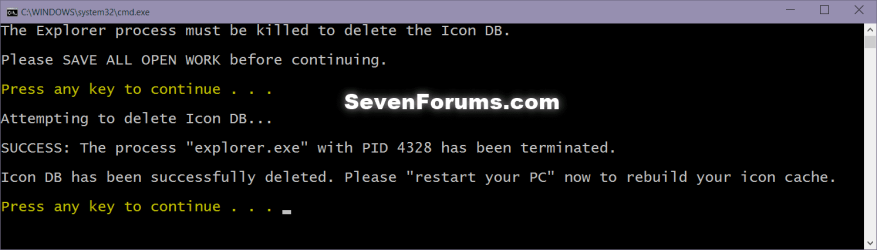
4. Follow the instructions in the command prompt to rebuild the Icon Cache. (see screenshot below)
Icon_cache_command.png
5. Restart your computer to generate a new IconCache.db file.

6. If the icons are still not displaying properly, then download and merge the ICO option in this tutorial for Windows 7 or Windows 8 to restore the default associations of .ico (icon) files.


OPTION TWO

To Manually Rebuild the Icon Cache using the Command Prompt


1. Close and save anything that you are working on. This command will kill explorer and restart the computer when completed.

2. Open a command prompt in Windows 7 or Windows 8.

3. In the command prompt, Copy and paste each command line below exactly as is one at a time and press enter after each command.
:warn:WARNING: The last command will restart the computer, so be sure to close and save anything that you are working on first.
  • ie4uinit.exe -ClearIconCache
  • taskkill /IM explorer.exe /F
  • DEL "%localappdata%\IconCache.db" /A
  • DEL "%localappdata%\Microsoft\Windows\Explorer\iconcache*" /A
  • shutdown /r /f /t 00
4. The IconCache.db file has now been rebuilt.

5. If the icons are still not displaying properly, then download and merge the ICO option in this tutorial for Windows 7 or Windows 8 to restore the default associations of .ico (icon) files.

That's it,
Shawn


Attachments

Last edited:
Hello f23948, :)

That's ok. It just means that the file has already been deleted. You can continue on to restart the PC to apply.
 

My Computer

Computer type
PC/Desktop
Computer Manufacturer/Model Number
Self built custom
OS
64-bit Windows 11 Pro for Workstations
CPU
Intel i7-8700K OC'd to 5 GHz
Motherboard
ASUS ROG Maximus XI Formula Z390
Memory
64 GB (4x16GB) G.SKILL TridentZ RGB DDR4 3600 MHz
Graphics Card(s)
ASUS ROG-STRIX-GTX1080TI-O11G-GAMING
Sound Card
Integrated
Monitor(s) Displays
2 x Samsung Odyssey G7 27"
Screen Resolution
2560x1440
Hard Drives
1TB Samsung 990 PRO M.2,
4TB Samsung 990 PRO PRO M.2,
TerraMaster F8 SSD Plus NAS
PSU
Seasonic Prime Titanium 850W
Case
Thermaltake Core P3
Cooling
Corsair Hydro H115i
Keyboard
Logitech wireless K800
Mouse
Logitech MX Master 4
Internet Speed
2 Gb/s Download and 100 Mb/s Upload
Antivirus
Malwarebyte Anti-Malware Premium
Browser
Google Chrome
Other Info
Logitech Z625 speaker system,
Logitech BRIO 4K Pro webcam,
HP Color LaserJet Pro MFP M477fdn,
APC SMART-UPS RT 1000 XL - SURT1000XLI,
Galaxy S23 Plus phone

My Computers

System One System Two

  • Computer type
    PC/Desktop
    Computer Manufacturer/Model Number
    PRO904059
    OS
    Linux Lite
    CPU
    Intel(R) Core(TM) i5-7300U CPU @ 2.60GHz 2.71 GHz
    Memory
    8.00 GB (7.87 GB usable)
    Hard Drives
    250 GB solid state drive
    Antivirus
    ESET Smart Security Premium
    Browser
    Firefox ESR
  • Computer type
    PC/Desktop
    System Manufacturer/Model Number
    Dell OptiPlex 9020
    OS
    Windows 10 Pro 21H2
    CPU
    Intel(R) Core(TM) i5-4590 CPU @ 3.30GHz
    Memory
    8.00 GB
    Graphics Card(s)
    Nvidia Quadro K620
    Browser
    Firefox ESR
also sfc /scannow found no corrupt files
Untitled.png
 

My Computers

System One System Two

  • Computer type
    PC/Desktop
    Computer Manufacturer/Model Number
    PRO904059
    OS
    Linux Lite
    CPU
    Intel(R) Core(TM) i5-7300U CPU @ 2.60GHz 2.71 GHz
    Memory
    8.00 GB (7.87 GB usable)
    Hard Drives
    250 GB solid state drive
    Antivirus
    ESET Smart Security Premium
    Browser
    Firefox ESR
  • Computer type
    PC/Desktop
    System Manufacturer/Model Number
    Dell OptiPlex 9020
    OS
    Windows 10 Pro 21H2
    CPU
    Intel(R) Core(TM) i5-4590 CPU @ 3.30GHz
    Memory
    8.00 GB
    Graphics Card(s)
    Nvidia Quadro K620
    Browser
    Firefox ESR
here comes again
Untitled.png
 

My Computers

System One System Two

  • Computer type
    PC/Desktop
    Computer Manufacturer/Model Number
    PRO904059
    OS
    Linux Lite
    CPU
    Intel(R) Core(TM) i5-7300U CPU @ 2.60GHz 2.71 GHz
    Memory
    8.00 GB (7.87 GB usable)
    Hard Drives
    250 GB solid state drive
    Antivirus
    ESET Smart Security Premium
    Browser
    Firefox ESR
  • Computer type
    PC/Desktop
    System Manufacturer/Model Number
    Dell OptiPlex 9020
    OS
    Windows 10 Pro 21H2
    CPU
    Intel(R) Core(TM) i5-4590 CPU @ 3.30GHz
    Memory
    8.00 GB
    Graphics Card(s)
    Nvidia Quadro K620
    Browser
    Firefox ESR
for few days, windows 7 haven't created iconcache automatically even i wasn't doing rebuilding icon cache
 

My Computers

System One System Two

  • Computer type
    PC/Desktop
    Computer Manufacturer/Model Number
    PRO904059
    OS
    Linux Lite
    CPU
    Intel(R) Core(TM) i5-7300U CPU @ 2.60GHz 2.71 GHz
    Memory
    8.00 GB (7.87 GB usable)
    Hard Drives
    250 GB solid state drive
    Antivirus
    ESET Smart Security Premium
    Browser
    Firefox ESR
  • Computer type
    PC/Desktop
    System Manufacturer/Model Number
    Dell OptiPlex 9020
    OS
    Windows 10 Pro 21H2
    CPU
    Intel(R) Core(TM) i5-4590 CPU @ 3.30GHz
    Memory
    8.00 GB
    Graphics Card(s)
    Nvidia Quadro K620
    Browser
    Firefox ESR

My Computer

Computer type
PC/Desktop
Computer Manufacturer/Model Number
Self built custom
OS
64-bit Windows 11 Pro for Workstations
CPU
Intel i7-8700K OC'd to 5 GHz
Motherboard
ASUS ROG Maximus XI Formula Z390
Memory
64 GB (4x16GB) G.SKILL TridentZ RGB DDR4 3600 MHz
Graphics Card(s)
ASUS ROG-STRIX-GTX1080TI-O11G-GAMING
Sound Card
Integrated
Monitor(s) Displays
2 x Samsung Odyssey G7 27"
Screen Resolution
2560x1440
Hard Drives
1TB Samsung 990 PRO M.2,
4TB Samsung 990 PRO PRO M.2,
TerraMaster F8 SSD Plus NAS
PSU
Seasonic Prime Titanium 850W
Case
Thermaltake Core P3
Cooling
Corsair Hydro H115i
Keyboard
Logitech wireless K800
Mouse
Logitech MX Master 4
Internet Speed
2 Gb/s Download and 100 Mb/s Upload
Antivirus
Malwarebyte Anti-Malware Premium
Browser
Google Chrome
Other Info
Logitech Z625 speaker system,
Logitech BRIO 4K Pro webcam,
HP Color LaserJet Pro MFP M477fdn,
APC SMART-UPS RT 1000 XL - SURT1000XLI,
Galaxy S23 Plus phone
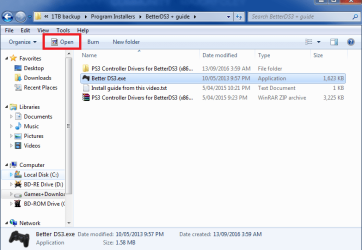
Quick question does this also fix when using explorer icons that appear next to things like organize in the main toolbar? Because when i click on an exe the open picture on it is that default missing icon picture.
 

Attachments

  • icon support.png
    icon support.png
    72.4 KB · Views: 99

My Computer

Computer type
PC/Desktop
OS
windows 7 Ultimate Service pack 1 x64
CPU
intel i5 2500k
Motherboard
Asus p8z68-v motherboard
Memory
8gb Ram
Graphics Card(s)
Sapphire AMD 6950 2gb
Screen Resolution
1920x1080
Hard Drives
2x samsung hd103SJ
1x ST2000DL003-9VT166
PSU
Silverstone silver 850watt power supply (ST85F-P)
Case
silverstone raven RV02-E
Keyboard
microsoft side winder x4
Mouse
Razer death adder v2

My Computer

Computer type
PC/Desktop
Computer Manufacturer/Model Number
Self built custom
OS
64-bit Windows 11 Pro for Workstations
CPU
Intel i7-8700K OC'd to 5 GHz
Motherboard
ASUS ROG Maximus XI Formula Z390
Memory
64 GB (4x16GB) G.SKILL TridentZ RGB DDR4 3600 MHz
Graphics Card(s)
ASUS ROG-STRIX-GTX1080TI-O11G-GAMING
Sound Card
Integrated
Monitor(s) Displays
2 x Samsung Odyssey G7 27"
Screen Resolution
2560x1440
Hard Drives
1TB Samsung 990 PRO M.2,
4TB Samsung 990 PRO PRO M.2,
TerraMaster F8 SSD Plus NAS
PSU
Seasonic Prime Titanium 850W
Case
Thermaltake Core P3
Cooling
Corsair Hydro H115i
Keyboard
Logitech wireless K800
Mouse
Logitech MX Master 4
Internet Speed
2 Gb/s Download and 100 Mb/s Upload
Antivirus
Malwarebyte Anti-Malware Premium
Browser
Google Chrome
Other Info
Logitech Z625 speaker system,
Logitech BRIO 4K Pro webcam,
HP Color LaserJet Pro MFP M477fdn,
APC SMART-UPS RT 1000 XL - SURT1000XLI,
Galaxy S23 Plus phone

My Computer

Computer type
PC/Desktop
OS
windows 7 Ultimate Service pack 1 x64
CPU
intel i5 2500k
Motherboard
Asus p8z68-v motherboard
Memory
8gb Ram
Graphics Card(s)
Sapphire AMD 6950 2gb
Screen Resolution
1920x1080
Hard Drives
2x samsung hd103SJ
1x ST2000DL003-9VT166
PSU
Silverstone silver 850watt power supply (ST85F-P)
Case
silverstone raven RV02-E
Keyboard
microsoft side winder x4
Mouse
Razer death adder v2
That's correct. It'll usually be the default exe icon.
 

My Computer

Computer type
PC/Desktop
Computer Manufacturer/Model Number
Self built custom
OS
64-bit Windows 11 Pro for Workstations
CPU
Intel i7-8700K OC'd to 5 GHz
Motherboard
ASUS ROG Maximus XI Formula Z390
Memory
64 GB (4x16GB) G.SKILL TridentZ RGB DDR4 3600 MHz
Graphics Card(s)
ASUS ROG-STRIX-GTX1080TI-O11G-GAMING
Sound Card
Integrated
Monitor(s) Displays
2 x Samsung Odyssey G7 27"
Screen Resolution
2560x1440
Hard Drives
1TB Samsung 990 PRO M.2,
4TB Samsung 990 PRO PRO M.2,
TerraMaster F8 SSD Plus NAS
PSU
Seasonic Prime Titanium 850W
Case
Thermaltake Core P3
Cooling
Corsair Hydro H115i
Keyboard
Logitech wireless K800
Mouse
Logitech MX Master 4
Internet Speed
2 Gb/s Download and 100 Mb/s Upload
Antivirus
Malwarebyte Anti-Malware Premium
Browser
Google Chrome
Other Info
Logitech Z625 speaker system,
Logitech BRIO 4K Pro webcam,
HP Color LaserJet Pro MFP M477fdn,
APC SMART-UPS RT 1000 XL - SURT1000XLI,
Galaxy S23 Plus phone
Does it work on Windows 10 build 15063?
 

My Computers

System One System Two

  • Computer type
    PC/Desktop
    Computer Manufacturer/Model Number
    PRO904059
    OS
    Linux Lite
    CPU
    Intel(R) Core(TM) i5-7300U CPU @ 2.60GHz 2.71 GHz
    Memory
    8.00 GB (7.87 GB usable)
    Hard Drives
    250 GB solid state drive
    Antivirus
    ESET Smart Security Premium
    Browser
    Firefox ESR
  • Computer type
    PC/Desktop
    System Manufacturer/Model Number
    Dell OptiPlex 9020
    OS
    Windows 10 Pro 21H2
    CPU
    Intel(R) Core(TM) i5-4590 CPU @ 3.30GHz
    Memory
    8.00 GB
    Graphics Card(s)
    Nvidia Quadro K620
    Browser
    Firefox ESR
It sure does. :)
 

My Computer

Computer type
PC/Desktop
Computer Manufacturer/Model Number
Self built custom
OS
64-bit Windows 11 Pro for Workstations
CPU
Intel i7-8700K OC'd to 5 GHz
Motherboard
ASUS ROG Maximus XI Formula Z390
Memory
64 GB (4x16GB) G.SKILL TridentZ RGB DDR4 3600 MHz
Graphics Card(s)
ASUS ROG-STRIX-GTX1080TI-O11G-GAMING
Sound Card
Integrated
Monitor(s) Displays
2 x Samsung Odyssey G7 27"
Screen Resolution
2560x1440
Hard Drives
1TB Samsung 990 PRO M.2,
4TB Samsung 990 PRO PRO M.2,
TerraMaster F8 SSD Plus NAS
PSU
Seasonic Prime Titanium 850W
Case
Thermaltake Core P3
Cooling
Corsair Hydro H115i
Keyboard
Logitech wireless K800
Mouse
Logitech MX Master 4
Internet Speed
2 Gb/s Download and 100 Mb/s Upload
Antivirus
Malwarebyte Anti-Malware Premium
Browser
Google Chrome
Other Info
Logitech Z625 speaker system,
Logitech BRIO 4K Pro webcam,
HP Color LaserJet Pro MFP M477fdn,
APC SMART-UPS RT 1000 XL - SURT1000XLI,
Galaxy S23 Plus phone
thank you Brink
 

My Computers

System One System Two

  • Computer type
    PC/Desktop
    Computer Manufacturer/Model Number
    PRO904059
    OS
    Linux Lite
    CPU
    Intel(R) Core(TM) i5-7300U CPU @ 2.60GHz 2.71 GHz
    Memory
    8.00 GB (7.87 GB usable)
    Hard Drives
    250 GB solid state drive
    Antivirus
    ESET Smart Security Premium
    Browser
    Firefox ESR
  • Computer type
    PC/Desktop
    System Manufacturer/Model Number
    Dell OptiPlex 9020
    OS
    Windows 10 Pro 21H2
    CPU
    Intel(R) Core(TM) i5-4590 CPU @ 3.30GHz
    Memory
    8.00 GB
    Graphics Card(s)
    Nvidia Quadro K620
    Browser
    Firefox ESR
You're most welcome. :)
 

My Computer

Computer type
PC/Desktop
Computer Manufacturer/Model Number
Self built custom
OS
64-bit Windows 11 Pro for Workstations
CPU
Intel i7-8700K OC'd to 5 GHz
Motherboard
ASUS ROG Maximus XI Formula Z390
Memory
64 GB (4x16GB) G.SKILL TridentZ RGB DDR4 3600 MHz
Graphics Card(s)
ASUS ROG-STRIX-GTX1080TI-O11G-GAMING
Sound Card
Integrated
Monitor(s) Displays
2 x Samsung Odyssey G7 27"
Screen Resolution
2560x1440
Hard Drives
1TB Samsung 990 PRO M.2,
4TB Samsung 990 PRO PRO M.2,
TerraMaster F8 SSD Plus NAS
PSU
Seasonic Prime Titanium 850W
Case
Thermaltake Core P3
Cooling
Corsair Hydro H115i
Keyboard
Logitech wireless K800
Mouse
Logitech MX Master 4
Internet Speed
2 Gb/s Download and 100 Mb/s Upload
Antivirus
Malwarebyte Anti-Malware Premium
Browser
Google Chrome
Other Info
Logitech Z625 speaker system,
Logitech BRIO 4K Pro webcam,
HP Color LaserJet Pro MFP M477fdn,
APC SMART-UPS RT 1000 XL - SURT1000XLI,
Galaxy S23 Plus phone
rebuilt icon cache bat

Listen mate, I've been a professional coder since 1977, so I don't use macroshit shagware other than absolutely unavoidably indispensable. So, having had to, this irritation was far beyond singularly significant. Really thank you, I was on the verge of writing the little script and then this popped up, which saved me the trouble and frustration of any further ms bs. I cannot tell why and I'm not interested at all to know, but the icons righted immediately without having to restart and without there being a db file in the directory. Maybe your little image-thing of ET is more significant than you think.

AMENDMENT: The directory which I'm referring to, is the one to which another solution referred, which is user\appdata\local\iconcache.db - I haven't read through this whole tread, obviously, but I've read your .bat file and it's the same directory. Checked again, refreshed the directory again, no iconcache.db file. There you go.
 
Last edited:

My Computers

System One System Two

  • OS
    windows 7 ultimate x32
  • Computer type
    PC/Desktop
Listen mate, I've been a professional coder since 1977, so I don't use macroshit shagware other than absolutely unavoidably indispensable. So, having had to, this irritation was far beyond singularly significant. Really thank you, I was on the verge of writing the little script and then this popped up, which saved me the trouble and frustration of any further ms bs. I cannot tell why and I'm not interested at all to know, but the icons righted immediately without having to restart and without there being a db file in the directory. Maybe your little image-thing of ET is more significant than you think.

AMENDMENT: The directory which I'm referring to, is the one to which another solution referred, which is user\appdata\local\iconcache.db - I haven't read through this whole tread, obviously, but I've read your .bat file and it's the same directory. Checked again, refreshed the directory again, no iconcache.db file. There you go.

Hello Timothy, and welcome to Seven Forums.

The iconcache.db files are hidden by default. Unless you have set to show hidden files (faded), you wouldn't normally see them.

Hidden Files and Folders - Show or Hide
 

My Computer

Computer type
PC/Desktop
Computer Manufacturer/Model Number
Self built custom
OS
64-bit Windows 11 Pro for Workstations
CPU
Intel i7-8700K OC'd to 5 GHz
Motherboard
ASUS ROG Maximus XI Formula Z390
Memory
64 GB (4x16GB) G.SKILL TridentZ RGB DDR4 3600 MHz
Graphics Card(s)
ASUS ROG-STRIX-GTX1080TI-O11G-GAMING
Sound Card
Integrated
Monitor(s) Displays
2 x Samsung Odyssey G7 27"
Screen Resolution
2560x1440
Hard Drives
1TB Samsung 990 PRO M.2,
4TB Samsung 990 PRO PRO M.2,
TerraMaster F8 SSD Plus NAS
PSU
Seasonic Prime Titanium 850W
Case
Thermaltake Core P3
Cooling
Corsair Hydro H115i
Keyboard
Logitech wireless K800
Mouse
Logitech MX Master 4
Internet Speed
2 Gb/s Download and 100 Mb/s Upload
Antivirus
Malwarebyte Anti-Malware Premium
Browser
Google Chrome
Other Info
Logitech Z625 speaker system,
Logitech BRIO 4K Pro webcam,
HP Color LaserJet Pro MFP M477fdn,
APC SMART-UPS RT 1000 XL - SURT1000XLI,
Galaxy S23 Plus phone
Yes, I know about those, I can see all hidden files and folders on the system drive. The reason I'm actually back here, is to amend further that the specific problematic box that has win7 on it (the software application and related hardware control system which the box is used for, doesn't work on any other version and is now being re-coded for Linux), has been shut down or restarted several times since I've your magic little script on there; and every time the same problem with the black icons; and every time the magic righting of the icons; and every time null iconcache.db file for the icons. I'm actually looking into a hacking sort of problem here, with the restarting process going on constantly in due course. Why the icon issue was actually bothering me, to be honest, is that I'm autistic and I think in pictures and having to read the icon's labels all of the time (about thirty on the desktop by now, for some reason "moving around" after a shutdown or restart) and then "translate" them to their pictures, took up a lot of time and already thin patience. The first solution was to delete the file right before shutting down, which then rebuilt and all was well, until that stopped working, eventually; that's why I know where the file is, the directory has a link on the desktop since I've started working on the problem. That became far beyond irritating, already having to bother with the ms bs non-operating system hacking paradise. I became slightly suspicious about the "disappearance" of the file though, all things considered; and as a first step, I've used Search Everything to see where it might have been "misplaced" or temporarily saved or whatever, with ms, one never knows; null iconcache.db file on the disk. The file is there right after a start or restart, but apparently doesn't get recreated after applying your magic little script. The significance of your ET-image is still unaccounted for, unfortunately. There you go, again; mate; do you not. By the way, since I've now gain confidence in you (apart from liking your ET-image very much and the autistic mind being a singular thing when it comes to strangers), would your rules allow met to ask specifically you about something other than this issue? I might encounter a few other problems and it would be nice to know that I can get help from somebody specific.
 

My Computers

System One System Two

  • OS
    windows 7 ultimate x32
  • Computer type
    PC/Desktop
By the way, since I've now gain confidence in you (apart from liking your ET-image very much and the autistic mind being a singular thing when it comes to strangers), would your rules allow met to ask specifically you about something other than this issue? I might encounter a few other problems and it would be nice to know that I can get help from somebody specific.

Of course you ask anything you like, but it would be best to create a new thread in the forum for any unrelated questions.
 

My Computer

Computer type
PC/Desktop
Computer Manufacturer/Model Number
Self built custom
OS
64-bit Windows 11 Pro for Workstations
CPU
Intel i7-8700K OC'd to 5 GHz
Motherboard
ASUS ROG Maximus XI Formula Z390
Memory
64 GB (4x16GB) G.SKILL TridentZ RGB DDR4 3600 MHz
Graphics Card(s)
ASUS ROG-STRIX-GTX1080TI-O11G-GAMING
Sound Card
Integrated
Monitor(s) Displays
2 x Samsung Odyssey G7 27"
Screen Resolution
2560x1440
Hard Drives
1TB Samsung 990 PRO M.2,
4TB Samsung 990 PRO PRO M.2,
TerraMaster F8 SSD Plus NAS
PSU
Seasonic Prime Titanium 850W
Case
Thermaltake Core P3
Cooling
Corsair Hydro H115i
Keyboard
Logitech wireless K800
Mouse
Logitech MX Master 4
Internet Speed
2 Gb/s Download and 100 Mb/s Upload
Antivirus
Malwarebyte Anti-Malware Premium
Browser
Google Chrome
Other Info
Logitech Z625 speaker system,
Logitech BRIO 4K Pro webcam,
HP Color LaserJet Pro MFP M477fdn,
APC SMART-UPS RT 1000 XL - SURT1000XLI,
Galaxy S23 Plus phone
Great and thanks. This script works perfect in Windows 7.
 

My Computers

System One System Two

  • Computer type
    PC/Desktop
    Computer Manufacturer/Model Number
    Custom
    OS
    Windows 10
    CPU
    Intel Core i9 10850k
  • Computer type
    PC/Desktop
Back
Top