
Icon Cache Size - Change in Windows

How to Change the Icon Cache Size in Vista, Windows 7, and Windows 8

   Information
When an icon is loaded for the first time it is cached in the iconcache.db file. The cached icons load faster than icons loaded directly from the source resource files. If the limit of the cache file is reached and overridden, you could experience incorrect or corrupted icons. Increasing the icon cache size helps to prevent icons from reloading from the source or being corrupted.

This tutorial will show you how to change the maximum size of the icon cache (iconcache.db) file to be more or less than it's default 500KB size for all users in Vista, Windows 7, and Windows 8.

You must be logged in as an administrator to be able to do the steps in this tutorial.

   Note
The icon cache is located at the hidden system folder location below for each user:

C:\Users\User-Name\AppData\Local\IconCache.db


OPTION ONE

To Automatically Reset or Change Icon Cache Size using VBS File


1. Click/tap on the Download button below to download the file below.
Change_Icon_Cache_Size.vbs


Download


2. Save the .vbs file to your Desktop.

3. Double click/tap on the downloaded .vbs file to run it.

4. Click/tap on Open and Yes (UAC) when prompted.
NOTE: If you like, you can stop getting the Open prompt by unblocking the downloaded .vbs file.

5. Follow the instructions in the prompts by the VBS file for what you would like to do. (see screenshots below)
A) To Set a Custom Icon Cache Size
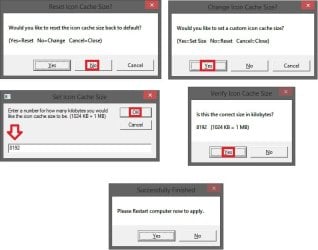
Change_Icon_Cache_Size_VBS.jpg
B) To Reset Icon Cache Size Back to Default
NOTE: This restores the default 500KB icon cache size.
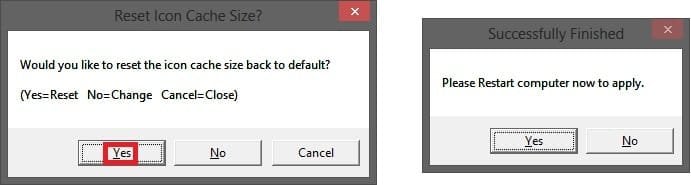
Reset_Icon_Cache_Size_to_Default_VBS.jpg
6. Be sure to restart the computer to apply.

7. When finished, you can now delete the downloaded .vbs file if you like.


OPTION TWO

To Manually Reset or Change Icon Cache Size using Registry Editor


1. Press the Windows+R keys to open the Run dialog, type regedit, and click/tap on OK.

2. If prompted by UAC, then click/tap on Yes (Windows 7/8) or Continue (Vista).

3. In regedit, navigate to the location below. (see screenshot below)
HKEY_LOCAL_MACHINE\SOFTWARE\Microsoft\Windows\CurrentVersion\Explorer
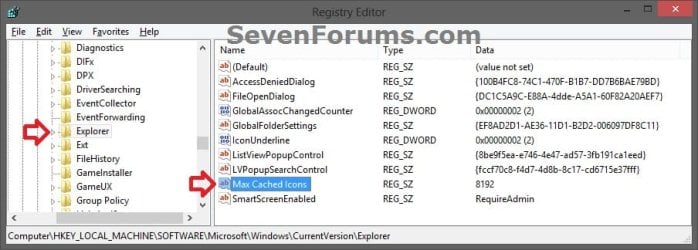
Icon_Cache_Size_Registry-1.jpg
4. Do step 5 or 6 below for what you would like to do.

5. To Set a Custom Icon Cache Size
A) If you have not already, in the right pane of Explorer, right click or press and hold on an empty area, click/tap on New and String Value, type Max Cached Icons, and press Enter. (see screenshot below step 3)

B) Double click/tap on Max Cached Icons to modify it. (see screenshot below step 3)

C) Type in a number for how many kilobytes (KB) you want the maximum icon cache size to be, and click/tap on OK. (see screenshot below)
NOTE: (1024KB = 1 MB) Setting this to 8192 KB (8 MB) gives good results. Your millage may vary, but you can always adjust the size to your needs at anytime.
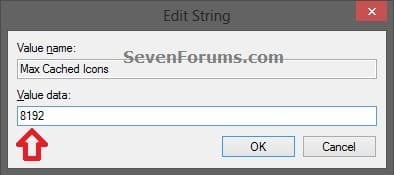
Icon_Cache_Size_Registry-2.jpg
D) Go to step 7 below.
6. To Reset Icon Cache Size Back to Default
NOTE: This restores the default 500KB icon cache size.
A) In the right pane of Explorer, right click on Max Cached Icons and click/tap on Delete. (see screenshot below step 3)

B) Click/tap on Yes. (see screenshot below)
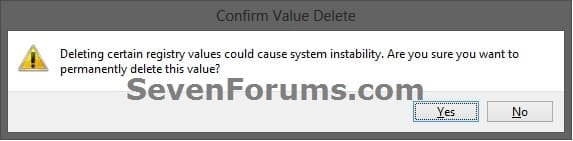
Icon_Cache_Size_Registry-3.jpg
C) Go to step 7 below.
7. Close regedit, and restart the computer to apply.
That's it,
Shawn


Attachments

Last edited:
Can same steps be applied on Windows 10 (64bit)? Is it ok to use a string value still? I read some instances suggesting it should be a QWORD. Very confused. If it should be a QWORD then what value needs to go in to achieve 4096kb? Thanks, Wayne
 

My Computer

Computer type
Laptop
Computer Manufacturer/Model Number
Alienware M17RX3
OS
Windows 7 Ultimate 64 bit
CPU
Sandybridge 2820 QM 2.3 ghz
Memory
8 gb
Graphics Card(s)
AMD Radeon 6970m
Sound Card
Integrated
Monitor(s) Displays
Laptop 17"
Screen Resolution
1980x1080
Hard Drives
750 gb mechanical (7,200RPM) Seagate Momentous paired with OCZ Synapse 128 gb SSD cache drive
Internet Speed
55 mbits download, 12 mbits download
Antivirus
Microsoft Security Essentials
Browser
IE11, Mozilla
Hello Wayne, :)

Sure, it can safely be used as is in Windows 10 as well. I hope it helps.
 

My Computer

Computer type
PC/Desktop
Computer Manufacturer/Model Number
Self built custom
OS
64-bit Windows 11 Pro for Workstations
CPU
Intel i7-8700K OC'd to 5 GHz
Motherboard
ASUS ROG Maximus XI Formula Z390
Memory
64 GB (4x16GB) G.SKILL TridentZ RGB DDR4 3600 MHz
Graphics Card(s)
ASUS ROG-STRIX-GTX1080TI-O11G-GAMING
Sound Card
Integrated
Monitor(s) Displays
2 x Samsung Odyssey G7 27"
Screen Resolution
2560x1440
Hard Drives
1TB Samsung 990 PRO M.2,
4TB Samsung 990 PRO PRO M.2,
TerraMaster F8 SSD Plus NAS
PSU
Seasonic Prime Titanium 850W
Case
Thermaltake Core P3
Cooling
Corsair Hydro H115i
Keyboard
Logitech wireless K800
Mouse
Logitech MX Master 4
Internet Speed
2 Gb/s Download and 100 Mb/s Upload
Antivirus
Malwarebyte Anti-Malware Premium
Browser
Google Chrome
Other Info
Logitech Z625 speaker system,
Logitech BRIO 4K Pro webcam,
HP Color LaserJet Pro MFP M477fdn,
APC SMART-UPS RT 1000 XL - SURT1000XLI,
Galaxy S23 Plus phone
Just out of interest what is the default icon cache size on Windows 10, is it still 500 Kb? I did this on my Windows 10 rig, maybe has improved it a bit but will see how it goes. I went for 4096 kb in the end
 

My Computer

Computer type
Laptop
Computer Manufacturer/Model Number
Alienware M17RX3
OS
Windows 7 Ultimate 64 bit
CPU
Sandybridge 2820 QM 2.3 ghz
Memory
8 gb
Graphics Card(s)
AMD Radeon 6970m
Sound Card
Integrated
Monitor(s) Displays
Laptop 17"
Screen Resolution
1980x1080
Hard Drives
750 gb mechanical (7,200RPM) Seagate Momentous paired with OCZ Synapse 128 gb SSD cache drive
Internet Speed
55 mbits download, 12 mbits download
Antivirus
Microsoft Security Essentials
Browser
IE11, Mozilla
I can only assume so since there is nothing in the registry by default to say what it is.
 

My Computer

Computer type
PC/Desktop
Computer Manufacturer/Model Number
Self built custom
OS
64-bit Windows 11 Pro for Workstations
CPU
Intel i7-8700K OC'd to 5 GHz
Motherboard
ASUS ROG Maximus XI Formula Z390
Memory
64 GB (4x16GB) G.SKILL TridentZ RGB DDR4 3600 MHz
Graphics Card(s)
ASUS ROG-STRIX-GTX1080TI-O11G-GAMING
Sound Card
Integrated
Monitor(s) Displays
2 x Samsung Odyssey G7 27"
Screen Resolution
2560x1440
Hard Drives
1TB Samsung 990 PRO M.2,
4TB Samsung 990 PRO PRO M.2,
TerraMaster F8 SSD Plus NAS
PSU
Seasonic Prime Titanium 850W
Case
Thermaltake Core P3
Cooling
Corsair Hydro H115i
Keyboard
Logitech wireless K800
Mouse
Logitech MX Master 4
Internet Speed
2 Gb/s Download and 100 Mb/s Upload
Antivirus
Malwarebyte Anti-Malware Premium
Browser
Google Chrome
Other Info
Logitech Z625 speaker system,
Logitech BRIO 4K Pro webcam,
HP Color LaserJet Pro MFP M477fdn,
APC SMART-UPS RT 1000 XL - SURT1000XLI,
Galaxy S23 Plus phone
Thank you
 

My Computer

Computer type
Laptop
Computer Manufacturer/Model Number
Alienware M17RX3
OS
Windows 7 Ultimate 64 bit
CPU
Sandybridge 2820 QM 2.3 ghz
Memory
8 gb
Graphics Card(s)
AMD Radeon 6970m
Sound Card
Integrated
Monitor(s) Displays
Laptop 17"
Screen Resolution
1980x1080
Hard Drives
750 gb mechanical (7,200RPM) Seagate Momentous paired with OCZ Synapse 128 gb SSD cache drive
Internet Speed
55 mbits download, 12 mbits download
Antivirus
Microsoft Security Essentials
Browser
IE11, Mozilla
You're most welcome. :)
 

My Computer

Computer type
PC/Desktop
Computer Manufacturer/Model Number
Self built custom
OS
64-bit Windows 11 Pro for Workstations
CPU
Intel i7-8700K OC'd to 5 GHz
Motherboard
ASUS ROG Maximus XI Formula Z390
Memory
64 GB (4x16GB) G.SKILL TridentZ RGB DDR4 3600 MHz
Graphics Card(s)
ASUS ROG-STRIX-GTX1080TI-O11G-GAMING
Sound Card
Integrated
Monitor(s) Displays
2 x Samsung Odyssey G7 27"
Screen Resolution
2560x1440
Hard Drives
1TB Samsung 990 PRO M.2,
4TB Samsung 990 PRO PRO M.2,
TerraMaster F8 SSD Plus NAS
PSU
Seasonic Prime Titanium 850W
Case
Thermaltake Core P3
Cooling
Corsair Hydro H115i
Keyboard
Logitech wireless K800
Mouse
Logitech MX Master 4
Internet Speed
2 Gb/s Download and 100 Mb/s Upload
Antivirus
Malwarebyte Anti-Malware Premium
Browser
Google Chrome
Other Info
Logitech Z625 speaker system,
Logitech BRIO 4K Pro webcam,
HP Color LaserJet Pro MFP M477fdn,
APC SMART-UPS RT 1000 XL - SURT1000XLI,
Galaxy S23 Plus phone
The correct value type for this setting is an SZ string. If changed Windows would not recognize it and use the default value.

For interest only:
I first saw the reference to this as 500 KB but that was back in Windows 98 days and it may be older than that. I don't believe this was ever officially documented, just an implementation detail that was valid when given but subject to change at any time. And I believe it has changed. As the current size of the cache file in my Windows 7 system is about 1.5 MB (with no registry setting) it would seem to be at least that. The actual default size would be difficult to determine.
 

My Computer

Computer type
PC/Desktop
Computer Manufacturer/Model Number
HP
OS
Windows 7 Pro 64 bit
CPU
Xeon W3520
Memory
8 GB
Graphics Card(s)
Nvidia Geforce 210
It does seem a little puzzling why the default was set so low by MS at 500kb especially as systems nowadays come armed with so much RAM. A few years back I had icon corruption on Windows 7. Only a bit and it affected thumbnails where the icon overlaid it at the bottom. The overlaid icons were random! Setting max icon cache on the machine to 4096 totally sorted it out and have never seen the issue since. So I guess whatever it is in Windows 7 it's set at less than 4096. On my Windows 10 machine there is no corruption but it baffled me as to why on booting the desktop icons weren't instant - well most are but stragglers come up with white paper generic icon and don't correctly display for another 2-3 seconds. Not long but noticeable. As the system is SSD it surprises me. Compare that to Windows 7 where as soon as the desktop displays the desktop icons are correct instantly, no delayed refresh. Now the Windows 7 with a cache SSD does take quite a bit longer to boot so maybe it has more time to get its house in order ready for the big display, the Windows 10 machine literally loads in seconds as it goes past bios and in an instant Windows 10 is ready waiting for me stick my PIN number in to login. I guess it's just a Windows 10 thing.

I do apologise as I have drifted away from the topic. I am glad both of you have set me right on the fact it needs to be a string regardless of Windows version or whether it's 32 or 64 bit OS. Google gives conflicting guides and in some cases a DWORD does get mentioned but it didn't sound right to me which is why I posted here. I'd still be so curious as to what Windows 10 default icon cache size is and whether it does use this registry entry (perhaps being a different animal it ignores it?). Frustratingly there is not really much info on the net with regards Windows 10 and icon cache probably as it's still only been mainstream a few months. If I ever find out I'll be sure to update on here and also post it on tenforums.com

As much as I craved the new machine it's been a stressful bumpy ride. Quirks like this, Windows 10 is still a bit buggy, lost features like native DVD playback and more annoyingly no native playback of mpg files forcing risky codec packs to be sought, skylake processor bug (I just had to get the one with the bug in it!!!). Am much preferring good old laptop and Windows 7 so far. Maybe the new machine will grow on me one day!!!!!

Cheers, Wayne
 

My Computer

Computer type
Laptop
Computer Manufacturer/Model Number
Alienware M17RX3
OS
Windows 7 Ultimate 64 bit
CPU
Sandybridge 2820 QM 2.3 ghz
Memory
8 gb
Graphics Card(s)
AMD Radeon 6970m
Sound Card
Integrated
Monitor(s) Displays
Laptop 17"
Screen Resolution
1980x1080
Hard Drives
750 gb mechanical (7,200RPM) Seagate Momentous paired with OCZ Synapse 128 gb SSD cache drive
Internet Speed
55 mbits download, 12 mbits download
Antivirus
Microsoft Security Essentials
Browser
IE11, Mozilla
Sorry to bother you again guys. I just wondered if the max cached icons string is correct for Windows 10? I have set it 4096, I even rebuilt the icon cache. But I see no improvement. I checked the size of the icon cache.db file before and after and it's still sitting at around 570 kb. It's as if Windows is not adding to the max cached icons beyond 500-600 kb. Most folders show the icons instantly but a number of them, mainly newer installed stuff, is slowish to populate first time around after a restart. Subsequent browses into these folders are instant but it's not saving the cache I am sure. On the ten forums thread someone was adamant it should be a DWORD. I don't really understand this or what I should be entering to make it as 4096 as it references hex

I just really don't want to mess things up.

See here General Discussion - Windows 10 Forums
Icons on desktop - Windows 10 Forums

Thanks Wayne
 
Last edited:

My Computer

Computer type
Laptop
Computer Manufacturer/Model Number
Alienware M17RX3
OS
Windows 7 Ultimate 64 bit
CPU
Sandybridge 2820 QM 2.3 ghz
Memory
8 gb
Graphics Card(s)
AMD Radeon 6970m
Sound Card
Integrated
Monitor(s) Displays
Laptop 17"
Screen Resolution
1980x1080
Hard Drives
750 gb mechanical (7,200RPM) Seagate Momentous paired with OCZ Synapse 128 gb SSD cache drive
Internet Speed
55 mbits download, 12 mbits download
Antivirus
Microsoft Security Essentials
Browser
IE11, Mozilla

My Computer

Computer type
Laptop
Computer Manufacturer/Model Number
Alienware M17RX3
OS
Windows 7 Ultimate 64 bit
CPU
Sandybridge 2820 QM 2.3 ghz
Memory
8 gb
Graphics Card(s)
AMD Radeon 6970m
Sound Card
Integrated
Monitor(s) Displays
Laptop 17"
Screen Resolution
1980x1080
Hard Drives
750 gb mechanical (7,200RPM) Seagate Momentous paired with OCZ Synapse 128 gb SSD cache drive
Internet Speed
55 mbits download, 12 mbits download
Antivirus
Microsoft Security Essentials
Browser
IE11, Mozilla
Tried DWORD

Ok I tried the DWORD based on the registry file suggested in the tenforums thread. It makes no diff. Maybe because the limit of 8192 kb is set too high and so windows 10 ignores it?
 

My Computer

Computer type
Laptop
Computer Manufacturer/Model Number
Alienware M17RX3
OS
Windows 7 Ultimate 64 bit
CPU
Sandybridge 2820 QM 2.3 ghz
Memory
8 gb
Graphics Card(s)
AMD Radeon 6970m
Sound Card
Integrated
Monitor(s) Displays
Laptop 17"
Screen Resolution
1980x1080
Hard Drives
750 gb mechanical (7,200RPM) Seagate Momentous paired with OCZ Synapse 128 gb SSD cache drive
Internet Speed
55 mbits download, 12 mbits download
Antivirus
Microsoft Security Essentials
Browser
IE11, Mozilla
Yeah, it has to be a string value instead.

If you have a lot of large size icons in the folder, it will always take longer to load them. :(
 

My Computer

Computer type
PC/Desktop
Computer Manufacturer/Model Number
Self built custom
OS
64-bit Windows 11 Pro for Workstations
CPU
Intel i7-8700K OC'd to 5 GHz
Motherboard
ASUS ROG Maximus XI Formula Z390
Memory
64 GB (4x16GB) G.SKILL TridentZ RGB DDR4 3600 MHz
Graphics Card(s)
ASUS ROG-STRIX-GTX1080TI-O11G-GAMING
Sound Card
Integrated
Monitor(s) Displays
2 x Samsung Odyssey G7 27"
Screen Resolution
2560x1440
Hard Drives
1TB Samsung 990 PRO M.2,
4TB Samsung 990 PRO PRO M.2,
TerraMaster F8 SSD Plus NAS
PSU
Seasonic Prime Titanium 850W
Case
Thermaltake Core P3
Cooling
Corsair Hydro H115i
Keyboard
Logitech wireless K800
Mouse
Logitech MX Master 4
Internet Speed
2 Gb/s Download and 100 Mb/s Upload
Antivirus
Malwarebyte Anti-Malware Premium
Browser
Google Chrome
Other Info
Logitech Z625 speaker system,
Logitech BRIO 4K Pro webcam,
HP Color LaserJet Pro MFP M477fdn,
APC SMART-UPS RT 1000 XL - SURT1000XLI,
Galaxy S23 Plus phone
Ok thanks, I changed it back. Even with an SSD drive as my windows boot?
 

My Computer

Computer type
Laptop
Computer Manufacturer/Model Number
Alienware M17RX3
OS
Windows 7 Ultimate 64 bit
CPU
Sandybridge 2820 QM 2.3 ghz
Memory
8 gb
Graphics Card(s)
AMD Radeon 6970m
Sound Card
Integrated
Monitor(s) Displays
Laptop 17"
Screen Resolution
1980x1080
Hard Drives
750 gb mechanical (7,200RPM) Seagate Momentous paired with OCZ Synapse 128 gb SSD cache drive
Internet Speed
55 mbits download, 12 mbits download
Antivirus
Microsoft Security Essentials
Browser
IE11, Mozilla
Yeah, when I view a folder like System32 using large icons view, it can scroll slower while waiting on the icons to load. This is on a SSD.
 

My Computer

Computer type
PC/Desktop
Computer Manufacturer/Model Number
Self built custom
OS
64-bit Windows 11 Pro for Workstations
CPU
Intel i7-8700K OC'd to 5 GHz
Motherboard
ASUS ROG Maximus XI Formula Z390
Memory
64 GB (4x16GB) G.SKILL TridentZ RGB DDR4 3600 MHz
Graphics Card(s)
ASUS ROG-STRIX-GTX1080TI-O11G-GAMING
Sound Card
Integrated
Monitor(s) Displays
2 x Samsung Odyssey G7 27"
Screen Resolution
2560x1440
Hard Drives
1TB Samsung 990 PRO M.2,
4TB Samsung 990 PRO PRO M.2,
TerraMaster F8 SSD Plus NAS
PSU
Seasonic Prime Titanium 850W
Case
Thermaltake Core P3
Cooling
Corsair Hydro H115i
Keyboard
Logitech wireless K800
Mouse
Logitech MX Master 4
Internet Speed
2 Gb/s Download and 100 Mb/s Upload
Antivirus
Malwarebyte Anti-Malware Premium
Browser
Google Chrome
Other Info
Logitech Z625 speaker system,
Logitech BRIO 4K Pro webcam,
HP Color LaserJet Pro MFP M477fdn,
APC SMART-UPS RT 1000 XL - SURT1000XLI,
Galaxy S23 Plus phone
Thanks. I am noticing the icon cache.db file growing now. it's at 800 kb. I guess the issue is just one of those things about windows. Just baffled that my Windows 7 machine, displays all desktop icons instantaneous fully drawn on a reboot or cold boot as soon as I login to desktop. 10 displays about 75% of them, and the rest with the white paper icon before drawing the rest after anywhere between 2 to about 4 seconds later. I know it's not long but it's odd especially as the machine running 10 is infinitely more powerful. I suppose the difference I should be grateful for though is my Windows 7 machine (after BIOS) takes about 20-25 seconds to reach desktop, the Windows 10 machine (after BIOS) takes about 1 or 2 seconds to reach desktop (I do have fast startup enabled by default but it's the same even if I manually restart. So maybe it's the extra boot time that gives 7 a chance to draw those desktop icons in good time and ready for the big reveal! I just am sure I never noticed the white generic icons in the early days of having the 10 machine. I've only had it 2 or 3 months but I guess in that time the number of desktop shortcuts I have placed has grown in that time so maybe this is key (about 45 shortcuts!)
 

My Computer

Computer type
Laptop
Computer Manufacturer/Model Number
Alienware M17RX3
OS
Windows 7 Ultimate 64 bit
CPU
Sandybridge 2820 QM 2.3 ghz
Memory
8 gb
Graphics Card(s)
AMD Radeon 6970m
Sound Card
Integrated
Monitor(s) Displays
Laptop 17"
Screen Resolution
1980x1080
Hard Drives
750 gb mechanical (7,200RPM) Seagate Momentous paired with OCZ Synapse 128 gb SSD cache drive
Internet Speed
55 mbits download, 12 mbits download
Antivirus
Microsoft Security Essentials
Browser
IE11, Mozilla
I think I know what is to blame for the initial slow(ish) display of desktop icons. And also some folders gradually displaying the .exe icons (mainly my downloads folder which has quite a few .exe files in it of varying degrees and sizes). It's Windows Defender. When I open the downloads folder I see a surge of cpu activity at about 15% whilst the exe icons generate. I opened task manager and saw the antimalware service executable was running at this percentage and then reduced to zero once when all the icons finished. So it seems this is the culprit and no amount of diddling with Maxed Icon Cache or rebuilding it will make a difference. That explains why after boot subsequent browses to the downloads folder are instant because Defender is happy with it. I guess it's doing what it should be doing but it's a tad annoying. I could try another service but I preferred Defender as it's integrated and in my mind of all the suites one could choose from Defender should play nicest with Windows (after all it's another MS product). Whilst not satisfied with the outcome it's nice to know why.

EDIT


Yep it's Defender confirmed, I rebooted. Disabled Defender real time scanning and opened my downloads folder. Every icon populated in a micro second. Obviously will switch it back on. Question is whether this should be considered a bug or intended behaviour! I do apologise for crossing over with 10 into a 7 forum. It's just because the tutorial was on here and I guess many things work the same across those 2 windows versions anyway.

Cheers,
Wayne
 

My Computer

Computer type
Laptop
Computer Manufacturer/Model Number
Alienware M17RX3
OS
Windows 7 Ultimate 64 bit
CPU
Sandybridge 2820 QM 2.3 ghz
Memory
8 gb
Graphics Card(s)
AMD Radeon 6970m
Sound Card
Integrated
Monitor(s) Displays
Laptop 17"
Screen Resolution
1980x1080
Hard Drives
750 gb mechanical (7,200RPM) Seagate Momentous paired with OCZ Synapse 128 gb SSD cache drive
Internet Speed
55 mbits download, 12 mbits download
Antivirus
Microsoft Security Essentials
Browser
IE11, Mozilla
Perfect. :party:
 

My Computer

Computer type
PC/Desktop
Computer Manufacturer/Model Number
Self built custom
OS
64-bit Windows 11 Pro for Workstations
CPU
Intel i7-8700K OC'd to 5 GHz
Motherboard
ASUS ROG Maximus XI Formula Z390
Memory
64 GB (4x16GB) G.SKILL TridentZ RGB DDR4 3600 MHz
Graphics Card(s)
ASUS ROG-STRIX-GTX1080TI-O11G-GAMING
Sound Card
Integrated
Monitor(s) Displays
2 x Samsung Odyssey G7 27"
Screen Resolution
2560x1440
Hard Drives
1TB Samsung 990 PRO M.2,
4TB Samsung 990 PRO PRO M.2,
TerraMaster F8 SSD Plus NAS
PSU
Seasonic Prime Titanium 850W
Case
Thermaltake Core P3
Cooling
Corsair Hydro H115i
Keyboard
Logitech wireless K800
Mouse
Logitech MX Master 4
Internet Speed
2 Gb/s Download and 100 Mb/s Upload
Antivirus
Malwarebyte Anti-Malware Premium
Browser
Google Chrome
Other Info
Logitech Z625 speaker system,
Logitech BRIO 4K Pro webcam,
HP Color LaserJet Pro MFP M477fdn,
APC SMART-UPS RT 1000 XL - SURT1000XLI,
Galaxy S23 Plus phone
I gotta say Shawn it never ceases to amaze me the amount of time and effort you put in across the 7, 8 and 10 forums. I am not an avid poster and offer little to no solutions (just not that smart!). But I read and try to digest much of the stuff on all the forums. I think you are to be applauded for your services. There are plenty of good guys floating around on these forums. For anything Windows related I wouldn't go anywhere else! And you don't get any abuse here, sometimes I grumble/vent a little frustrated at MS. I know it's not what the forums are designed for but its just a little better to make a post even if nobody agrees. On here it is tolerated (within reason), can you imagine trying that on an apple forum - you'd be hung, drawn and quartered before you've even clicked post!
 

My Computer

Computer type
Laptop
Computer Manufacturer/Model Number
Alienware M17RX3
OS
Windows 7 Ultimate 64 bit
CPU
Sandybridge 2820 QM 2.3 ghz
Memory
8 gb
Graphics Card(s)
AMD Radeon 6970m
Sound Card
Integrated
Monitor(s) Displays
Laptop 17"
Screen Resolution
1980x1080
Hard Drives
750 gb mechanical (7,200RPM) Seagate Momentous paired with OCZ Synapse 128 gb SSD cache drive
Internet Speed
55 mbits download, 12 mbits download
Antivirus
Microsoft Security Essentials
Browser
IE11, Mozilla
Yeah, you may have an apple knocking at your door if you did. LOL ;)
 

My Computer

Computer type
PC/Desktop
Computer Manufacturer/Model Number
Self built custom
OS
64-bit Windows 11 Pro for Workstations
CPU
Intel i7-8700K OC'd to 5 GHz
Motherboard
ASUS ROG Maximus XI Formula Z390
Memory
64 GB (4x16GB) G.SKILL TridentZ RGB DDR4 3600 MHz
Graphics Card(s)
ASUS ROG-STRIX-GTX1080TI-O11G-GAMING
Sound Card
Integrated
Monitor(s) Displays
2 x Samsung Odyssey G7 27"
Screen Resolution
2560x1440
Hard Drives
1TB Samsung 990 PRO M.2,
4TB Samsung 990 PRO PRO M.2,
TerraMaster F8 SSD Plus NAS
PSU
Seasonic Prime Titanium 850W
Case
Thermaltake Core P3
Cooling
Corsair Hydro H115i
Keyboard
Logitech wireless K800
Mouse
Logitech MX Master 4
Internet Speed
2 Gb/s Download and 100 Mb/s Upload
Antivirus
Malwarebyte Anti-Malware Premium
Browser
Google Chrome
Other Info
Logitech Z625 speaker system,
Logitech BRIO 4K Pro webcam,
HP Color LaserJet Pro MFP M477fdn,
APC SMART-UPS RT 1000 XL - SURT1000XLI,
Galaxy S23 Plus phone
Back
Top