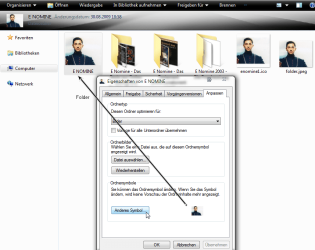
In former versions, we could set a CDs front as icon in our music-folder. Now in Windows 7 it does _allmost_ the same, but it wraps an ugly yellow foler around it, look at my example:
http://img25.imageshack.us/img25/5963/udklipd.jpg
How do I change it back, so the CD-cover is used as icon, as in XP?
Sorry if somebody else has asked this. I have tried to search for it, but my English might not be good enough, as I did not find anything.
http://img25.imageshack.us/img25/5963/udklipd.jpg
How do I change it back, so the CD-cover is used as icon, as in XP?
Sorry if somebody else has asked this. I have tried to search for it, but my English might not be good enough, as I did not find anything.
My Computer
- OS
- Windows 7 Ultimate x64
- CPU
- Intel E6850 3,0 running 3,6 Ghz
- Motherboard
- Gigabyte DS4 P35
- Memory
- 2x2 and Gb Corsair PC6400 CAS5 - 4GB total
- Graphics Card(s)
- Nvidia Geforce 260GTX
- Sound Card
- Creative X-Fi Fata1ty Gamer Extreme
- Monitor(s) Displays
- Samsung 2493hm
- Screen Resolution
- 1920*1200
- Hard Drives
- Intel X25-M SSD for system
2x 1Tb Samsung F1 as seperate discs
- PSU
- Zahlman 850HP
- Case
- Shg
- Cooling
- Evo 120
- Keyboard
- Logitech G15 (blue backlight)
- Mouse
- Logitech G5 laser
- Internet Speed
- 25/25 mbit
- Other Info
- 1 Samsung SATA dvd-burner
1 LiteOn SATA dvd-burner