
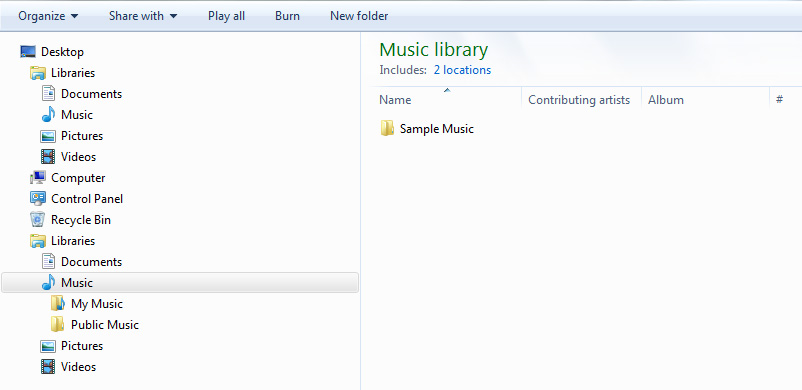
In Windows Explorer, Libraries folder is duplicated under Desktop

Allen Beard

New member
Local time
7:29 AM
Messages
6
Has anyone encountered this problem?
Can anyone help?

In Windows Explorer, Libraries folder is duplicated under Desktop
09ee8720-90c8-4164-8abb-4ecddcea3d4f


I accidentally enabled HomeGroup, which messed up my folder permissions, resulting in padlock icons under Libraries sub-folders.

I immediately disabled HomeGroup, invoked "Restore default libraries", and reapplied inherited folder permissions.

After this, whenever I click on a Libraries sub-folder, it opens up a new Windows Explorer, and spawns a second Libraries folder Under Desktop, just like in the above picture after I clicked on the Music sub-folder.

I have tried every suggestion related to repairing Libraries, such as:
· "Tools\Folder options\" and toggle "Browse folders"
· Import clean/default Libraries registry
· System Restore
· Re-register "actxprxy.dll" and "ieproxy.dll"

Nothing seems to fix it.

This strange behaviour happens only on this user account; Libraries on a different user account is normal.
 

My Computer

Computer type
PC/Desktop
OS
Windows 7 Professional x64
Hi Allen Beard,

Welcome to SevenForums!

In Windows Explorer, Libraries folder is duplicated under Desktop

09ee8720-90c8-4164-8abb-4ecddcea3d4f

This strange behaviour happens only on this user account; Libraries on a different user account is normal.

Have you changed the location of your Music folder from C:\?

I hope this helps!
 

My Computer

Computer type
Laptop
Computer Manufacturer/Model Number
Fujitsu LIFEBOOK
OS
Win 7 HP SP1 64-bit Vista HB SP2 32-bit Linux Mint 18.3
CPU
Intel(R) Pentium(R) CPU P6200 @ 2.13GHz
Motherboard
FUJITSU FJNBB06
Memory
4.00 GB
Graphics Card(s)
Intel(R) Graphics Media Accelerator HD
Sound Card
[1] Realtek High Definition Audio [2] Intel(R) Display Audio
Screen Resolution
1366 x 768 x 32 bits (4294967296 colors) @ 59 Hz
Hard Drives
TOSHIBA MK5076GSX
Antivirus
AVG FREE
Hi Paul Black,

No, all Libraries sub-folders are set to defaults.

The problem happens with all Libraries sub-folders.
 
Last edited:

My Computer

Computer type
PC/Desktop
OS
Windows 7 Professional x64

My Computer

Computer type
Laptop
Computer Manufacturer/Model Number
Dell M6500 Precision Work Station
OS
Windows 7 Pro SP1 64 bit
Memory
8 GB
Screen Resolution
1920x
Internet Speed
30 Mbps
Antivirus
Norton Security
Browser
IE 11
I looked at that thread.
My problem is different.
My problem occurs in Windows Explorer, not Desktop.
First, there is one Libraries, but when I unfold Libraries and click on any Libraries sub-folder, a new Windows Explorer opens and a second Libraries folder is generated, below the Recycle Bin, as is shown in the image.
 
Last edited:

My Computer

Computer type
PC/Desktop
OS
Windows 7 Professional x64
I misunderstood. My apologies. I find it strange that WE displays the Libraries under Desktop. Based on your screen shot, I was thinking that the Libraries were in your C:\Users\"your user name"\Desktop folder thus the link I provided.

Paul may be on to something. I'm wondering if, when you opened the Home Group, it somehow has you sharing files with another user and when you try to access your Libraries, it thinks you're another user and is creating the new Libraries. Each user in a HomeGroup controls his own Libraries. Perhaps something to do with Network sharing? Does that make any sense? This is beyond my knowledge of how that works.
 

My Computer

Computer type
Laptop
Computer Manufacturer/Model Number
Dell M6500 Precision Work Station
OS
Windows 7 Pro SP1 64 bit
Memory
8 GB
Screen Resolution
1920x
Internet Speed
30 Mbps
Antivirus
Norton Security
Browser
IE 11
Allen. Click on the Start button, open Computer, then click on Local Disc C:, then select Users, then open the Folder with your User name.

This should show a list the various items that are in Windows Explorer. Check for any duplicates & delete them & they should go to the Recycle Bin, so you can recover them if necessary. If you Right Click on any item listed you should see "Include In Library" & the menu to the right will list some options.
 

My Computer

Computer type
PC/Desktop
Computer Manufacturer/Model Number
Self built using existing case
OS
Windows 7 Home Premium 64 bit sp1
CPU
Intel i5 3570 3.4Ghz Ivy Bridge SKT 1155 quad core
Motherboard
Gigabyte Z77-HD3 SKT 1155 2xSata 3, 4x USB 3.0
Memory
G-Skill Rip Jaws 16Gb (8x2) DDR3 -1600 PC3 12800 CL 10 red
Graphics Card(s)
Gigabyte NVIDIA GT610 1Gb DDR3 810/1200 PCI-E 2.0 Silent
Sound Card
NVIDIA High Definition & Realtech High Definition Audio
Monitor(s) Displays
2 x Philips 226V4L 16:9 aspect ratio
Screen Resolution
1920 x 1080 HD
Hard Drives
Samsung 840 Pro 256gb SSD, SATA 3.
Hitachi Touro Portable 1tb, USB 3.0 HDD used for image b/ups.
PSU
Corsair VS450
Case
Codeng
Cooling
PSU fan & CPU fan
Keyboard
Logitech
Mouse
Logitech Wireless trackball M570
Internet Speed
Wireless 3G. 3mg down & 550kb up.
Antivirus
Bitdefender Internet Security 2020
Browser
Opera (Current Version) & Firefox
Other Info
MS Office 2013 Pro. Davis weather station software. MGE Nova 600 avr UPS.
Ranger4, I found no duplicates.

it thinks you're another user and is creating the new Libraries. Each user in a HomeGroup controls his own Libraries. Perhaps something to do with Network sharing? Does that make any sense?
That makes sense.

This is beyond my knowledge of how that works.
Me too.

These things (homegroup / network sharing) should be easily reversible, but instead, I fear that I may be forced to do the one thing I have been resisting... start again with a new user account, just to solve one irritating bug.
 
Last edited:

My Computer

Computer type
PC/Desktop
OS
Windows 7 Professional x64
I need to think about this some more.

I wonder what would happen if you turned off file and media sharing in the Network options. I'll check it on my system later.

Also, why do you have a guest user?
 

My Computer

Computer type
Laptop
Computer Manufacturer/Model Number
Dell M6500 Precision Work Station
OS
Windows 7 Pro SP1 64 bit
Memory
8 GB
Screen Resolution
1920x
Internet Speed
30 Mbps
Antivirus
Norton Security
Browser
IE 11
why do you have a guest user?
It's windows default.
It's been disabled from the start, and I've never use it.

By the way, what led you to think that I have a guest user?
 
Last edited:

My Computer

Computer type
PC/Desktop
OS
Windows 7 Professional x64
Allen. Have you tried copying the duplicate Library & those items listed in it to a flash drive & then delete them. If that fixes the problem you can delete the copy in the flash drive.If it also deletes the other Library as well then you have a back up you cam reinstall.
 

My Computer

Computer type
PC/Desktop
Computer Manufacturer/Model Number
Self built using existing case
OS
Windows 7 Home Premium 64 bit sp1
CPU
Intel i5 3570 3.4Ghz Ivy Bridge SKT 1155 quad core
Motherboard
Gigabyte Z77-HD3 SKT 1155 2xSata 3, 4x USB 3.0
Memory
G-Skill Rip Jaws 16Gb (8x2) DDR3 -1600 PC3 12800 CL 10 red
Graphics Card(s)
Gigabyte NVIDIA GT610 1Gb DDR3 810/1200 PCI-E 2.0 Silent
Sound Card
NVIDIA High Definition & Realtech High Definition Audio
Monitor(s) Displays
2 x Philips 226V4L 16:9 aspect ratio
Screen Resolution
1920 x 1080 HD
Hard Drives
Samsung 840 Pro 256gb SSD, SATA 3.
Hitachi Touro Portable 1tb, USB 3.0 HDD used for image b/ups.
PSU
Corsair VS450
Case
Codeng
Cooling
PSU fan & CPU fan
Keyboard
Logitech
Mouse
Logitech Wireless trackball M570
Internet Speed
Wireless 3G. 3mg down & 550kb up.
Antivirus
Bitdefender Internet Security 2020
Browser
Opera (Current Version) & Firefox
Other Info
MS Office 2013 Pro. Davis weather station software. MGE Nova 600 avr UPS.
Allen. Have you tried copying the duplicate Library & those items listed in it to a flash drive & then delete them. If that fixes the problem you can delete the copy in the flash drive. If it also deletes the other Library as well then you have a back up you can reinstall.
:thumbsup:
 

My Computer

Computer type
Laptop
Computer Manufacturer/Model Number
Fujitsu LIFEBOOK
OS
Win 7 HP SP1 64-bit Vista HB SP2 32-bit Linux Mint 18.3
CPU
Intel(R) Pentium(R) CPU P6200 @ 2.13GHz
Motherboard
FUJITSU FJNBB06
Memory
4.00 GB
Graphics Card(s)
Intel(R) Graphics Media Accelerator HD
Sound Card
[1] Realtek High Definition Audio [2] Intel(R) Display Audio
Screen Resolution
1366 x 768 x 32 bits (4294967296 colors) @ 59 Hz
Hard Drives
TOSHIBA MK5076GSX
Antivirus
AVG FREE
Paul Black, Ranger4, the duplicate Libraries is a virtual link and cannot be deleted.
The sub-folders are mirror of the originals. Deleting them simply resulted in them disappearing from both places.
 
Last edited:

My Computer

Computer type
PC/Desktop
OS
Windows 7 Professional x64

My Computer

Computer type
PC/Desktop
Computer Manufacturer/Model Number
Self built using existing case
OS
Windows 7 Home Premium 64 bit sp1
CPU
Intel i5 3570 3.4Ghz Ivy Bridge SKT 1155 quad core
Motherboard
Gigabyte Z77-HD3 SKT 1155 2xSata 3, 4x USB 3.0
Memory
G-Skill Rip Jaws 16Gb (8x2) DDR3 -1600 PC3 12800 CL 10 red
Graphics Card(s)
Gigabyte NVIDIA GT610 1Gb DDR3 810/1200 PCI-E 2.0 Silent
Sound Card
NVIDIA High Definition & Realtech High Definition Audio
Monitor(s) Displays
2 x Philips 226V4L 16:9 aspect ratio
Screen Resolution
1920 x 1080 HD
Hard Drives
Samsung 840 Pro 256gb SSD, SATA 3.
Hitachi Touro Portable 1tb, USB 3.0 HDD used for image b/ups.
PSU
Corsair VS450
Case
Codeng
Cooling
PSU fan & CPU fan
Keyboard
Logitech
Mouse
Logitech Wireless trackball M570
Internet Speed
Wireless 3G. 3mg down & 550kb up.
Antivirus
Bitdefender Internet Security 2020
Browser
Opera (Current Version) & Firefox
Other Info
MS Office 2013 Pro. Davis weather station software. MGE Nova 600 avr UPS.
Back
Top