Icons Change on taskbar!

Digital7

New member
Member
VIP
Local time
6:21 AM
Messages
86
Location
USA
oK FOLKS new question for the hour :)

i want to change icons of all the applications i use and while they are running they show up on my taskbar...i want to change this icons shown in image ..and this ICONS are not Pinned only shows up once i launch application!

what's the best and safe way of going about this...and do i have to back up original icons?


vg26hc.jpg


you guys r awesome :geek:
thanks!

:p
 

My Computer

Computer Manufacturer/Model Number
AlienWare GodFatheriZed!
OS
WIN 7 x64
CPU
I7 550
Memory
8 GB DDR3
Graphics Card(s)
9800 GTX Turbo Dual
Monitor(s) Displays
21" Samsung True Colors HD + 25 SYNC Master
Screen Resolution
1680*1050
Hard Drives
Total 1.5 TB
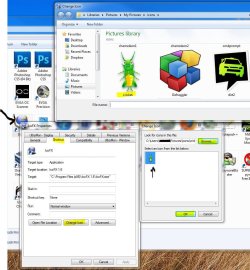
You could just right click on the shortcut of the program you want to change the icon of, go to properties-shortcut tab- change icon - browse for the new icons location you want to change it to- select it, OK. Then you can pin it, or keep it wherever. Have the programs closed when you're doing probably would be best. You may have to reboot your computer for the icon to change if it's pinned.

You could also do it from a pinned shortcut on the taskbar. Just right click it, then right click on the programs name in the window, and then same as above.


2.JPG

Couple of programs you could use that might be of help. Iconviewer lets you have an Icon tab on the shortcuts right click menu window. You can choose different ones from that if it shows multiple ones, or save the shortcuts icon, etc.

IcoFX you can make your own icons from png's, etc.

Use the 64 bit one of iconviewer, since you have 64 bit.

Download IconViewer

IcoFX - The Free Icon Editor

listed in-

http://www.sevenforums.com/software/92-free-great-programs-windows-7-a.html

Don't think you need to make a backup of the original icon of the shortcut, but you could if you want with the iconviewer.

And check out this forum and the tutorials. You'll probably find more threads on the subject.
 

My Computer

Computer type
PC/Desktop
Computer Manufacturer/Model Number
Airbot 2.0
OS
Windows 7 Ultimate x64 SP1
CPU
Core i7 920 (D0) @ 4Ghz, *26c idle *65c full load on air
Motherboard
Asus P6X58D Premium - Sata 6Gb/s - USB 3.0
Memory
12GB DDR3 Corsair Dominator -CMD12GX3M6A1600C8 at 1600MHz
Graphics Card(s)
Zotac Geforce GTX 770
Sound Card
ASUS Xonar D2X
Monitor(s) Displays
1 LG 24" Flatron W2453V-PF 1 Samsung 24" P2450H both 2ms RT
Screen Resolution
1920x1080@60hz
Hard Drives
1 Samsung 250GB 840 Evo SSD
1 OCZ Vertex2 180GB SSD
1 TB Samsung Spinpoint F1 7200RPM 32MB cache
2 500GB WD Caviar Blacks 7200RPM 32MB cache (WD5001AALS)

Pioneer DVD Burner DVR-S18M
PSU
Corsair HX1000W
Case
Cooler Master HAF 932
Cooling
Case Fans *3 230mm, *1 140mm/CPU - *Tuniq Tower 120 Extreme
Keyboard
Logitech Wireless MK700
Mouse
Logitech Wireless MK700
Internet Speed
DL 15 Mbps UL 0.98 Mbps
Antivirus
None
Browser
Firefox Nightly
Other Info
Processor-7.7 *RAM- 7.9 *Graphics-7.9 *Gaming Graphics- 7.9 *SSD- 7.8 W.E.I final score= 7.7
*Phone- LG Nexus 5
OK, let me see if I have this right. Those are not pinned programs. Just icons from currently open programs? If I have that right try this. Make a folder with the icons you want to show. Put the folder in documents or somewhere.

Right click the taskbar icon. Right click on the name of the program. Choose properties. On shortcut tab, click on change icon. navigate to the icon you want to display. Apply and OK your way out. Next time you open that program, your chosen icon will display in the taskbar when the program is open. No need to back up anything as your original icons are already in the programs exe file, and will still be available. I hope that is what you meant. A Guy

Edit:

Airbot beat me to it :)
 

My Computer

Computer type
PC/Desktop
OS
Windows 10 Home x64
CPU
INTEL Core i5-750 Quad-Core 3.37GHz
Motherboard
ASUS P7P55D
Memory
HyperX Fury Black Series 8GB (2 x 4GB) 1866Mhz
Graphics Card(s)
EVGA GeForce GTX 750 Superclocked 1GB 128-Bit GDDR5
Monitor(s) Displays
LG 32MA68HY 32" IPS
Screen Resolution
1920 x 1080
Hard Drives
Samsung 840 Evo 120GB, SEAGATE 500GB Barracuda® 7200.12, SATA 3 Gb/s, 7200 RPM, 16MB cache
PSU
ANTEC TruePower New TP-550, 80 PLUS, 550W
Case
ANTEC Three Hundred Illusion
Cooling
COOLER MASTER Hyper 212 Plus, 4 x 120mm 1 x 140mm Noctua's
Internet Speed
85 + Mbps
Antivirus
Avast
Browser
Vivaldi
Back
Top